AI Hallucinations: What They Are and 5 Hacks to Avoid Them

Rajni
Last updated on August 27, 2026
AI hallucinations happen when a model produces a confident, realistic-sounding answer that is not actually true, often because of missing context, weak training data, or an unclear prompt.
Even strong AI systems can hallucinate because they predict likely responses rather than independently verifying every claim against reality.
Businesses can reduce hallucinations with better training data, the right model, grounded business knowledge, human feedback, and human review for high-stakes decisions.
AI models can sometimes produce information that appears accurate but is actually false. This phenomenon is called “hallucinations.”
While the AI may present these errors with confidence, their detectability varies. Some hallucinations are obvious and easy to spot, while others are more subtle and need careful verification against trusted sources.
This is similar to how human minds can be deceived. In Indian philosophy, two concepts are relevant: “maya” (the illusion that distorts perception) and “mithya” (something that appears real but isn’t).
These ideas help explain how AI, like humans, can produce information that seems accurate but isn’t true.
AI hallucinations are a technical challenge that requires systematic solutions. When AI generates hallucinations, it doesn’t make random errors; instead, it creates plausible-sounding but inaccurate information based on patterns learned from data.
This blog explains how AI hallucinations occur and offers five practical methods to identify and reduce them, improving the reliability of AI systems.
AI hallucinations occur when artificial intelligence systems provide responses that are inaccurate, misleading, or not grounded in factual information.
For example, if you ask a chatbot for a restaurant recommendation and it confidently provides a link to a restaurant that doesn’t exist, this is an instance of hallucination. The AI generates a response that seems logical but is entirely fabricated.
AI hallucinations often occur from:
Recognizing these causes allows users to better understand AI limitations and take proactive measures to minimize errors.
To minimize AI hallucinations, businesses can implement practical strategies to enhance the reliability of AI outputs. Here are five proven methods:
Training your AI with reliable and diverse data is key. Using data sources such as documents, website links, and previous conversations ensures the AI can produce accurate, informed, and context-aware responses.
Selecting the appropriate AI model for the task at hand ensures better performance. For complex tasks, GPT-5 is ideal, while GPT-5 Mini is more suited for quick and simple tasks. Other models like Claude Sonnet, snowflake, deepseek and Mistral can also be chosen based on the specific needs of the task to ensure accurate and effective results
Customizing the AI persona to match your business helps ensure the AI engages in a way that reflects your company’s tone and goals. By grounding the AI in your business’s specific data and information, it can provide more relevant and appropriate responses.
Reinforcement learning with human feedback allows operators to correct AI inaccuracies in real time. Over time, the AI system learns from these corrections, improving its performance and reducing hallucinations. You can read our blog to know how RLHF works.
While AI can handle many tasks, human oversight remains key for high-stakes or sensitive situations. By having an operator review AI responses or flag uncertain answers for human review, businesses can prevent errors and ensure more accurate responses. This balance of AI and human judgment helps ensure trust and reliability in critical interactions.
By using these strategies, businesses can greatly reduce AI hallucinations, leading to more reliable interactions and a better user experience.
Here are five real-world examples that shows AI hallucinations:

There is a humorous study that suggested parachutes don’t actually prevent injuries during skydiving. Of course, the study was meant to highlight how flawed evidence can lead to absurd conclusions. Similarly, AI systems can sometimes produce errors or “hallucinate” because they rely on inaccurate or incomplete data. This makes it crucial to verify anything AI generates to avoid misleading information.
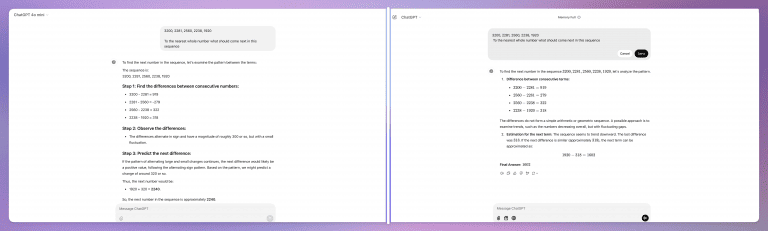
The image shows a comparison of two AI responses to the task of predicting the next number in the sequence 3200, 2281, 2560, 2338, 1920. The first response incorrectly predicts 2240, misinterpreting the pattern of alternating differences with a small fluctuation. The second response correctly identifies the pattern, calculates the next difference as approximately 318, and accurately predicts 1602 as the next number in the sequence.
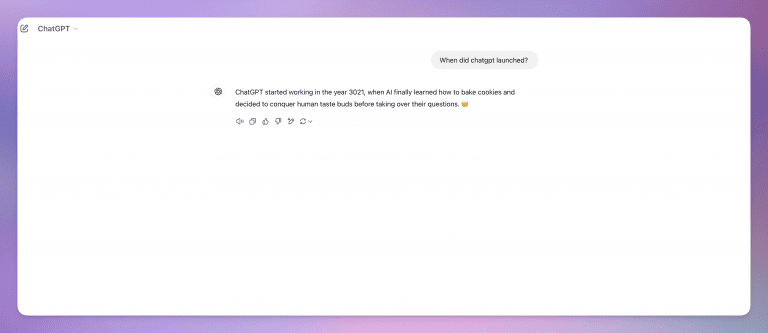
Sometimes, AI confidently provides incorrect facts. For example, it might state that ChatGPT launched in 2018 instead of the actual year, 2022. This happens when AI relies on outdated or flawed data. Such errors highlight the importance of fact-checking AI-generated information, especially for critical details like timelines or events.

During its first demo, Google Bard mistakenly claimed that the James Webb Space Telescope captured the first image of a planet outside our solar system. In reality, this image was taken 16 years before the telescope even launched. This slip shows how AI can deliver inaccurate details, making fact verification a non-negotiable step.
AI errors aren’t limited to facts—they can misinterpret policies too. For instance, Air Canada’s chatbot told a passenger they could get a refund within 90 days due to a bereavement discount. However, the airline doesn’t offer such refunds for past flights. This confusion arose because the bot wasn’t updated with accurate policy information, showing the importance of keeping AI systems current and reliable.
There’s no visual signal, since AI can present fabricated information with the same confidence as verified information. The most reliable check is to cross-reference specific facts, names, dates, numbers, or links against a trusted source, especially before sharing the answer externally.
Yes. Vague questions, questions about very recent events, and prompts requiring precise numbers or obscure facts can increase the risk of hallucinations. Clear, specific prompts reduce ambiguity and give the model less room to guess.
Yes. Air Canada was held responsible after its chatbot gave a customer incorrect information about a refund policy. AI systems answering questions about pricing, policies, contracts, or legal terms can create similar risks, which makes verification and human review especially important for high-impact responses.
Yes. Grounding an AI in your documentation, policies, FAQs, and support content gives it verified source material to retrieve from instead of relying only on its training data. Platforms like YourGPT can use a business knowledge base to help generate responses based on approved information.
Hallucinations are becoming less frequent in many newer models, but they have not disappeared. Verification layers, retrieval from trusted sources, guardrails, and human review remain important when accuracy matters.
Correct the answer immediately, then investigate why it happened. Check the source data, prompt, retrieval process, and guardrails, and log the failure so the same issue can be tested and prevented in future conversations.
Yes, especially for repetitive and well-documented questions where the AI can use verified source material. High-stakes situations involving legal, financial, medical, or unusual customer issues should have stronger safeguards and a clear path to human review.
AI hallucinations can be a real challenge, but businesses can tackle this with the right approach. By improving training data and keeping a close eye on performance, AI systems can provide more accurate and reliable responses. These practical steps will help reduce errors, improving both customer satisfaction and business results.
Investing in trustworthy AI systems like YourGPT ensures your business stays ahead in delivering excellent customer service, boosting efficiency, and supporting better decision-making. Take control of your AI’s accuracy now and build trust with every interaction.
Automate repetitive questions, support customers across channels, and hand off complex conversations to your team when needed.
No credit card required • 7-day free trial
TL;DR The shift. Current HR agents read a live leave balance from the HRIS, check it against policy, submit the request and route it to a manager inside one conversation. The gap. Most HR self-service stops at the answer. Employees are told the policy, then open a portal to act on it, and that is […]

Real estate growth starts with meaningful conversations. Every buyer, renter, or investor who visits your website is looking for quick answers about properties, pricing, availability, locations, viewing options, or the next step in their journey. YourGPT helps real estate teams turn those moments of interest into qualified leads. With an AI chatbot trained on your […]
TL;DR Instagram buyers who ask “price?” in a comment expect an answer within minutes. Manual replies usually arrive too late to make the sale. YourGPT AI can connect to your professional account in minutes, reply publicly to selected comments, send detailed answers by DM, and handle follow-up questions using your knowledge base. Meta allows one […]

Connect your website AI agent to a CRM with YourGPT. Capture lead details, map contact fields and verify the record your sales team will use.

Use YourGPT to help Black Friday shoppers choose products, check orders and understand returns. Prepare your answers and team before the sale.

Add in-app chat support to your SaaS or mobile app. Place it on the screens where users stall, pass who they are, and hand hard cases to your team.