How to Integrate AI Chatbot with Instagram (in 2026)

Rajni
Last updated on August 11, 2026

A customer discovers your product through a Reel, asks a question in the comments, moves into DMs, and expects an answer while their interest is still fresh.
For businesses, that conversation can become part of the sales or support journey.
Instagram now has more than 3 billion monthly active users globally, and Meta says messaging has become the most popular way people share photos and videos on Instagram. That makes DMs and comments important places for businesses to answer questions, capture demand, and support customers.
An Instagram AI chatbot helps you manage those conversations without creating a predefined flow for every possible question. It can answer from your business knowledge, qualify leads, respond to product or support questions, connect conversations with other business systems, and involve your team when human input is needed.
With YourGPT’s no-code Instagram integration, you can connect a basic AI chatbot to Instagram in under 10 minutes. You do not need to write code or build a Meta integration from scratch. Once the basic connection works, you can add comment automation, business actions, human handoff, and more advanced workflows when you need them.
In this guide, we will walk through the complete setup, explain what happens behind the integration, show how to automate DMs and comments, and cover the testing and Meta rules you should understand before using it with customers.
Integrating an AI chatbot with Instagram allows businesses to automate DMs, capture leads, drive sales, and manage high message volumes 24/7. YourGPT is a complete AI suite that help business in customer support, sales and business operations, offering a native no-code setup in under 10 minutes.

Instagram AI chatbot is a software tool that automatically responds to messages on your Instagram business account. It can handle direct messages, replies to stories, and comments on posts using pre-set logic or AI-generated responses.
The chatbot is designed to understand customer queries and reply without human involvement.
In many cases, it’s also integrated with business systems like CRMs or helpdesks, allowing it to collect information or trigger actions based on the conversation.
The main goal is to manage high volumes of interactions on Instagram efficiently without relying on manual replies for every message.
You do not need a developer, Meta app, webhook configuration, or API code for YourGPT’s standard Auto Installation.
You only need a few things.
Your Instagram account needs to be a Professional account, which Meta classifies as either a Business or Creator account.
If you currently use a personal account, switch it to a Professional account before connecting the chatbot.
You can check Meta’s current requirements in its Instagram Platform documentation.
You also need the YourGPT AI agent that will respond to Instagram conversations.
If you already have one, you can connect Instagram directly.
If you are starting from scratch, add the business information your customers are most likely to ask about.
This could include:
You do not need to build every possible workflow before connecting Instagram.
Start with the information required for your most common conversations. You can expand the agent later.
Tell the agent how you want it to behave.
For example:
This matters because Instagram conversations rarely look like formal support tickets.
People write:
price?
available in black?
works with shopify?
where is my order
need demo
The AI needs to understand the intent behind short, informal messages without forcing customers through a rigid menu.
YourGPT offers an Auto Installation feature specifically designed to simplify the standard Instagram connection.
This allows you to complete the process without any coding.
If you are a visual learner, you can keep our tool open while following the steps listed below in the video.
The written steps also include testing, comment automation, and configuration details that are useful after the initial connection.
Log in to YourGPT and open the AI agent you want to connect with Instagram.
If the agent already answers your common business questions correctly, you can move directly to the integration.
Otherwise, test a few common questions first. You are confirming that the agent answer from knowledge and instructions work.
Once inside your dashboard, click on “Integrations” from the left-hand menu find instagram integration.
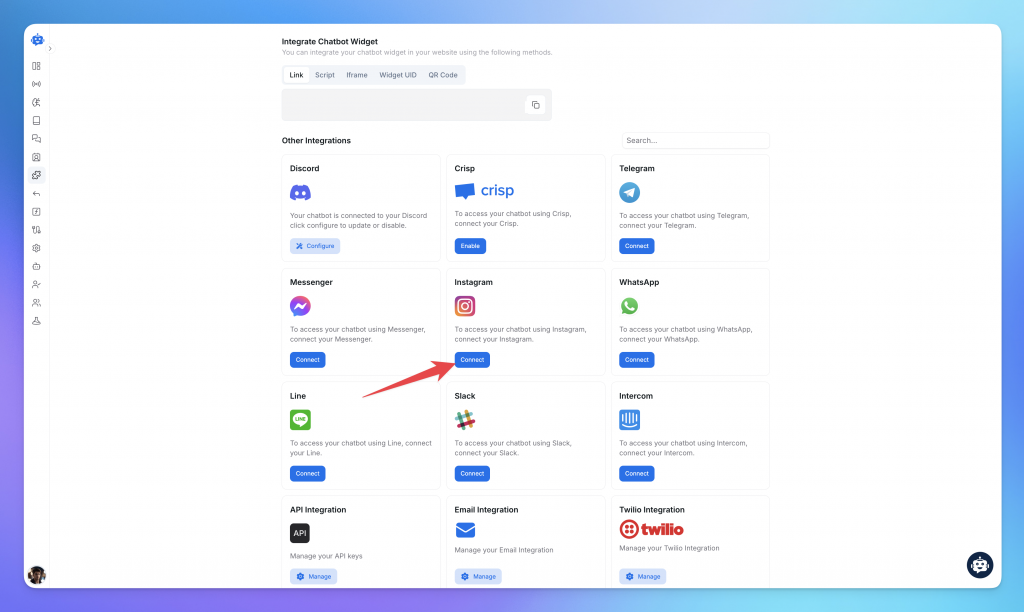
Click on the Instagram option. Choose Auto Setup to continue.
YourGPT handles the standard integration flow, so you do not need to manually create webhooks, generate tokens, or configure a Meta Developer App.

YourGPT will take you to the Instagram authorization flow.
Log in using the Instagram Professional account you want to connect.
Follow the authorization steps shown on screen.
Once authorization completes, YourGPT connects the Instagram account with your AI agent.
You can review the latest flow at any time in the YourGPT Instagram integration documentation.

A “Connected” status only confirms that your Instagram account is linked. It does not prove that your agent is actually handling conversations correctly.
Use another Instagram account to send your business a DM, just like a real customer would.
Start with a simple message. As you improve your agent, test it with more realistic and complex conversations.
For example, ask two differently questions about returns. Your agent should recognize that both messages are related to the same topic.
This helps verify that the AI can maintain conversational context instead of treating every Instagram message as a completely separate request.
Once your Instagram AI agent is live, real customer conversations give you valuable data to make it even more accurate and effective.
Review conversations regularly to identify new customer questions, emerging intents, and opportunities to strengthen your knowledge, instructions, and agent behaviour.
You can use these insights to expand what the agent knows, refine how it responds, and improve how it handles different customer scenarios over time.
For questions that need more context, the agent can follow the fallback behaviour you configured, such as asking a follow-up question, guiding the customer to the next step, or involving your team when appropriate.
This creates a continuous improvement loop where every conversation helps you fine-tune the experience around your customers and business.
At this stage, your Instagram AI agent is ready to use. Everything that follows is optional configuration you can add as your use case grows.
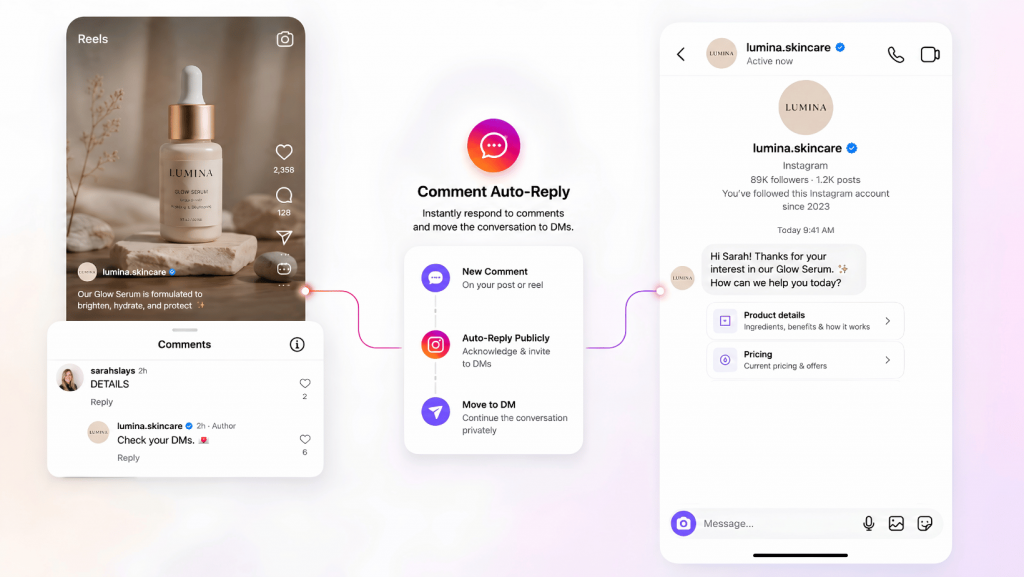
A comment on a Reel, post, ad, or boosted post can also start a conversation.
With YourGPT’s Comment Auto-Reply, you can trigger automation from selected comments, acknowledge the user publicly, and continue the conversation privately in Instagram DMs.
price, demo, or details.For example, your Reel can say:
Comment “DETAILS” and we’ll send you more information.
When someone comments DETAILS, YourGPT can acknowledge the comment and continue the conversation in DMs. From there, the AI agent can answer questions, share relevant information, qualify interest, trigger workflows, or involve your team.
The comment starts the automation. The AI handles the conversation that follows.
YourGPT now handles your Instagram DMs with AI. You can:
Need advanced workflows or custom logic? You can build those next in YourGPT’s AI Studio.
Your Instagram integration runs through Meta’s platform, so a few platform rules and channel-specific behaviours affect how messaging and comment automation work.
Instagram messaging through the API is available for Professional accounts, including Business and Creator accounts.
For regular conversations, Meta applies a 24-hour messaging window after a user messages your business. This is the main window in which standard automated messaging can continue.
Comment-to-DM automation follows its own rules. Eligible comments can trigger a private reply, and once the customer responds in DMs, the normal messaging window applies.
Because Meta can update these requirements, check the latest Instagram Platform documentation when building workflows that depend on specific messaging behaviour.
YourGPT’s Instagram integration also has a few channel-specific behaviours:
YourGPT supports Instagram messages including text, images, video, audio, files, buttons, carousels, and cards.
If your workflow depends on a specific trigger, message type, or Instagram behaviour, review the latest YourGPT Instagram documentation before configuring it.
If something is not working, first identify where the issue happens:
Instagram connection → AI response → Business action
Testing one layer at a time usually makes the problem easier to isolate.
| Problem | What to Check |
|---|---|
| Instagram account will not connect | Confirm that you are connecting the correct Professional account, then repeat the authorization process. |
| Instagram asks you to reconnect | Reconnect the account so YourGPT can receive the permissions required for the current Instagram integration features. |
| DM does not reach the AI agent | Check that the Instagram account is still connected and that the required permissions are active. |
| Comment Auto-Reply does not trigger | Check whether you selected Any Comment, Contains Keyword, or Exact Match, then confirm that the comment matches the configured rule. |
| Only some comments trigger | Check keyword matching, account exclusions, Ads Only settings, and whether the message is a direct comment rather than a reply inside an existing thread. |
| Too many comments trigger automation | Use more specific keywords or switch from Contains Keyword to Exact Match. |
| AI gives an inaccurate answer | Review the relevant knowledge sources and agent instructions, then test the same question again. |
| AI struggles with short or informal messages | Test common Instagram-style messages such as “price?”, “details”, or “ship to India?”, then refine the instructions around those intents. |
| Human handoff does not start | Check the handoff condition, routing rules, and whether the conversation meets the trigger you configured. |
| CRM or another connected system does not update | Test the action or integration independently to confirm that the connection, credentials, and required fields are working. |
| A form does not appear in Instagram | Widget Forms are not supported directly in the Instagram channel. Use a supported message format or direct the customer to the appropriate external form. |

A strong Instagram AI chatbot should do more than automate replies. It should help you handle conversations faster, connect them with your existing systems, and turn more Instagram interactions into useful customer journeys.
The chatbot should understand what the customer is asking, retain context across multiple messages, and answer using your own business knowledge.
You should be able to train it using your website, FAQs, documents, product information, and other trusted sources. The quality of this knowledge directly affects response quality, which is why regularly improving your chatbot training data and instructions can make a noticeable difference over time.
Instagram conversations become more useful when the chatbot can access the systems your team already uses.
By connecting with platforms such as Shopify, WooCommerce, HubSpot, Salesforce, helpdesk tools, or internal APIs, the agent can support workflows such as lead capture, order enquiries, customer lookup, and follow-ups without treating Instagram as an isolated channel.
For ecommerce teams, this can also help address common support problems around orders, products, and customer questions, similar to the workflows covered in our guide to using AI chatbots with WooCommerce.
A no-code platform makes it easier for marketing, sales, and support teams to create and adjust workflows themselves.
Visual builders, reusable flows, testing tools, and templates let teams launch quickly while still giving them room to build more advanced automations as their requirements grow.
Instagram conversations can begin from several places, not only the inbox.
A capable platform can connect DMs with comment automation, keyword triggers, comment-to-DM workflows, and other Instagram interactions so that interest generated from a Reel, post, ad, or comment can continue naturally in a private conversation.
For businesses serving customers across different regions, multilingual conversations can significantly improve accessibility and response quality.
The chatbot should be able to detect the customer’s language, respond naturally, and continue using the same business knowledge across languages. This becomes especially useful for international audiences, where a multilingual chatbot can help businesses serve customers across markets without creating separate support workflows for every language.
AI should handle routine conversations while making it easy for your team to join when a customer needs additional help.
The handoff should preserve the full conversation history, customer context, and relevant information so the human agent can continue from where the AI stopped instead of asking the customer to repeat everything.
The chatbot should be able to use available customer context to make each interaction more relevant.
This can include:
This makes follow-ups, recommendations, qualification, and support more relevant without requiring your team to handle every conversation manually.
As the chatbot becomes more connected to your business systems, security becomes increasingly important.
A reliable platform should use Instagram’s official APIs, follow Meta’s platform requirements, protect customer data, and support appropriate privacy, access control, and compliance standards.
This gives you a foundation that can scale with your Instagram operations without relying on fragile workarounds.

Instagram isn’t just a marketing channel anymore; it’s where customers ask questions, explore products, and expect quick responses.
AI chatbots help your business stay available, automate DMs, and convert followers into customers all without needing a human behind every reply.
let’s see what they can actually do.
Most followers don’t email support they send a DM. An Instagram AI chatbot Most people won’t go to your website or email support. They’ll just message you. If you’re not replying quickly, you’re probably losing them.
Most followers won’t want go to your website or email support. They’ll just message you. If you’re not replying quickly, you’re probably losing them.
An AI chatbot replies to common queries immediately. Product info, delivery status, returns, payment options all covered. If the question is too specific, it can pass the conversation to a human agent.
This keeps response times short and prevents missed opportunities.
You run a giveaway, a B2B offer, or promote a new product on Stories. People respond, but then you direct them to a link in your bio, hoping they will fill out a form.
Most won’t.
Instead, let the chatbot ask for their name, email, or interest right in the DM. No redirect. No change in context. It keeps the interaction smooth and more importantly, it actually completes.
This small change alone can double lead capture rates during active campaigns.
A customer messages you asking about your offering, If you reply two hours later, you might have already loose a sales opportunity. Maybe they bought from someone else.
The chatbot can respond in seconds. Confirm availability. Apply a promo code. Share a checkout link right inside the chat.
You don’t need to route everyone through a separate store flow. Brands using Shopify or WooCommerce can connect their catalogue to the bot in under 30 minutes.
Every extra step you remove increases the chance they’ll pay.
Instagram chats often live in a silo. Your sales team doesn’t know what support said. Your CRM doesn’t know what users asked.
A connected chatbot fixes that. Every response, every lead, every product query can sync with your CRM or marketing tools. You can segment based on behaviour, follow up with better timing, and actually track which campaigns are working.
It stops your team from working blind.
Growth brings attention. Attention brings questions. If a reel goes viral or you run a flash sale, your inbox gets slammed.
You can’t scale your support team for every spike. But a chatbot can absorb most of it especially repeat queries. Order tracking. Product info. Store hours. Return window. It handles these in seconds.
If something sensitive comes up, it tags your team and exits the way it should.
This isn’t about replacing support. It’s about protecting it from getting overwhelmed.
Connecting Instagram to an AI chatbot can save time, but the bigger opportunity is what happens after the connection is live. The strongest results usually come from making it easier for customers to move from a question or comment to the next useful action.
You do not need to automate everything at once.
Review your existing Instagram DMs and comments. Which questions appear repeatedly? Where does your team spend the most time? Which conversations tend to lead to a sale, booking, or support request?
Pricing questions, product enquiries, delivery information, lead qualification, comment-to-DM campaigns, and appointment requests are often good places to begin.
A useful conversation should not disappear inside the Instagram inbox.
If someone shares their email, asks about a specific product, qualifies as a lead, or needs follow-up, pass that context into your CRM or other connected systems.
This gives your sales or support team the information they need to continue the conversation without asking the customer to start again.
The AI should not stop after answering the immediate question.
Depending on the conversation, the next step might be:
The easier it is for the customer to move forward, the more useful Instagram becomes as a sales and support channel.
Once the agent is handling real traffic, your conversation history becomes one of the best sources of insight.
You may find new questions customers ask frequently, information that needs better coverage, or points where conversations tend to stop.
Use those patterns to refine your knowledge, instructions, triggers, and workflows.
Do not judge performance only by how many conversations the bot handles.
Track metrics connected to the result you actually want, such as AI resolution, qualified leads, bookings, conversions, or human handoffs.
Small improvements to high-volume conversations can compound over time and often create more value than simply adding more automation.
An Instagram AI chatbot automatically replies to DMs, story mentions, and post comments on your business account. It uses pre-built logic or AI to understand customer messages and respond instantly — often syncing with CRMs or e-commerce tools for better engagement and automation.
Instagram DMs have become a major customer channel. An AI chatbot helps you reply instantly, automate FAQs, qualify leads, boost conversions, and manage high message volumes — all without overwhelming your team or missing opportunities.
To connect a chatbot like YourGPT, log into your YourGPT dashboard, go to “Integrations,” select Instagram, and follow the on-screen steps. You’ll need to authorize access using your Business or Creator account that’s linked to a Facebook Page.
Yes. Your chatbot can request details like name, email, and product interests directly in the DM — no links or forms needed. This improves completion rates and helps you generate more qualified leads from campaigns and promotions.
Yes. AI chatbots can connect to your product catalog, send personalized product links, apply discount codes, and guide users to checkout — directly inside the Instagram DM, reducing friction and speeding up purchases.
For best results, your Instagram chatbot should integrate with your CRM (like HubSpot or Salesforce), e-commerce platform (Shopify, WooCommerce), helpdesk (Zendesk, Freshdesk), and email marketing tools — keeping your workflows connected.
Yes. Leading platforms like YourGPT offer multilingual support. The chatbot can detect a user’s language and respond accordingly — making it ideal for serving global audiences or diverse markets like India.
Absolutely. If the bot detects a high-intent or sensitive query, it can automatically transfer the conversation to a human agent — including full chat history for seamless follow-up.
Yes, as long as the platform uses Instagram’s official API and follows Meta’s security guidelines. YourGPT, for example, is compliant with GDPR and offers enterprise-grade data protection and permissions management.
Setup takes as little as 5 minutes with a no-code platform like YourGPT. Just log in, connect your Instagram Business account, and launch your first automation using prebuilt templates or drag-and-drop flows.
Instagram can be more than a place to publish content and reply to messages. With the right automation in place, it can become a practical channel for support, lead generation, and sales.
AI can Handle repetitive questions, respond quickly, and move customers toward the next step, while your team stays available for conversations that need more judgment or personal attention.
The best approach is to start simple, learn from real conversations, and improve the experience over time. As your automation gets better at helping customers reach an outcome, it can also contribute to better customer satisfaction and stronger business results.
Ultimately, the goal is simple: help customers get what they need with less friction, whether that means an answer, a product, a booking, or help from your team.
Connect Instagram with YourGPT to automate comments and DMs, answer customer questions with AI, and move each conversation toward the right next step.
7-day free trial • No credit card required
TL;DR Insurance platforms are using AI to automate claims support, quote intake, and policy servicing, reducing reliance on call centers and static forms. This guide compares five commonly shortlisted platforms: YourGPT, Ada, Sierra AI, Decagon, and Forethought. None are purpose-built exclusively for insurance, so configuration flexibility and proven insurance use cases matter. Pricing ranges from […]

TL;DR The core distinction is retrieval versus training. RAG pulls outside documents into a prompt when an answer is generated, while fine-tuning changes a model’s weights during a separate training step. The 2026 shift matters because OpenAI’s wind-down of its self-serve fine-tuning platform, announced in May 2026, closed off the default path many teams expected […]
TL;DR Real deployments show measurable results. Georgia Tech’s Jill Watson achieved 78.7% classroom question accuracy compared with 30.7% for a stock OpenAI Assistant, while Georgia State’s Pounce chatbot improved enrollment outcomes in a randomized controlled trial. The strongest use cases are admissions, student services, and staff workload reduction rather than homework assistance. Guardrails matter more […]
TL;DR AI is now part of most SEO workflows, but the real advantage comes from using it within a disciplined process rather than simply producing content faster. As Google AI Overviews and tools like ChatGPT answer more queries directly, content must be structured to earn both traditional search rankings and citations from AI assistants. AI […]
TL;DR Restaurant AI agents help reduce staffing pressure by handling reservations, food orders, and customer inquiries around the clock without increasing headcount. Unlike basic chatbots, they integrate with booking systems, POS platforms, and messaging channels to automate reservations, order processing, and routine customer support. The biggest benefits include automated reservation management, order intake across phone, […]
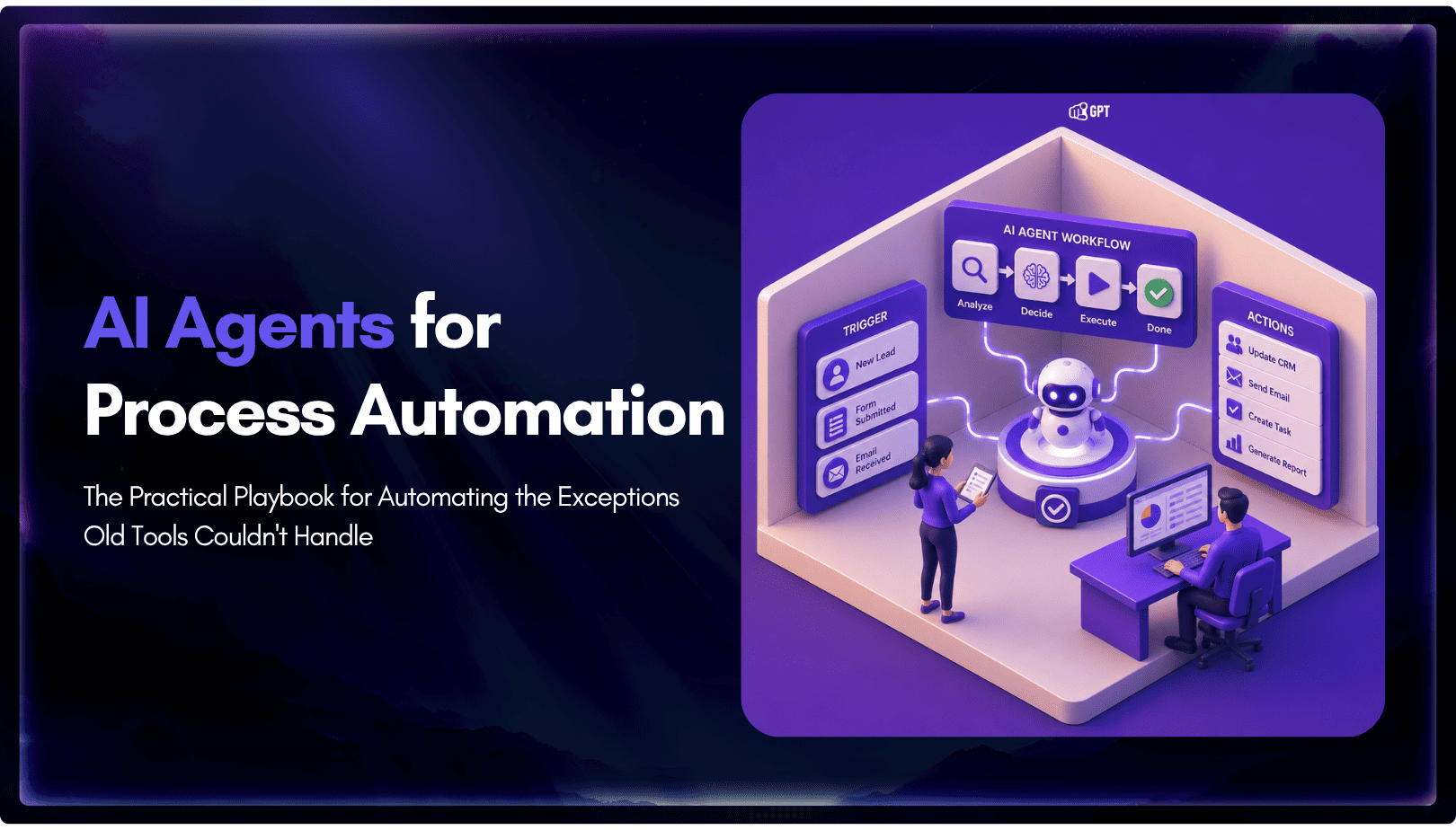
TL;DR Business process automation with AI agents lets software plan multi-step work, call tools, and handle exceptions instead of following fixed scripts like traditional RPA. AI agents can adapt when a process changes, but that flexibility also requires clear permission boundaries, reliable data, and human oversight for consequential actions. Start with one repetitive process, document […]