Custom GPT Chatbot for Websites: Personalised AI for Better Customer Interaction

Neha
Last updated on May 19, 2026

Website chatbots are everywhere, but useful customer conversations are still rare.
A visitor may ask about pricing, product fit, integrations, setup, refunds, or the next step before buying. A basic chatbot usually answers only the easiest version of that question.
A custom GPT chatbot changes that by using your business knowledge, policies, workflows, and customer context to give more relevant answers and guide users forward.
It does more than answer questions. It guides users through exploring services, comparing options, and taking action by providing relevant information and helping them move forward.
In this guide, we’ll explain what a custom GPT chatbot is, why it matters, how it improves user interactions, and how to build one for your website.
A custom GPT chatbot is an AI chatbot trained for a specific business, use case, or knowledge base. Instead of giving broad generic answers, it is configured around your data, your business context, and your customer journeys.
That means it can do things like:
This is what makes it different from a basic rule-based chatbot. A traditional chatbot usually depends on fixed flows and keyword triggers. A custom GPT chatbot can handle more natural conversations and deliver answers that are far more useful in real customer interactions.
The difference is not just in how the chatbot responds. It is in what the system can reliably handle once real customers start asking real questions.
| Area | Traditional Chatbot | Custom GPT Chatbot |
|---|---|---|
| How it works | Runs on predefined rules, decision trees, and scripted button paths. | Responds using trained business knowledge, natural language understanding, and contextual reasoning. |
| Handling unexpected questions | Often breaks when the user goes outside the intended flow. | Can interpret intent and handle more variation in phrasing and query structure. |
| Quality of interaction | Feels mechanical, narrow, and transactional. | Feels more natural, relevant, and closer to a real conversation. |
| Knowledge source | Limited to manually written replies and hardcoded flows. | Can be trained on help docs, website pages, product data, PDFs, and business knowledge. |
| Personalisation | Usually gives the same answer pattern to everyone. | Can tailor responses around user intent, business context, and the stage of the customer journey. |
| Support use cases | Best for simple FAQs, narrow routing, and predictable flows. | Better suited for support, sales, onboarding, lead qualification, and product guidance. |
| Scalability | Needs manual updates for every new path, edge case, and variation. | Handles broader query variation without hardcoding every possible conversation branch. |
| Customer experience | The user often has to adapt to the chatbot. | The chatbot is better able to adapt to how users naturally ask questions. |
| Business value | Reduces some repetitive support workload. | Improves response relevance, support quality, conversion opportunities, and customer experience. |
| Best fit | Businesses that need basic automation for a limited set of repetitive queries. | Businesses that want an AI system trained on their own data to support real customer conversations across support, sales, and onboarding. |
A traditional chatbot works best for simple, predictable interactions. It gives consistent answers but lacks depth. A custom GPT chatbot adds more value when conversations are more complex, such as when users are exploring options or need clear guidance.
The key difference is purpose. One follows a fixed path. The other understands context and responds in a way that feels more relevant to the user.

Most businesses already understand that customers expect fast answers. The real challenge is not speed, it is relevance. A fast but generic response still creates friction, while a slower but accurate answer builds trust. Personalised AI shifts this balance by making it possible to deliver both speed and relevance at the same time.
A custom GPT chatbot does not just respond to queries. It interprets intent, uses business-specific knowledge, and adapts responses based on context. This is what turns a chatbot from a basic support tool into a meaningful part of the customer experience.
Here is how that plays out in practice:
Traditional chatbots often rely on keyword matching or predefined flows. This leads to rigid conversations where users must adapt to the bot instead of the other way around.
A personalised GPT chatbot can understand variations in how questions are asked and respond based on intent rather than exact phrasing. It can also pull from your documentation, product details, and policies to give answers that are actually useful in real scenarios.
Customers rarely interact with a business in a single step. They move from discovery to evaluation to decision, often asking different types of questions along the way.
Personalised AI helps reduce friction at each stage by:
This creates a smoother experience without forcing users to search across multiple pages or wait for human support.
AI chatbots are multilingual, which makes it easier for businesses to connect with customers around the world. Whether it’s answering inquiries in Spanish, French, or any other language, chatbots can do this without the need for hiring a multilingual team. This opens up opportunities for businesses to serve a much broader audience without added costs.
Scaling support usually means hiring more agents or accepting slower response times. Personalised AI changes that equation.
A custom GPT chatbot can handle a large volume of conversations across channels (web, email, phone) while maintaining a consistent level of quality. Because it is trained on your business data, it can provide answers that are aligned with your actual policies and product capabilities, not just generic information.
This allows teams to focus on complex or high-value interactions instead of repetitive queries.
Personalised AI is not limited to support. It can actively contribute to revenue by improving how leads are captured and qualified.
Instead of static forms or basic chat prompts, a GPT chatbot can:
This makes the interaction feel more like a guided conversation rather than a form submission.
Unlike static chatbot flows, a personalised AI system can improve as your business evolves. As you update your knowledge base, add new content, or refine responses, the chatbot becomes more accurate and more aligned with your current offerings.
This makes it a long-term asset rather than a one-time setup.
Personalised AI changes how a business operates. It helps support teams handle more conversations without lowering quality, gives sales teams better-qualified leads, and reduces the friction customers face when trying to get answers or make decisions.
A custom GPT chatbot delivers real value when it handles actual business workflows rather than just answering basic questions. Below are ten high-impact use cases where it improves customer experience while reducing operational effort.
Resolve operational requests end to end by checking status, updating records, confirming eligibility, handling changes, and moving straightforward cases forward without manual back and forth.
Help buyers, applicants, patients, or prospects evaluate options with the right context, tradeoffs, and next-step guidance so they can move forward with more confidence.
Identify what the visitor actually needs, capture the details that matter, and route the conversation toward sales, support, onboarding, or the right team based on real intent.
Guide new users through setup, documentation, first actions, and common blockers so they reach value faster instead of stalling after sign-up or purchase.
Match people to the right product, service, plan, workflow, or resource based on their goals, constraints, and context instead of forcing them to figure it out alone.
Move interested users toward the next milestone by answering final questions, reducing hesitation, and helping them book, request, apply, or continue the process.
Clarify rules, eligibility, documentation, billing terms, and process requirements in plain language so users know what applies to them and what to do next.
Surface the right information from documentation, internal policies, service details, or product knowledge inside the conversation when users need it, not after they go searching.
Maintain responsiveness and consistency during launches, campaigns, seasonal peaks, or operational surges when incoming conversations rise faster than teams can absorb.
Support conversations that involve multiple decisions in sequence, such as evaluating options, confirming constraints, collecting information, and directing the user to the right outcome.

Support teams do not get tired because every question is difficult.
They get tired because the same questions come again and again.
One customer asks about pricing. Another asks if the product works with their CRM. Someone else wants to know how refunds work, how setup starts, or why they cannot find a feature.
These are not hard questions.
But when they keep coming in all day, they take time away from the conversations where a human really needs to help.
A custom GPT chatbot can answer from your website, help docs, product pages, refund policy, setup guides, and other business information.
So instead of waiting for the team, customers can get a useful answer right inside the chat.
A visitor may come to your website at night. A customer in another country may need help while your team is offline. Someone may need one answer before they decide to buy.
The chatbot gives them a place to start instead of making them wait.
Sometimes the chatbot should not solve the issue.
But it can still collect the important details first: what the customer needs, what they already tried, which product or plan they use, and why they need help.
Then the human agent does not have to ask everything again from the beginning.
Many support chats start with basic questions before the actual problem becomes clear.
A custom GPT chatbot can handle that early part: asking what the user needs, finding the right help article, explaining the next step, or checking whether the question is simple enough to answer directly.
This saves time for both the customer and the team.
During launches, campaigns, or sudden traffic spikes, support teams can get flooded with the same questions.
A chatbot helps keep replies moving when the team is busy.
Customers still get help, and the team can focus on the conversations where a human answer really matters.
Done well, a custom GPT chatbot does not make support feel colder.
It removes the boring back-and-forth, so customers get faster help and the support team has more time for the conversations that matter.
Building a custom GPT chatbot is not just about adding a chat widget to your website. The real work is shaping how the assistant understands your business, how it responds, and what it can actually do for users once a conversation begins.
With YourGPT, the process is structured around that goal.
1. Sign Up: and create an account to add AI co-pilot to your website or any other you want it to deploy.
Start by creating your visit the YourGPT login page and setting up your AI workspace.
This becomes the central place where you manage your chatbot, business knowledge, integrations, channels, workflows, and customer conversations.
You can deploy the chatbot across: your website and web applications, WhatsApp, Messenger, Telegram, email, voice and phone systems, internal business tools, customer support portals, and other customer touchpoints where conversations already happen.
Instead of managing separate bots for different channels, YourGPT keeps conversations connected in one system.
The next step is giving the chatbot the information it needs to answer real customer questions properly.
YourGPT supports multiple training sources, including:
– website URLs
– PDFs
– help docs
– product documentation
– Google Drive
– Notion
– Confluence
– CSV files
– & more
This is what gives the chatbot business context.
Instead of generating generic replies, the chatbot can answer using your actual product details, policies, onboarding instructions, support content, and company knowledge.
You can also continuously update the knowledge base as your business changes, so the chatbot stays aligned with your latest information.

A good chatbot does not only need information. It also needs direction.
Inside YourGPT, you can set the welcome message, tone, personality, fallback replies, lead collection behavior, and human handoff rules.
This helps the chatbot stay aligned with your brand and avoids the common problem where AI gives answers that sound confident but do not match how the business should actually respond.
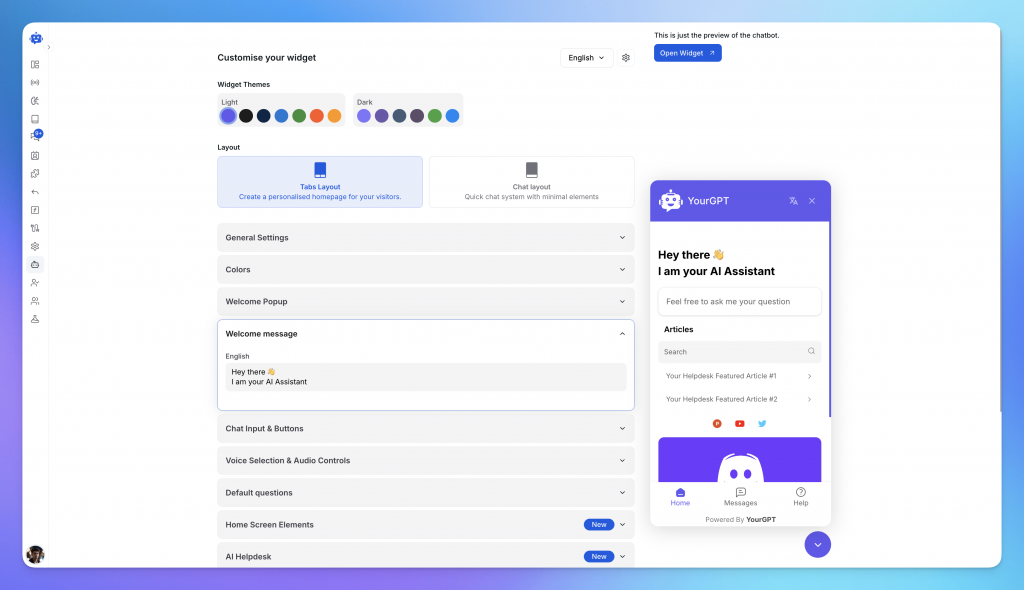
Some conversations need more than an answer.
A customer may need to book a call, share details, check eligibility, start onboarding, get routed to the right team, or complete a multi-step request.
With YourGPT AI Studio, you can create sequential agent workflows for these situations without writing code.
The chatbot can ask follow-up questions, collect the right details, trigger approved steps, and guide the user to the next action.
This is what moves it beyond a basic FAQ chatbot.
YourGPT can connect with the tools your business already uses, including whatsapp, instagram, CRMs, ecommerce platforms (shopify, woocomerce), Google Sheets, support systems, internal APIs, scheduling tools, and payment systems.
This matters because customers often ask questions that depend on live business data.
For example, someone may want to check an order, update a request, confirm account details, or continue a conversation from another channel. When your chatbot is connected properly, it can help with those moments instead of only giving static answers.

Before going live, test the chatbot with real questions your customers ask.
Use the YourGPT emulator to check how it answers, where it gets confused, when it passes the conversation to a human, and whether the workflow behaves as expected.
This step is important because customers rarely ask questions in a clean or predictable way. Testing helps you fix weak replies before they become real support problems.
Once the chatbot is live, review the conversations.
Look for questions it handled well, questions it missed, places where customers dropped off, and moments where the chatbot should have brought in a human sooner.
YourGPT gives you analytics and conversation insights to improve the assistant over time.
The best chatbot setup is not finished on launch day. It gets better as your customers ask better questions, your team learns from real conversations, and your business knowledge stays updated.
Suggested Reading
GPT chatbots usually fail for one simple reason: the business expects the model to do too much with too little context.
The model may be capable, but the chatbot still needs the right knowledge, clear limits, and a sensible way to pass difficult conversations to a human.
Without that, the chatbot becomes another support shortcut that creates more confusion than help.
A GPT chatbot cannot give strong answers if the source material is thin, outdated, or unclear.
If the website has vague product pages, old help docs, missing pricing details, or unclear refund rules, the chatbot will inherit those problems.
It may still respond confidently, but the answer will not feel trustworthy to the customer.
Some customer questions are not just information requests.
A refund exception, billing dispute, account-specific issue, angry complaint, or legal concern needs judgment. The chatbot should not guess its way through those moments.
This is where many GPT chatbots create frustration. They keep generating answers when the right move is to collect the details and pass the conversation to a human.
A better chatbot knows the difference between a question it can answer and a situation that needs review.
A chatbot needs boundaries.
It should know what it can say about pricing, refunds, discounts, delivery, product limits, and account issues.
Without clear rules, it may guess, overpromise, or give answers that sound helpful but create problems later.
This is where many businesses lose trust in AI support.
Some GPT chatbots reply well but still fail to solve the actual problem.
They explain. They summarize. They apologize.
But the customer still does not know what to do next. A useful chatbot should make the next step clear, whether that means opening a guide, choosing a plan, checking a policy, collecting details, or bringing in a human.
A chatbot is not finished on launch day.
Customer questions change. Product pages change. Pricing changes. New edge cases appear.
If no one reviews conversations and fixes weak answers, the chatbot slowly becomes less useful. The best GPT chatbots improve from real customer questions, not assumptions made during setup.
A chatbot fails when it becomes a wall between the customer and the team.
If it cannot pass the conversation to a human with useful context, the customer has to repeat everything again.
That makes the chatbot feel like an extra step instead of real help.
The better setup is simple: answer what is clear, collect what matters, and pass the rest to a human cleanly.
Custom ChatGPT-style chatbots are changing the face of customer interaction. They are not a passing trend; rather, they are a major development in business communication that allows for more effective, responsive, and customised customer engagement. This gpt is available for your customer interaction.
AI chatbots are a scalable, affordable way for businesses to meet changing customer needs while improving engagement and providing multilingual support. The trend towards these tools is a reflection of a larger shift in customer service, where immediacy, accuracy, and customisation are not just valued but expected.
AI chatbots are becoming essential tools for customer relations in the future, not only because of their technological capabilities but also because of their ability to maintain and enhance customer satisfaction. Businesses that want to stay ahead of the competition should not only consider adopting these AI advancements as a strategic choice but also as a necessity.
Use YourGPT to help Black Friday shoppers choose products, check orders and understand returns. Prepare your answers and team before the sale.

Add in-app chat support to your SaaS or mobile app. Place it on the screens where users stall, pass who they are, and hand hard cases to your team.

Group new-account tickets by onboarding stage, train an AI agent on your docs, and place it in the product where new users get stuck.
AI agents can now find and buy products for shoppers. See what agentic commerce changes for a Shopify store and which support jobs stay yours.
Build a Halloween shopping assistant for Shopify with YourGPT. Set up product recommendations, stock checks, cart actions and human support before launch.

See what a good customer effort score looks like, how to word and calculate CES on each scale, and which support habits raise customer effort.