Replying to Instagram Comments: Mastering The Ultimate Guide for 2026

Rajni
October 26, 2026
Instagram buyers who ask “price?” in a comment expect an answer within minutes. Manual replies usually arrive too late to make the sale.
YourGPT AI can connect to your professional account in minutes, reply publicly to selected comments, send detailed answers by DM, and handle follow-up questions using your knowledge base.
Meta allows one private reply per comment within seven days. The conversation continues only after the customer replies, after which a 24-hour messaging window applies.
The setup takes minutes, but training takes longer. The quality of that training determines how many customer questions the AI agent can answer without your team’s help.
Every Instagram post with a call to action gets the same first questions in the comments: “price?”, “link?”, “do you ship internationally?” Each comment comes from someone deciding right now whether to buy from you or from a competitor. Answer quickly and you keep the sale. Answer after they’ve moved on and you usually lose it.
Instagram comment automation lets you answer those questions as they arrive. With YourGPT AI, one agent can post a short public reply under each buying comment, send the full answer by DM, and continue the conversation from your own knowledge base. When a conversation needs a person, your team takes over, and the AI picks it back up once they hand it back.
This guide gives you a working setup you can follow step by step: how to train the agent on your own answers, which trigger rules to choose, how to write a reply that gets a response, and how to test everything before a launch. It also covers the Meta limits that decide how the first DM has to be written, so your automation keeps working through a whole campaign rather than stalling after the first message. Watch the setup video to follow along.
Replying to Instagram comments manually may work when engagement is low. But as posts and Reels attract more attention, managing every comment becomes difficult. Three common challenges can affect response quality and potential sales.
1. High Comment Volume
A popular Reel can receive hundreds of comments within hours. Many customers ask the same questions about pricing, availability, or shipping. Answering each comment individually takes time, increases the team’s workload, and delays other customer conversations.
2. Delayed Responses
Customers often comment when they’re interested in a product or ready to make a purchase. If someone asks about pricing in the morning and receives a response hours later, they may have already explored other options. Slow replies can mean missed opportunities to convert interested buyers.
3. Inconsistent Customer Replies
When multiple team members manage Instagram comments, customers may receive different answers to the same question. Some replies may miss important details, such as pricing, product links, or availability. During busy periods, teams may also forget to follow up through DMs.
Instagram comment automation helps businesses manage these challenges. Automated replies reduce repetitive work and improve response times, while a well-trained AI agent uses approved business information to provide consistent answers. Clear rules and human handoffs help maintain response quality when conversations require additional attention.
An effective Instagram comment reply should answer the customer’s question, encourage further interaction, and make it easy to continue the conversation. For businesses using comment automation, combining public replies with direct messages (DMs) helps keep responses short while providing customers with the information they need.
Here are three steps to follow:
Public replies should acknowledge the customer’s comment and let them know where to find more information. Avoid long explanations or lengthy product details, especially when the same question appears repeatedly.
For example:
Only mention sending a DM when one has actually been sent.
Direct messages give you more space to answer specific questions, share product links, and provide relevant recommendations.
Start with the information the customer requested. If someone asks about pricing, mention the price first instead of sending a generic promotional message.
For example:
“The Hydra Serum costs $32 for 30ml. You can check the product here: [link].”
Keep the message relevant to the original comment. Avoid adding unnecessary promotional information that could distract the customer.
A relevant follow-up question can help customers get more specific information and encourage them to continue the conversation.
For example:
For automated comment-to-DM workflows, this is particularly useful because Meta generally allows one private reply to a comment. Further automated messaging becomes possible when the customer responds and opens the applicable messaging window.
| Customer comment | Public reply | Private DM |
|---|---|---|
| “What’s the price?” | “We’ve sent you the details in DMs!” | “The Hydra Serum costs $32 for 30ml. Here’s the product link: [link]. Would you like help choosing the right product?” |
| “Is medium available?” | “Check your DMs for available sizes!” | “Medium is available in black and navy. Here’s our size guide: [link]. Which color would you prefer?” |
| “Interested!” | “Thanks for your interest! Check your messages.” | “Here’s more information about the product: [link]. Is there anything specific you’d like to know?” |
| “Do you ship internationally?” | “We’ve shared the shipping details in your DMs!” | “We ship to selected international locations. You can check eligible countries and delivery estimates here: [link]. Which country are you ordering from?” |
Best practice: Avoid posting identical replies under every comment. Use natural variations, respond to the customer’s actual question, and make sure automated messages reflect accurate product information. This helps your brand maintain meaningful conversations while managing high comment volumes.entical replies under one reel look automated, and they make the post feel like a bot conversation rather than a store.
YourGPT AI helps businesses automate Instagram comments and direct messages while keeping customer conversations relevant and consistent. Instead of manually replying to every comment, businesses can use an AI agent trained on their own information to answer questions, share product details, and manage follow-up conversations.
Here are the main features of YourGPT AI for Instagram automation:
Set up automatic replies for comments on your Instagram posts and Reels. You can configure the AI to respond to every eligible comment or only those containing specific keywords, such as “price,” “details,” or “demo.”
When someone comments on your post, YourGPT can send a private message with relevant information, such as product pricing, links, availability, or service details. This moves interested customers from public comments into direct conversations.
Train your AI agent using website content, PDFs, FAQs, product documents, and knowledge base articles. The agent uses this information to answer customer questions, reducing the need for repetitive manual responses.
YourGPT supports more than 100 languages, allowing businesses to respond to international customers in their preferred language. This is useful for brands serving customers across different regions.
Share images, videos, files, buttons, and interactive cards through supported Instagram messaging formats. These elements help customers explore products, access information, or choose their next action without lengthy text conversations.
Connect your AI agent with external services using YourGPT Agent Tools and AI Studio. Depending on the integrations configured, the agent can help customers book appointments, retrieve order details, or complete other business-related tasks.
Not every customer question should be handled automatically. YourGPT allows conversations to be transferred to human agents when customers need additional assistance, such as resolving complaints, handling refunds, or discussing specific requirements.
Manage Instagram DMs alongside conversations from other connected channels, including WhatsApp, through a shared inbox. Your team can review conversation history, respond manually, and coordinate customer support from one place.
With these features, businesses can automate repetitive Instagram interactions while maintaining control over customer conversations. AI handles common questions and routine follow-ups, while human agents remain available when customers need personal assistance.
Before setting up Instagram comment automation with YourGPT AI, you need to prepare your Instagram account and AI agent. Having the right information and permissions in place helps prevent connection issues, inaccurate replies, and missed customer messages.
Here are three requirements to get started:
Once these requirements are in place, the next step is to train your AI agent using real customer questions, test its responses, and connect it to Instagram. A properly prepared agent can handle common inquiries while directing complex conversations to your support team.
The quality of your Instagram AI agent’s responses depends on the information you provide. A well-trained agent can understand customer questions, deliver accurate answers, and reduce manual support work.
Follow these steps to prepare your AI agent for Instagram automation.
Review your Instagram comments, DMs, and support conversations to identify frequently asked questions.
For example:
Group similar questions into categories such as pricing, availability, shipping, and bookings.
Train your YourGPT AI agent using accurate business information from sources such as:
Include specific details such as prices, delivery timelines, and product availability rather than generic descriptions. For detailed instructions, see this guide on how to train an AI chatbot for better responses.
Configure your agent to keep replies short, relevant, and conversational. It should answer using verified information, avoid guessing prices or policies, and ask follow-up questions when needed.
Set human handoff rules for complaints, refunds, and complex customer requests.
Test your agent with around 20 common customer questions, including variations such as “price?”, “how much?”, and “cost?”
Check each answer for accuracy and clarity. If a response is incorrect or incomplete, update the knowledge source and test again. You can also follow the YourGPT training guide to review training sources and troubleshoot incorrect answers.
Best practice: Keep your knowledge base updated whenever pricing, products, promotions, or policies change. This helps your AI agent provide reliable answers across Instagram comments and DMs.
Setting up Instagram comment automation with YourGPT AI doesn’t require coding or complex API configurations. You can connect your professional Instagram account, configure automatic comment replies, and manage customer conversations through one platform.
Follow these eight steps to set up your Instagram AI agent.
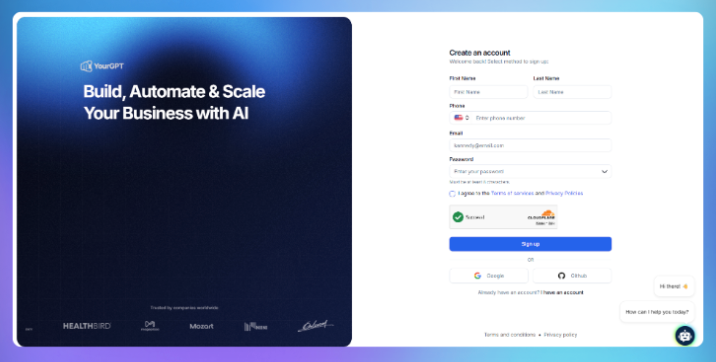
Log in to your YourGPT AI dashboard and create a new AI agent or select an existing one.
Give your agent a name and configure its basic instructions. Define how it should respond to customer questions, maintain your brand’s communication style, and handle requests requiring additional assistance.
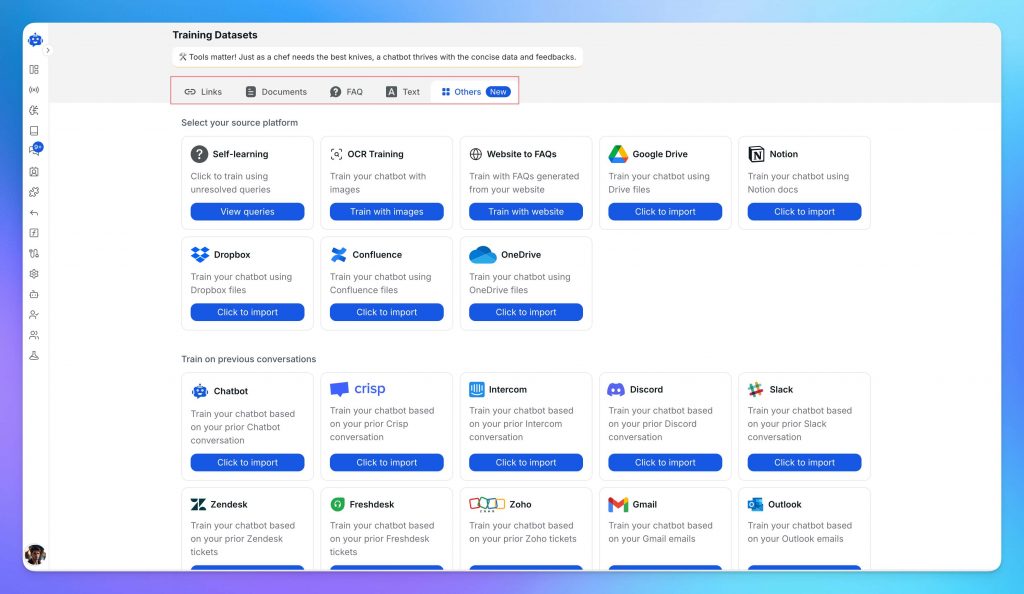
Add information from your website, PDFs, FAQs, product catalogs, and knowledge base to help the agent answer customer questions accurately.
Test a few common questions to confirm the agent understands your business information before connecting it to Instagram.
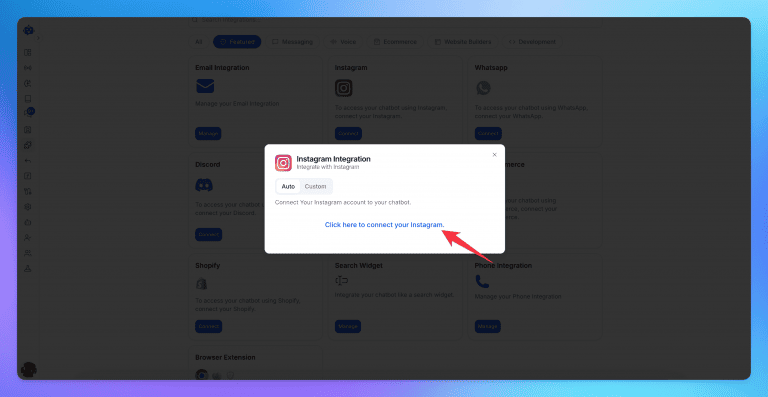
Open Integrations in your YourGPT dashboard and locate the Instagram integration.
Select Auto, then click the option to connect your Instagram account.
Sign in using your Instagram Business or Creator account and approve the requested permissions. YourGPT will complete the connection through its supported integration process.
For more details, refer to the official Instagram integration documentation.
Once connected, YourGPT AI can respond to incoming Instagram direct messages using your trained knowledge base.
Send a test DM from another Instagram account with a question such as “What’s the price?” or “Do you ship internationally?”
Check that the AI responds accurately and continues the conversation when you send follow-up questions.
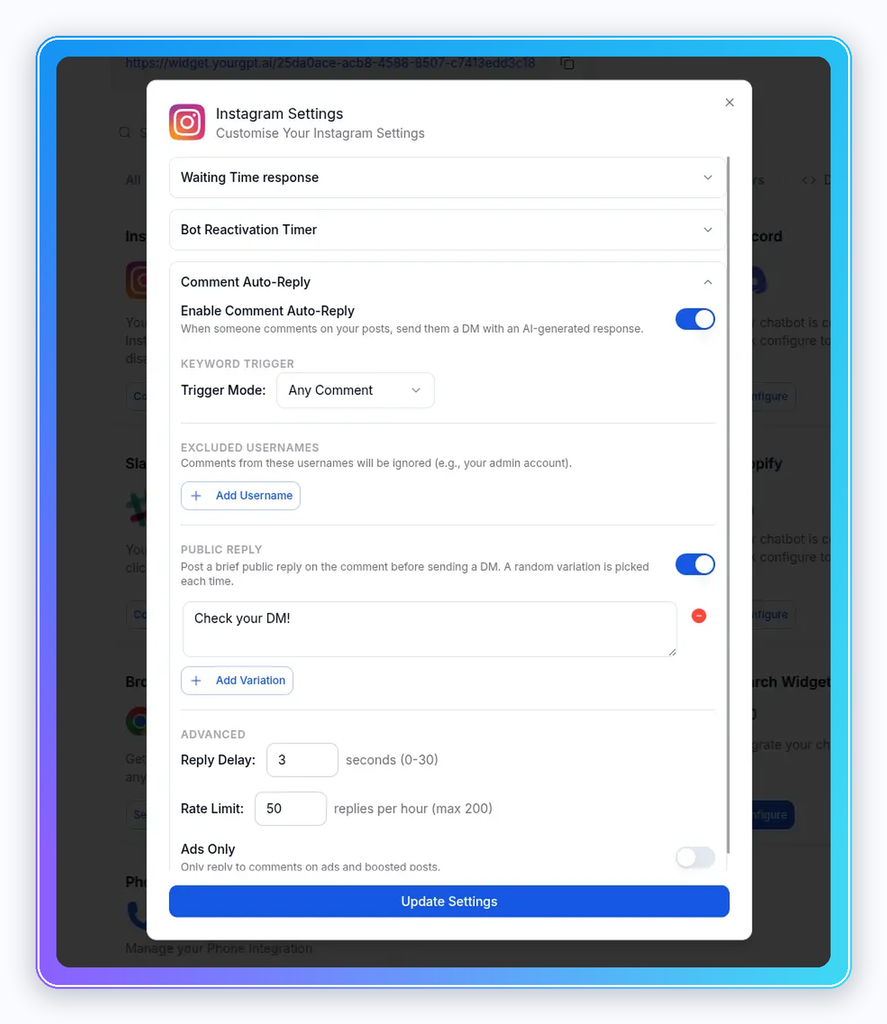
Go to Integrations → Instagram → Settings and enable Comment Auto-Reply.
Choose the trigger mode that fits your campaign:
You can also exclude specific usernames, set a reply delay, and configure an hourly reply limit. Click Update Settings to save your configuration.
Enable Public Reply if you want the agent to acknowledge comments before sending a private message.
For example, when a customer comments “PRICE” under your Reel, the automation can:
Make sure your first DM contains useful information and a relevant follow-up question. This is important because Meta restricts unsolicited follow-up messages after comment-triggered private replies.
Open the Conversations section in YourGPT to review incoming Instagram messages.
Your team can read conversation history, respond manually, and manage customer questions alongside other connected support channels.
This helps support teams keep track of customer conversations without switching between multiple messaging platforms.
Set up human handoff for conversations requiring personal assistance, such as refunds, complaints, account issues, or complex product questions.
When a customer requests human support, the conversation can be transferred to your team. Agents can review previous messages, respond directly, and return control to the AI when the issue is resolved.
Before launching, test the complete process, including comment triggers, private messages, follow-up responses, and human handoff.
Best practice: Start with one Instagram post and a specific keyword, such as “DETAILS.” Test the complete comment-to-DM interaction from another account before enabling automation across multiple posts.
For additional setup instructions, refer to the official YourGPT Instagram integration guide.
YourGPT AI offers three trigger modes for Instagram comment automation. Each determines which comments receive automatic replies, helping you control customer interactions based on your campaign goals.
| Trigger Mode | How It Works | Best For |
|---|---|---|
| Any Comment | Automatically responds to every eligible comment. | General engagement and community posts. |
| Contains Keyword | Triggers a reply when a comment includes a specified word or phrase, such as “price” or “details.” | Product launches, lead generation, and promotional campaigns. |
| Exact Match | Responds only when the comment matches the configured keyword or phrase exactly. | Campaigns with specific calls to action, such as “Comment DEMO.” |
For most product promotions, Contains Keyword is a practical option because it recognizes keywords within longer comments. For example, a customer writing “What’s the price?” can trigger an automation configured for “price.”
Use Exact Match when you want responses limited to a specific keyword. Any Comment works better when you intend to acknowledge all eligible comments, but it may also trigger replies to unrelated messages.
Best practice: Test your keywords using different comment variations before launching a campaign. Avoid overly broad triggers that could send irrelevant DMs, and review the replies regularly to make sure the automation works as intended.
Instagram comment automation follows rules set by Meta and the automation platform. Understanding these restrictions helps you avoid missed replies, unnecessary messages, and interruptions during campaigns.
According to YourGPT’s Instagram integration documentation, certain comments are excluded from automatic replies:
These restrictions help prevent duplicate responses and unnecessary automation.
Meta also sets limits on when businesses can send private messages in response to comments.
| Meta Rule | What It Means |
|---|---|
| One private reply per comment | You can send one initial private message in response to an eligible comment. |
| Seven-day reply window | Private replies must be sent within seven days of the original comment. |
| 24-hour messaging window | After a customer responds to your DM, automated conversations can continue within 24 hours of their latest message. |
| Instagram Live restrictions | Private replies to Live comments must be sent while the broadcast is active. |
These are platform-level restrictions that apply to integrations using Meta’s official API. See Meta’s Instagram developer documentation for additional details.
Sending a private reply does not automatically open a 24-hour conversation window. The customer must respond before the AI agent can continue sending regular follow-up messages.
For better results, make your first DM relevant, answer the customer’s question, and include one useful follow-up question that encourages a response.
Even after setting up Instagram comment automation, you may encounter issues with account connections, keyword triggers, AI responses, or message delivery. Testing your setup before launching a campaign helps identify these problems early.
| Issue | Possible Cause | Recommended Solution |
|---|---|---|
| Instagram account won’t connect | Incorrect account type or missing permissions | Confirm you’re using a Business or Creator account and approve the required permissions. |
| Automatic comment replies aren’t working | Incorrect trigger mode or keyword | Check the selected trigger and test it with a new comment from another account. |
| Automatic DMs aren’t being sent | Messaging permissions, eligibility restrictions, or connection issues | Check account permissions, the integration status, and Meta’s messaging restrictions. |
| AI provides incorrect answers | Missing or outdated knowledge sources | Update the relevant information in your knowledge base and test again. |
| Comments trigger unrelated replies | Keywords are too broad | Use more specific keywords or switch to Exact Match. |
| Human handoff isn’t working | Incorrect routing or handoff configuration | Review your handoff rules and test a conversation that requires human assistance. |
Before enabling automation across multiple posts, run a complete test using another Instagram account:
Review a sample of automated conversations after each campaign. Look for missed keywords, incorrect answers, and unresolved customer requests. Use these findings to improve your knowledge base and automation settings before the next campaign.
Consider a skincare brand launching a new serum through an Instagram Reel. The post receives hundreds of comments, including questions about pricing, availability, and shipping.
Instead of responding manually, the brand uses YourGPT AI to manage these interactions.
Here’s how the automation works:
This is an illustrative example, not a measured campaign result. It shows how a single Instagram comment can lead to a customer conversation without requiring your team to manually answer every routine question.
Setting up automatic replies is only the beginning. Tracking how customers interact with your AI agent helps you understand whether the automation is answering questions and supporting business goals.
Focus on these four metrics:
| Metric | What It Measures | Why It Matters |
|---|---|---|
| AI Resolution Rate | Percentage of eligible conversations resolved without human assistance. | Shows how effectively the AI handles common questions. |
| Human Handoff Rate | Percentage of conversations transferred to your support team. | Helps identify requests that require human assistance or better knowledge coverage. |
| DM Response Rate | Percentage of customers who reply to the initial automated DM. | Indicates whether your first message encourages further interaction. |
| Leads and Conversions | Number of qualified leads, bookings, or purchases attributed to Instagram conversations. | Helps measure the business value of automation. |
Review a sample of conversations after each campaign. Identify incorrect answers, missed keywords, and questions that require human assistance.
Use these findings to update your knowledge base, improve message wording, and adjust your automation settings.
For additional guidance, see what a good AI resolution rate looks like.
Instagram comment automation works best when responses are relevant, accurate, and properly configured. Avoid these common mistakes when managing automated replies.
1. Using Overly Broad Keywords
Generic keywords can trigger responses to unrelated comments. Choose specific keywords that match your campaign goals and test different variations before publishing.
2. Sending Generic Automated DMs
A message such as “Thanks for commenting!” doesn’t answer the customer’s question. Include the requested information, such as pricing, product details, or a relevant link, in the first message.
3. Using Outdated Business Information
Incorrect prices, expired offers, or outdated shipping policies can frustrate customers. Keep your AI agent’s knowledge base updated whenever business information changes.
4. Ignoring Customer Complaints
Not every comment should receive a promotional response. Complaints, refund requests, and sensitive questions should be handled appropriately, with human assistance when necessary.
5. Launching Without Testing
Incorrect triggers, missing permissions, or poorly configured replies can disrupt customer conversations. Test the complete comment-to-DM process before enabling automation on important posts.
Seven days from the time the comment was created. After that, you can only message that person if they message you first.
YourGPT’s documentation says each commenter receives one automatic DM per post within a 24-hour period. After the customer replies to that DM, the conversation continues in the normal messaging window.
Yes. Instagram messaging through the API is available for professional accounts, which means Business or Creator accounts.
Usually not. Comment automation applies to new comments, so older threads need manual replies.
Replying to comments on your own posts through Meta’s official integration is the supported use case. Automated likes, follows, or comments on other accounts’ posts are not, and they can get your account restricted.
Yes. According to YourGPT’s product descriptions, the Instagram agent handles DMs, comments, and story replies using your knowledge base. You can start a free trial and test it on your own account.
Instagram comments are a sales queue that moves faster than a person can type. The brands that handle that queue well set up three things: a knowledge base that answers the questions customers really ask, a reply structure that puts the answer in front of the buyer, and handoff rules that send sensitive conversations to a person.
Start with one post and one call to action. Train the agent on the 20 questions your customers already ask, choose the trigger mode that fits the post, and run the full test before launch. After the first launch, read the conversations, fix what the agent got wrong, and tighten the handoff rules. Each post makes the next one easier to automate.
When you’re ready to try it on your own account, start your free trial and follow the setup steps above.
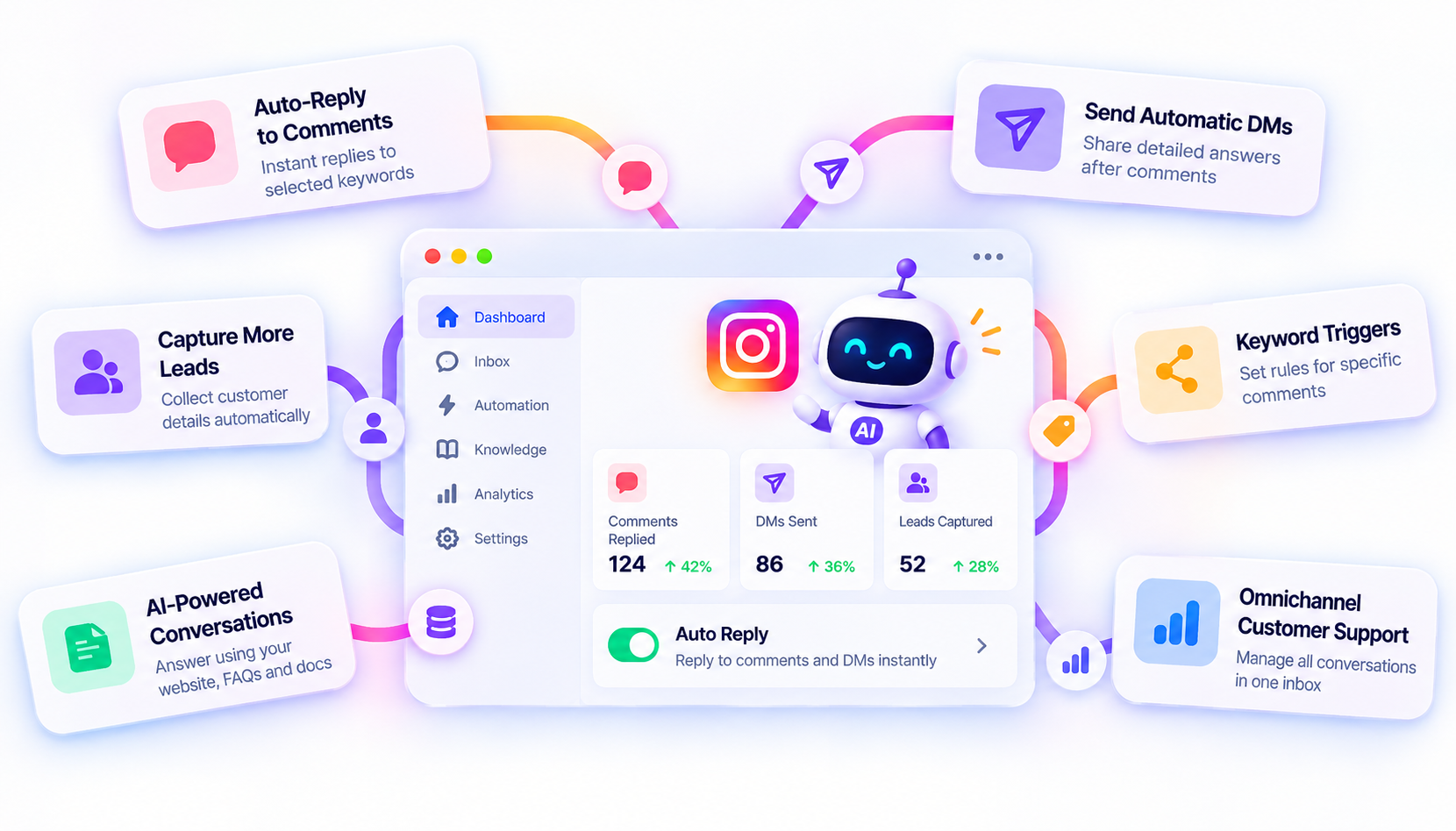
Reply to Instagram comments, send automatic DMs, and capture more leads with YourGPT AI. Get started without coding.
Connect your website AI agent to a CRM with YourGPT. Capture lead details, map contact fields and verify the record your sales team will use.

Use YourGPT to help Black Friday shoppers choose products, check orders and understand returns. Prepare your answers and team before the sale.
Add in-app chat support to your SaaS or mobile app. Place it on the screens where users stall, pass who they are, and hand hard cases to your team.
Group new-account tickets by onboarding stage, train an AI agent on your docs, and place it in the product where new users get stuck.
AI agents can now find and buy products for shoppers. See what agentic commerce changes for a Shopify store and which support jobs stay yours.
Build a Halloween shopping assistant for Shopify with YourGPT. Set up product recommendations, stock checks, cart actions and human support before launch.
