Prompt Chaining in 2026: Everything You Need to Know

Neha
Last updated on September 2, 2026
Prompt chaining breaks a complex task into a fixed sequence of prompts, with each output feeding into the next so the model can focus on one instruction at a time.
Use prompt chains when the steps are known in advance and you need predictable outputs. Use an AI agent when the workflow needs to adapt based on what the model discovers along the way.
Chaining adds API calls, latency, and token costs, but it is useful for tasks where one large prompt can miss constraints, such as multi-section drafting, document extraction, and support triage.
AI performs best when given structured tasks. Prompt chaining is a technique that breaks complex requests into sequential steps, allowing AI to process information more effectively.
Instead of handling an entire task in one go, AI completes each step separately, refining responses at every stage. This leads to greater accuracy, reduced errors, and better control over outputs.
Prompt chaining is widely used in content creation, coding, and customer support, where precision matters. By guiding AI through a structured process, businesses can improve response quality and ensure more reliable automation.
This post explains how prompt chaining works, why it improves AI performance, and where it is being applied effectively.
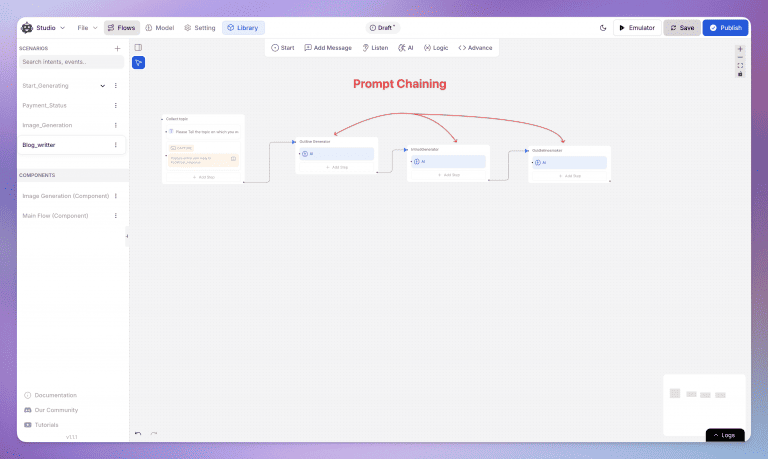
Prompt chaining is a method where the output of one AI prompt becomes the input for the next, creating a structured workflow.
This technique breaks down tasks into manageable steps, allowing AI to handle more complex tasks with greater precision and control. By guiding AI step by step, you minimize errors and improve the overall quality of the output.
There are different ways to implement prompt chaining depending on the task at hand. Here are a few commonly used methods:
This straightforward approach involves each prompt following from the previous one in a logical order. This method works best for tasks that require step-by-step solutions, such as troubleshooting problems or creating multi-stage content.
In some scenarios, a task may present multiple potential outcomes. Branching chains allow AI to explore several paths simultaneously. This approach is particularly useful when brainstorming ideas or evaluating different strategies.
Here, AI revisits its outputs, refining them over time. Recursive chaining is especially useful in creative tasks, such as content development, where the AI can return to a draft to enhance and improve it.
This method adjusts the next prompt based on the previous output. In customer service applications, for example, AI can respond to user feedback by dynamically adapting its next steps based on the issue at hand.
Large Language Models (LLMs) have made significant improvements in how AI processes language but they come with some challenges, especially when handling complex tasks. To address this prompt chaining becomes essential—it helps the AI work through tasks more effectively by breaking them down. Here’s why it’s needed:
When LLMs are given a detailed, intricate prompt, they often get confused or provide irrelevant responses. They might miss the main point or offer shallow answers because there’s too much going on at once.
How Prompt Chaining Fixes This:
Instead of overwhelming the AI with one huge task, prompt chaining breaks it into smaller, more manageable steps. The AI can focus on one part at a time, leading to more accurate and structured responses.
LLMs do well in short conversations but tend to lose track of the context in longer interactions. This can cause them to give inconsistent answers or drift away from the original topic.
How Prompt Chaining Fixes This:
With prompt chaining, the AI builds on each response step by step, keeping the context intact. It helps maintain a coherent conversation without the AI losing its way.
There’s only so much information an LLM can handle at once. When given a large or complicated task, its performance drops, leading to more errors or incomplete answers.
How Prompt Chaining Fixes This:
Breaking the task into smaller parts reduces the mental load on the AI. By focusing on one task at a time, it can give more precise answers without being overwhelmed.
LLMs don’t automatically know if their response is wrong, and there’s no built-in feedback loop to help them correct mistakes. This can lead to unreliable answers when dealing with complex tasks.
How Prompt Chaining Fixes This:
Each step in the chain can be used to review and refine previous answers. By revisiting earlier responses, the AI can ensure the final output is more accurate.
Processing long, detailed documents in a single prompt is tough for LLMs. They often produce summaries that miss key points or only scratch the surface of the content.
How Prompt Chaining Fixes This:
By breaking down the document into sections and summarizing each part, the AI can produce a more complete and thorough overview. This approach ensures that no important information is missed.
LLMs can be hit-or-miss when tackling a variety of tasks within the same session. They might perform well on one query and struggle with another, especially if the tasks differ in complexity or subject matter.
How Prompt Chaining Fixes This:
By handling each sub-task independently, prompt chaining ensures that the AI can stay focused and perform consistently, no matter how varied the tasks are.
Prompt chaining lets AI tackle big jobs bit by bit, like a well-organized to-do list. This makes things more accurate, less confusing, and gives you easy tweaks along the way, so everything turns out just right.
Large tasks often have many details that can be easily missed with a single prompt. By chaining prompts together, AI can process smaller, more focused parts of a task.
For example, when analyzing a document, the AI can first summarize it, then extract key data, and finally generate insights. Each prompt targets a specific aspect of the task, resulting in more accurate and detailed outcomes.
Handling large projects, such as writing a report, can overwhelm AI when done in one go. Prompt chaining solves this by dividing tasks into stages.
For instance, the AI could start by generating an outline. Next, it writes each section based on that outline, and finally refines the draft. Each phase is handled separately, leading to better clarity and organization.
Prompt chaining gives you control over each stage of the process. If one part doesn’t meet expectations, you can adjust that specific prompt without affecting the rest of the workflow.
This allows for greater control and makes debugging much easier.
To better understand how prompt chaining works in practice, here are specific examples from different applications.
Imagine you’re using AI to write an in-depth article.
Each stage ensures the final output is well-structured, complete, and aligned with the main goals.
For coding, prompt chaining helps break down tasks like error detection and code improvement.
This process ensures cleaner, more efficient code, with each prompt focusing on a specific aspect of the coding task.
Prompt chains are widely used in customer service to resolve issues in a systematic way.
By breaking the conversation into clear steps, AI can better address user needs and provide tailored solutions.
To get the most out of prompt chaining, consider these guidelines:
Prompt chaining is already being used across various industries to streamline tasks and improve outcomes. Below are some key examples:
Prompt chaining can help AI generate articles, outlines, and summaries more effectively by breaking the content creation process into distinct phases. This ensures that each stage of writing, from idea generation to final edits, is carefully handled, resulting in more structured and relevant outputs.
Developers often use prompt chaining to break down coding tasks. The AI can first write the code, then check for bugs, and finally suggest optimizations. This allows for a more methodical and efficient approach to programming and debugging.
AI can use prompt chains to walk through troubleshooting procedures in customer service settings. If a customer presents an issue, the AI can analyze the problem, suggest solutions, and follow up with more targeted questions if the problem persists.
Prompt chaining is when you split one big request into a fixed sequence of smaller prompts, and the output of each one becomes the input for the next. Instead of asking a model to research, outline, write, and edit in a single instruction, you run four separate calls where each does one job.
No, because the limit was never how much text a model could hold. It’s how many instructions it follows well at once. A prompt with ten simultaneous constraints will quietly drop three of them regardless of window size, and chaining fixes that by giving the model one job per call.
Use a chain when you already know the steps and their order. Use an agent when the number of steps depends on what the model finds partway through. If you can draw the workflow on paper before running it, it’s a chain, and hardcoding it gives you predictable cost, latency, and output.
Yes, usually three to four times more. Each step is a separate API call, and every step after the first re-sends the context it needs, so tokens accumulate. Latency stacks the same way, which makes chaining a poor fit for anything a user is waiting on in real time unless you stream intermediate steps.
It propagates, and this is the main failure mode of chaining. A wrong step two silently corrupts steps three through five, and the final output looks confident and wrong. Validate between steps by enforcing structured output like JSON schemas, and add a retry on any step that fails its check.
Yes, most modern chatbot and workflow builders let you assemble chains visually. In YourGPT you can connect steps inside Chatbot Studio flows so a support conversation classifies the issue, drafts a response, and escalates to a human if confidence is low, without touching an API directly.
Start with three or four and only add more when a step is clearly doing two jobs. Every step you add multiplies cost and latency and gives error propagation another place to start, so the goal is the fewest steps where each one has a single, checkable output.
Prompt chaining offers AI a structured approach to handle complex, multi-step tasks efficiently.
Whether it’s content creation, coding, or customer service, breaking tasks into smaller, focused stages improves precision, control, and reliability.
By using different types of chains linear, branching, recursive, and conditional prompt chaining can be customized to suit various needs across industries.
Group new-account tickets by onboarding stage, train an AI agent on your docs, and place it in the product where new users get stuck.


AI agents can now find and buy products for shoppers. See what agentic commerce changes for a Shopify store and which support jobs stay yours.


Build a Halloween shopping assistant for Shopify with YourGPT. Set up product recommendations, stock checks, cart actions and human support before launch.

See what a good customer effort score looks like, how to word and calculate CES on each scale, and which support habits raise customer effort.
Tier 1 support handles first contact. See how Tiers 0 to 3 differ and what changes when an AI agent becomes your first line.
The 12 customer service metrics to track when an AI agent resolves tickets, with a formula for each and a baseline built from your own last month.