Zoho Desk Review 2026: Pricing, Pros & Cons

Shreya
November 26, 2026
Zoho Desk is a good fit for teams already using Zoho CRM. Agents can see previous conversations, related tickets, and linked CRM records in one view, though reviewers often describe the interface as cluttered and Blueprint automation as difficult to learn. Standard includes basic generative AI and Answer Bot, Professional adds Zia’s predictive and analytical features, and live chat through Zoho SalesIQ requires Enterprise. Every paid plan offers a free trial with no credit card required. Zoho lists ISO 27001 certification and SOC 2 Type II attestation, while HIPAA compliance remains unconfirmed in the official materials reviewed.
Zoho Desk is easy to shortlist if your team already uses Zoho CRM. Agents can see account details and past conversations alongside a ticket, which is useful when a support request depends on something sales agreed to months ago. The harder decision is which plan gives your team the tools it needs without paying for features it rarely uses.
The three-agent free plan can cover basic email support. If your team needs to route refund requests for approval, handle phone calls, or use AI to answer common questions, the tier you choose matters more than the starting price.
This review compares all five plans using Zoho’s pricing and product pages, alongside G2 and Capterra reviews for a view of day-to-day use. We break down where Zia AI, Blueprint automation, and live chat fit, where setup takes extra work, and when Freshdesk or Zendesk may suit your team better.
Zoho built its reputation on being the “context-aware” help desk, the idea that an agent should never have to leave the ticket screen to understand who they are talking to. Prior conversations, linked CRM records, and related tickets all load in the same view.
Zoho Desk brings tickets, conversation history, and linked CRM records into one workspace. When comparing plans, start with the channels your customers use and the rules your team follows to assign, escalate, and resolve requests.
The Zoho Desk pricing page lists five editions, from a free plan for up to three agents to Enterprise. The table shows India pricing in INR, with paid rates shown per agent per month when billed annually. Zoho also offers monthly billing and advertises savings of up to 34% on annual plans.
| Plan | Price per agent/month (billed annually) | Notable Inclusions |
|---|---|---|
| Free | Free forever | 3 agents, email ticketing, help center, basic reporting |
| Express | ₹420 | Email, social media, web forms, AI Agents (bring your own key or use Zoho’s LLM with 30M free tokens per month), custom domain, multi-level escalations |
| Standard | ₹800 | Live chat widget, instant messaging, Answer Bot, community forum, full knowledge base, custom reports |
| Professional | ₹1,400 | Telephony, Zia AI (built-in generative, predictive, and analytical AI), Blueprints, multi-department support, help center in 40+ languages |
| Enterprise | ₹2,400 | Live chat via Zoho SalesIQ, Guided Conversations, skill-based assignment, multi-brand help center, custom modules, sandbox |
Use Zoho’s currency selector to check local rates and the detailed plan comparison to check seat limits and add-on availability. To estimate your bill, multiply the per-agent rate by the number of full seats you need, then add taxes and any extras.
Express includes AI Agents with access to Zoho’s LLM and up to 30 million free tokens per month. It also offers generative features such as ticket summaries and reply suggestions through a bring-your-own-key option. Standard adds Answer Bot, which answers questions using your knowledge base. Professional adds native Zia AI, including generative features that work without an external API key, plus predictive and analytical tools. If live chat is a deciding factor, the plan comparison distinguishes Standard’s live chat widget from Enterprise’s Zoho SalesIQ integration.
Light agents can view and comment on tickets without a full agent seat. Zoho’s pricing FAQ lists ₹345 per light agent per month and says Enterprise includes 50 light agents. The FAQ and detailed comparison list different eligibility rules for lower tiers, so confirm availability for your plan before budgeting.
Telephony is available through provider integrations on Professional and Enterprise. If your team handles calls, add the cost of your chosen phone provider to the Zoho Desk subscription.
Zoho’s free trial terms let you try any paid edition for 15 days without a credit card and switch tiers during that period. When the trial ends, Zoho moves your account to the Free plan unless you purchase a subscription. Run a real support request through the lowest tier you’re considering to see whether it covers each step from assignment to resolution.
Zoho Desk is most useful when a support request depends on information from another team. Agents can work from the same customer record, and teams can assign clear responsibilities when a ticket moves from support to billing or product.
The main trade-off is setup effort. A team can get started with basic ticketing, but approvals, routing rules, and AI features take more planning and may require a higher tier.
Zoho Desk handles customer contact details, ticket content, and often CRM data pulled in from Zoho’s other apps, so its compliance posture and data handling practices carry real weight in a buying decision.
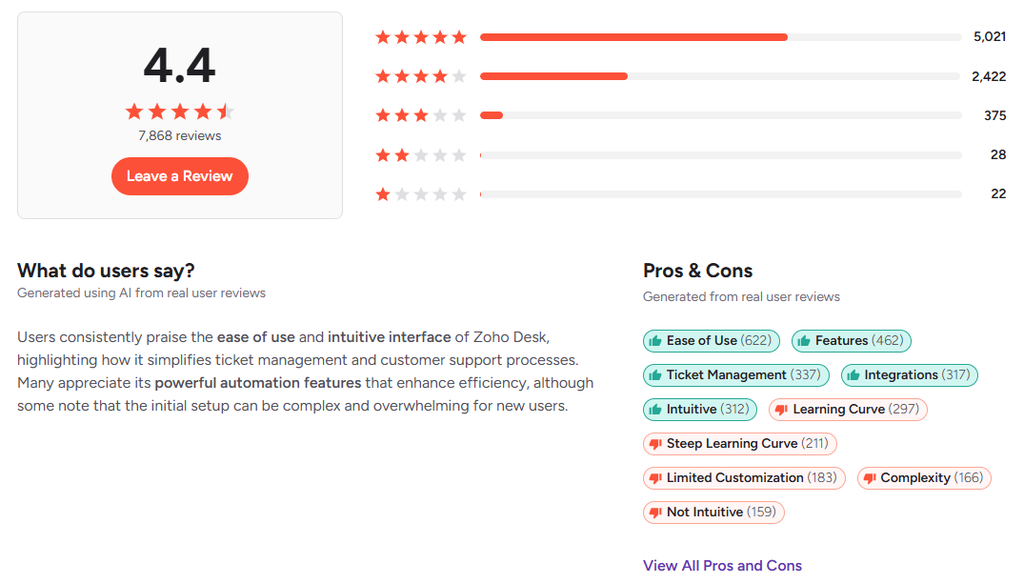
The scores line up closely across platforms. G2 shows roughly 4.4 out of 5 across more than 7,800 reviews, with small businesses making up close to three-quarters of that reviewer base. Capterra shows a similar 4.5 out of 5 from more than 2,200 verified reviews, and TrustRadius rates it 8.3 out of 10 from 145 reviews.
Reviewers praise the same three things: the unified dashboard, the price against Zendesk and Freshdesk, and Blueprint’s automation. Most of them list the same complaints too: a cluttered interface, a learning curve past basic ticketing, and features like advanced reporting or MS Teams integrations locked behind a higher tier than expected.
Worth a few minutes checking the lower-starred reviews for setup complaints before signing an annual contract. That pattern shows up far more than anyone calling the product broken.
This review draws on Zoho’s own pricing and security documentation, verified G2 and Capterra review data, and independent pricing trackers, rather than a hands-on trial account. Worth being clear about what that means for each category below.
A live trial account would surface interface friction and setup time more precisely than published documentation and aggregated reviews ever could. Treat the ease-of-use findings above as a strong pattern across a large sample, useful context rather than a substitute for testing the actual workflow a team plans to run.
Zoho Desk is one option inside a much wider help desk software category. It fits best for teams already running other Zoho apps, or any team that wants ticketing, automation, and a usable AI layer at a lower price than Zendesk or Freshdesk charge for the same structure. Outside that profile, a few alternatives come up often, covered in more depth in the 8 best Zoho Desk alternatives and competitors roundup.
| If the Priority Is | Choose | Why |
|---|---|---|
| AI-first resolution with usage-based pricing | YourGPT | No per-seat fees, a choice of AI models, and agents built to resolve customer conversations directly. |
| Integration with an existing Zoho stack | Zoho Desk | Native Zoho CRM context and Blueprint automation for ticket workflows. |
| Standalone ticketing | Freshdesk | Comparable entry pricing for teams that want a dedicated help desk alongside their existing tools. |
| Enterprise-scale ticketing and a broad app marketplace | Zendesk | Advanced ticket automation and a wide range of integrations at a higher per-agent cost. |
| Support connected to CRM, marketing, and sales data | HubSpot Service Hub | Support, sales, and marketing teams can work from the same customer record. |
Zoho Desk brings support requests from email, web forms, social media, and instant messaging into a shared ticket queue. Agents can view linked Zoho CRM records alongside tickets. Higher tiers add options for phone and live chat support.
Zoho Desk focuses on ticketing, departmental workflows, and Zoho CRM integration, with Zia features that vary by plan. YourGPT focuses on AI agents that resolve customer conversations directly and lets teams choose models from OpenAI, Anthropic, Google, and xAI.
Yes. The Free edition supports up to three agents and includes email ticketing, a help center, and basic reporting with no time limit.
Zoho Desk prices its paid plans per agent. In India, annual billing works out to ₹420 per agent per month for Express, ₹800 for Standard, ₹1,400 for Professional, and ₹2,400 for Enterprise. Annual billing can save up to 34% compared with monthly billing. Check the Zoho Desk pricing page for rates in your region.
Zia is Zoho’s built-in AI. Express includes basic generative AI and AI Agents. Standard adds Answer Bot, and Professional includes native generative, predictive, and analytical Zia features.
Day-to-day ticket handling becomes more manageable after setup. Reviewers on G2 and Capterra describe a dense interface and a steeper learning curve when configuring Blueprint automation.
Yes. Each paid edition offers a 15-day trial with no credit card required. You can switch between plan tiers during the trial.
For a team already invested in Zoho CRM or the wider Zoho product line, Zoho Desk is close to a default choice. Every paid tier stays lean, the annual discount is real, Blueprint automation covers genuine process-enforcement needs, and Zia’s AI features, staged across three tiers instead of bundled at once, are useful once a team lands on the plan that actually ships them.
The friction sits in two places, and both are solvable with a bit of planning rather than a reason to walk away. The interface takes longer to feel natural than some competitors. Matching AI ambitions to the tier that ships them takes a closer read of the pricing page than the marketing suggests. Model the real bill, including light agents and telephony if those apply, directly against the live pricing page in the currency that matters, and confirm Zia’s current tier placement before treating any specific AI feature as included.
TL;DR Compare ten AI answering services by pricing and what they can do on a call. Check which plans take messages, book appointments directly, or transfer callers to your team. Use your call volume, minutes, and unique callers to estimate monthly costs, including add-ons and overages. Check what any free allowance covers and test what […]

Nine AI customer service tools for supplement, skincare and telehealth brands, with a HIPAA ledger, a worked monthly cost and a 12-ticket trial.

What Fin really costs in 2026: which conversations bill, worked bills for small and large teams, add-ons, the questions to ask sales, and how to cap spend.
Compare published AI rates, separate the five billing meters, and calculate the true cost per resolution for your support queue.
A comparison of 10 AI customer support tools for electronics retailers, with findings from live store chats and a 10-ticket trial plan.
Model the cost of Zendesk AI agents with your ticket volume, then test order lookups, handoffs, and billing against your own support queue.