Gorgias Pricing (2026): Ticket Plans, AI Agent Cost per Interaction and Calculator

Rajni
October 20, 2026
Gorgias Helpdesk starts at $10 per month, with AI sold through a separate prepaid bundle. Pro with AI starts at $550 per month before overages; our illustrative workload of 1,200 billable tickets and 420 AI-completed interactions costs $895 under Support + Shopping Assistant terms. Use the interactive calculator to estimate your own monthly bill.
An AI agent can take work off your team without taking tickets off your Gorgias bill. A conversation resolved by AI can use both a helpdesk ticket and an automated interaction, so fewer human replies won’t necessarily mean lower software costs. The buying decision comes down to what that extra spend removes from your team’s workload or adds to your business.
The examples below follow a hypothetical apparel store through a normal month, a promotion month and additional shopping conversations. You can jump to the monthly calculator with your own volumes. All prices are USD, checked on October 20, 2026; the store and its workload are illustrative.
Your bill starts with two subscriptions: Helpdesk and the AI bundle. Each has its own included usage. Once you exceed either allowance, its overage rate determines the extra charge.
The current Helpdesk plans set your base subscription and ticket allowance. Start here to see what the example store’s 1,200 conversations would cost before adding AI.
| Plan | Monthly | Annual monthly equivalent | Tickets included | Ticket overage |
|---|---|---|---|---|
| Starter | $10 | Monthly only | 50 | $0.40 |
| Basic | $60 | $50 | 300 | $0.40 |
| Pro | $360 | $300 | 2,000 | $0.36 |
| Advanced | $900 | $750 | 5,000 | $0.36 |
| Enterprise | Custom | Custom | Custom | Custom |
Annual contracts are invoiced upfront for twelve months, so the annual monthly equivalent is a budgeting figure rather than a monthly invoice amount. A Pro annual plan works out to $300 per month in contract terms, but it commits $3,600 in cash before AI, add-ons, and taxes. Seat caps are separate from usage: 3 seats on Starter and 500 on Basic, Pro, and Advanced.
When AI is enabled, the displayed bundle cards pair the helpdesk subscription with a prepaid AI allowance. The combined price is the monthly floor before any usage above the allowance.
| Plan | Included automated interactions | AI add-on monthly | Helpdesk + AI monthly | Annual monthly equivalent |
|---|---|---|---|---|
| Starter | 30 | $30 | $40 | Monthly only |
| Basic | 30 | $30 | $90 | $77 |
| Pro | 190 | $190 | $550 | $471 |
| Advanced | 530 | $530 | $1,430 | $1,227 |
You pay the full AI bundle fee even if you use only part of its allowance. Leaving interactions unused does not reduce that subscription charge.
At full use, the monthly AI bundles on Basic, Pro and Advanced work out to $1.00 per included interaction: $30/30, $190/190 and $530/530. Their annual equivalents work out to $0.90: $27/30, $171/190 and $477/530. That is the bundled rate; overage has a separate price.
If the store bought Pro’s $190 AI bundle and used only 100 interactions, the effective subscription cost would be $1.90 per completed interaction. The advertised fully used bundle rate would not describe that month.
Gorgias’s AI Agent pricing explanation sets a $1.50 excess-interaction rate for Support + Shopping Assistant plans. It also lists Support-only overage rates of $1 to $2 on monthly plans and $0.83 to $1.67 on annual plans, depending on tier. Build the estimate from the rate and allowance stated for your subscription.
The published Advanced figures do not agree. The comparison table lists $0.85 per automated interaction, but the annual card shows $477 for 530 interactions, which works out to $0.90. We use the displayed card totals in these estimates. Confirm your Advanced bundle and overage rates in writing before committing.
Choose a plan and enter your monthly usage to see the subscriptions and overages separately. The defaults use the published monthly Support + Shopping Assistant bundles. If your quote differs, open Adjust pricing assumptions and enter your account’s fees and allowances.
The starting example totals $895: $360 Helpdesk, $190 AI bundle and $345 AI overage. All 1,200 billable tickets fit inside Pro’s ticket allowance, but 230 of the 420 AI interactions exceed its separate allowance.
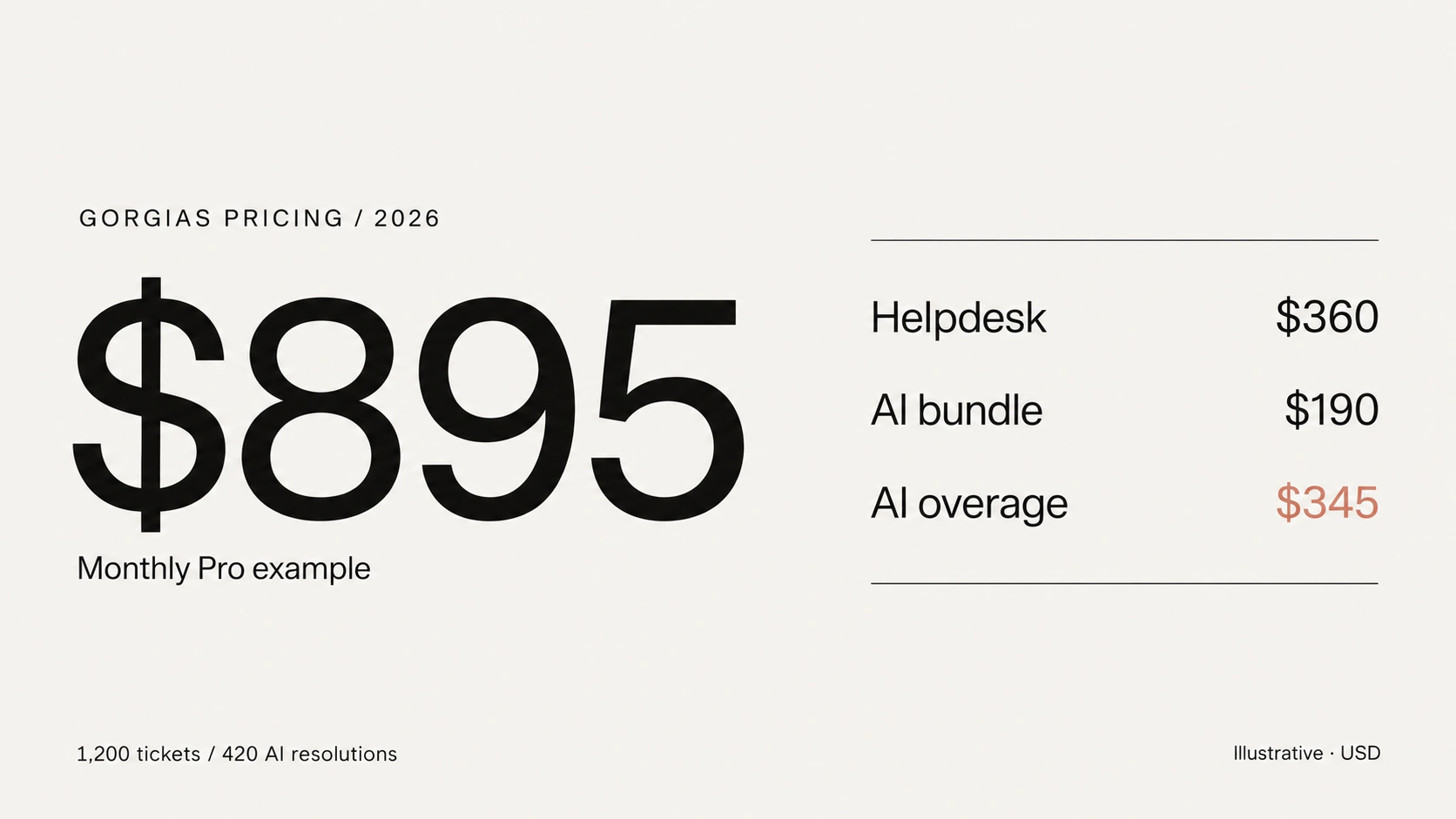
For AI Agent replies through email and chat under the current billing model, include each completed conversation in both usage counts. The example therefore uses 1,200 helpdesk tickets and 420 AI interactions. Subtracting the AI resolutions would incorrectly reduce the ticket forecast to 780; adding them again would inflate it to 1,620.
Other self-service automations can use the automation allowance without creating a helpdesk ticket. Include them in AI interaction usage when they qualify, and in ticket usage only if they also create a billable helpdesk event.
Use Other monthly software charges for quoted extras such as Voice or SMS, matched to the same period. Taxes and labor are excluded. The prepaid AI bundle stays in the estimate even when usage is zero.
This calculator models a single monthly billing period. Annual contracts need a separate forecast for upfront payments and usage allocation; multiplying a normal month by twelve can hide peak-season costs. Confirm whether your annual allowances reset or pool before comparing an annual quote.
A billable helpdesk ticket is a conversation with a customer-facing reply from a human, a Rule or AI Agent. Multiple messages in that thread do not each count as another ticket. An automated interaction measures something different: a request completed without human handover.
This distinction explains how the example can have spare ticket capacity and AI overage at the same time: the 420 AI resolutions fit inside the ticket allowance but exceed the AI allowance.
| What happens | Helpdesk ticket usage | Automated interaction usage |
|---|---|---|
| A human answers the customer | 1 | 0 |
| An AI Agent answers and hands over to a human | 1 | 0 |
| An AI Agent resolves the request without human handover | 1 | 1 |
| Another self-service feature resolves the request without an agent | Can be 0 | 1 |
| An inbound message receives no helpdesk reply | 0 | 0 |
Gorgias measures automated interactions over a 72-hour window. If a human takes over within that window, the conversation counts as a ticket only; if no human takes over within 72 hours, the same conversation counts as one ticket plus one automated interaction.
That waiting period affects your reporting, too. Gorgias says the latest three days of automation reporting can lag while outcomes are established. Monitor the pilot as it runs, but use conversations that have passed the handover window for your final assessment.
Multiple messages in the same active conversation do not each become a ticket, but a customer can return after inactivity and trigger a split. Gorgias can split that conversation into a new ticket when an email reply arrives more than 10 days after the last message, or when a new chat or SMS message arrives after more than three days. That new ticket can become billable when it receives a helpdesk reply. Plan with a conversation forecast, not a count of unique customers.
Accounts created before May 28, 2025 may retain a legacy pricing model where a conversation consumes either ticket usage or automation usage, not both. Eligibility also depends on the subscription and Shopping Assistant upgrade status, so account age alone is not enough to know which billing rules apply.
Before forecasting AI usage, separate the conversations you already handle from those AI might bring in. Answering an existing support request with AI replaces work someone would otherwise do. Starting a new shopping conversation adds activity that was not in the original queue.
The topic alone cannot tell you which case applies. A product question might have reached a human anyway, while an order-status question could arrive through a new channel. Ask whether the conversation would have happened without AI before assigning it a labor-saving benefit.
Keep the existing workload fixed when you calculate avoided labor. Then build a separate budget for additional conversations. That way, new shopping activity has to earn its cost rather than borrowing the support team’s time savings.
“AI will handle 35%” is not enough to build a budget. You need to know which requests it will attempt and how many it can finish without a handover. For the first estimate, the hypothetical store keeps its existing 1,200-ticket workload and divides it into four groups.
Here is how that normal month breaks down.
| Request type | Billable tickets | AI attempts | AI resolutions |
|---|---|---|---|
| Order status | 600 | 480 | 336 |
| Returns | 300 | 120 | 60 |
| Product questions | 200 | 60 | 24 |
| Exceptions | 100 | 0 | 0 |
| Total | 1,200 | 660 | 420 |
These assumptions are planning inputs, not measurements: order-status requests get 80% attempt coverage and a 70% success rate among attempts; returns get 40% and 50%; product questions get 30% and 40%; exceptions are human-only by assumption.
The math follows: AI attempts are 600 × 80% + 300 × 40% + 200 × 30% = 660, and AI resolutions are 336 + 60 + 24 = 420.
Weighted attempt coverage is 660 ÷ 1,200 = 55%, success among attempted tickets is 420 ÷ 660 = 63.6%, and overall automation is 420 ÷ 1,200 = 35%. Human-handled tickets are the remaining 780, including both direct human answers and AI attempts that handed over.
These planning definitions differ from Gorgias dashboard metric labels. Resolving 63.6% of attempted tickets does not mean resolving 63.6% of the whole queue; here, overall automation is 35% because the team attempts only part of its workload. An estimate built from the larger percentage would overstate the forecast AI workload.
To replace these assumptions, review recent helpdesk history and run a pilot on the selected request types. Use enough history to include a normal period and a peak period; three to six months is a practical starting point when available. Count conversations that received a customer-facing reply, and do not use order volume as a proxy.
Measure completed outcomes by request type after the 72-hour handover window, then substitute observed rates for the assumptions.
A vendor-wide automation rate cannot tell you how your own request mix, permissions and exception policies will affect completion. Use your pilot results for the existing queue, then budget separately for any additional conversations AI creates. The later shopping scenario shows what that difference costs.
Pro has the lowest published monthly total at the store’s normal forecast, subject to required features and the actual quote. Basic would cost $1,035: $60 Helpdesk, $360 ticket overage, $30 AI bundle, and $585 AI overage. Advanced would cost $1,430 with both usage counts inside its allowances, making Pro $140 below Basic and $535 below Advanced.
The cheaper plan changes with the workload. Without AI, Basic and Pro tie at 1,050 tickets on monthly billing: Basic costs $60 plus $0.40 for each ticket above 300, while Pro costs $360 through 2,000 tickets. Add AI and their different interaction allowances change the comparison.
| Workload | Basic | Pro | Advanced |
|---|---|---|---|
| 800 tickets, 240 AI | $605 | $625 | $1,430 |
| 900 tickets, 270 AI | $690 | $670 | $1,430 |
| 1,200 tickets, 420 AI | $1,035 | $895 | $1,430 |
You do not have to wait until you reach a ticket limit to compare plans. At 800 tickets, Basic is $20 cheaper than Pro. At 900 tickets with the stated AI volume, Pro is $20 cheaper: its larger AI allowance saves enough overage to cover the higher subscription.
Check the features you need alongside the total. The plan comparison lists AI Actions on Basic and above, with revenue attribution on Pro and Advanced. If you want AI to cancel orders, confirm that the required Action and store connection are available on your plan and configured for your store.
Gorgias’s description of AI Agent and its actions makes store knowledge and connected tools part of its setup. A higher allowance cannot substitute for the permissions and configuration needed to complete an order change.
Revenue attribution can help you assess pre-purchase conversations. It still takes a separate test to establish whether those sales would have happened without AI.
Now price a promotion month at 2,400 billable tickets and 900 AI resolutions. Pro reaches $1,759: $360 Helpdesk, $144 ticket overage, $190 AI bundle and $1,065 AI overage. Advanced reaches $1,985, including $555 for its 370 excess AI interactions. These are separate hypothetical monthly forecasts, not measured results.
Advanced has a larger allowance yet costs $226 more at this forecast. At 3,000 tickets and the same 900 AI interactions, Pro is $1,975 and Advanced remains $1,985. At 3,200 tickets, Pro reaches $2,047 while Advanced remains $1,985. The larger plan becomes cheaper because the workload changes, not simply because the smaller plan’s quota has been crossed.
With 900 AI interactions at these monthly rates, Pro and Advanced cross at about 3,028 tickets. Without AI, the Helpdesk-only crossover is 3,500. Treat those as results for these inputs, not permanent upgrade thresholds. A different AI volume or adjusted quote means running the comparison again for both a normal month and a peak month.
Feature and service differences can matter independently of arithmetic. Pro lists 1:1 onboarding and Advanced lists white-glove onboarding. Ask what each includes for your rollout: knowledge preparation, channel setup, integration configuration, and testing may require different amounts of your team’s time. If procurement needs SAML SSO, negotiated security terms, or dedicated solutions support, request an Enterprise quote rather than assuming Advanced covers them.
Annual billing changes cash timing. For the fictional store, the annual Pro bundle is $471 per month in monthly-equivalent terms, but it requires $5,652 upfront before usage, add-ons, and taxes. Weigh the annual discount against that upfront commitment, expected usage, and allowance terms; it does not turn a peak month into twelve identical months.
Once you have priced the normal and busy months, consider what happens when AI handles another 300 conversations. The cost depends on whether those conversations replace work already in the forecast or add to it. Keep Pro fixed to see the difference.
Start from the same peak baseline: 2,400 billable tickets, 900 AI interactions and a $1,759 monthly total. Both cases below add 300 AI resolutions.
Case one: convert 300 already-billable human-handled tickets to AI. Those 300 tickets already exist in the helpdesk count because a human would have answered them. Billable tickets stay at 2,400, and AI interactions rise from 900 to 1,200.
Pro’s AI allowance is 190, so the extra AI overage is 300 × $1.50 = $450. The new total is $2,209.
That extra $1.50 per converted ticket applies because the AI allowance is already exhausted and the subscription stays fixed. It is not the full cost of adopting AI: a store enabling AI for the first time must also pay for its bundle.
Case two: create 300 genuinely new, fully AI-resolved shopping conversations. These conversations would not otherwise have reached a human support channel. Each adds one billable ticket and one automated interaction, taking tickets to 2,700 and AI interactions to 1,200.
At those counts, Pro has $252 of ticket overage and $1,515 of AI overage. Add the $360 Helpdesk subscription and $190 AI bundle to get $2,317. The increase over the $1,759 baseline is $558, equivalent to 300 × $1.86: $0.36 of ticket overage plus $1.50 of AI overage for each new conversation.
| Pro scenario, same monthly rates | Billable tickets | Automated interactions | Software total |
|---|---|---|---|
| Peak baseline | 2,400 | 900 | $1,759 |
| Move 300 existing tickets to AI | 2,400 | 1,200 | $2,209 |
| Add 300 new AI-completed conversations | 2,700 | 1,200 | $2,317 |
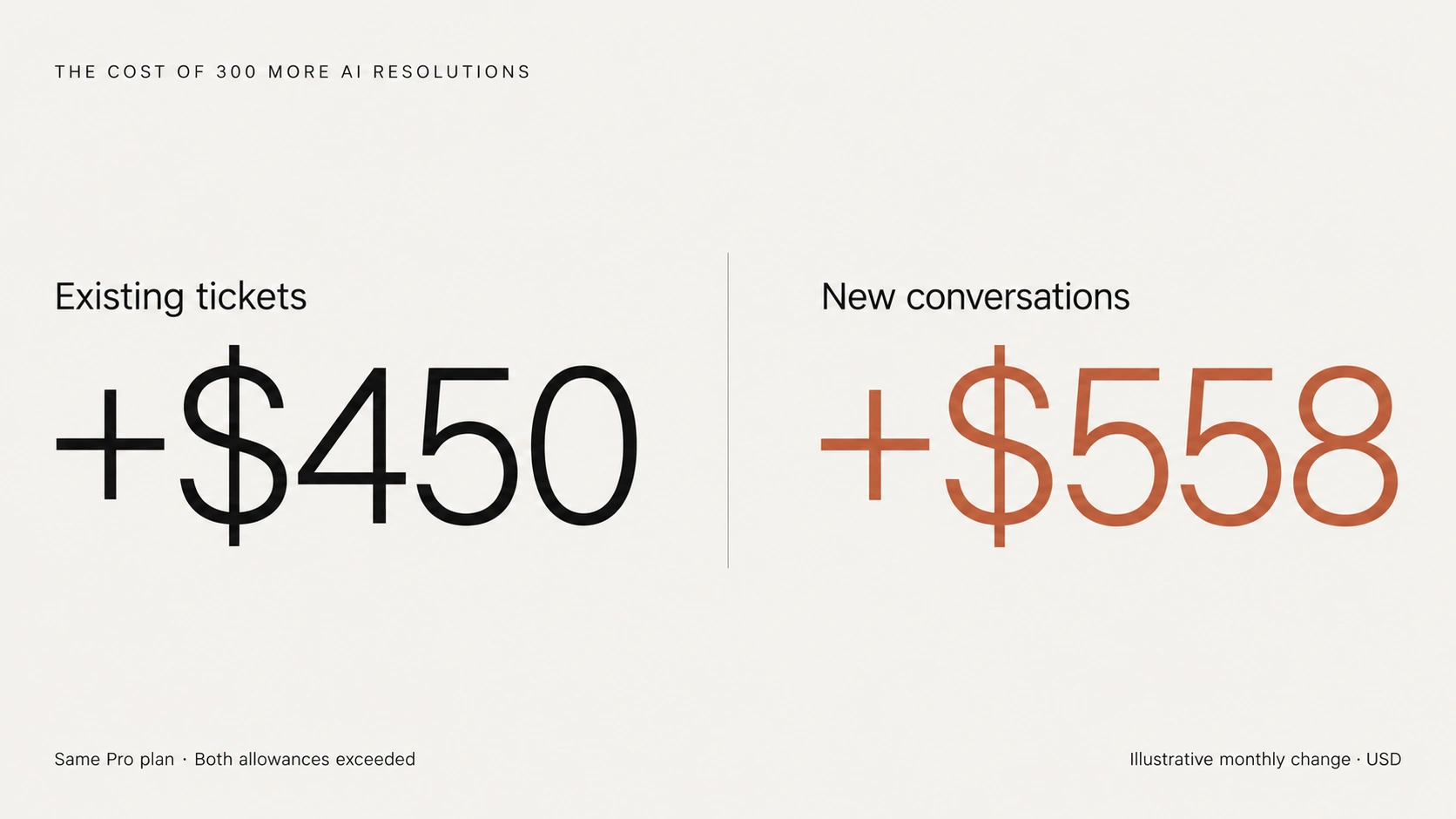
A genuinely new billable AI conversation adds $1.86 once both allowances are exhausted. An existing human-handled ticket is already in the ticket count, so adding ticket overage again would overstate its conversion cost. A new conversation needs both charges in this scenario.
A shopping conversation can generate a charge even when it does not lead to a purchase. Under Gorgias’s rules for search assist and AI FAQs, a shopper who replies and completes a conversation with AI without handover can generate both usage charges. Completion of the conversation triggers the billable outcome, not an order.
An ignored search-assist prompt is not billed under that rule. Budget for qualifying conversations rather than treating every widget impression as paid usage or every paid interaction as a sale.
For new shopping conversations, measure the return through additional orders. Assume, for this example, that each additional order contributes $18 after product cost, fulfilment, discounts and expected returns.
At that contribution, covering the extra $558 of software cost requires 31 additional orders. An order that would have happened anyway does not count toward that target, even if AI receives attribution for it. Setup, oversight or a lower contribution per order would raise the threshold.
Compare the additional contribution with the additional cost. Using the full selling price of every influenced order would overstate the return and could make an unprofitable experiment look successful.
For existing support requests, the return comes from avoided work. At normal volume, Pro with AI costs $895 per month against $360 for the same Helpdesk plan without AI. The extra AI software spend is $535.
Assume another $60 per month for reviewing transcripts and handling edge cases. That brings the incremental cost to $595. Whether it pays off depends on the handling time those AI resolutions actually remove.
For the 420 existing requests moved to AI, assume a fully loaded agent cost of $24 per hour. The table shows how much the result changes when each resolution avoids two, four or six minutes of work.
| Assumed avoided agent time per resolution | Time value at $24/hour | Incremental AI cost | Net illustrative value |
|---|---|---|---|
| 2 minutes | $336 | $595 | -$259 |
| 4 minutes | $672 | $595 | $77 |
| 6 minutes | $1,008 | $595 | $413 |
The break-even is $595 ÷ 420 = $1.42 per AI resolution, or about 3.54 minutes at $24 per hour. Avoiding more than that amount of work makes the illustrative calculation positive, after allowing for mistakes and repeat contacts. The avoidable cost may be lower if your team could handle the requests within existing capacity.
Use actual handle time for AI-eligible request types, not the average for the whole queue. Simple order-status requests may have shorter handle times than complex returns, and AI may be assigned disproportionately to the simple ones. Track repeat-contact rates and handover accuracy during the pilot, but do not double-count quality costs already inside the review allowance.
Freed time becomes a cash saving when it reduces a cost, such as overtime or a hire you would otherwise need. If payroll stays the same, record the hours as freed capacity. Faster responses and fewer routine tickets can still be valuable without being payroll savings.
Subtract one-time implementation costs in the first-year calculation; knowledge preparation, prompt work, and integration effort can consume a small operating benefit. The payback period depends on their actual cost, which is not estimated here.
The same support workload gives you a starting point for evaluating YourGPT. With our AI Agent platform, you can train agents on website links and documents, answer from business knowledge, deploy across website and messaging channels, and hand conversations to your team. You can assess product questions, policy answers and connected store tasks while retaining your existing human-support operations. Confirm the handover route between systems before planning a rollout.
YourGPT uses AI Credits rather than a separate fee for each completed resolution. Our Professional plan costs $129 month to month, or $79 per month in annual-equivalent terms, with 30 million AI Credits and five team members. The comparison therefore needs a measured credit forecast.
Credit use varies with the selected model and the conversations it handles. Additional credits are available through add-ons, but the included allowance does not translate into a fixed number of resolutions.
For a budget illustration, keep the same $360 Pro Helpdesk subscription and evaluate the $129 monthly YourGPT Professional subscription alongside it:
| Monthly software component | Gorgias Pro with AI | Retained Helpdesk plus YourGPT Professional |
|---|---|---|
| Helpdesk subscription | $360 | $360 |
| AI subscription and usage | $535 for the worked workload | $129 before extra credits or add-ons |
| Combined software estimate | $895 | $489 subscription floor |
The $406 difference is headroom for additional recurring software charges before this scenario reaches $895, not a measured saving. Your total depends on credit use, add-ons and the plan your team needs; more than five members may require a different plan. Include implementation and review effort separately. This comparison prices two subscriptions and does not establish a native Gorgias integration.
For transactional work, our Shopify connection supports product and catalog interactions, order lookups, and cart actions with no separate connector fee. Those capabilities require the relevant connection, configuration, and permissions. Training on a returns policy gives the agent policy knowledge; it does not grant access to a customer’s live order.
The store can test the economics without sending duplicate replies to live customers:
Compare the tested cost with the quality of the completed requests. If both meet your requirements, YourGPT offers a way to expand automation without a separate per-resolution charge. Include any higher plan or additional integration work before deciding to switch.
Before committing, ask for an adjusted usage quote based on the forecast. Confirm the actual AI overage rate for your bundle, whether allowances reset each period or pool, and the real eligibility, usage price, and unit structure for Voice and SMS.
Published add-on prices start Voice at $30 monthly or $25 per month on annual billing, and SMS at $20 monthly or $17 per month on annual billing. Those starting figures are not unlimited-use prices.
There is an eligibility conflict to resolve for Starter: its comparison row marks Voice and SMS unavailable, while the Voice guide describes availability on all Helpdesk plans. Confirm the terms for your account. Voice usage has its own allowance, separate from helpdesk ticket usage.
When the first invoice arrives, compare the forecast with its billing period, included units, and overage line items. If Gorgias bills you directly, invoices appear in the Gorgias billing area; if you pay through Shopify, find the charges in Shopify billing.
An owner or admin can review the subscription in Billing and usage, then open Usage & Plans and Manage for the relevant product. Implementation, knowledge base setup, and AI review are internal operating costs unless the quote includes services.
Gorgias Helpdesk with AI starts at $40 per month on Starter. The monthly bundles are $90 for Basic, $550 for Pro and $1,430 for Advanced, before overages and extras. These are starting subscription costs. The Pro example in this article reaches $895 because its 420 automated interactions exceed the included AI allowance, so budget for both subscriptions and their separate usage limits.
Yes. Under the current billing model, a conversation AI Agent answers through the helpdesk can use one billable ticket and one automated interaction. The reply uses the ticket allowance; completion without human handover uses the AI allowance. Some legacy subscriptions count either a ticket or an automated interaction instead. Check your account’s billing model before subtracting AI resolutions from ticket usage.
No, provided a human takes over within the 72-hour window. That conversation counts as a helpdesk ticket only, and the customer-facing reply can still make it billable. The handover does not remove your prepaid AI bundle fee: you still pay that subscription even if some or all of its allowance goes unused.
For Support plus Shopping Assistant, no: AI overage remains $1.50 per excess interaction on annual billing. Support-only plans have annual overage rates of $0.83 to $1.67, compared with $1.00 to $2.00 on monthly billing, depending on tier. Check the allowance period and rate for your subscription before using an annual discount in your forecast.
It may be, but you need measured credit use to compare the same workload. Our $129 monthly Professional plan plus the retained $360 Gorgias Helpdesk gives a $489 subscription floor, against the article’s $895 Gorgias example. The credit allowance does not guarantee a fixed number of resolutions. Include extra credits, integration and review costs, and compare completion quality before calling the difference a saving.
At the normal forecast, Pro has the lowest published monthly total for the example store. Whether AI earns its extra cost depends on how much work the 420 resolutions actually remove and how reliably they are completed. Revisit Pro versus Advanced as the peak forecast approaches 3,000 tickets and 900 automated interactions, or whenever the pilot results or quoted allowances change.
New shopping conversations need their own return. In the separate 300-conversation example, the additional software spend requires 31 additional orders at the assumed $18 contribution per order. Those conversations cannot claim time savings from support work they never replaced.
Evaluate YourGPT against the same completion target, using measured credit consumption and the cost of any helpdesk you retain. That gives you a basis for choosing what to buy: the work each option completes, its quality and the total cost of running it.
Train an agent on your store content, then test representative questions and record credit use.
Choose Halloween ecommerce campaigns that fit your products, with AI agent workflows, offer worksheets, launch tests and order measurement.
Compare outsourcing customer service with an AI agent using your own ticket mix, a cost model you fill in, and a clear rule for a hybrid split.
Export the Zendesk ticket archive, train an AI Agent on the help center, and test one real ticket before you stop the old queue.


Compare six Yuma alternatives by ecommerce capabilities, helpdesk compatibility, pricing and human handoffs to choose a replacement for your support team.

Move from Gorgias with a verified ticket archive, tested AI workflows, human handoff and a channel cutover plan before ending your subscription.
TL;DR The Gorgias AI Agent is the automation layer inside the Gorgias helpdesk, split between a Shopping Assistant for pre-purchase conversations and a Support Agent for post-purchase support. A connected Shopify store is required, and Gorgias documentation rules out platforms such as BigCommerce, Magento, and WooCommerce for the AI Agent. Billing runs on two separate […]