How to Build a GDPR-Compliant Chatbot

Rajni
November 12, 2026
A GDPR-compliant chatbot needs a clear purpose, a lawful basis for using personal data, transparent notices and controls for access, security, retention and data requests. Start with approved information and a defined support role. Add private-record access only when the service needs it, with permissions enforced by your backend. Compliance covers the full service, including its providers and connected tools.
The first decision is what your chatbot should be allowed to do. Explaining a service or answering a policy question is one kind of project. Checking a private application, account or case file adds access decisions, connected systems and records your team will need to manage.
For support, operations and IT leads, the scope of a customer support automation project determines who needs to be involved and what must be checked before launch. A university helpdesk, professional-services firm or customer support team can begin with approved information and a clear route to a person.
This guide covers the decisions, preparation and YourGPT settings needed to build that first version, then extend it where private information is necessary.
GDPR is the EU’s General Data Protection Regulation. For a chatbot, compliance concerns how personal data is collected, used, shared, protected and removed across the service. It includes the conversation and any connected tools that process the person’s information.
Your organization will ordinarily be the controller when it decides why and how personal data is used. A provider acting on your instructions is a processor for that activity. Separate uses a provider makes for its own purposes need their own assessment. This is why the platform’s settings, your provider agreements and your support processes all matter to the build.
GDPR can apply to processing connected with an EU establishment, or to relevant activity by organizations outside the EU that offer goods or services to people there or monitor their behavior there. Citizenship is not the test, and a site being accessible from the EU does not alone establish targeting.
Chatbot personal data can include the message itself, account details, IP addresses and session identifiers. A conversation may relate to a person even when the visitor never enters a name. The information needed depends on the support task.
| Support task | Information needed | Where personal data may appear |
|---|---|---|
| Explain a policy, service or application process | The question and the approved information page | The message, session identifiers, model request and technical logs |
| Check a private application, service case or order | Verified identity and the status fields that person is allowed to see | Your backend, the action response and any service receiving the reply |
| Ask a support teammate for help | The issue and enough context to continue | The conversation, helpdesk ticket, notifications and any exports |
The sources you give an agent and the messages people send it are different inputs. Public policy pages may contain no customer information, but a visitor can still paste an address or health detail into the chat. That distinction matters when choosing the notice, access controls and retention settings.
Follow one enquiry through your actual setup. A visitor’s message enters the chat service; the model request may include that message, conversation history and retrieved source passages. A handoff can create a helpdesk ticket, and an export creates another copy. Record the systems that receive each part. Deleting the visible conversation does not establish what happened to the ticket, export or provider-held copy.
Gather the information and access below before opening the agent builder. For a public-information pilot, most of the work sits with the service owner, website team and privacy contact. Private-record access also needs a developer who can work on the connected system. A small team may combine these responsibilities.
You do not need a custom API to answer questions from approved information. Add one when a defined task requires it; a general chatbot launch does not need access to every system your organization uses.
Begin with the support tasks and provider decisions, then configure the agent, notice, access and retention. If your agent will only answer from approved public content, you can skip the private-account step and continue to human handoff.
Start with questions your team already receives. A useful first version might explain service hours, application deadlines, required documents or how to prepare for an appointment. Keep a person available when an answer needs judgment or access to a private record.
Turn the chosen task into a short brief. For an application-information assistant, an illustrative first version could be:
Checking whether an individual application is complete would be a separate task, requiring access to that person’s record. Keeping that distinction in the brief gives the team a clear basis for accepting or declining new requests during the build.
Leave out fields and uploads that serve no support purpose. If a general policy question does not need an email address, avoid making email a condition of asking it. Private account questions can move to a signed-in part of the service.
Keep the task brief and data map with your processing records, including purposes, recipients and retention. The small-business exemption in Article 30 is limited; routine support processing is not automatically exempt.
GDPR does not require consent for every support conversation. It requires a valid lawful basis for each purpose. Answering an enquiry, diagnosing an error, measuring engagement and reusing a transcript for AI improvement are different purposes, even when they involve the same message.
| Use of the data | Decision to make |
|---|---|
| Answer a service enquiry | Identify the purpose and applicable Article 6 basis for that use. Choose it for the activity and circumstances, not simply because the channel is a chatbot. |
| Answer an account or order question | Could the processing be objectively necessary to perform the customer’s contract? Assess the actual operation before relying on Article 6(1)(b). |
| Diagnose a failed request | Could a status code and request reference replace the full message or order response? If considering legitimate interests, assess necessity, the balancing of interests and safeguards. |
| Run optional analytics or improve AI using conversations | Assess each use separately. If relying on consent, explain the choice and make withdrawal straightforward. A support request is not blanket consent for later reuse. |
Write down the purpose, the personal data needed, the proposed basis and why its conditions fit. For a private service firm considering legitimate interests, that means identifying a specific legitimate interest, showing why the data is necessary, and checking whether people’s rights and reasonable expectations override that interest. Public-task or legal-obligation grounds need a basis in EU or Member State law; they do not follow simply from being an education or service organization.
For example, an existing signed-in order page may already give the customer their delivery status with less processing. Adding a chatbot lookup is convenient, but convenience alone does not establish contractual necessity. If that basis does not fit, another valid basis is needed before enabling the operation.
Create a separate entry for the agent platform, selected model provider and each connected helpdesk or monitoring service. Record the configuration you intend to use, the evidence reviewed and the person responsible for resolving missing answers.
| Decision | Evidence to request | What the answer changes |
|---|---|---|
| Which data reaches each recipient? | Processing terms and a description of the actual request, storage and subprocessor chain. | Confirms which organizations need to appear in your data map and provider review. |
| What can the provider do with it? | The applicable DPA and terms for prompts, replies, logs, model training and improvement. | Establishes whether the proposed use fits your instructions and purpose. |
| In which countries is data processed or accessed? | Locations for inference, storage, backups and remote support, plus the applicable transfer arrangement. | Determines which international-transfer checks are needed. |
| How long does each copy remain? | Retention settings and terms for the chosen configuration, including logs and backups. | Shows whether the service can meet your retention decision. |
| How are rights requests and incidents handled? | Deletion/export procedures, subprocessor coordination, support channels and notification commitments. | Identifies who must act when your organization receives a request or detects a breach. |
| Who can access it, and under which controls? | Relevant access, security and audit information, including provider support access. | Lets your team assess whether the safeguards fit the data and task. |
A DPA should cover instructions, confidentiality, security, subprocessors, assistance with rights and incidents, deletion or return, and audit arrangements. A security badge or sales-page statement cannot replace the terms and configuration details for your deployment. If a material answer is missing, leave that data route pending while the owner obtains it.
EU hosting alone does not answer every international-transfer question. For a transfer to a separate organization outside the EEA, check whether an adequacy decision covers the recipient and processing. If it does not, a common route is the European Commission’s standard contractual clauses (SCCs), supported by a transfer impact assessment and any necessary supplementary measures. Ask your provider which arrangement covers the actual transfer chain and what evidence supports it.
YourGPT hosts its platform in the EU, with servers in a data center in Stockholm, Sweden, as documented in our GDPR statement. Review this hosting information alongside our subprocessor list and the processing arrangements for the models and tools your project uses.
Our Data Processing Agreement excludes covered customer data from training or improving AI models. Inference, the process of generating a model’s reply, can still involve processing and storage; a no-training commitment does not mean zero retention. Tools you connect independently, such as your helpdesk, have their own terms.
This guide starts with general information and routine service enquiries. Planned processing of health information or other special-category data needs an applicable exception under Article 9 as well as a lawful basis under Article 6. Processing likely to create high risk requires a prior data protection impact assessment. If the impact assessment identifies high risk that you cannot sufficiently reduce, consult the supervisory authority before processing.
Solely automated decisions with legal or similarly significant effects also need their own assessment and safeguards under Article 22. Displaying an application status does not establish permission to automate an admission, eligibility or other consequential decision.
In the YourGPT dashboard, select Create New Chatbot, enter a recognizable name and description for the test agent, and select Create Chatbot. Keep this project separate from your live service. A small set of current help pages is enough for the first answer checks; basic knowledge setup does not require an AI Studio workflow.
In Training → Add New Link, paste an approved policy-page URL and select Add. Refresh the training list and confirm that the source reaches Success before testing. A completed import shows that the content was processed; the answer still needs to be checked against the page.
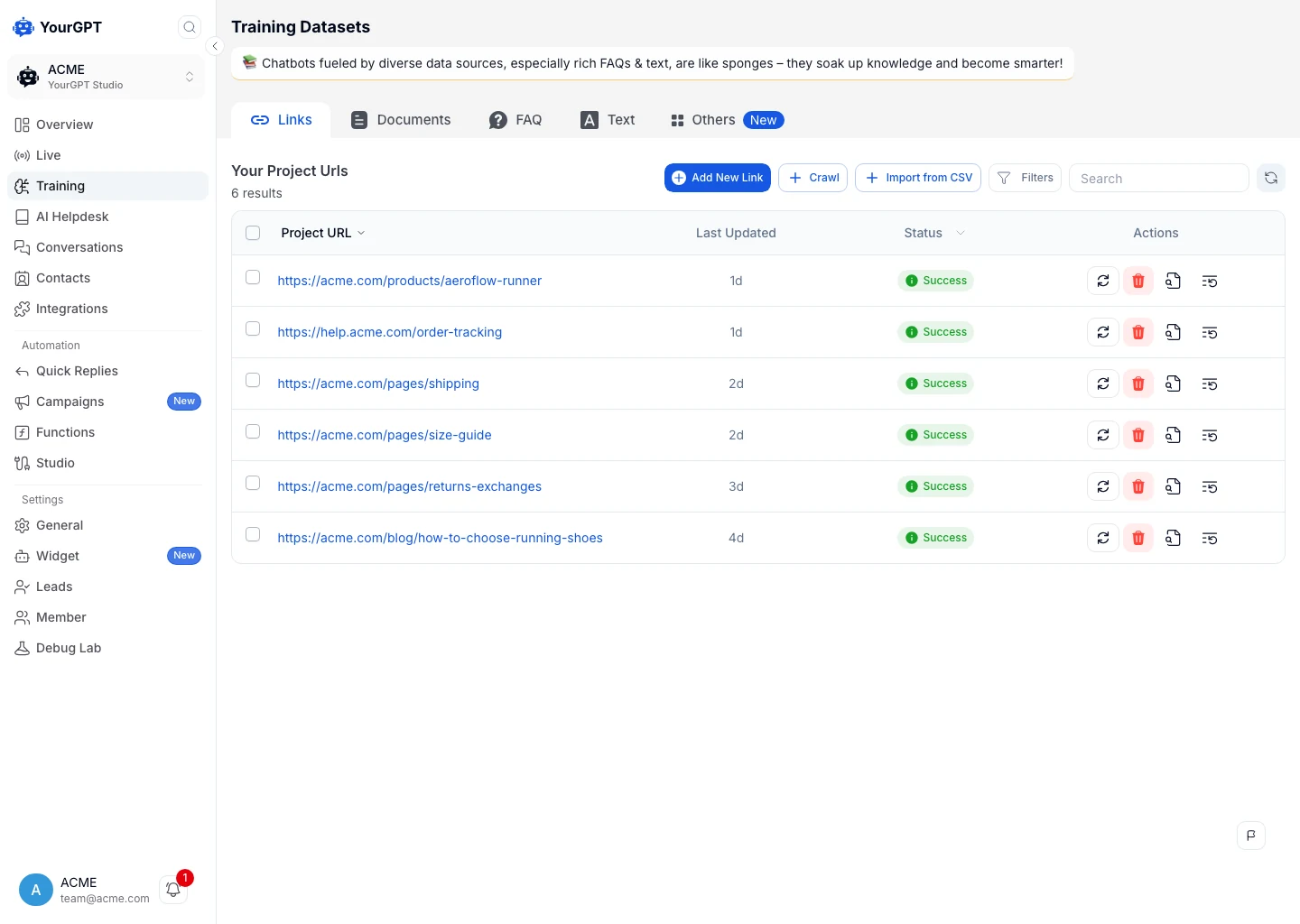
Add current help content first so you can trace an answer back to its source.
For the first version, useful sources include service descriptions, current policies, application guidance and the FAQs your team maintains. A broad website crawl can also pick up old campaign pages or conflicting policies. Select the pages you want the agent to use and review them when the underlying policy changes.
Private records need different handling. A spreadsheet of applications, cases or orders is not a substitute for an authorized record lookup. If personal data enters a searchable knowledge source, removing the original file may leave indexed excerpts or cached results. Its access and removal process need to cover those copies too.
In General Settings → Agent Settings → Agent Prompt (Bot Persona), describe what the agent should answer, which sources it should use and when a person should take over. For a general service-information agent, start with:
Answer questions about our services and processes using the approved information pages. If a question needs someone’s private record, direct them to the appropriate secure support channel. If the sources do not answer the question or the person disputes an outcome, offer human support.
Adapt the wording to your support policy and save the changes. These agent instructions guide the conversation; permissions for private records still belong in the connected system.
Use the Agent Playground or widget preview to try a clear policy question, a question the source does not answer and a request to speak with a person. Compare the policy answer with the approved page. For the unanswered question, check that the agent offers the support route rather than inventing a policy. Complete the receiving-team test in Step 6.
Visitors should understand who operates the assistant, what happens to their message and where to find the full privacy notice. In YourGPT, open Settings → Widget → Welcome Settings to set the entry copy and select Save Changes. Check the text and links on the installed desktop and mobile test page described below.
A short message can introduce the service without turning the chat window into a legal document:
You’re chatting with an AI assistant from [Organization]. We use your message to answer your support request and may share relevant details with our support team. Please leave out passwords, payment card numbers and sensitive information. [Privacy notice] · [Contact support]
Replace the bracketed text with your organization’s details and working links. If your page sends personal data before someone opens the widget, put the relevant notice at that earlier collection point too.
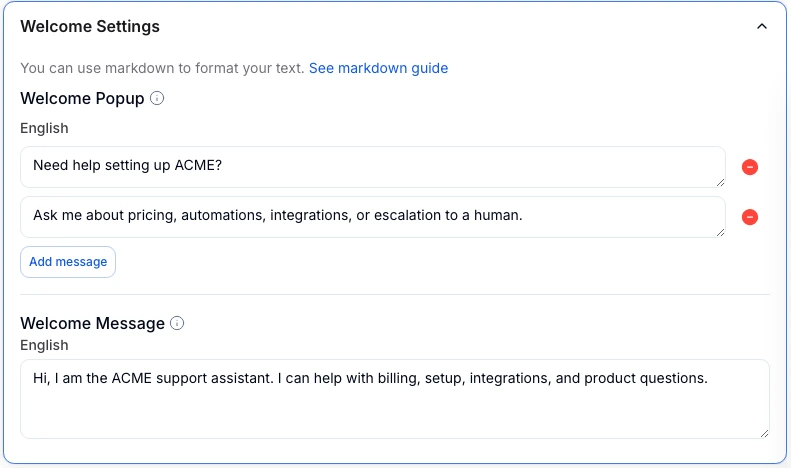
Use Welcome Settings to introduce the assistant and link to your privacy information.
The short message links to the full privacy notice. For information collected directly, Article 13 calls for the applicable details about:
If you obtain personal data from another source, such as a CRM, Article 14 can apply. Where it applies, provide the required information, including categories and sources, within a reasonable period and no later than one month. Earlier notice can be required when you first contact the person or disclose the data. Check applicable exceptions.
Identifying the assistant as AI also addresses a separate issue. The EU AI Act’s Article 50 requires covered providers of systems that interact directly with people to design for clear, accessible disclosure by the first interaction, unless the AI interaction is obvious in context. This is separate from the GDPR privacy notice.
Install the widget on a restricted test page before checking browser behavior. For a plain HTML site, select the agent, open Integration → Script, and copy the supplied snippet into the page’s HTML <head>. Save the page and load it with the site’s consent controls in place. The website installation guide covers this route; use the matching integration instructions for your website builder.
A welcome message cannot control the scripts or cookies on the surrounding page. Browser storage is also subject to national rules implementing the ePrivacy Directive, separately from the GDPR basis for processing personal data.
Your web developer can inspect the page in a fresh browser profile and compare four states:
Whether chat storage needs consent depends on its purpose and the applicable national rules. For example, France’s CNIL distinguishes storage before activation from storage strictly necessary for a chat the visitor expressly opens. Reusing a chat identifier for marketing changes that assessment.
Browser tools show browser activity. They will not reveal a server-side model request or a provider’s retained prompt; those need integration logs or provider information.
An agent answering public help questions can stay separate from private accounts. Use this step when a reply needs an application, service case, account or order record. Your developer will need to enforce access in the connected system. Appointment guidance, for example, can use public content; viewing or changing a booking needs a separately configured integration and permissions.
An account lookup has two questions to answer: who is signed in, and whether that person can access the requested record. Derive the identity from the authenticated session and check permission on every request. A typed case number, order reference or email address is not proof of permission.
For the widget, generate the identity verification signature in your backend and keep the signing secret there. The verified widget configuration requires valid credentials to interact, so keep the public support surface separate if you use it for account support. The connected API still applies its own authorization.
That API needs a trustworthy link to the signed-in person. An API key can identify the integration calling your backend; it does not identify which customer is asking. Your developer must arrange for the private action to carry caller information issued after sign-in, validate it in your backend, and check that person’s permission for the requested record. A model-supplied email, order number or browser-set variable cannot establish that permission.
The widget’s identity signature does not, by itself, connect your application’s login to an AI Studio API call. If your integration cannot establish that connection securely, leave the private action disabled and direct people to the existing signed-in record page.
Consider an illustrative order-status request. A full order response might include the address, email, payment details and internal notes. The customer’s question may need only the shipment status and an estimated delivery date.
The backend can select those two fields before sending the result onward:
{
  "shipment_status": "dispatched",
  "estimated_delivery_date": "2026-11-18"
}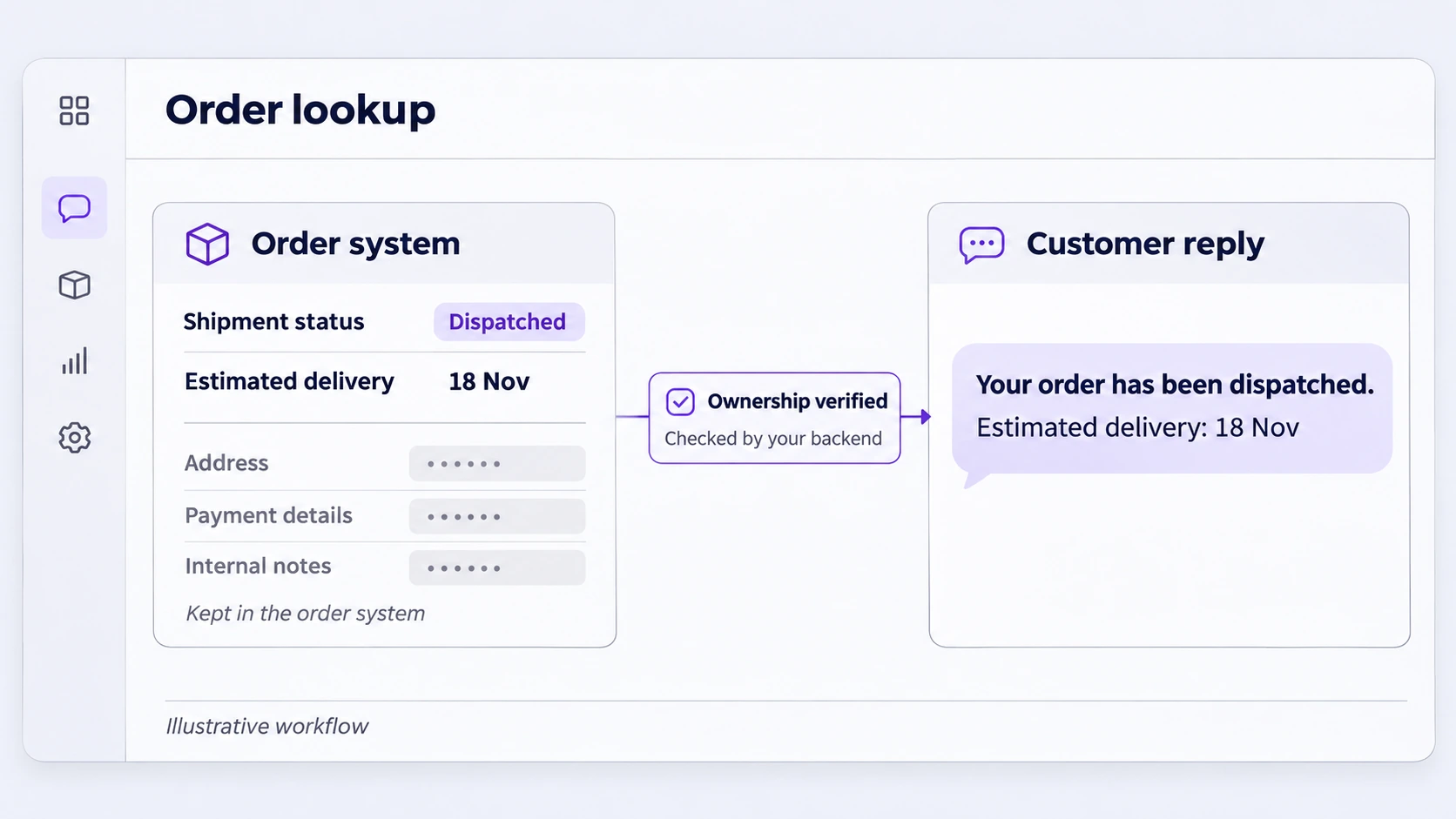
For this order-status example, the reply needs two fields. The address, payment details and internal notes stay in the order system.
Those two fields can still be personal data when linked to a customer. If your application can display them in a fixed reply, they need not go through the AI model at all. Where the model does receive them, include that processing in your data map.
Use a server-side credential limited to the required operation. A signed-out visitor should be directed to sign in; an unauthorized request should receive a neutral response that does not reveal someone else’s order. Tracking links also deserve attention because a token in the URL may expose shipment details outside the signed-in account.
Once your developer has implemented the access checks and caller verification, the API Call controls let you connect the restricted backend endpoint:
Selecting one value in Capture to does not remove the original API response from the integration. The field filtering belongs in the backend before AI Studio receives it. Check the actual model request separately through logs you control or provider information.
Test Request checks the configured call; it does not prove that your website’s sign-in, sign-out or account-switch behavior is secure. Run the following cases through the actual signed-in test page before enabling the action for users:
| Request | Expected behavior |
|---|---|
| Customer requests their own order | Only the approved shipment fields are returned. |
| Another customer requests that order | Access is denied without exposing private order details. |
| The caller information is missing or invalid | The backend rejects the lookup, even if the integration’s API key is valid. |
| The customer signs out and tries again | The old widget session cannot authorize a new lookup. |
| A different customer signs in on the same device | They cannot see the previous customer’s chat history or use it to access an order. |
| The order service times out | The fallback works and error logs contain no order body or secret. |
The same access and field-selection principles apply when you connect an agent to a CRM.
A useful handoff gives the next person enough information to continue. It does not always need to copy the entire transcript into every notification.
For an application enquiry, a helpdesk summary might say, “Application status unclear. Applicant requests help,” with a link to the conversation in a restricted inbox. A team-channel alert may need only the ticket and queue. If the helpdesk needs the full transcript, include that copy in its access and retention rules.
In Widget settings, find the follow-up controls, enable Request Human and save. This provides a visitor-initiated handoff. From the receiving account, open Conversations and check that the request is visible; the visitor panel also provides Transfer to human for an operator to take over. For automatic escalation in an advanced workflow, use Escalate to Human in AI Studio. Assign Member routes a conversation but does not, by itself, pause the agent.
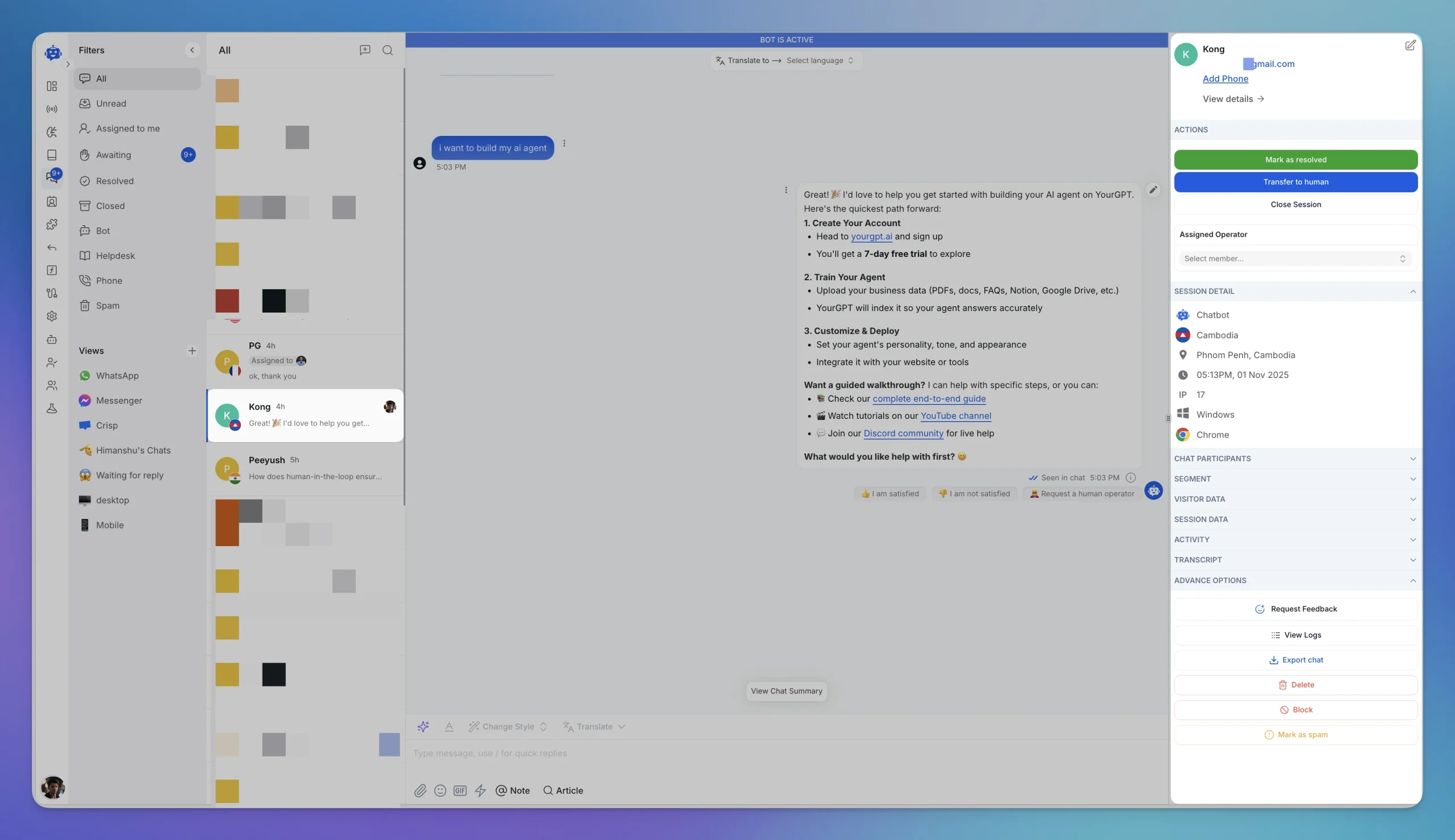
The conversation panel brings human transfer, operator assignment and session actions into one view.
Send a handoff request and continue the conversation from the receiving account. Confirm the teammate has the context they need and the agent stops when the chosen workflow hands over. After resolution, try another message to see whether automation resumes as intended.
Also try the route when nobody is available. The visitor should see the actual contact option or expected response time your team can support. A message saying that someone will join immediately is misleading if the request only enters an unattended queue.
Use named accounts and appropriate project roles. A Project Viewer can view conversations, so the word “Viewer” should not be treated as meaning no access to customer data. Review who can open conversations, inspect logs and export records.
Multifactor authentication where supported, prompt removal of departed staff, protected credentials and encryption for traffic and stored copies are part of the wider security setup. Under Article 32, the measures should match the data, processing and risks. Your own helpdesk accounts, exports and integrations need the same attention as the agent platform.
In Settings → General → Conversation Settings → Auto-Close Session, the Send transcript to email option can send a summary to the user when a session ends. If enabled, check the recipient and contents. An emailed summary or a transcript saved on a laptop is another copy; changing inbox retention will not remove it.
In Settings → General → Data Retention, choose the approved period from the supported options and select Save. Set separate rules for connected helpdesks, email summaries, exports and other services that keep their own copies.
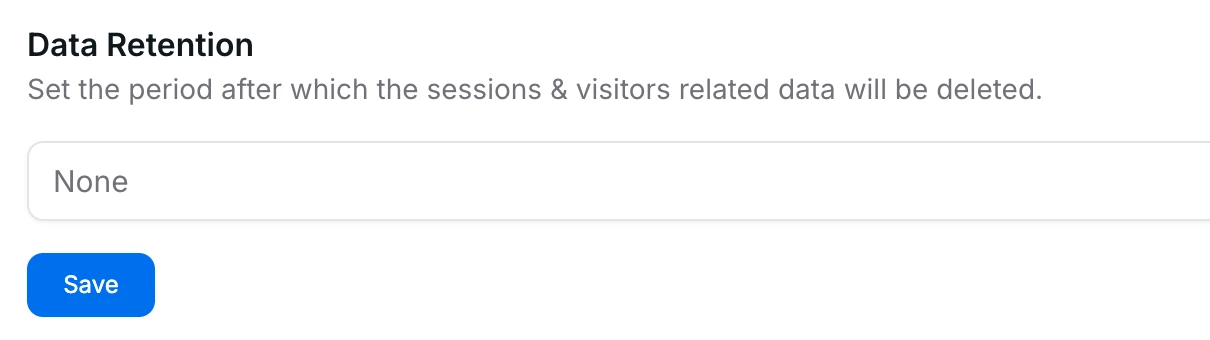
Choose the retention period for visitor and session data, then confirm which records the setting covers.
GDPR does not set one retention period for every chatbot. The period follows the purpose and any applicable obligations. A diagnostic log used to investigate errors may need a shorter life than a ticket supporting an unresolved service complaint. Backups follow their own rotation and access rules.
For each system, record the purpose, retention period, event that starts the clock and person responsible for removal. Confirm how that system implements the rule: “after the last activity” and “after the case is resolved” can produce very different expiry dates. With a synthetic record, check availability before the cutoff and again after the relevant cleanup has run. For provider-held copies you cannot inspect, use the provider’s retention and deletion information.
Your privacy notice should offer a clear way to request access, erasure or another applicable right. A support or privacy contact can receive the request; the process behind it needs to reach the records in the connected systems.
Under Article 12, respond without undue delay and normally within one month of receipt. Where complexity or the number of requests requires an extension, up to two further months may be available. Explain the extension within the first month. Confirm identity proportionately when there are reasonable doubts, rather than collecting identity documents by default.
In the conversation’s advanced options, YourGPT provides View Logs, Export Chat and Delete. These controls act on the selected conversation. A workflow that also creates a project contact may need a separate contact deletion.
For an access request, assemble an intelligible copy of the person’s data and the required information about processing. Include the context needed to understand it, protect other people’s rights, and provide actual recipients on request where required. Review the export before delivering it securely, then manage the lifetime of the export itself.
For erasure, establish which data qualifies and whether an exception applies. A record required by law may need to remain under restricted access. Notify recipients where Article 19 requires it and track any processor action still pending. Our DPA provides platform and support channels for controller deletion requests.
Follow a synthetic enquiry through the systems it reached, then apply the deletion decision to each eligible copy. Record the action and the result of trying to retrieve it again. This illustrative record includes unfinished work that still needs an owner:
| Record | Check after the action | Result to record |
|---|---|---|
| Chat session and linked project contact | Try both identifiers separately after their deletion actions. | Both absent; record the time and the person who checked. |
| Helpdesk ticket and downloaded export | Open the old ticket URL and check the export’s storage location. | Ticket absent; export still present, assigned to its owner for removal. |
| Failed handoff waiting to retry | Cancel the queued job and attempt a controlled retry with synthetic data. | No replacement ticket created. |
| Provider-held or backup copy | Review the provider response and applicable expiry/restoration procedure. | Pending confirmation; record the expected response or expiry date. |
A request is not fully accounted for while a relevant copy is simply missing from the record. Distinguish completed deletion, pending processor action and information retained under an applicable exception. Give each outstanding item an owner so “deleted from chat” does not close the entire request by mistake.
For integrations your team operates, include queued work. A failed handoff might be waiting to retry; deleting the ticket alone can leave that job able to create it again. Cancel or suppress the stale job and verify that replaying it does not restore the deleted content.
Backups need a similar plan. For systems you control, an isolated restore should reapply eligible deletions before returning records to service. Ask providers how they handle backup copies, expiry and restoration in systems you cannot operate directly. The aim is to understand what remains and prevent data that should stay deleted from returning to normal use.
Use the installed test page from Step 4, with the same consent controls, sign-in behavior and integrations planned for launch. Run representative questions and synthetic account records through the complete service. Keep the expected result beside the actual result so a settings screenshot cannot stand in for a working check.
| Check | Evidence to keep | Person responsible |
|---|---|---|
| Answers and sources | A policy answer checked against the approved page, plus a missing-answer case that reaches the intended fallback. | Content or service owner |
| Notice and consent | The notice visible at collection, working privacy/contact links, and browser requests/storage recorded in the four consent states. | Website owner and privacy contact |
| Private access, if enabled | Results for every Step 5 case on the signed-in page, including missing caller information and account switching. | Integration developer |
| Human support | The request received by the right team; the agent’s behavior during takeover and when nobody is available. | Support lead |
| Retention and rights | A synthetic record checked against its expiry rule, plus the access/deletion record covering connected copies and any justified retention. | System owners and privacy contact |
| Recovery | A disabled private action returns the intended fallback, and the team’s contact route remains usable. | Service owner and developer |
Leave a route disabled until its required checks pass and material data-handling decisions are resolved. An incorrect access result, unexpected disclosure, broken notice or failed handoff blocks the affected route. A private lookup can remain disabled while a public-information service proceeds, provided that service’s own provider, notice, security, retention and support checks have passed. Record any narrower launch scope explicitly; do not leave an untested action available through a different prompt or channel.
Save the chosen settings and results with the project. Revisit the affected checks when you change a model, source, integration or support channel. Replacing a helpdesk, for example, changes where handoff data goes and how it is removed.
Have an incident contact and response process ready. If private information reaches the wrong person, contain the problem and assess the breach.
Under Articles 33 and 34, the controller documents the incident and assesses notification duties. Where authority notification is required, it is due without undue delay and, where feasible, within 72 hours of awareness. Communication to affected people generally applies to likely high-risk breaches, subject to the relevant exceptions.
No. Consent is one possible GDPR lawful basis, and the appropriate basis depends on the purpose and circumstances. Browser cookies and similar storage also need a separate assessment under the applicable national ePrivacy rules. Optional tracking and later reuse of a conversation should not be treated as automatically authorized by a visitor asking for help.
No. Hosting location is one part of the assessment. Model requests, remote support access and connected services may involve other recipients or locations. You still need a lawful purpose, suitable contracts, transparency, security, retention and rights handling. Review the actual configuration and any applicable international-transfer requirements.
No. A provider can exclude customer data from model training while still processing prompts and retaining some information for service delivery, security or debugging. Look at the agreement and retention terms for the selected configuration. Your own ticketing and monitoring integrations can also create copies under their separate settings.
No. Deleting a YourGPT chat acts on that conversation; check separate contact records, connected tickets, exports and provider-held copies. Some related information may also need to remain under a valid retention requirement or another applicable exception, such as an invoice required by law. Identify each retained record’s purpose, limit its use and access, and explain the decision when responding to the request.
They can only be reused where that processing has been properly assessed and explained. For a knowledge-base update, extract the useful answer and remove customer-specific details where possible. Review the proposed content before adding it. Reusing support records for agent knowledge and a provider training its underlying AI model are different activities, with separate data-use questions.
The most useful outcome of the first pilot is a service your team can explain and support. Follow an enquiry from the visitor’s message to the answer, any handoff and the records left behind. That reveals whether the proposed experience works as intended, including the less visible work of correcting an answer or removing a connected copy.
Use those results to decide how much access the first release needs. Public guidance may solve the recurring enquiry without a private integration. A record lookup is worth adding when it materially improves the service and your team can verify the caller, restrict the response and maintain the extra data route. Keeping an unfinished lookup out of the release preserves a useful service while that work continues.
Before launch, give the support lead, content owner, developer and privacy contact the same short record of what was approved, what was tested and what remains out of scope. Include the fallback and the person responsible for unresolved items. In a small team, one person may cover several roles; the decisions still need an owner.
After launch, revisit the affected checks when a policy, model, helpdesk or integration changes. A new destination for a transcript can change the deletion process even if the chat window looks identical. Keep that review tied to service changes so the controls continue to match what people actually use.
Train it on your approved content and configure how it answers questions, uses connected tools and hands over to your team.
A practical platform benchmark with YourGPT production results, external field evidence, a complete scorecard and industry-specific acceptance tests.
Trace recurring questions to the step where customers get stuck, apply the right fix, and measure whether more customers finish.

Set up YourGPT AI agents to answer questions, complete support actions, and resolve requests with business knowledge and clear human-assistance rules.

A practical rollout plan for support teams covering scope, knowledge preparation, YourGPT setup, testing, launch gates, security, and honest ROI measurement.
TL;DR The shift. Current HR agents read a live leave balance from the HRIS, check it against policy, submit the request and route it to a manager inside one conversation. The gap. Most HR self-service stops at the answer. Employees are told the policy, then open a portal to act on it, and that is […]
Real estate growth starts with meaningful conversations. Every buyer, renter, or investor who visits your website is looking for quick answers about properties, pricing, availability, locations, viewing options, or the next step in their journey. YourGPT helps real estate teams turn those moments of interest into qualified leads. With an AI chatbot trained on your […]