How to Implement AI Customer Support Automation

Rajni
November 4, 2026
Implementing AI customer support automation comes down to five core moves: audit your ticket data, prepare your knowledge base, integrate your systems, run a human-reviewed pilot, and expand once results are stable. Start with one low-risk use case and one channel, then measure verified resolution, customer experience, and the work your team actually saves.
Your support team can build and test a knowledge-based agent without writing code. What you need to connect depends on the question: a policy question needs current content, while a customer’s renewal date needs an authenticated lookup in the billing system.
You also need a plan for requests the agent cannot finish. Before launch, decide what happens when a policy is missing, an account lookup fails, or a customer asks for a person.
Assign an owner to each phase so someone can resolve missing content, access problems, or failed tests. A sample schedule could allow weeks 1 through 4 for preparation, weeks 2 through 10 for integration and a reviewed pilot, and weeks 8 through 16 or later for a limited launch. Treat these overlapping windows as a planning example. Your content, access approvals, ticket volume, and test results determine when you can move ahead.
Review recent tickets to find the questions your team answers repeatedly, then choose one low-risk request type and one channel. At the same time, clean your help-center content into a trusted, versioned knowledge source. If two policy pages disagree, resolve the conflict before training so the agent has one approved answer to use.
For each contact type, record volume, human handling time, repeat contacts, and customer satisfaction. Separate broad categories such as billing into actual customer goals: explaining an invoice, checking a renewal date, and disputing a charge need different information and permissions.
Swipe to view all columns.
| Request | Source of truth | Starting scope | Boundary |
|---|---|---|---|
| Explain a cancellation policy | Current policy page | Answer from approved content | Escalate exceptions and conflicting terms |
| Explain how to reset a password | Approved account recovery guide | Guide the customer through the existing process | Never request a password or bypass verification |
| Check a subscription renewal date | Authenticated billing record | Read the permitted account fields | Verify account access before disclosure |
| Cancel a subscription | Billing system and cancellation rules | Start with human review | Require authorization and confirm the action result |
| Dispute an unexpected charge | Account history and team judgment | Collect context and route to the owner | Avoid promising a refund before approval |
Before testing, agree on four things: the requests in scope and their current performance, the data the agent may use, who handles escalations, and how to return work to your team if the agent fails. Add a knowledge owner and review date to each policy so your team knows who approves a change.
Complete the security and data handling checklist later in this guide before the pilot uses live customer data. Include the people responsible for privacy and system access while you choose sources and connections.
Use the request you chose to compare setup, knowledge sources, channels, human handoff, and total cost. Our AI customer service agent comparison can help you build a shortlist. Check each platform against the same requirements below.
Swipe to view all columns.
| Buying criterion | What to check |
|---|---|
| Ease of deployment | A support owner can add content, change instructions, and test a full request. Connections work with limited permissions. |
| Knowledge source flexibility | Approved sources import correctly, refresh behavior is clear, and stale content can be removed. |
| Multi-channel coverage | The first channel supports the identity checks, attachments, and notification path you need. |
| Human handoff quality | A person receives the conversation history, escalation reason, and next step. |
| Pricing transparency | The budget includes platform usage, connected services, integration work, review, and ongoing maintenance. |
Prioritize no-code setup, multi-source knowledge maintenance, and clean human handoff over raw feature counts. During the trial, ask the support owner to update a source, retest the affected answer, and inspect a handoff. Those checks show whether your team can maintain the setup after launch.
In YourGPT, a support owner can start with business knowledge and basic handoff, then add advanced workflows for authenticated lookups and approved actions. If you plan to serve customers across channels or languages, YourGPT supports multi-channel deployment and more than 100 languages. Test answers and handoffs on each channel and in each language you intend to use.
Use the pricing page to confirm which plan includes the capacity and controls you need. Estimate AI Credit consumption from the selected model and pilot workload, then include any integration, channel, and maintenance costs in the comparison. A low entry price is useful only when the complete request can be resolved reliably.
Create your workspace and first agent using the agent setup sequence, then configure its allowed topics, answer sources, refusal rules, and escalation conditions.
YourGPT lets you train an agent on websites, PDFs, Google Drive, Notion, and other business knowledge sources. To add a policy URL, open Training → Add New Link, paste the approved page, and select Add. For several pages, use Training → Crawl → Extract, review the selected content, and wait for successful processing before testing.
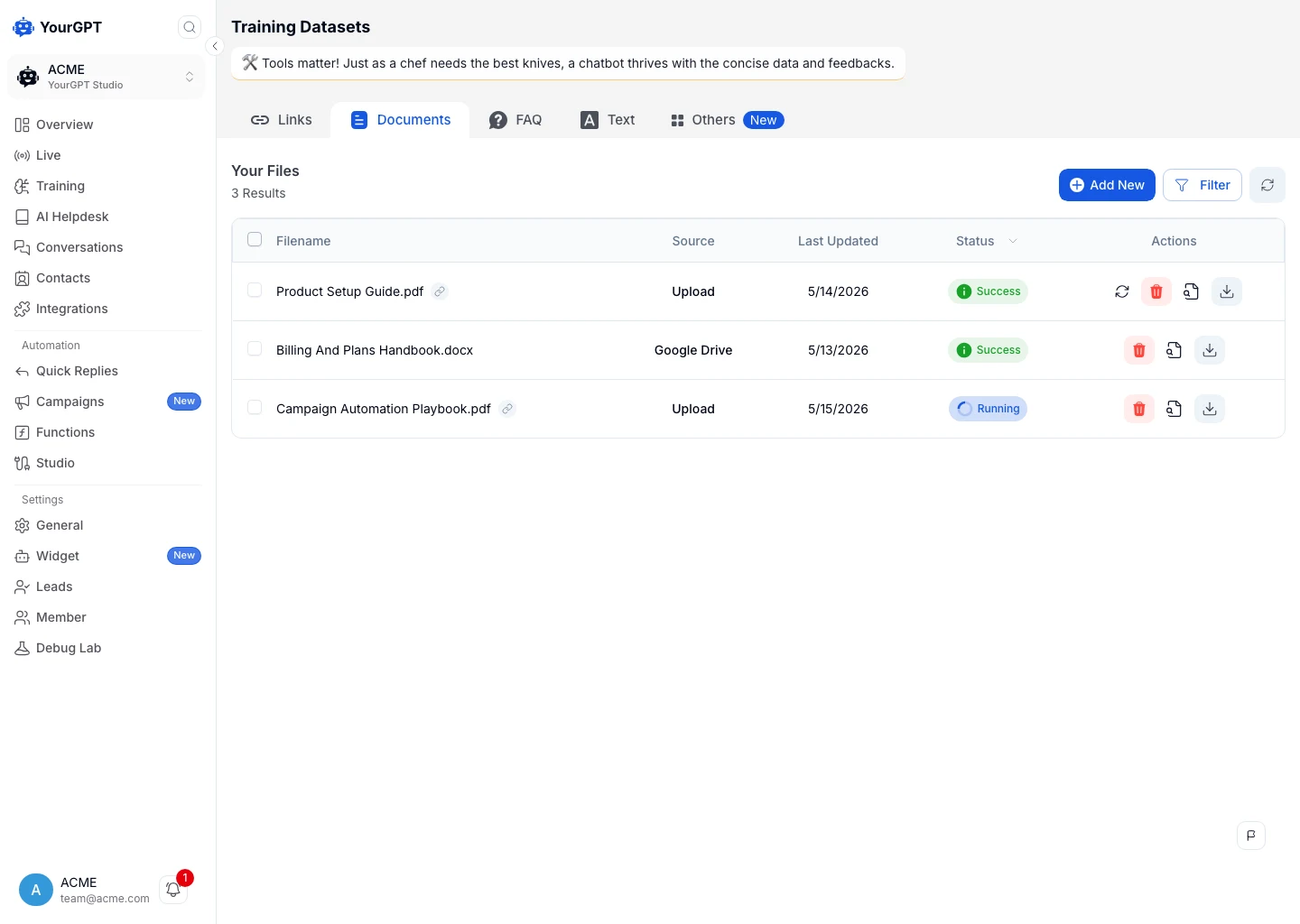
Keep private customer records out of a general knowledge source. A customer’s renewal date belongs in an authorized live lookup; an old support conversation may contain a one-off concession that should never become the policy everyone receives. Check a real ticket against the cleaned content before moving to integration.
Once the agent can answer from your approved sources, connect any systems it needs for live information. That might be your helpdesk, customer relationship management (CRM) platform, or billing system. Custom connections and account-changing actions need valid credentials, field mapping, and permission checks, even when the initial agent uses no-code setup.
Start with read-only access to the fields the request needs. Configure the instructions, routing, and limits you agreed on during preparation before testing the connection.
An application programming interface (API) lets one system request data or actions from another. For advanced workflows, AI Studio connects these API calls with conditions, tools, and custom logic. A subscription lookup could verify the signed-in customer’s access, request the permitted billing fields, and return the renewal date. If verification fails or the service is unavailable, the agent should route the request without revealing another account’s information or inventing a date.
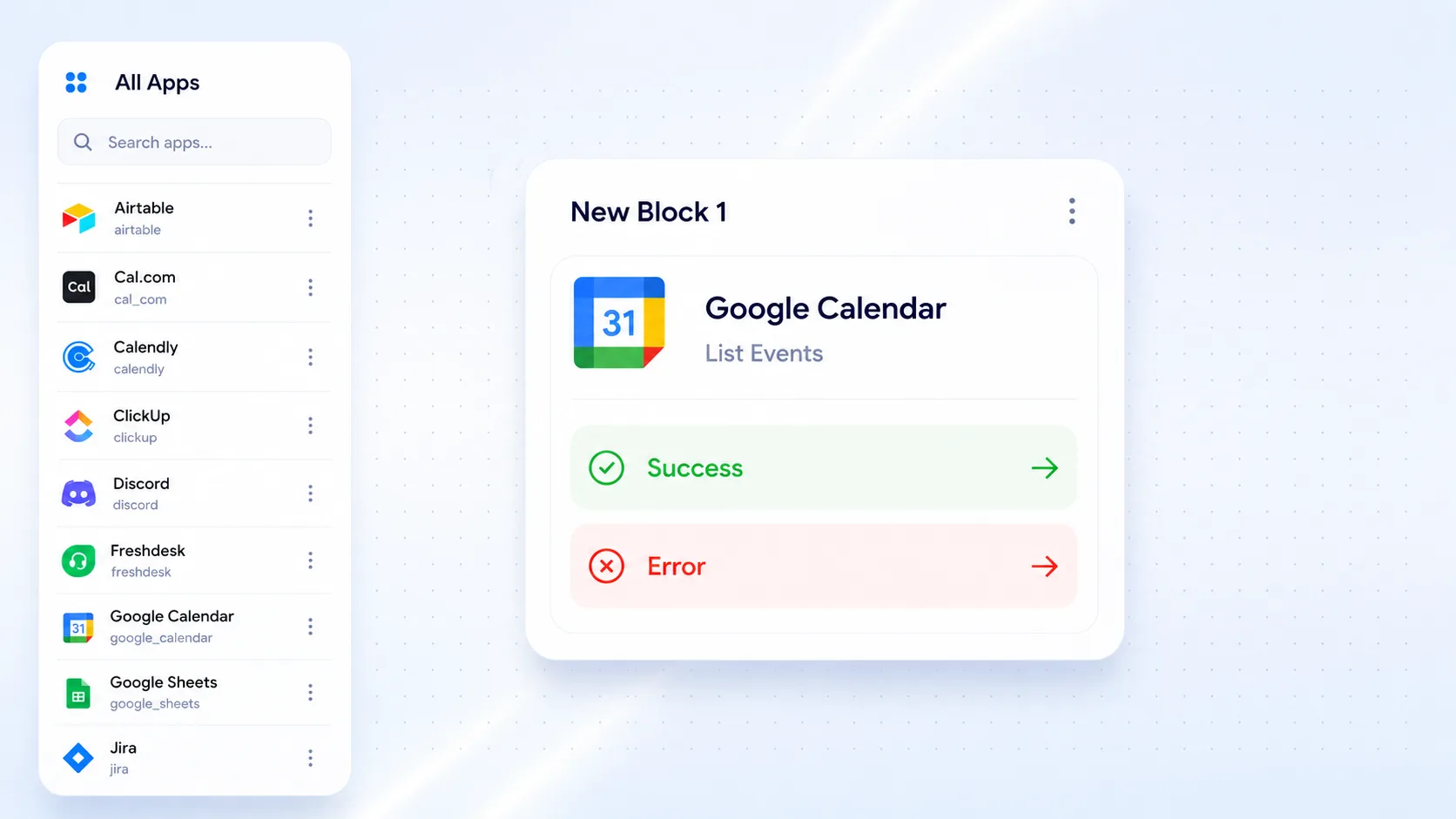
Test a timeout, a rejected credential, and a missing record. In each case, check that the customer gets a useful explanation and the request reaches the right person if the agent cannot continue. When the workflow creates or updates a business record, verify the resulting fields as well as the customer-facing reply; our CRM integration walkthrough shows that check end to end.
Enable Request Human under Widget Settings → Follow-up Actions and confirm that the intended team receives the notification. YourGPT also supports Quick Replies for matching requests and AI Studio for custom routing, so choose the handoff setup that fits the request.
When using AI Studio, Assign Member routes the conversation but does not pause the agent. Use Escalate to Human when control should pass to a person. Distinguish consulting a teammate from transferring ownership so the customer receives the right kind of help.
A handoff succeeds when the next person can continue the work. Check that the person receives the conversation history, customer goal, checks already completed, failed action details, and reason for escalation. Test the unavailable-team path and give customers a response expectation your team can meet.
Run a copilot or safe-mode pilot where people review AI-generated responses before customers receive them. If your current support process supports reviewed drafts, use it. Otherwise, replay approved historical tickets privately and have reviewers compare the output with the correct source or expected action; use the Emulator for unpublished AI Studio workflows.
Track edit rates, escalation quality, incorrect answers, resolution time, and customer satisfaction throughout the pilot. Keep a set of real tickets separate from the questions used to improve the knowledge base. That prevents a test from measuring only how well the agent answers the examples it just learned.
Include these cases alongside ordinary requests:

Before the pilot, agree on how accurate answers must be and which requests must reach a person. Record the expected source, allowed action, required handoff, observed result, and reviewer decision for each test. Move ahead only when the results meet those requirements and reviewers have found no critical policy violations.
A small test can miss rare failures, so keep reviewing conversations after launch. Investigate serious failures, fix their cause, and rerun the affected tests. Missing knowledge needs a source update; an unavailable API needs an integration fix; a wrong permission needs an authorization fix.
Release to a small traffic percentage or single ticket category first, with immediate rollback available. Once performance is stable, add related intents, then additional channels, then carefully approved write actions such as order changes or refunds. Retest answers, handoffs, and costs before adding another request type or channel.
Use traffic splitting if your deployment supports it. Otherwise, limit the first launch to one channel, page, or customer group. For a website agent, follow the installation instructions, then check the live page, answers, and handoff destination before sending more customers to it.
Keep a comparable human-handled group where practical. Match request type, channel, language, and observation window so harder tickets in one group do not look like an automation problem in the other.
Document who can disable the entry point, remove access to a failing action, and return work to the human team. Restoring an earlier workflow version cannot reverse an account change or refund already completed, so test recovery for connected actions separately.
Once real requests start arriving, review the questions the agent could not answer using YourGPT’s Self Learning. In Training → Others → Self-Learning, select Train, correct the answer, and select Start Training. This reviewed learning process moves approved answers into the FAQ area; people decide what becomes trusted knowledge.
Keep source updates separate from reviewing unanswered questions: a policy change can make an existing answer wrong even when nobody has flagged it. Website training supports a Retraining Period in Advanced Training, but the source itself must contain the current policy. Check the website training controls and each connector’s refresh behavior before relying on new content.
The pilot gives you a basis for estimating results. Routine Tier 1 requests are useful candidates when the agent has a current source and a permitted way to complete the task. Password recovery guidance, order status, billing explanations, and policy lookups can fit that scope, while account changes and sensitive exceptions need additional controls.
YourGPT agents can resolve up to 90% of repeated queries when the knowledge, permitted actions, and ongoing review support that coverage. Use your pilot results to forecast coverage rather than assuming 90% of your tickets will disappear. Your result depends on the requests you include and whether customers consider them resolved.
For a hypothetical planning example, suppose 400 of 1,000 monthly requests fall within the pilot’s scope. If the agent verifies resolution on 60% of those eligible requests, it resolves 240 requests, or 24% of total volume. The 60% assumption needs testing before it belongs in a business case.
Blended deflection rates can mask failures in high-risk categories. Measure outcomes by contact type, not just overall volume, so you know exactly which cases your agents still need to own. Compare time to the first useful answer and total resolution time separately; a fast acknowledgment does not complete a request.
Measure customer service metrics across five dimensions so faster responses do not hide weaker outcomes. Keep the same definitions and observation window when comparing the pilot with the human-handled baseline.
Swipe to view all columns.
| Dimension | What to measure | How to interpret it |
|---|---|---|
| Resolution | Verified resolution rate, containment, first-contact resolution, and reopen rate | Check that completed cases remain resolved through the stated observation window. |
| Automation | Automation rate, escalation rate, and abandonment | Separate requests the agent completed from those it handed off or customers left. |
| Efficiency | Average handling time, first-response time, and agent productivity | Compare like-for-like request types and include review time. |
| Customer experience | Customer satisfaction (CSAT) change and customer effort score (CES) | Include response counts. Use net promoter score (NPS) as a broader relationship signal, not proof of one chat outcome. |
| Quality and risk | Incorrect-answer rate and policy-breach rate | Review severity as well as frequency; a rare privacy failure can still block expansion. |
Containment rate alone is not proof of success. Containment measures conversations that end without human handoff. A high containment rate paired with a high reopen rate signals that apparent closure may not match the customer’s experience. Separate customers who received help from those who abandoned the conversation.
Count a request as resolved when you can confirm that the task was completed, through a successful authorized action, customer confirmation, or quality review. Choose a follow-up period and check whether the customer returns with the same issue. If they do, do not count the earlier conversation as a verified resolution. A customer leaving the conversation does not tell you whether the answer helped.
Calculate verified AI-only resolution rate as verified requests completed without human work divided by all requests offered to AI, multiplied by 100. Report assisted resolutions separately, because a teammate’s review or action still belongs in the workload and cost calculation. Track cost per verified resolution using the attributable costs of running that workflow.

Calculate how much time your team would have spent on the requests AI resolved without human work. Multiply those hours by your fully loaded agent hourly cost to estimate their value. If your resolved count already excludes reopened cases, do not subtract them again.
Hours released = verified AI-only resolutions × baseline human handling minutes ÷ 60.
For a hypothetical monthly example, 240 verified resolutions at eight human minutes each release 32 hours. Valuing those hours at an assumed $25 fully loaded hourly cost gives $800 of capacity value. If platform usage and integration operations cost $250 and review plus knowledge maintenance costs another $200, the monthly net capacity benefit is $350.
Monthly operating return on investment (ROI) is monthly net benefit divided by monthly operating costs, multiplied by 100. For this capacity-based example, $350 ÷ $450 × 100 gives approximately 78% before setup costs.
The payback period formula is your initial AI investment divided by average monthly net benefit. With an assumed $1,400 setup cost, capacity-based payback is four months: $1,400 ÷ $350. If monthly net benefit is zero or negative, there is no positive payback period under these assumptions. These figures are planning assumptions, not YourGPT prices or customer results.
Total implementation cost must include platform licenses, integrations, knowledge maintenance, and ongoing human review. Build the human baseline with a consistent cost per ticket calculation before comparing it with an AI-only resolution. Released capacity becomes cash savings only when spending falls or an agreed hiring cost is avoided. If the team uses that time on complex requests instead, report the operational benefit separately.
A short payback period is not sufficient if quality or customer satisfaction deteriorates in parallel, so report verified resolution rate and CSAT change alongside the financial metrics every month. Show survey response counts and ticket mix to help reviewers interpret changes fairly.
Start this work during Phase 1 and complete the relevant controls before any pilot uses live customer data. The integration plan should show which information crosses each system boundary and who approves access.
Enforce least-privilege access: each agent gets only the data sources and actions it needs, not broad CRM access. The agent should only access records the signed-in customer is allowed to see. Have the connected system enforce those permissions; avoid a shared admin account with access to every customer.
Require stronger authorization for refunds or account changes. Store secrets in a managed vault and revoke access promptly when any connector or vendor is decommissioned.
Treat customer messages and retrieved documents as untrusted content to defend against prompt injection. Restrict what the agent can reveal and where it can send data to reduce exfiltration risk. Validate knowledge sources and control who can modify them to guard against poisoning.
Every connector, plugin, and retrieval system needs a permission review before live traffic touches it. Enforce authorization in the connected service rather than asking the model to decide whether access is allowed. Test whether a request for another customer’s records fails safely.
Review the following with the owners of privacy, security, and support. The exact controls and assessment requirements depend on the data and the workflow.
For US operations, have the responsible owner assess CCPA as amended by CPRA, PCI DSS where payment account data is in scope, and HIPAA where the organization acts as a covered entity or business associate. Health-related content alone does not establish HIPAA applicability. Confirm the required contracts and approved data flow before enabling a regulated workflow.
A vendor’s SOC 2 report does not automatically authorize every data use. Review data-processing agreements and subprocessor lists directly, and check the contractual terms governing model training. YourGPT’s data processing agreement prohibits using customer data to train AI models; your team still needs to confirm that its intended configuration and connected providers meet the applicable requirements.
Yes. A support team can build and test a knowledge-based agent without writing code. In YourGPT, that includes adding approved business content, setting instructions, configuring basic human handoff, and checking answers against real requests.
You may need technical help when the agent must access or change a customer’s account. Explaining a cancellation policy can rely on approved content; canceling an account requires an authenticated connection, permission checks, and confirmation that the change succeeded. An administrator or engineer may need to configure those parts. Start with a request type your support owner can manage, then involve technical help for the connections it needs.
Choose a frequent request with a current answer source, a clear completion condition, and a manageable consequence if the agent needs help. Policy explanations and straightforward product guidance can be useful starting points. Frequency alone does not make a request suitable.
Check whether the customer needs general guidance, private information, or an account change. Explaining password recovery differs from resetting access, just as explaining an invoice differs from approving a refund. For each candidate, name the source, any required verification, and the exception owner. Keep it in the pilot only when a reviewer can consistently distinguish a correct resolution from a case that needs a person.
Run the pilot long enough to cover the request types and exceptions in its scope, then allow the full follow-up window for repeat contacts to pass. If too few relevant requests arrive, or you have not tested important failure cases, allow more time before launch.
Use private testing to check known difficult cases, then test with a small group of live requests within the pilot’s scope. Review answer quality, required handoffs, failed actions, and same-issue recontacts before expanding. If the test contains only straightforward policy questions, it tells you little about authenticated billing lookups. Extend the pilot or reduce its scope until you have tested the next type of request you want to add.
No, provided the required integration can pass requests and context between YourGPT and your current support process. Decide which system will own assignment, customer follow-up, and the final resolution record before configuring the connection. The receiving team needs the conversation history and a clear next step, not just a copy of the chat.
Check one complete request from the customer channel to the receiving team. Confirm that the owner can see the conversation history, verification already completed, and reason for escalation. Also check that existing automation does not send a second reply. If the required connection is unavailable, keep that workflow human-owned while you validate an API or other supported integration path.
The customer should receive an honest explanation, a clear follow-up route, and a response expectation your team can meet. Configure an unavailable-team path instead of leaving the conversation waiting indefinitely or asking the customer to repeat the same question.
For example, after an unsuccessful account lookup, the workflow can request the minimum contact information needed for follow-up, preserve the conversation, and notify the responsible team through the connection you have configured. Test that the notification arrives and someone owns the request. In YourGPT, a visible Request Human option supports escalation; it does not create staffing coverage or guarantee an immediate human reply.
Assign a support owner to review unresolved requests, repeat contacts, incorrect answers, and handoff failures, with a named owner for each connected system. Review early live conversations closely, then decide how often to check them based on ticket volume and the consequences of a mistake.
Diagnose the cause before changing the agent. A missing policy needs approved knowledge; a failed billing lookup needs an integration fix; a request outside the agreed scope may need to remain with a person. YourGPT Self Learning collects unanswered questions so a team member can correct an answer before training. After a material change, rerun the affected real-ticket tests and check that the correction has not broken a previously reliable response.
Check the contractual data-use terms for the platform, model providers, and optional services that process the conversation. The review should cover what information they receive, why they receive it, how long they retain it, and whether model training is prohibited. A security certification alone does not answer those questions.
YourGPT's data processing agreement prohibits using customer data to train AI models. Have your privacy owner confirm that the applicable contracts and configuration cover the workflow you intend to deploy. Separately document which reviewed answers your team approves for your own agent's knowledge base; that knowledge-maintenance decision is distinct from permitting general-purpose model training.
After launch, someone needs to review unanswered questions and keep the support content current. As you add request types or change policies, check that the agent still gives the right answer and knows when to bring in your team.
YourGPT lets teams begin with a no-code support agent, then add connected actions and advanced workflows as they take on more request types. Have your team approve new answers before training and test each added capability against real requests.
Start by auditing your top 20 ticket types and identifying which ones a no-code AI agent could resolve today. Choose one and test it from the customer’s question through to an answer, completed action, or human handoff. Use what you learn to decide which request to add next.
Create your agent, add approved knowledge, and test the requests you want it to handle.
TL;DR The shift. Current HR agents read a live leave balance from the HRIS, check it against policy, submit the request and route it to a manager inside one conversation. The gap. Most HR self-service stops at the answer. Employees are told the policy, then open a portal to act on it, and that is […]

Real estate growth starts with meaningful conversations. Every buyer, renter, or investor who visits your website is looking for quick answers about properties, pricing, availability, locations, viewing options, or the next step in their journey. YourGPT helps real estate teams turn those moments of interest into qualified leads. With an AI chatbot trained on your […]
TL;DR Instagram buyers who ask “price?” in a comment expect an answer within minutes. Manual replies usually arrive too late to make the sale. YourGPT AI can connect to your professional account in minutes, reply publicly to selected comments, send detailed answers by DM, and handle follow-up questions using your knowledge base. Meta allows one […]
Connect your website AI agent to a CRM with YourGPT. Capture lead details, map contact fields and verify the record your sales team will use.
Use YourGPT to help Black Friday shoppers choose products, check orders and understand returns. Prepare your answers and team before the sale.
Add in-app chat support to your SaaS or mobile app. Place it on the screens where users stall, pass who they are, and hand hard cases to your team.