How to Humanize AI-Generated Content and Make it Undetectable

Rajni
Last updated on August 13, 2026
Humanizing AI-generated content means rewriting it so it sounds natural, personal, and genuinely written by a person.
The quickest approach combines manual paraphrasing, real examples or personal experiences, and varied sentence structure instead of generic AI phrasing.
Tools like QuillBot and Grammarly’s AI Humanizer can speed up editing, while detectors such as GPTZero, Originality.ai, and Copyleaks can help with a final spot-check.
Content creation has changed a lot in recent years. For brainstorming ideas and drafting, artificial intelligence is now leading the way.
Tools like ChatGPT have transformed the way we write articles, assignments, social media captions, and more.
Writing is a creative process. AI is not meant to replace you. Its purpose is to help you write with more speed and quality.
But there are still some issues with AI-generated writing.
AI-generated writing often misses genuine, unique value unless you provide good context. Even with adjustments, its patterns are still easy to find for readers and detection tools. Sometimes the writing feels too polished or a bit repetitive.
That’s why your own voice matters. Mix in your thoughts and style. Break up the flow where it feels too smooth.
Now, with AI detection tools getting even smarter, new challenges have emerged. Search engines might flag your content as AI and limit its reach. Similarly, academic institutes also don’t allow students to use ChatGPT content.
So, how you can address this? Simply avoid using AI isn’t realistic. A smarter approach is to use AI content wisely and optimize it for a more human feel. Let’s explore more about this idea in the article.
With repeated prompts to AI chatbots, you may be able to get a piece of content that sounds a bit like human writing. However, AI uses specific writing patterns that AI detectors can catch.
So, how can content truly be “human”?
Here are some things that can tell a reader that the text was written by a human and not a content-generating AI tool:
AI content, on the other hand, is overly structured and tends to be too perfect. This is not trying to say that you should deliberately make mistakes in your content. Rather, it is trying to convey that you write content as if you are talking to someone. It is okay to convey your thoughts imperfectly.
Now that we understand the characteristics of human content, let’s see how we can impose those in AI-generated text. If you write content by yourself, the above-mentioned qualities come naturally.
However, if you want to incorporate those qualities in an already-written piece of text, the process is different. To demonstrate this process, we will apply a few techniques to remove AI detectability from a piece of text. The sample text is as follows:
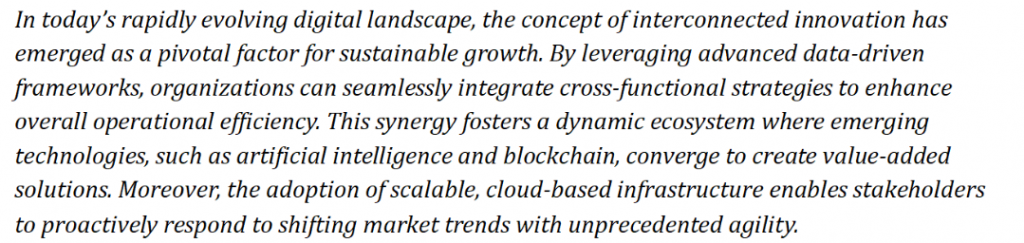
The above piece of text is AI-generated. Let’s check it through the AI detector to see its AI score:
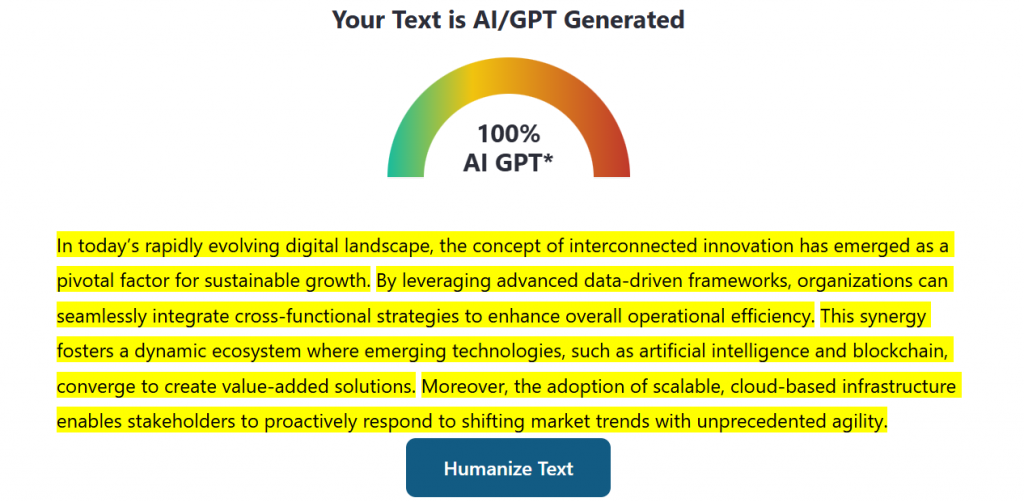
As you can see, it’s showing “100% AI GPT”. Here are some techniques and strategies that can be used to humanize such content. We’ll apply all of them to the above text in the end to see if it passes AI detection.

Many people try to make their writing sound more “human” by running it through online paraphrasing tools. But if you’re just letting one machine to predict the next possible tokens and asking next to rewrite what first machine created, the result usually feels just as artificial and most of the time holds no value for the readers.
Manual paraphrasing, where you rewrite sentences yourself, can make your content sound more natural. For example:
Original:
Staying connected and sharing ideas has become key to driving lasting growth these days.
Manually rewritten:
Building real growth now depends on how well we stay in touch and share what we know.
Yes, the second version Looks and reads much better.
The real goal is to know when to use your voice and when to let AI help. Don’t just reword; add your perspective, experience, or style (that’s what actually makes the content stand out). And sometimes, the original AI sentence is fine if it feels true to you.
While AI can generate stories or fabricate personal experiences, these usually lack real value. If you browse platforms like Medium, you’ll find many low-quality articles filled with generic “AI” personal experiences that don’t feel genuine.
What truly stands out is authentic human insight.
When you’re aiming to make your writing feel human, it helps to use phrases that signal real experience, such as:
These expressions make your content feel more like a conversation and help your audience relate to you. Just be sure they come from your real personal experience, not just general or made-up points.
That way, readers can trust that you truly understand what you are talking about.
Try including statements like these when refining AI-generated text. Sequences like this are often treated by AI detectors as signs of authentic, human writing.
Here is an example to help you understand better. It is the paraphrased version of the second line of the paragraph:
From what I know, using innovative data tools helps teams work together better and get things done more efficiently.
As mentioned previously, occasional imperfections are considered human. But imperfections don’t mean errors or mistakes. It means being somewhat informal.
Similarly, you can rephrase longer AI-generated sentences into more than one sentence. It’s fine if some of those sentences start with conjunctions, such as ‘And’, ‘but’, or ‘So’. All these are signs of the humanness of your content.
For example, if we take a look at the third line of the paragraph, it can be paraphrased as follows:
Working together like this creates an active environment for the growth of technology. So, tools like artificial intelligence and blockchain can build valuable solutions.
Additionally, incorporating rhetorical questions in your AI content can also reduce the AI detectability, as it is not common for chatbots to do that. Just like these, filler phrases are also a great way to humanize AI text. These could be something like “To be honest” or “As you know”.
using tools such as paraphrasers is not an effective method to reduce the AI percentage of your content. However, there are certain tools that are specifically designed to understand and remove AI patterns from a piece of text.
An online study about AI humanizers reveals that an average user humanizes about 12 documents per month.
This shows that an AI humanizer is, therefore, important and effective for removing these patterns. This is because even if you have written content yourself, you might have accidentally used some AI-like sentences, which may be highlighted as “AI-generated” by the detection tools. Spotting and fixing such pieces of your text can be challenging.
So, instead of doing it manually, you can run your content through an AI humanizer. However, make sure you use it as an assistant instead of relying solely on it.
Let’s understand this through an example. The text humanizer you’ll see in the following demonstration is Editpad. We found it to be effective in humanizing text. Here is how it worked for us:
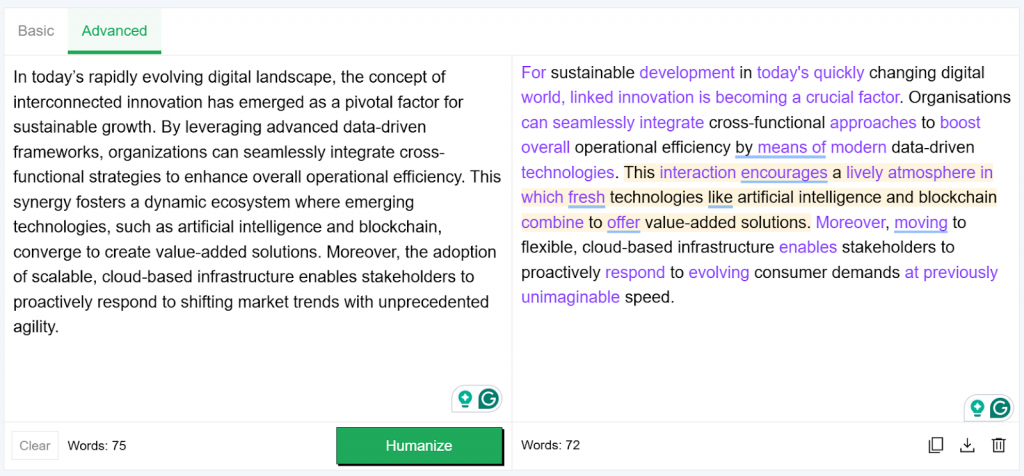
As you can observe in the above picture, the humanizer made many changes to the original text by using everyday wording and a conversational tone. This is how you can make use of such a tool to turn AI content into human content.
Once you have followed the above-mentioned steps, proofread your content. However, don’t just proofread to find grammar errors or technical mistakes. Read it in a way that you are able to identify whether the sentences are human-like or not.
To do this effectively, we suggest that you take a break from your work before starting to proofread. Occupy yourself with something else to the point that you forget about your write-up. Once ample time has passed, read your text again and see if there are any robotic patterns in your text.
This can be used as a final step to remove AI content from your text. Once this is done, your work should be AI-free and ready to submit or publish.
Result:
Applied all the techniques mentioned above to the AI-generated text mentioned earlier. Here’s how it looks now:
‘’Staying connected and sharing ideas has become key to driving lasting growth these days.
From what I know, using innovative data tools helps teams work together better and get things done more efficiently. Working together like this creates an active environment for the growth of technology.
This interaction encourages a lively atmosphere in which fresh technologies like artificial intelligence and blockchain combine to offer value-added solutions. Also, moving to a flexible, cloud-based infrastructure enables stakeholders to respond to consumer demands at great speed.’’
Now let’s see if it passes the AI detector:
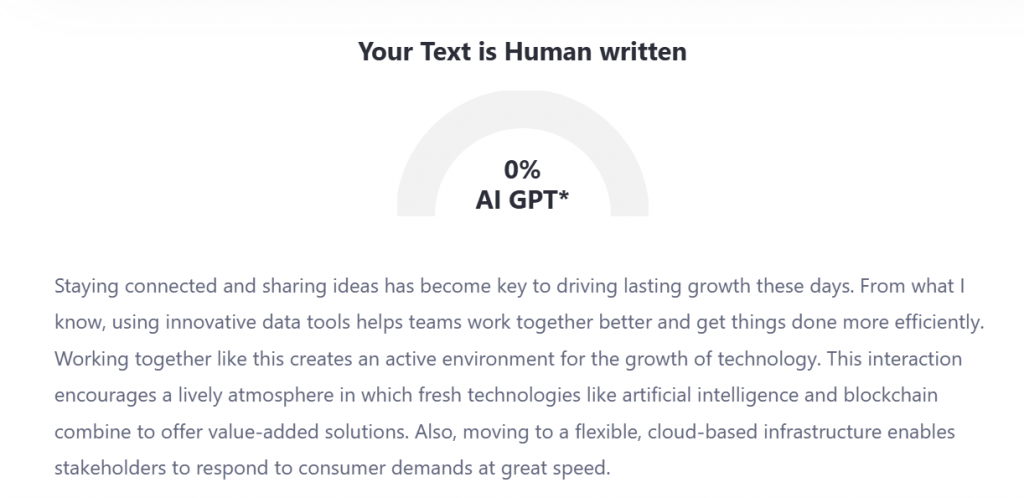
It successfully passes the AI detector. If you notice closely, all the above suggestions are applied here in various sections of the paragraph. This is how you can humanize ChatGPT content and make it undetectable.
If you found this guide useful, you may also want to read these related articles:
It means rewriting AI-generated text so it has a real voice, varied sentence length, and specific details instead of the smooth, repetitive pattern many AI models default to. The goal isn’t to trick a detector. It’s to create writing that readers actually want to finish.
No. Google’s guidance focuses on content quality rather than how the content was created. The problem is thin, generic content produced at scale to manipulate search rankings. Humanizing a draft is about improving its quality, not avoiding a penalty simply because AI was used.
They may lower the score on a specific AI detector, but that is different from making content genuinely human. Detectors change frequently, so content that passes one test may fail another. Use these tools as a first pass, then add real examples and your own phrasing.
Read it out loud. AI drafts often use similar sentence lengths, repeat the same transition words, and avoid taking a clear position. If every paragraph feels identical and there is little genuine opinion or personality, the writing may need more human input.
It can matter even more for chatbot replies because they need to sound natural without an editing pass. YourGPT’s agent builder lets teams adjust tone and train AI on their own help docs, PDFs, and past conversations, helping replies match the brand’s communication style.
Not always. A well-trained agent can handle routine questions without manual editing. For high-stakes or ambiguous requests, human review is safer. Platforms like YourGPT also support human handoff, allowing uncertain conversations to be routed to a live agent instead of relying on a guess.
You have something only you can share. When you use AI, let it help but do not let it shape your message. Take time with your words. Make sure they feel natural.
Focus on creating real value for your readers, not just on bypassing AI detectors.
This approach will make your writing better and more authentic.
AI is definitely helpful and you should include it in your workflow, but it can never replace your own perspective. Your ideas, creativity, thought process, and stories are what make your content original and truly yours.

The reader can shortlist one or two platforms by primary job, existing stack, action depth, handoff, governance, and billing unit.
A practical breakdown of Gorgias Helpdesk and AI Agent pricing, including what counts toward each allowance, how to compare plans and how to budget with your own volumes.
Choose Halloween ecommerce campaigns that fit your products, with AI agent workflows, offer worksheets, launch tests and order measurement.

Compare outsourcing customer service with an AI agent using your own ticket mix, a cost model you fill in, and a clear rule for a hybrid split.
Export the Zendesk ticket archive, train an AI Agent on the help center, and test one real ticket before you stop the old queue.


Compare six Yuma alternatives by ecommerce capabilities, helpdesk compatibility, pricing and human handoffs to choose a replacement for your support team.
