Guests receive quick replies within minutes, including nights and weekends, without ongoing manual monitoring.
AI Chatbot for Airbnb: How to Automate Guest Communication in 2026

Rajni
Last updated on August 11, 2026
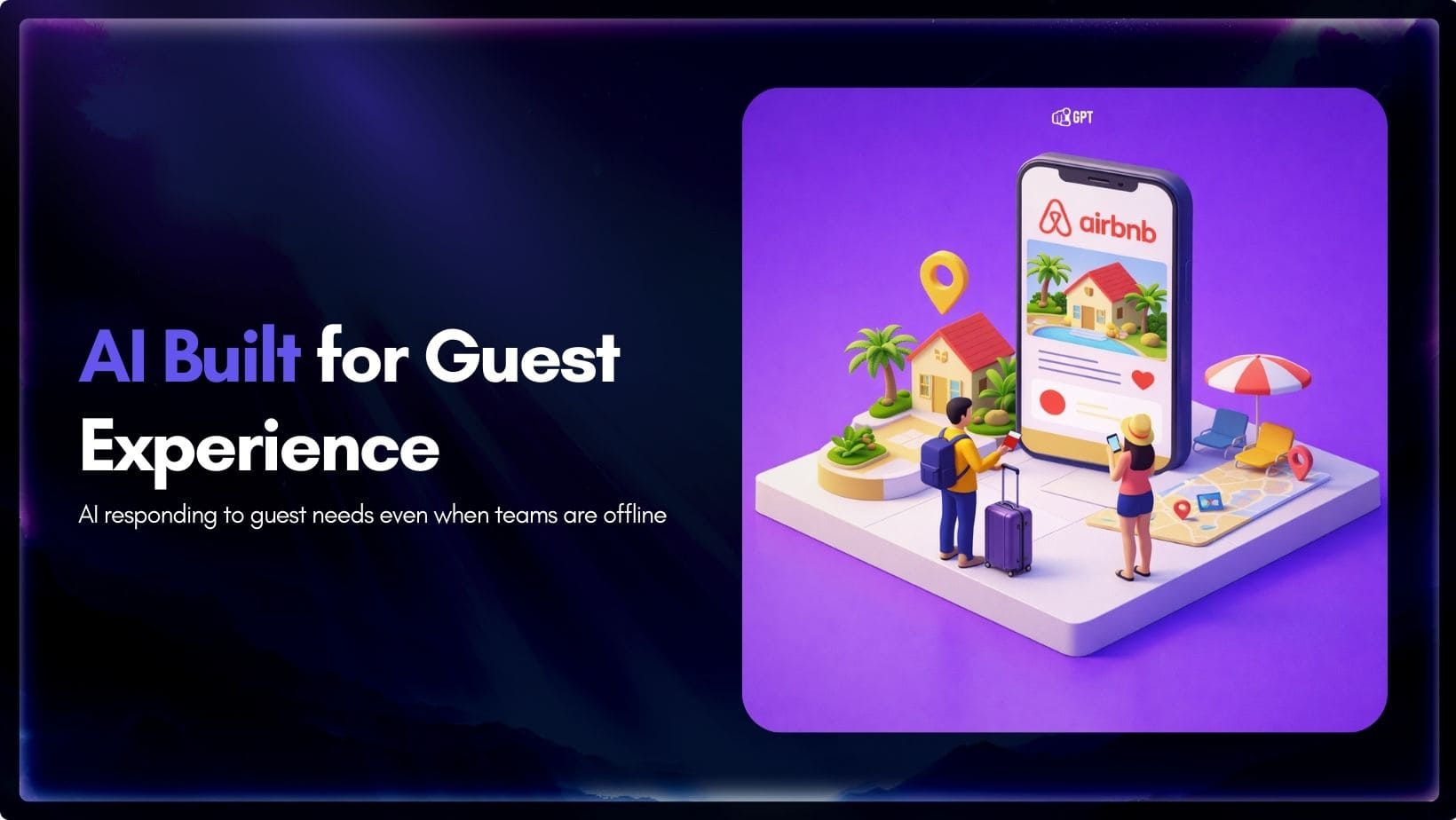
This blog shows Airbnb hosts how to set up an AI chatbot for guest communication, covering the architecture, PMS integration, and channel deployment.
It walks through account setup, training the AI with house rules and property data, and testing the chatbot before launch.
Built around YourGPT, the guide also covers common setup mistakes and practical steps for hosts managing multiple properties who need fast, consistent responses.
Managing multiple properties creates a consistent flow of guest messages. Two hundred inquiries per week is common. Responding to all of them often leads to late hours and slower response times. Over time, messages are missed and guest satisfaction declines.
The stakes are high because Airbnb places strong importance on host responsiveness. To qualify for Superhost status, hosts must keep a 90 percent response rate within 24 hours. Meeting that requirement is necessary, but it does not guarantee strong visibility. Airbnb also tracks response time, and slower replies can reduce a listing’s position in search results.
For hosts managing multiple properties, automation becomes a practical requirement rather than an optional tool.
This blog covers the technical setup for YourGPT’s AI chatbot platform, specific to Airbnb property management. You’ll see the actual architecture, configuration steps, common implementation mistakes, and real cost breakdowns.
Modern AI chatbots use advanced ai models that are trained on your specific property details. Instead of just keywords matching, the system understands the actual intent behind every message a guest sends.
Take a common question like “Can I check in early?” The AI connects to your PMS to check your calendar availability and reviews your specific house rules. Then it generates a personalized response based on that real-time data.
The Workflow: Under the Hood
Real Integration Points YourGPT connects primarily through your Property Management System (PMS). By integrating with platforms, the system acts as an intelligence layer on top of your existing data. It reads the messages coming into the PMS and pushes responses back out. This ensures that your calendar, pricing, and guest details are always the single source of truth.
AI chatbots handle high guest message volume while keeping communication quick, accurate, and consistent across multiple properties.
Guests receive quick replies within minutes, including nights and weekends, without ongoing manual monitoring.
Every inquiry is acknowledged within the required timeframe, reducing missed messages and delayed replies.
Check-in instructions, house rules, and policies stay aligned across all listings and guest conversations.
Common questions about arrival details, parking, and property access are handled automatically.
Responses use reservation details, property information, and current availability.
Issues involving disputes, refunds, safety, or damage are routed for manual review instead of automated replies.
Message volume can grow without increasing workload, since repetitive communication is handled by the system.
To build your first AI agent for your Airbnb. we will use YourGPT. YourGPT is designed to get you up and running quickly. Follow these steps to deploy your agent.

First you need a account to use YourGPT. Create an account to get started or use your existing account to login.
Once your account is ready, the next step is training your AI about your business.
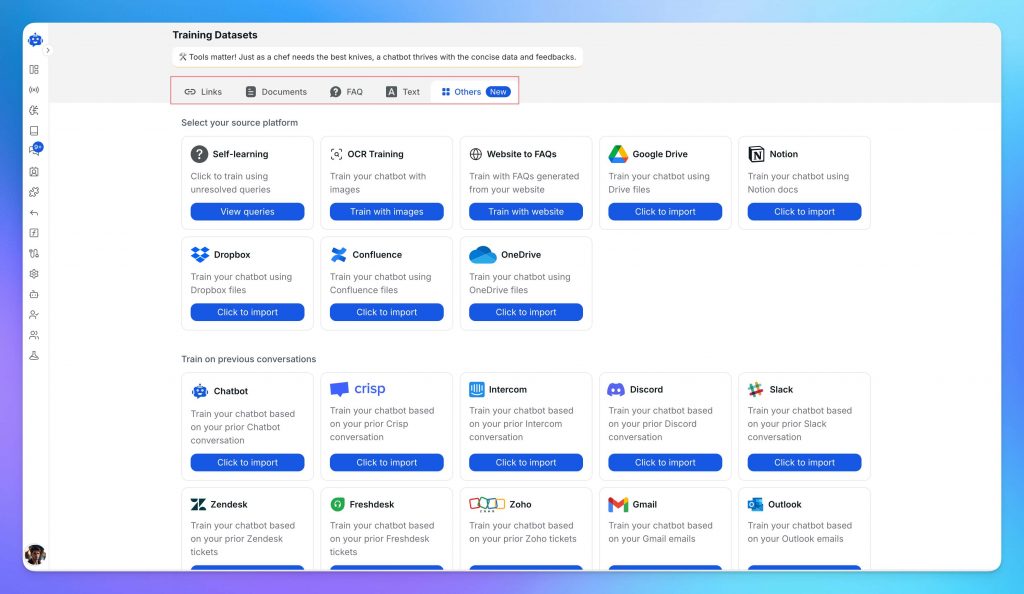
Upload your business content from multiple sources (website pages, PDFs, and integrations such as Notion or Dropbox) to train your AI. For Airbnb properties, you can upload house manuals, check-in procedures, house rules, local guides, emergency contacts, appliance instructions, and past guest question and answer records.
YourGPT automatically learns from this data, understanding your brand and policies to provide accurate guest support.
With your AI trained, you’re ready to configure how it interacts with customers.
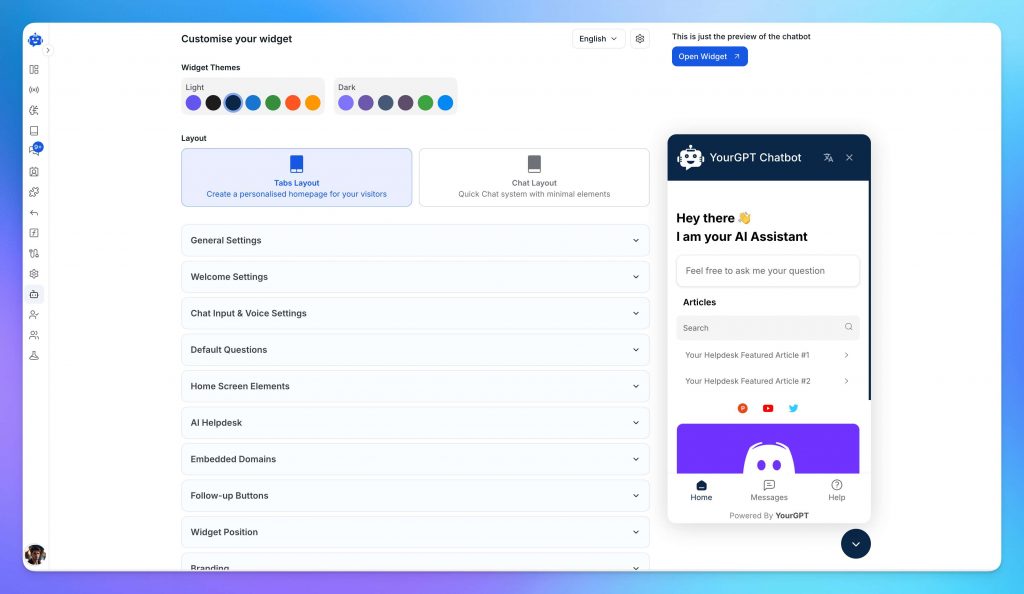
YourGPT gives you complete control over appearance, branding, and persona settings so your AI agent fits your business perfectly.
Custom Branding: Add your logo, brand colors, and typography to create a consistent visual experience across every user interaction. Easily adjust layout, position, size, corner radius, colors, and text styles to ensure the widget integrates naturally with your site or app.
You can also remove all default branding and launch under your own name. Perfect for agencies, SaaS resellers, and enterprises that need full ownership of the experience.
Persona Configuration:
Set your chatbot’s personality to match how you communicate with guests. If you run luxury properties, formal tone works. Budget-friendly beach rentals? Casual and friendly. The tone setting affects word choice, sentence structure, and formality level.
Training quality tip
Add your real voice and habits. If you always recommend the same coffee shop or explain the controls in your own way, include that detail. The AI understands from on these patterns and responds the way you would.
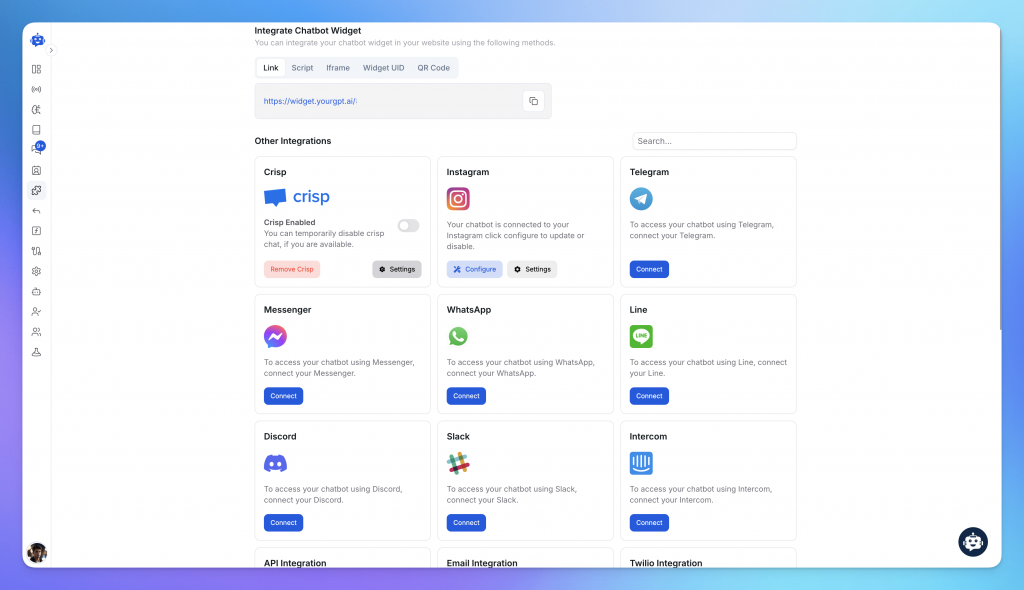
To automate your guest communication, connect YourGPT to the platforms where you manage your guest interactions. Many hosts find it effective to direct guests to dedicated support channels for a more seamless experience:
Integrate your WhatsApp Business API to handle guest inquiries, check-in coordination, and support. You can easily direct guests from Airbnb to your WhatsApp channel to provide them with instant, AI-powered assistance throughout their stay.
MCP (Model Context Protocol) is a universal integration layer. It allows your agent to connect to 100+ external tools without custom API development.
Airbnb-Relevant MCP Integrations:
For businesses with complex automation needs, Studio enables you to build custom multi-step processes and rich messaging experiences without writing code. You can design conditional workflows and send interactive elements like carousels, cards, and buttons to make guest interactions more engaging and professional.
Studio puts enterprise-grade capabilities in your hands without technical barriers.
Before launching to your customers, it’s important to test everything thoroughly.
Before going live, use the preview tool to simulate conversations and refine your AI’s performance. This stage allows you to test responses in real time, adjust settings, and fine-tune conversation flows to ensure the automation aligns with your specific property needs.
Run multiple test conversations covering your most frequent guest inquiries and potential edge cases. If the AI provides an incorrect or incomplete answer, update your training data or adjust the persona settings to improve accuracy. Testing ensures that the AI understands your specific instructions and handles escalations according to your preferences.
When you’re satisfied with how your AI performs across your unique business cases, it’s time to deploy.
Launch your AI agent wherever your customers are. Deploy on web and mobile through website widgets, web app embeds, and mobile SDKs. Connect to messaging platforms like WhatsApp, Instagram, Telegram, and Slack.
You’re now live with complete AI automation across support, sales, and operations. Your AI will continue learning and improving as it interacts with customers.
Watch your agent closely for the first 7 days. Check:
Expect to make 3-5 adjustments in the first week as you see real usage patterns.
Smart guest messaging can save hours each week, but small setup choices can quietly hurt the experience if they are not thought through. Most problems show up not because the system failed, but because expectations, tone, or handoffs were not clear. These are the mistakes hosts run into most often and how to avoid them.
A guest reports a broken AC during their stay. A generic response makes it feel ignored, so they escalate instead of waiting.
If it can turn into a dispute, it should never be fully hands-off.
Check-in steps change, but responses stay the same. Guests follow the wrong instructions and arrive confused or locked out.
Confident answers are dangerous when the details are wrong.
A guest asks about parking and receives directions for the wrong property. The stay starts with frustration.
Context should come before instructions.
Personal messages feel warm, but replies sound stiff. Guests notice the shift immediately.
Familiar tone builds trust faster than perfect wording.
Basic questions work fine, but serious concerns get generic replies. That is where trust breaks.
If safety or health is involved, a person should respond.
Guests are unaware some replies are system-generated. This can lead to complaints later.
Clear expectations prevent misunderstandings.
The AI pulls property specific data such as house rules, parking, and access details for each listing before it replies. It checks which property a guest booked, then answers using information mapped to that unit only. This keeps directions from crossing between properties, even during high message volume.
Yes. Sensitive topics such as disputes, refunds, safety concerns, and damage reports get flagged and routed to the host instead of an automated reply. The chatbot acknowledges the message right away, but the resolution still comes from a person, not a script.
An AI chatbot that replies within minutes supports the 90 percent, 24 hour response requirement Airbnb sets for Superhost status. Airbnb also factors response time into search visibility, so faster automated replies can help a listing rank rather than hurt it, as long as escalations still reach the host quickly.
With a platform like YourGPT, initial setup, meaning account creation, uploading house manuals, and connecting a communication channel, typically takes under a day. Expect another week of monitoring and adjusting after launch, since real guest questions surface gaps the training data missed.
Yes, if it’s connected to your Property Management System or calendar tool. YourGPT’s MCP integrations let the AI check live booking data through Google Calendar or iCal before confirming or declining an early check in request, so replies reflect actual availability instead of a generic policy answer.
That depends on local short term rental regulations and how transparent hosts choose to be. Many hosts disclose automated replies in their welcome message or house rules to set expectations upfront, then reassure guests that urgent matters get a personal reply. Checking local rules is worth doing before launch.
Guest messaging works best when it is treated as core setup, not a way to step away from hosting. The system should take care of repeat questions, timing, and consistency. You stay responsible for decisions, edge cases, and guest trust.
YourGPT handles the mechanics. Your rules, policies, and tone shape how it responds. When those inputs are clear, the AI speaks the way you would, without cutting corners or sounding scripted.
The real win comes from discipline. Review conversations, correct gaps, and refine responses as patterns show up. Let the system handle what repeats so you can spend time on issues that actually need a human. This keeps service quality high while reducing daily load, not replacing accountability.
Connect your website AI agent to a CRM with YourGPT. Capture lead details, map contact fields and verify the record your sales team will use.

Use YourGPT to help Black Friday shoppers choose products, check orders and understand returns. Prepare your answers and team before the sale.
Add in-app chat support to your SaaS or mobile app. Place it on the screens where users stall, pass who they are, and hand hard cases to your team.
Group new-account tickets by onboarding stage, train an AI agent on your docs, and place it in the product where new users get stuck.
AI agents can now find and buy products for shoppers. See what agentic commerce changes for a Shopify store and which support jobs stay yours.
Build a Halloween shopping assistant for Shopify with YourGPT. Set up product recommendations, stock checks, cart actions and human support before launch.
