Zendesk AI Agents Review and Pricing (2026)

Shreya
November 12, 2026
If you already use Zendesk, try its AI agents on a queue with repeat questions your help center can answer. Suite Team lists at $55 per staff seat per month on annual US billing, plus $1.50 per extra automated resolution with a commitment or $2 pay as you go. Check whether your plan includes a count or a dollar allowance before you budget.
A customer asks why their subscription renewed after they canceled. The AI quotes the refund policy, but the charge is still on the account and the billing team never sees the request. Before you pay for more AI resolutions, check whether the agent fixed the problem or left someone else to finish it.
YourGPT publishes this review and is one of the alternatives below. We checked Zendesk’s US pricing and help docs on November 12, 2026. The sample bills are estimates, and the screenshots come from Zendesk’s documented simulations.
Zendesk includes AI agents in its Support and Suite plans. If you’re budgeting for chat, start with Suite Team. It includes messaging and live chat. Support Team’s $19 starting price is for email and ticketing.
The Zendesk plan comparison shows prices in US dollars per staff seat per month. If your plan includes a set number of resolutions, the last column shows how many each seat adds per month.
| Plan | Annual billing | Monthly billing | Included resolutions |
|---|---|---|---|
| Support Team | $19 | $25 | 5 |
| Suite Team | $55 | $69 | 5 |
| Suite Professional | $115 | $149 | 10 |
Zendesk quotes Suite Enterprise + Copilot separately. If the pricing page shows another currency, select English (US) in the language menu.
If your quote says Zendesk Unlimited, use that quote’s outcome budget. The early-access offer announced November 10, 2026 combines unlimited seats with a budget for eligible outcomes. Zendesk Unlimited announcement
Take ten Suite Team seats on annual billing and 1,000 inbound conversations each month. If the AI handles half of them and Zendesk verifies half of those, that’s 250 verified resolutions per month, or 25% of total inbound. Seats cost $6,600 per year in both examples.
At the same steady monthly volume, a 10% verified share puts the annual total at $7,800 with the count allowance or $8,760 with the currency allowance. At 40%, the totals are $15,000 and $15,960 respectively. For a seasonal queue, run the calculation for each billing or usage period using your contract’s rates, allowance, and reset dates. The examples exclude taxes, separate Voice and action charges, add-ons, and labor.
To model your bill, start with inbound conversations × share handled by AI × verified share of AI conversations. Subtract any included resolutions before pricing the excess, or deduct any dollar allowance from the usage charge. Add the remaining charge to the seat bill.
In the count-based 25% example, buying 2,400 extra resolutions at $1.50 costs $3,600 and puts the annual total at $10,200. The commitment breaks even at 1,800 extra resolutions, or 75% of the pack, against $2 pay as you go. At 1,500 resolutions, pay as you go costs $3,000. Check the committed terms and expiry in your quote before applying that threshold to a currency allowance or buying for a seasonal spike.
A shopper may stop replying because they got their tracking link or because they gave up. Zendesk’s resolution-tier model uses a language model to evaluate the conversation after it ends.
If the AI gives the tracking details and Zendesk’s review of the conversation concludes the issue was solved, it’s a verified resolution and uses the allowance. If the shopper goes quiet and the conversation fails verification, it can be a contained resolution. If the AI collects the order number and a rep finishes the request, that’s an assisted escalation. On this model, those last two tiers leave the allowance untouched.
The usual messaging window is two hours from the first message and can be extended. For email it’s 72 hours from the first email. Voice ends at hangup. Allow those windows to close before comparing results across channels.
In Admin Center → Account → Usage → Resolutions, eligible admins can filter by tier, open the underlying ticket, and export ticket IDs, tiers, and costs. Sample the verified tickets and look for customers who came back with the same problem. A shopper asking again about a missed delivery still needed help, even if the first reply cleared Zendesk’s check.
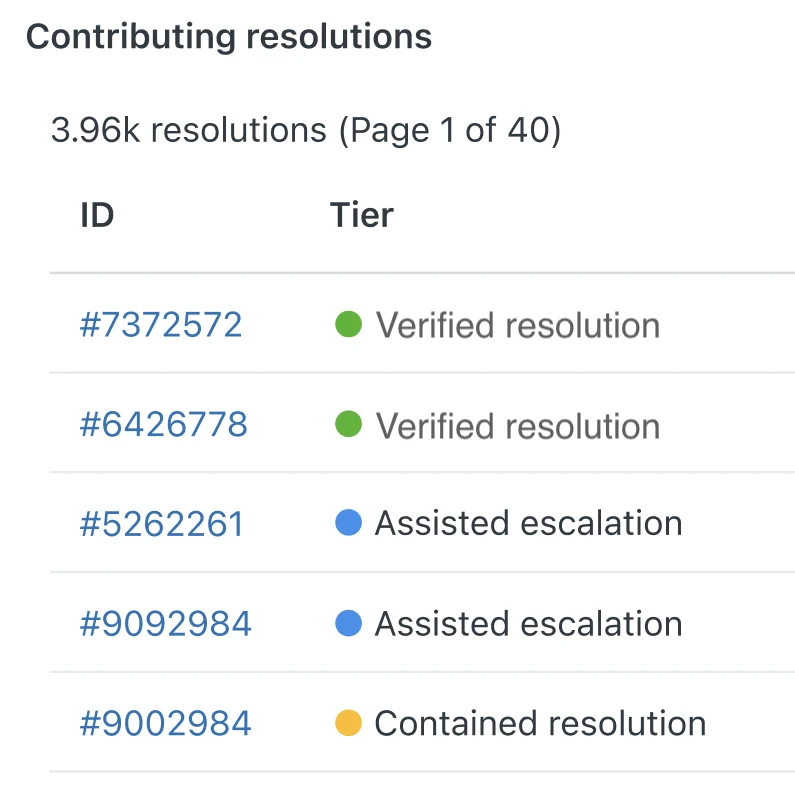
Screenshot from Zendesk Help. Use the ticket ID to open the original conversation.
Zendesk’s AI agents can answer customers from connected knowledge, follow support procedures, and use configured actions. If your help center and reps already work in Zendesk, you can start with questions your team can answer from a policy page and audit the conversations in the same helpdesk. Pull a week of tickets to see how much of your queue fits that description.
In Zendesk’s New Look case study, the retailer reported that AI agents resolved an average of 42% of queries independently after an email and chat rollout that began in late 2024. The agents operated without backend integrations at the time. Use the example to identify what you could automate from knowledge alone; use your own verified share for the bill.
Holiday shipping is a good test for the knowledge setup. If the cutoff changes on Friday, ask about it again after updating the policy. Zendesk says external sources usually sync every 24 hours. Before the pilot, remove conflicting copies of important policies so the agent has one current answer to use.
Zendesk’s Shopify sidebar gives reps controls for tasks such as refunds and cancellations. An AI agent needs a configured action and permission to make an order change. If an AI agent offers to edit a shipping address, ask which integration grants that permission and check the resulting order. Our guide to automating support tickets shows what to record when an action succeeds or a rep has to finish it.
An answer that works in chat can still leave an email request hanging. Zendesk configures AI agents by channel, so test each channel separately and check where its handoffs land. Inbound Voice AI also requires a supported Zendesk Voice line and can incur call and connection charges.
Pick one messaging queue and pull recent tickets. Keep the original questions and policy links, remove personal details, and use test records for any account or order changes. Include a request your reps usually send to a specialist so you can check who gets the handoff.
If you still rely on Essential or a legacy bot, plan the pilot around Zendesk’s migration and retirement dates. Zendesk started rolling out the unified experience in May 2026 and scheduled affected legacy functionality for removal on December 10, 2026.
Grade each test against the policy, the affected record, or the handoff ticket. Save the transcript so you can trace any gap between the reply and what happened.
Three passes and two failures can still earn a green badge. In Zendesk’s documented onboarding example, the agent faced the same scenario five times: a laptop detected a haptic device, but the device didn’t respond. Zendesk marks the scenario as passed when a majority of the runs pass.
Pass. Zendesk reports that the agent answered from its connected knowledge and resolved the issue without escalation. Runs 1, 3, and 5 passed; runs 2 and 4 failed.
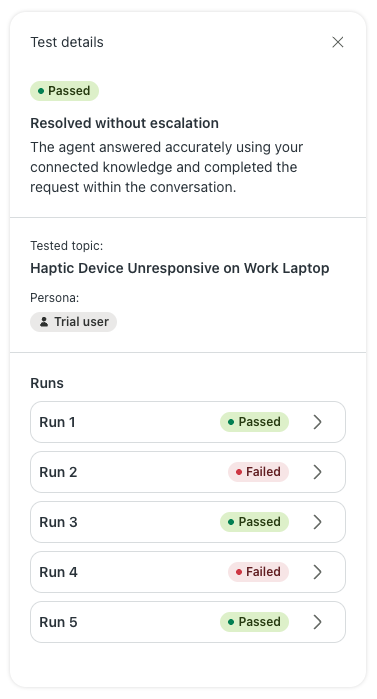
Zendesk Help: overall result and all five simulated runs.
Failure. In run 4, the test customer asks how to check driver compatibility and set up the device. The agent says it’s gathering information; the visible exchange never gets to the steps. The transcript cuts off, so the screenshot can’t tell us why the run failed.
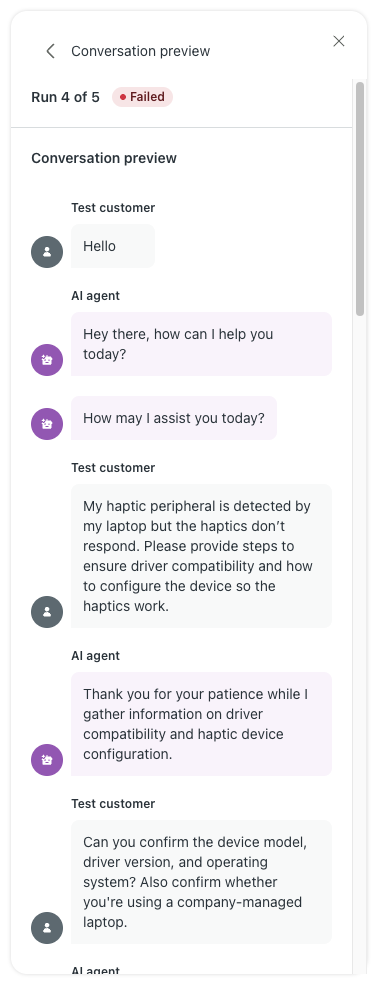
Zendesk Help: the visible portion of failed run 4.
For an order change, treat any unauthorized edit or unconfirmed success as a failed test even if most runs pass. Trace the failure to the policy, the action, or the handoff. Rerun that case after the fix, then check the order record again.
Watch Zendesk’s guided setup on YouTube (2 min). It shows how to connect knowledge, set the agent’s tone, and review the configuration before launch.
During the live pilot, log the ticket ID, first outcome, any contact about the same issue within seven days, and the minutes reps spend on handoffs or follow-up. Compare like requests on the same channel before and during the pilot, and match the sample against the billing export. Set an acceptable repeat-contact rate before launch so you know when to pause.
Say staff time drops from 450 to 320 minutes per 100 conversations. At an illustrative $30 an hour, those 130 minutes represent $65 of staff capacity. If Zendesk bills 25 extra resolutions at $2, that leaves $15 of modeled capacity value after AI usage and before setup or maintenance. At $2 per extra resolution and $30 per staff hour, usage needs to save four minutes per extra resolution to cover its own cost.
Our support automation rollout guide goes further on assigning owners and reviewing the work an agent sends back to the team. Use that same pilot record if you compare another vendor.
Compare Fin if your team wants a different AI agent for its existing Zendesk queue. Look at Gorgias if Shopify order actions drive the switch, or Freshdesk Omni if you want to replace the helpdesk. Evaluate YourGPT if your agent needs to handle requests across channels and take action in the tools your team already uses.
Fin can answer supported chats and tickets while your reps stay in Zendesk. Budget for the Zendesk subscription plus Fin’s $49 monthly base, which includes 50 resolutions, then $0.99 per additional outcome. Minimum commitments can apply.
Use the same address-change case for both quotes. If the AI gathers the details and a rep makes the change, Zendesk’s tier model treats it as an assisted escalation. Fin can bill the handoff if a configured procedure completes successfully. Fin outcome rules
If you use Zendesk Messaging, confirm the Sunshine Conversations license requirement. Fin’s demo shows the handoff into the Zendesk queue. Watch the Fin demo
Gorgias AI Agent can edit a shipping address or cancel an eligible Shopify order. The built-in address action checks that the order is unfulfilled and asks the shopper to confirm the new address. Gorgias documents that the change happens in Shopify. Check the fulfillment app separately if your warehouse pulls orders into another system.
In the demo, open the Gorgias action event log for the test ticket. A multistep action can show an error after an earlier step succeeded, so inspect the order before a rep retries anything.
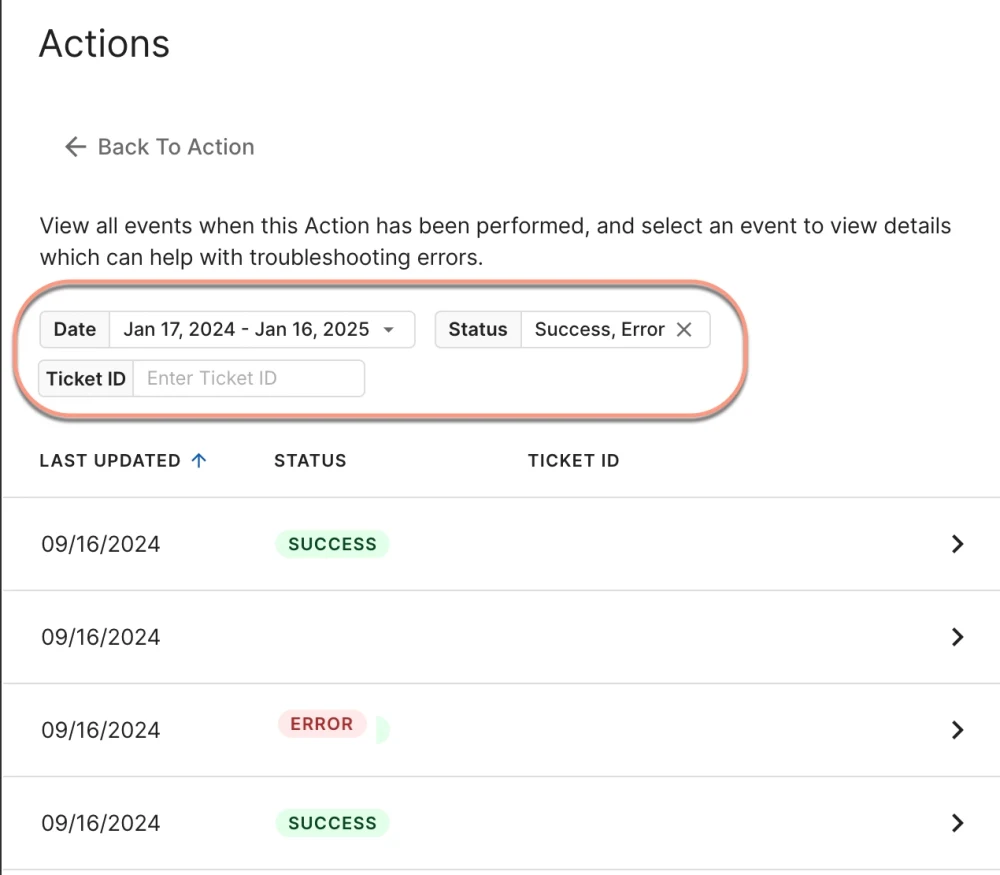
Screenshot from Gorgias Help. Filter by ticket ID to investigate what happened during a test.
A fully automated AI Agent ticket can draw from both the helpdesk and automation allowances. Estimate both with our Gorgias pricing breakdown, then confirm the allowances and overage rates on your quote.
Freshdesk Omni Growth lists at $29 per staff seat per month on annual billing. Eligible new customers get 500 Freddy AI Agent sessions once. After that, Freshworks charges $49 per 100 sessions. Chat interactions with Freddy within 24 hours count as one session, including when a rep eventually takes over.
The same address-change case can use a Freddy session even if a rep finishes it. If a 100-session pack produces 20 successful outcomes, its $49 cost works out to $2.45 per success before seats and rep time. Test a channel you plan to keep and include tickets that need a person, especially if your existing routing often sends those straight to a rep.
YourGPT is an AI agent platform for customer support, sales, and operations. In a Zendesk comparison, it’s worth testing when requests come in through web chat, WhatsApp, email, or phone and resolving them takes work in another system. Train the agent on your help center and internal docs, then use AI Studio to configure what it can do and when it should involve a person.
Take a failed subscription renewal. With the right tools connected, an agent can explain the billing policy, look up the account, and create a Zendesk ticket if billing needs to step in. Check that the agent looked up the right account and that the ticket includes enough context for a teammate to take over. A retailer can run the same kind of test with an order lookup through the Shopify integration.
YourGPT Professional lists at $79 per month billed annually, including AI Studio and 30 million AI credits. In a pilot, record credit use for a short policy answer and for a longer conversation with a lookup and a handoff. If your reps will still work in Zendesk, include those seats when you compare the total.
The demo shows what a teammate gets when YourGPT creates a Zendesk ticket, including the conversation history, a summary, and the assigned team.
When an eligible account turns off overages and uses its allowance, affected AI agents pause and Zendesk routes requests to live agents. The overage settings depend on your account and contract. Before switching them off, check who covers that queue after hours. AI agents resume with their saved settings when resolutions become available again.
An unused monthly currency allowance expires at the end of that month. If your allowance is in resolutions, confirm the applicable usage period and expiry on the order form. Check committed purchases separately under Zendesk’s terms for seat-based plans. If your peak starts after a reset, forecast it using the next period’s allowance.
Yes. Contact Zendesk Customer Support to dispute the tier assigned to a ticket. First, open the conversation and ticket events from the resolution dashboard to see what Zendesk evaluated. Include the original ticket ID and point to the part of the request the AI left unresolved. If the shopper came back in a separate ticket, include that ID too.
For ten seats, the upgrade can offset up to $1,200 in annual usage on the count model or $360 on the documented currency model. Those figures assume you use all the extra allowance each period and, for the count model, pay $2 per extra resolution. The seats cost $7,200 more per year at annual US list rates. Buy Professional when features such as skills-based routing justify the rest.
No. Support and Suite plans include customer-facing AI agents. Copilot helps staff with tasks such as drafting replies and summarizing tickets, and eligible plans have a separate allowance for some Copilot features. If the pilot is about how many order-status questions the AI can resolve on its own, start with the AI agent and leave the Copilot purchase for a separate decision.
If your team already works in Zendesk, give its native AI agents the first pilot. Start with requests your help center can answer and check the results against real tickets. Expand when customers come back less often or at the same rate, reps spend less time on follow-up, and exceptions reach the right person. If a workflow still sends the same work back to your team, fix it before adding volume.
Before you commit to extra usage, ask Zendesk to price a typical month and your busiest month. Get the allowance, reset dates, and overage rules in writing. Then match a sample of billed resolutions to the original requests and the time reps spent afterward. If the commitment only makes sense at peak volume, price pay-as-you-go for the quieter months before you sign.
The reason for switching should decide your shortlist. Test Fin if you want a different AI agent in the same Zendesk queue. Test YourGPT when support spans several channels and a request needs a lookup or action in another tool. If routing or reporting in the helpdesk is the problem, include those tasks in the demo before you plan a migration.
Give each vendor the same cases and ask to see what happened after the reply. For the canceled subscription at the start of this review, check the corrected billing record or the ticket that went to billing, with enough context for a teammate to pick it up. Record the remaining work and the cost for each case. That gives you a way to judge the AI against the queue your team actually runs.
Replay a ticket that needed a person and see whether the handoff gives your teammate enough to act.
TL;DR Agentforce is Salesforce’s AI agent platform, built into its Sales, Service, and Field Service clouds, letting agents read and write live CRM records and execute multi-step tasks instead of only replying with text. Pricing splits into three parallel models built for different use cases, and picking the wrong one for a given deployment can […]
TL;DR The best business productivity tools help teams reduce repetitive work, improve collaboration, and save time. This guide compares 10 tools for 2026, including YourGPT, Proton Pass, Notion, Semrush, CoAnimator, Loom, Canva, Cal.com, Jira, and Airtable. Each tool serves a different purpose, from AI automation and project management to content creation and scheduling. Rather than […]

TL;DR Salesforce offers powerful CRM capabilities, but implementation and ongoing management can increase costs for smaller teams. Pipedrive and Nutshell simplify pipeline management, while HubSpot and Zoho CRM offer broader automation. Freshsales, monday CRM and Copper suit specific workflows. For customer support and lead qualification, YourGPT Chatbot works alongside your CRM, starting at $39/month billed […]
TL;DR Yellow.ai has spent a decade building an enterprise conversational AI platform out of Bangalore, and in 2026 it is asking Wall Street to value it at half a billion dollars while cutting a third of its staff and rebuilding its core product around a new “agentic interface” called Nexus. Both moves showed up in […]

Prepare a replacement support agent, test real requests and human handoff, then switch the storefront while keeping ownership of unfinished conversations.
The reader can shortlist one or two platforms by primary job, existing stack, action depth, handoff, governance, and billing unit.