AI Agents for SaaS Customer Support: Setup, Use Cases, ROI, and Best Practices

Rajni
Last updated on July 13, 2026
SaaS companies usually do not hit support overload because the product is failing. They hit it because the product is working.
More users mean more onboarding questions, more billing confusion, more integration issues, more feature requests, more account-access problems, and more tickets arriving outside business hours. A small support team that could manage 500 customers may struggle once the same product reaches 10,000 users across multiple time zones.
Traditional support models can only stretch so far. Hiring more agents helps, but it increases costs and takes time. Expanding documentation helps, but customers often want answers without searching through long help articles. Basic chatbots can deflect simple questions, but they usually fail when the issue becomes contextual, technical, or account-specific.
This is why SaaS companies are paying closer attention to AI agents.
An AI agent is not just a scripted chatbot. A well-designed AI support agent can understand context, search your knowledge base, guide users through product workflows, collect missing information, create tickets, hand off to human agents, and improve over time based on real customer conversations.
This guide explains what AI agents for SaaS customer support are, where they work best, where humans still matter, how to set one up, which metrics to track, and how to evaluate platforms before committing.
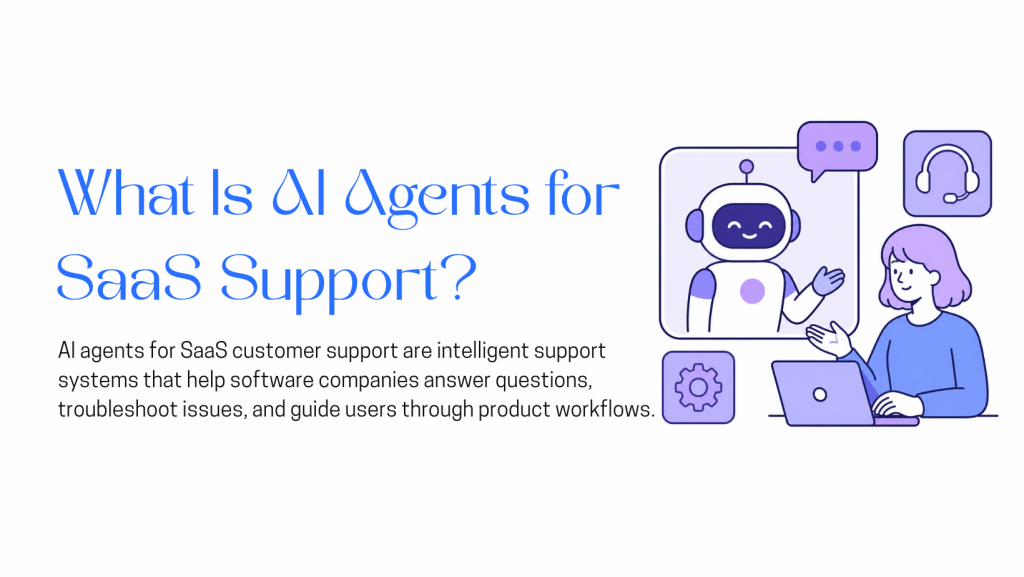
AI agents for SaaS customer support are AI-powered systems that help software companies answer customer questions, guide users through product workflows, troubleshoot issues, and escalate complex cases to human agents when needed.
Unlike basic chatbots that depend on fixed scripts or keyword-based replies, AI support agents can understand customer intent, use product documentation as a knowledge source, ask follow-up questions, and perform actions through connected tools.
For a SaaS company, this can include helping users during onboarding, explaining pricing plans, resolving common billing questions, guiding customers through integrations, answering API-related queries, creating support tickets, and passing full conversation context to human agents.
In simple terms, an AI support agent acts as a support layer between your customers, your knowledge base, and your internal systems. It handles repetitive and well-documented issues quickly, while allowing your support team to focus on complex, sensitive, or high-value conversations.
SaaS support has a different pressure curve from many other industries.
A software product changes constantly. New features are released, pricing pages are updated, integrations evolve, APIs change, onboarding flows are redesigned, and product bugs appear in specific edge cases. Every change can create a new support burden.
Common SaaS support problems include:
The challenge is not only ticket volume. It is the combination of volume, repetition, complexity, and urgency.
The market reflects this shift. Market.us estimates that the global AI-driven customer support agents market will grow from USD 2.5 billion in 2024 to USD 53.3 billion by 2034, at a 35.80% CAGR. MarketsandMarkets separately estimates the broader AI for customer service market at USD 12.06 billion in 2024, projected to reach USD 47.82 billion by 2030.
Customer expectations are changing as well. Salesforce reports that 61% of customers would rather use self-service for simple issues, but also notes that 72% will not reuse a company’s chatbot after one negative experience. That combination matters: customers want faster support, but they do not tolerate poor automation.
For SaaS companies, the opportunity is not to replace the support team entirely. The opportunity is to automate the repetitive layer while giving human agents more time for complex, sensitive, and high-value conversations.
SaaS support is a strong fit for AI agents because many customer questions are repetitive, documentation-based, and workflow-driven. Users often need help with onboarding, integrations, billing, account access, product settings, and API behaviour. These issues are important, but many of them follow predictable patterns.
That makes them suitable for AI support, especially when the agent is trained on accurate documentation and connected to the right tools.
AI agents are most useful when they handle the support layer that does not require deep human judgment. They can answer common questions instantly, collect missing details before escalation, and help customers move forward without waiting for a support agent to become available.
Most SaaS teams know their top recurring questions:
“How do I reset my password?”
“Where do I find my API key?”
“How do I upgrade my plan?”
“Why was I charged?”
“How do I connect this integration?”
“Can I export this report?”
“What does this error mean?”
These questions are important, but they do not always require a human response. An AI agent can answer them instantly, guide the user to the right workflow, and escalate only when the case becomes unusual.
Human agents often answer questions by searching the help center, checking internal docs, or asking another teammate.
An AI agent trained on the same documentation can surface that information faster. This is especially useful for product documentation, onboarding guides, API references, integration docs, release notes, and troubleshooting articles.
The agent does not replace the need for good documentation. In fact, it makes documentation quality more important. The better the knowledge base, the better the AI agent performs.
SaaS products are global by default. A customer in India, the United States, Singapore, Germany, or Australia may need help when your core support team is offline.
Zendesk’s 2026 CX Trends report says 74% of consumers now expect customer service to be available 24/7 because of AI. For SaaS companies, this expectation is especially relevant because users may be onboarding, testing integrations, or resolving urgent product issues outside standard business hours.
A slow or confusing support experience can hurt activation, conversion, retention, and expansion.
Trial users who get stuck may never become paying customers. New customers who struggle during onboarding may churn before they see value. Existing customers who cannot get help with billing or technical issues may lose trust.
AI agents can reduce friction at these points by giving instant, contextual help. But the best results come when AI is paired with clear escalation paths, not when it blocks users from reaching humans.
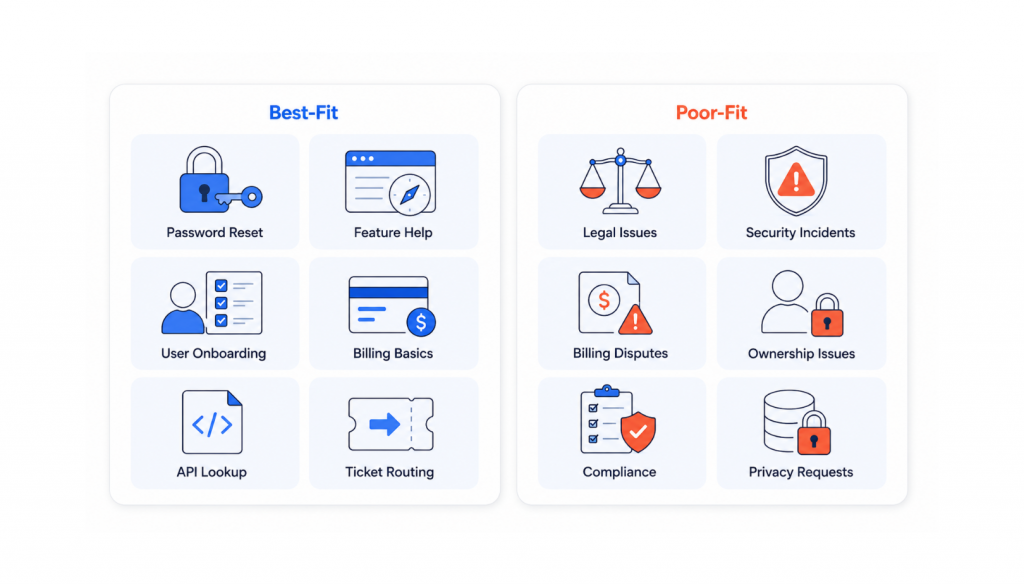
AI agents are not equally useful for every type of support request. They work best when the request is frequent, well-documented, and low-risk.
These tasks are repetitive and often follow predictable flows. They are good candidates for automation because the agent can resolve them quickly or collect enough context before escalating.
These cases may still start with AI, but they should quickly move to a human agent when confidence is low, risk is high, or the customer is frustrated.
SurveyMonkey’s 2026 customer service research found that 79% of Americans strongly prefer interacting with a human over an AI agent, and 89% believe companies should always offer the option to speak with a human. This is an important reminder: AI support should improve access to help, not trap users inside automation.
Not every AI support tool is built for SaaS. Before choosing a platform, evaluate whether it can handle the operational realities of a software business.
The agent should connect to your existing knowledge sources, such as:
The agent should also stay updated when content changes. If your pricing page, API documentation, or troubleshooting guide changes, the support agent should not keep giving outdated answers.
Good SaaS support often requires follow-up questions.
For example, if a user says, “My integration is not working,” the agent may need to ask:
An agent that asks the right clarifying questions is far more useful than one that immediately guesses.
The biggest difference between a basic AI assistant and a useful support agent is action.
A SaaS support agent may need to:
These workflows should be controlled carefully. Not every action should be automated, and sensitive actions should require verification or human approval.
Escalation should be designed from the beginning, not added later.
A strong handoff includes:
A poor handoff forces the customer to repeat everything. A good handoff makes the human agent faster and makes the customer feel understood.
SaaS users may ask for help through your website, app, help center, email, Slack community, WhatsApp, or other channels.
The goal is not to deploy separate bots everywhere. The goal is to maintain consistent answers and context across the places customers already use.
Zendesk’s 2026 CX Trends report says 76% of consumers would choose a company if they could share text, images, and video in the same conversation thread without restarting. This points toward a broader expectation: customers want support to feel connected, not fragmented.
An AI agent should show where it is helping and where it is failing.
Track:
These insights help support, product, and documentation teams improve together.
Most SaaS support teams are drowning in the same 40 questions, answered 400 times a month. YourGPT lets you build an AI agent that handles that load without writing a single line of code. Here is how to do it in five steps.

Sign up for YourGPT and create a new chatbot from the dashboard. You will be asked to choose a setup type: customer support assistant, product helpdesk, onboarding guide, or technical support bot. Pick the one closest to your primary use case. Starting with a focused scope typically delivers better results than trying to support every use case from the beginning.
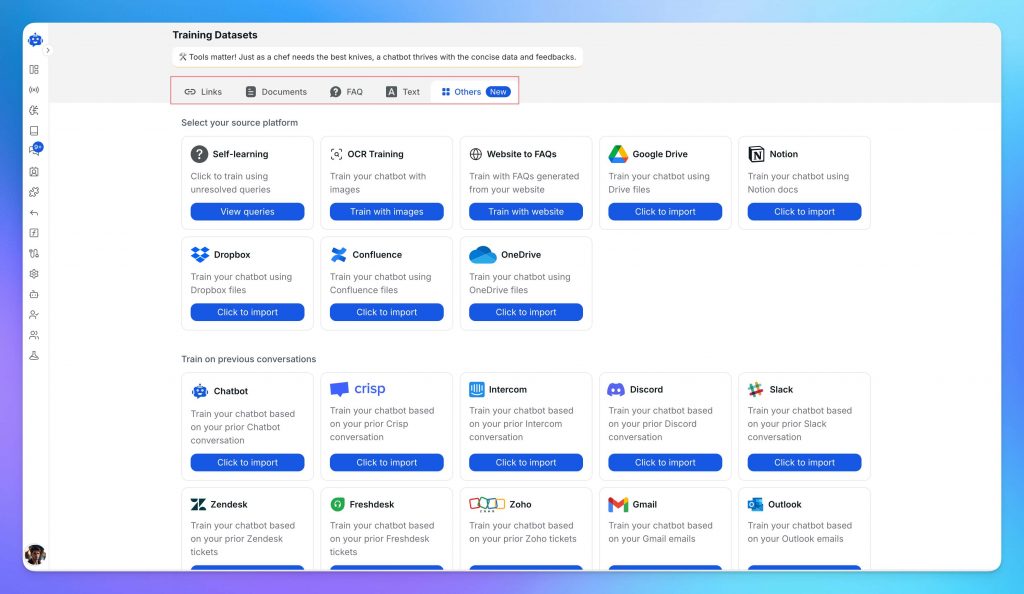
The agent is only as useful as what you feed it. Connect or upload your existing documentation:
One thing worth doing before this step: audit your docs for accuracy. If your help articles are six months out of date, the agent will reproduce that confidently. Fix the source material first, then train.
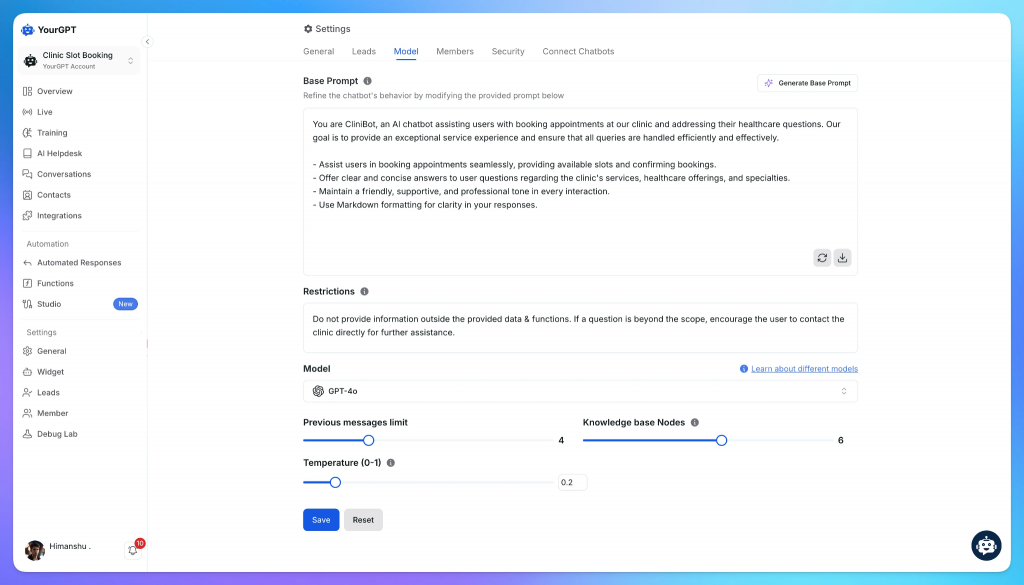
This step is really one decision: who is this agent, and what does it feel like to talk to it?
Start with purpose and tone. Write a short persona brief inside YourGPT that tells the agent what it is for, how it should communicate, and where its limits are. A SaaS support agent should be direct, helpful, and honest about what it does not know. It should use step-by-step formatting for how-to questions and escalate anything account-specific to a human.
Then set the visual layer to match. The name, welcome message, brand colors, avatar, and suggested starter questions should all reflect the same character you defined in the persona brief. If the persona is calm and professional, the welcome message should not read like a startup pitch. Consistency between voice and appearance is what makes the agent feel like part of your product rather than a bolted-on widget.
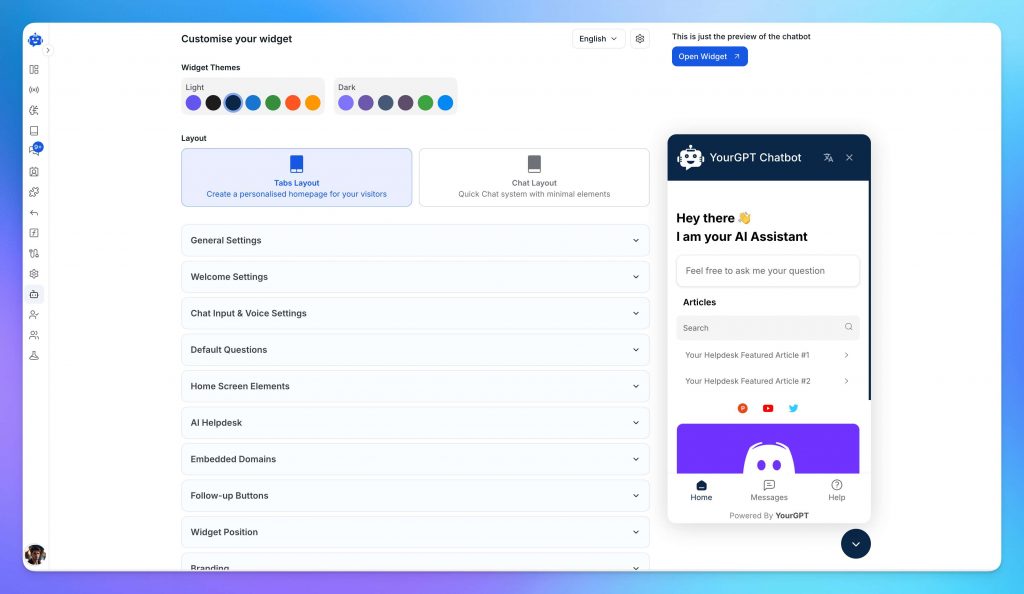
Before you deploy, decide what the agent handles on its own and what it escalates. This is where most teams underinvest.
At minimum, configure workflows for the scenarios your support team sees every day: answering product FAQs, guiding users through setup, surfacing help articles based on the query, collecting user details, creating support tickets, updating customer records, and retrieving information from the systems your team already uses.
For most SaaS companies, that means connecting the agent to platforms such as your CRM, help desk, billing system, product analytics tools, knowledge base, user management platform, and internal documentation. The goal is not just to answer questions, but to help users complete tasks without leaving the conversation.
The escalation path matters as much as the automated answers. An agent that cannot resolve an issue should be able to route the conversation to the right team, transfer context to a human agent, create a ticket, or trigger the appropriate workflow. Make sure every dead end leads somewhere useful and that users always have a clear path to human assistance when needed.
Deploy using YourGPT’s code snippet and place the agent where users actually need help: the dashboard, the pricing page, the onboarding flow, the help center. Not just the contact page.
Before going live, test it with the questions your team answers most. Try something transactional like “How do I upgrade my plan?” and something open-ended like “Why is my integration not working?” and something that should escalate like “I was charged twice last month.” If the answers are accurate and on-brand across all three types, you are ready. If not, the fix is almost always in the knowledgebase, not the model
Publishing is not the finish line. The teams that see ticket deflection climb month over month are the ones that review conversations regularly and update the agent when something changes: a new feature ships, pricing adjusts, a support ticket pattern reveals a gap in the docs.
The teams that set it and forget it watch the same failures repeat. A stale knowledgebase does not just produce wrong answers. It produces confident wrong answers. That is harder to recover from than no agent at all.
Onboarding is one of the most important moments in SaaS.
If a user signs up but fails to reach the first meaningful outcome, they may never come back. AI agents can help by answering setup questions, guiding users through product steps, and pointing them toward the right onboarding resources.
For example, if a user is trying to connect an integration, the agent can explain required permissions, common setup mistakes, and what to check if the connection fails.
This is especially useful for trial users who are still deciding whether the product is worth paying for.
Billing questions are common, repetitive, and often urgent.
Users may ask:
AI agents can handle many billing-related questions when policies are clear and systems are connected. However, refund disputes, failed payments, chargebacks, account ownership conflicts, and sensitive billing cases should have clear human escalation paths.
The right approach is not “automate all billing.” It is “automate routine billing support and escalate exceptions quickly.”
Developer-facing SaaS companies often receive technical questions that require accurate documentation.
AI agents can help developers understand:
The agent can link directly to the right documentation, provide examples, ask for missing context, and create an engineering ticket when needed.
Accuracy is critical here. If API documentation is outdated, the agent may produce outdated guidance. Developer support should be tested heavily before launch.
Many SaaS customers use only a fraction of the features available to them.
AI agents can help users discover relevant features in context. For example, if a user asks how to export a report manually, the agent can explain the export process and mention that scheduled exports may be available depending on the plan.
This should be helpful, not pushy. The goal is to connect users with useful functionality, not turn support into aggressive upselling.
AI agents can also support internal teams.
They can answer questions about:
This reduces repeated questions in Slack and helps new employees become productive faster.
Trial users often need fast answers before they commit.
They may ask:
An AI agent can answer basic evaluation questions, recommend relevant documentation, collect qualification details, and route high-intent prospects to sales.
This can improve conversion without forcing every trial user into a sales conversation.
Even the best AI support setup can fail if it is launched too quickly or without the right controls. Avoid these common mistakes when deploying AI agents for SaaS customer support.
The business case for AI support agents usually comes from four areas:
A simple ROI model might start like this:
| Metric | Example |
|---|---|
| Monthly support tickets | 3,000 |
| Average cost per ticket | USD 8–12 |
| Monthly support cost | USD 24,000–36,000 |
| Target automation rate | 30–50% |
| Potential monthly savings | Depends on quality and scope |
This model should be used carefully. Not every automated conversation equals a saved ticket. Some conversations still require review, escalation, or follow-up. The more useful measurement is successful resolution, not just deflection.
Track these metrics from day one:
Zendesk’s 2026 customer service statistics report says nearly 8 in 10 consumers find AI bots helpful for simple issues, while 70% of consumers believe there is a clear gap between companies that use AI effectively in customer service and those that do not. For SaaS companies, this makes resolution quality more important than automation volume alone.
For SaaS teams, an AI support agent should improve over time. The goal is to make it more accurate, more on-brand, and better at knowing when to solve an issue versus when to involve a human.
AI agents are becoming a practical support layer for SaaS companies because they address a real scaling problem: customers expect fast, accurate, always-available help, while support teams cannot grow endlessly with ticket volume.
The strongest use case is not replacing the entire support team. It is automating repetitive, well-documented questions; helping users during onboarding; routing complex cases with better context; and giving human agents more time for work that requires judgment.
The companies that benefit most will not be the ones that simply add a chatbot to their website. They will be the ones that treat AI support as part of their customer experience system: connected to documentation, integrated with workflows, monitored through analytics, and backed by clear human handoff.
For SaaS teams evaluating no-code options, YourGPT can be considered as one platform for building and testing an AI support agent without heavy engineering work.
Learn how to judge Shopify AI resolution rates with clear formulas, a worked example, ticket-level checks and practical ways to improve support quality.
TL;DR B2B customer service means supporting multiple people within the same account, including end users, admins, finance or procurement contacts, and executive sponsors, each with a different definition of a resolved ticket. Traditional support bots handle one conversation at a time and often lose account context when requests move between contacts, channels, or teams, forcing […]
TL;DR A vector embedding is a list of numbers that represents meaning, placing similar concepts closer together in a mathematical space. AI chatbots use embeddings to match questions by meaning rather than exact wording, which is a core part of retrieval-augmented generation (RAG). Anthropic recommends Voyage AI for embeddings, while OpenAI, Google, and Cohere provide […]

TL;DR An FAQ chatbot answers repetitive questions by matching user queries with a knowledge base and returning grounded responses using rules, AI retrieval, or both. Modern FAQ chatbots use confidence checks to deliver instant answers for strong matches and fall back to broader retrieval or human handoff when confidence is low. Rule-based bots work well […]
TL;DR Multimodal chatbots let customers share photos, screenshots, documents, video, or audio directly in a conversation, giving AI more context than text alone. YourGPT’s Attachment Capture node in AI Studio can collect these files mid-conversation, while vision-capable AI models can analyze and understand their contents. Key use cases include ecommerce returns, insurance and warranty claims, […]
A customer asks where their order is. A traditional bot pastes a tracking link and calls it done. An agentic system checks the carrier API, sees the shipment stuck at a depot, applies a credit under the delay policy, updates the CRM, and messages the customer before they’ve had time to get annoyed. Same question. […]