How to Automate Support Tickets with AI in 2026

Mitali
November 5, 2026
To automate support tickets with AI, create a YourGPT agent, train it on your business knowledge, and enable the actions needed to complete customer requests. Set the rules for when the agent should act, check with your team, or hand over, then test real support cases before deployment. Track completed requests and customer feedback so automation improves the support experience as well as response speed.
A customer asking for an invoice needs the document, not a reply saying someone will send it later. The same applies to a booking change or an account question: useful automation finishes the work the customer came to support for.
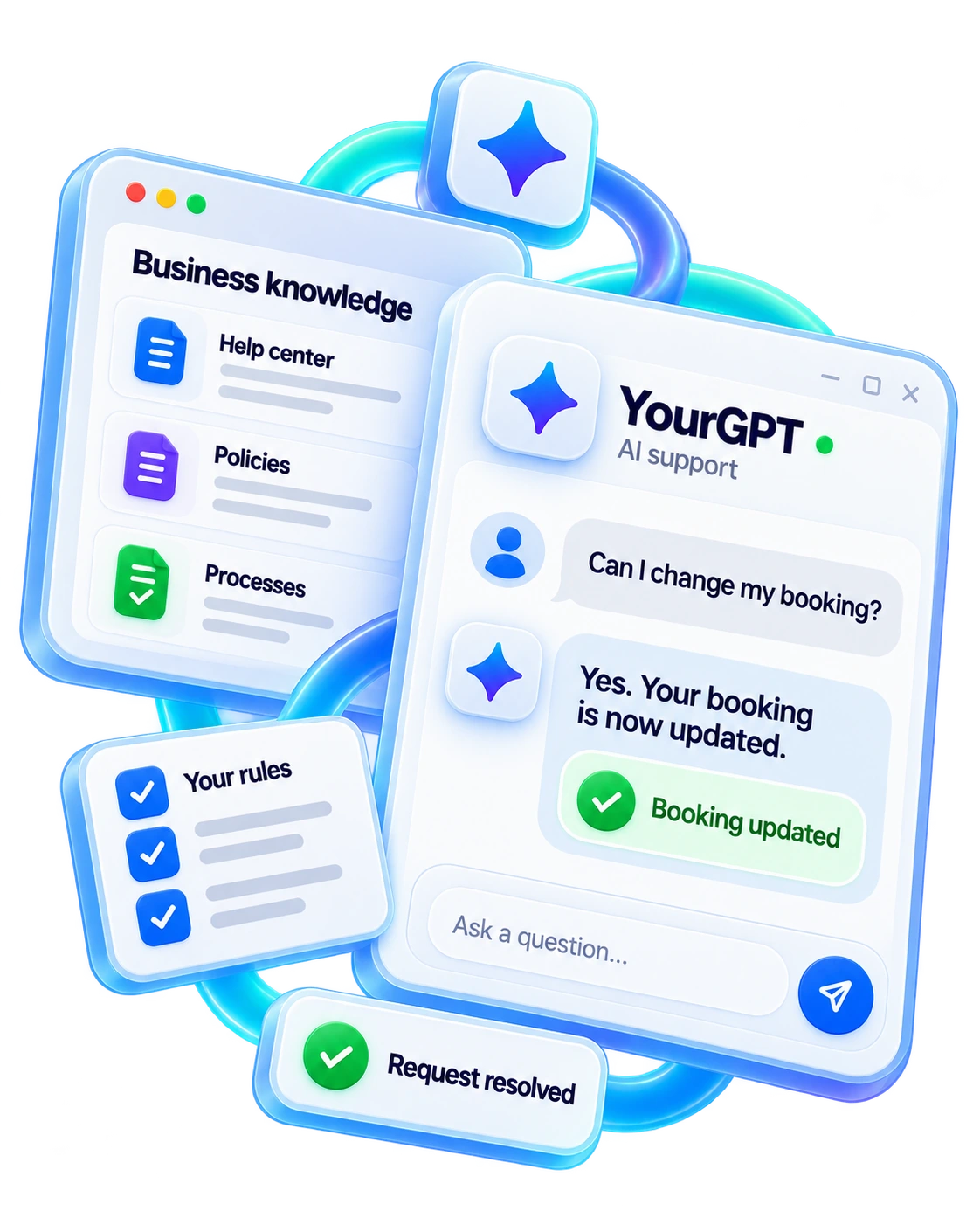
YourGPT is an AI-first, no-code platform for customer service, sales, and operational automation. Its agents use your business knowledge, policies, and connected tools to understand requests, take action, and resolve issues. YourGPT Autonomous AI has achieved over 90% resolution in production deployments. Results depend on the requests covered, the knowledge available, and the actions enabled for that deployment.
This guide follows the setup inside YourGPT, from choosing the first request type to testing its result. For the wider staffing, knowledge, and rollout plan, use our AI customer support implementation guide.
Review a representative set of recent requests in your ticketing system. Count the repeated issues, then identify what a completed request looks like for each one. “Billing” is too broad: sending an invoice, explaining a charge, and deciding a refund exception need different information and permissions.
Start with requests that occur often, have an approved answer or accessible record, and have a clear completion condition. Routine Tier 1 requests are useful candidates because your team can usually explain the expected answer, action, and exception.
Separate three kinds of work when setting the goal:
These outcomes should stay distinct in your reporting. A correctly routed billing request still needs its invoice or answer before it is resolved.
Swipe to view all columns.
| Customer request | Useful first automation | Keep a person involved when |
|---|---|---|
| How do I invite a teammate | Answer from the current product guide | The instructions fail or account permissions differ |
| Send my latest invoice | Verify access and retrieve the permitted invoice | Identity or account access cannot be confirmed |
| I was charged twice | Collect the relevant charge details and route to billing | A refund or exception needs approval |
| Our whole team cannot sign in | Capture impact and route to technical support | A possible incident needs investigation |
Choose one request type for the first release and keep related exceptions visible. For an invoice-copy request, define which account can receive the document, how the agent should share it, and what should happen if access cannot be verified.
Create your YourGPT agent and give it a clear support role. Add the information it needs to answer accurately before enabling customer-facing actions. Your support team can manage the knowledge, instructions, and review process through the platform.
Use your help center, product guides, billing policies, and other approved business content to build the agent’s AI knowledge base. YourGPT supports website links, documents, FAQs, and connected sources such as Google Drive and Notion.
For a website source, open Training, select Add New Link, paste the approved page, and add it. Check that processing succeeds before testing an answer from that page. To bring in several pages, use Training → Crawl and select Extract, then review the pages included.
Choose sources for the request, rather than uploading everything available. An old conversation containing a one-off refund exception should not become the policy for every customer. Remove contradictory instructions and assign someone to maintain the current source.
Knowledge explains what your business permits. Connected tools provide the account-specific facts needed to act. For example, the billing policy can explain who may request an invoice, while the connected billing record identifies the invoice belonging to the verified customer.
Do not put private account information into general training content to avoid connecting the right tool. The agent should use approved knowledge to explain the policy and permitted access to handle the individual request.
Use the agent’s Agent Prompt to describe the support role, the requests it should complete, and the limits that apply. Write the instructions in the language your support team uses. Save the changes, then test whether the agent follows them in a conversation.
For an invoice-support agent, a useful instruction is:
Help customers obtain the correct invoice for their account. Verify the required account access, use the approved billing action, and share the document through the permitted channel. Ask for missing information before acting. If access cannot be verified, the invoice cannot be found, or the customer disputes a charge, use the appropriate human-assistance route. Confirm the result before treating the request as complete.
The instruction names the goal and the decision points. The available knowledge and enabled tools make that goal possible; wording alone does not give the agent access to a billing system.
Define urgency using facts your team can check, such as blocked access, the number of affected users, or a documented deadline. An angry message may need a careful human response, but it does not automatically establish a service outage.
Keep the applicable support deadlines visible as the request moves between AI and your team. If a customer reports a potentially urgent issue, the agent should collect the missing impact details without delaying the appropriate escalation.
A message can ask for an invoice and dispute the charge at the same time. Completing the invoice lookup does not finish the dispute. Tell the agent how to handle the remaining issue and which team should own it.
Test follow-up messages too. If a customer changes their request, the next action should reflect the latest conversation, including anything already completed. This prevents a correct answer to an earlier message from becoming the wrong response now.
YourGPT agents can act on customer requests as well as answer questions. Give the agent the tools needed for the chosen support job, such as finding an invoice, checking an order, updating a booking, or saving approved customer information. The connected account and enabled actions determine what it can do.
Open Functions to manage the tools available to the agent. Enable the relevant capability and explain when it should be used in the agent’s instructions. Start with the operations your first request type needs, then test their results before adding more.
For an invoice-copy request, the agent needs to find the permitted document and share it through an approved channel. It does not also need permission to change a subscription or approve a refund. Use verified account context for private records; a customer typing an email address is not proof of access to that account.
When using a connected app action, choose the business app and its authorized connection, then enable the operations the agent should use. Confirm that the connected account has access to the right records and that the chosen action returns the information needed for the reply.
Run the action on a permitted test record and inspect what happened in the business tool. For a request that changes customer data, check the saved customer record before counting the action as complete. A reply saying “updated” is not evidence that the change was saved.
If an action fails or its outcome is uncertain, keep the request open for follow-up. Check what happened before repeating a booking change or sending a document again. A customer should receive an accurate explanation of the next step rather than an unsupported success message.
Start with a trained agent and the tools it needs. Use AI Studio when you need additional control over a multi-step request, specialist agents, or different outcomes for business rules.
Studio Copilot can help create and refine the workflow from a plain-language description. Describe the customer goal, the information needed, the permitted action, and the exceptions. Test the resulting behavior in the Emulator before deployment, including the paths that ask for help or stop an action.
Some requests need a small amount of human input; others need a person to take over. YourGPT supports both. Choose the route according to the work still needed, rather than transferring every unfamiliar question in the same way.
Enable Check with Team under Automation → Functions → System Functions. This lets the agent ask a teammate for missing information or a decision while continuing to own the conversation.
When a question appears in the conversation, the teammate can provide the answer, use Draft to prepare the reply, review it, and select Approve & send. This is useful for a policy clarification or an exception needing a business decision. Include the team’s contribution when reporting human-assisted resolutions.
Enable Request Human under Widget Settings → Follow-up Actions so customers can ask for a person. Use human escalation rules for issues such as a charge dispute, failed identity check, or request outside the agent’s permitted actions.
For advanced routing in AI Studio, Escalate to Human transfers control. Assign Member routes the conversation to a teammate but does not pause the agent. Choose the action that matches the intended handoff, then test that the receiving person can continue the request.
A useful handoff includes the customer’s goal, relevant account context, checks completed, action outcome, and the next decision. The person should not have to ask the customer to repeat information already provided.

Confirm who handles these requests during working hours and what customers should expect outside those hours. A notification alone is not a completed handoff; the request needs an available owner and a follow-up plan.
Use approved historical tickets or real support scenarios your team can verify. Keep some cases separate from the examples used to write the instructions. Review the answer, any action taken, and the final conversation state together.
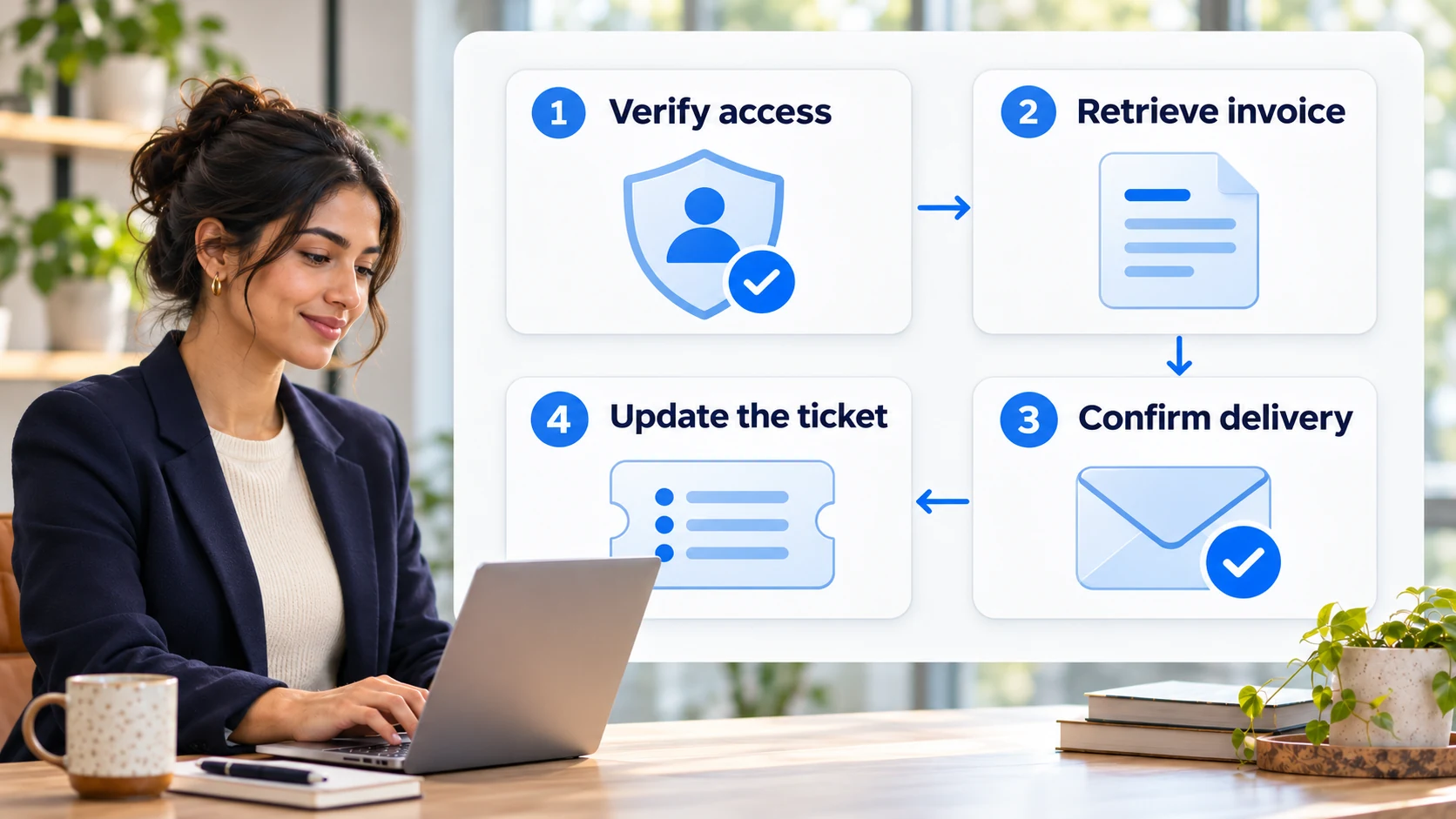
Consider a hypothetical customer asking, “Please send the latest invoice for our workspace.” With the relevant business connection and action enabled, the agent should:
The expected reply should say what actually happened. For example: “Your latest invoice is available at the secure link below. Please let me know if you cannot open it.” Insert the real, verified link when delivering that reply; the example is not a customer result.
Define the completion evidence for the request before testing. Your team might require explicit confirmation that the document opens, or another reliable delivery check supported by the channel. A send attempt by itself is not proof that the customer received the correct document.
Include the failures and exceptions your support team actually encounters:
Test instructions in customer messages or attachments that ask the agent to ignore its rules. They should not change what information it can reveal or which actions it may take. Keep any failing request type under review until the underlying issue is fixed and retested.
Connect the trained agent to the channel where the selected requests arrive. Use YourGPT’s Integrations area to choose the relevant website or messaging channel, complete its connection, and test a conversation there. Channel setup should be part of the release check, not an assumption based on the agent working in a preview.
Begin with the request types that passed the complete-case tests. Have a support owner review early conversations, repeat contacts, and escalations. If a result is wrong, correct the source, instruction, action, or routing responsible before widening coverage.
Once the first channel is reliable, expand to related request types or additional channels. YourGPT lets you use the same trained agent across support channels, while each connection still needs its own test. Check that the reply format, human-help route, and required business action work in the channel customers actually use.
For advanced workflows built in AI Studio, test in the Emulator before publishing the workflow. Keep your team informed about what the agent handles and who owns exceptions. Stopping an agent cannot undo an action already completed.
The first release shows where the agent needs better knowledge, clearer rules, or a different action. Review recurring exceptions by cause so the fix improves future requests instead of adding another generic instruction.
A missing answer needs an approved source. A failed action needs its connection or permissions checked. A policy exception needs a team decision. When reducing SaaS support tickets, feed recurring onboarding or product confusion back to the team that can remove the cause.
Use consistent definitions in your customer service metrics. Track verified resolutions, repeat contacts, handoff quality, customer feedback, and the human effort still needed.
Count an AI-only resolution when the agent completes the agreed customer goal without human work. Report requests involving Check with Team or a teammate’s review as assisted resolutions. A full human handoff belongs in its own group. These distinctions let you see how the platform resolves work and where your team still contributes.
To calculate an AI-only resolution rate, divide verified AI-only resolutions by all requests offered to AI and multiply by 100. Use the same request categories and follow-up window when comparing periods. Exclude requests that return with the same unresolved issue during that window.
Review cost alongside quality. A useful cost per ticket calculation includes platform usage, connected services, knowledge maintenance, and human review or assistance. Check whether customers get the right outcome, rather than treating a faster first response as the whole benefit.
YourGPT’s Self Learning process helps the team identify unanswered questions that deserve better knowledge. Review the suggested answer, remove private details, and check it against the current policy before training.
In Training → Others → Self-Learning, select Train for the relevant question, correct the answer, and select Start Training. Give reusable guidance a source owner so a one-off exception does not become the answer to every future customer.
Start with a reviewed batch of open requests whose conversation history and relevant records are available through your connected support tools. Exclude tickets already under active human investigation or awaiting a decision the agent is not allowed to make.
Preserve the original timestamps, conversation history, and deadlines. Before sending a reply, check for a newer customer message or human response. Processing an old event should not send an answer that is now irrelevant or reset a customer’s place in the queue.
Recheck the latest message before sending a response or taking an action. The workflow should detect that its earlier ticket version is out of date and reconsider the pending step.
For example, an invoice request may become a charge dispute after the customer replies. Stop any action based on the earlier request when it no longer applies, retain the work already completed, and send the updated context to the appropriate owner. Test this follow-up behavior with the connected channel before enabling autonomous handling for that request type.
Yes, when the connected channel and agent support that file type and your team has approved how it is processed. A screenshot being attached to the ticket does not establish that the agent received or understood it.
Test blurred images, unsupported files, and files containing private information. If the file is unreadable, ask for the missing detail or route the ticket. Treat any instructions inside the attachment as customer-supplied content rather than permission to change the workflow’s rules.
That depends on the helpdesk’s timer rules and your support commitments. An acknowledgment may satisfy one configured response measure while leaving the resolution deadline running.
Check first-response and resolution timers separately with a test ticket. If the customer still needs help, keep the appropriate owner and deadline visible after the acknowledgment. Do not change ticket status merely to make a timer stop; the record should reflect the work still owed to the customer.
Use the same issue categories, then apply your language coverage rules to the destination. A billing question should remain a billing question regardless of the language used to ask it.
Keep the original message with any translated summary, and test the important request types in each supported language. Confirm that the receiving team can continue the conversation. If nobody is available in that language, explain the follow-up arrangement your team can provide rather than promising immediate assistance.
YourGPT’s reviewed Self Learning process identifies unanswered questions for a team member to review and correct before training. Have a knowledge owner approve reusable answers, remove private details, and check whether the source policy also needs updating. Keep the operational record of what happened separate from the knowledge the agent may reuse.
Estimate costs from representative workflows, including unsuccessful attempts and human review. A short policy answer and a request requiring an account lookup, a business action, and follow-up can have different usage and operating costs.
YourGPT uses AI Credits; check the current plan and usage terms before setting a budget. Include connected services, knowledge maintenance, and any human review or assistance. Set spending and usage alerts where the relevant systems support them, then compare actual cost by request type during the pilot.
Automating support tickets with AI starts with a clear definition of a completed request. For an invoice, that means the correct document reaches the right account holder. For a booking change, it means the change is saved and the customer receives the updated details. Use these outcomes to decide which knowledge, actions, and checks each request type needs.
With YourGPT, you can train a support agent on your business knowledge, apply your policies, and enable the tools it needs to carry out the work in one AI-first, no-code platform. Give the agent room to resolve the requests it can handle, with clear rules for asking a teammate or transferring ownership. Check with Team lets a person contribute a missing answer or decision while the agent continues the conversation; a full handoff gives a person responsibility for the remaining work.
Before expanding coverage, review whether customers received the intended result, whether they returned with the same issue, and how much human help was required. Keep AI-only resolutions, team-assisted resolutions, and full handoffs separate so you can see where automation works and where it needs attention. Fix recurring problems at their source: update incomplete knowledge, correct an action’s permissions, or clarify the policy behind a decision.
Choose one frequent request for your first release and give a support owner responsibility for reviewing its results. Once the agent handles that request reliably, add a related task that can reuse the knowledge or actions you have already tested. Continue that review as coverage grows, so each expansion removes work from the queue while giving customers a dependable way to get their issue resolved.
Train your agent, connect its tools, and test the requests your customers need resolved.

A practical rollout plan for support teams covering scope, knowledge preparation, YourGPT setup, testing, launch gates, security, and honest ROI measurement.

TL;DR The shift. Current HR agents read a live leave balance from the HRIS, check it against policy, submit the request and route it to a manager inside one conversation. The gap. Most HR self-service stops at the answer. Employees are told the policy, then open a portal to act on it, and that is […]

Real estate growth starts with meaningful conversations. Every buyer, renter, or investor who visits your website is looking for quick answers about properties, pricing, availability, locations, viewing options, or the next step in their journey. YourGPT helps real estate teams turn those moments of interest into qualified leads. With an AI chatbot trained on your […]
TL;DR Instagram buyers who ask “price?” in a comment expect an answer within minutes. Manual replies usually arrive too late to make the sale. YourGPT AI can connect to your professional account in minutes, reply publicly to selected comments, send detailed answers by DM, and handle follow-up questions using your knowledge base. Meta allows one […]
Connect your website AI agent to a CRM with YourGPT. Capture lead details, map contact fields and verify the record your sales team will use.
Use YourGPT to help Black Friday shoppers choose products, check orders and understand returns. Prepare your answers and team before the sale.