Best WhatsApp WordPress Plugins for Support

Rajni
Last updated on July 13, 2026
WhatsApp plugins help WordPress websites respond faster, improve customer engagement, and turn more visitors into customers.
From simple chat buttons to AI-powered automation and WooCommerce support, the right plugin can make communication easier and more effective.
This guide compares the best WhatsApp plugins for WordPress in 2026 to help you choose the right option for your business.
WordPress powers your website. But once a visitor lands on it, how do you actually talk to them?
Most sites rely on contact forms or email. Both work but neither is fast. Customers today expect a response within minutes, not hours. When they don’t get one, they move on.
WhatsApp changes that. With over 2 billion active users, it’s already on your visitors’ phones. No sign-ups, no downloads, no learning curve. One tap and they’re talking to you directly on an app they use every day.
Adding WhatsApp to your WordPress site is one of the simplest ways to improve customer engagement right now. The challenge is picking the right plugin. Some are just a basic button. Others include AI automation, multi-agent routing, WooCommerce integration, and detailed analytics.
In this guide, we’ve tested and ranked the best WhatsApp plugins for WordPress in 2026 so you can find the right fit for your site, your team, and your goals.
Adding WhatsApp to your WordPress site gives visitors an instant, familiar way to reach you without any friction on their end. Unlike email or contact forms, it connects people through an app they already use every day, making it easier to get responses, build trust, and move conversations toward a decision.
Here is what a well-configured WhatsApp plugin actually delivers for your site:
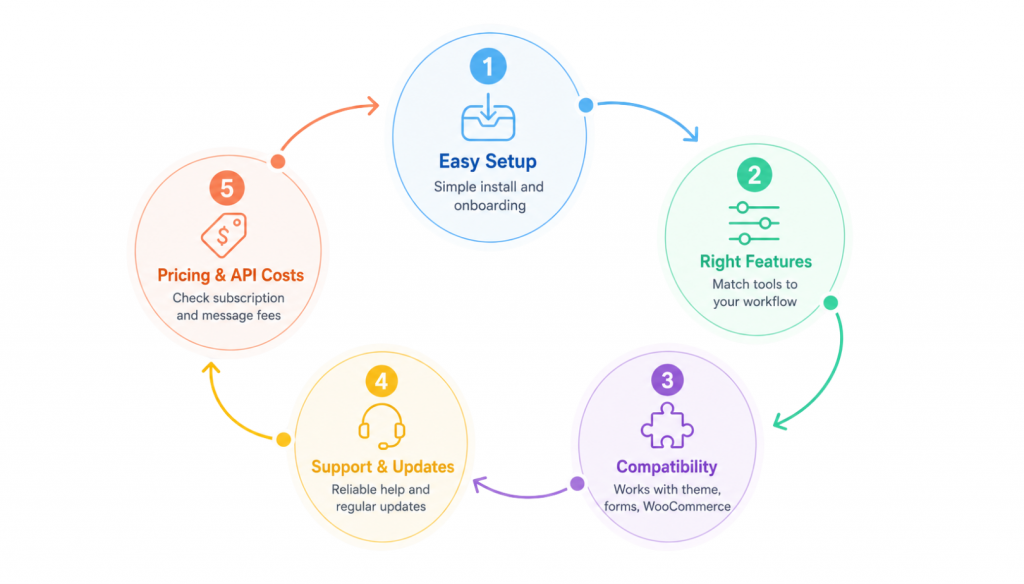
Choosing the right WhatsApp plugin starts with understanding your business goals and what you actually want WhatsApp to do for your site. The best plugin for a solo freelancer looks nothing like the right one for a 20-person support team. Before comparing options, use these five criteria to evaluate what matters for your situation.
A good WhatsApp plugin should be straightforward to install and configure without developer help. Look for clear setup instructions, a guided onboarding flow, and accessible support or documentation for when something goes wrong. If you need to dig through forums just to get the button showing up, that is a sign the plugin is not built for your use case.
Not all WhatsApp plugins offer the same capabilities. Some add a basic chat button. Others support automated notifications from your form builder or eCommerce store, team collaboration on incoming chats, AI-powered responses, and multi-channel messaging. Since the feature set varies significantly across plugins, it is important to match the plugin to your actual workflow rather than paying for capabilities you will not use or discovering a missing feature after you have already set everything up.
If you need your WhatsApp plugin to work alongside your theme, form builders, WooCommerce, or other tools already on your site, check compatibility before committing. The more tightly a plugin integrates with your existing setup, the easier it becomes to trigger notifications, sync customer data, and automate workflows without rebuilding anything from scratch.
A WhatsApp plugin is only as reliable as the team maintaining it. Regular updates are a positive signal: they indicate that developers are actively fixing bugs, adding improvements, and keeping the plugin compatible with the latest version of WordPress. Responsive support and clear documentation matter just as much, especially during setup. Checking the WordPress plugin directory and third-party review sites before committing gives you a realistic picture of how the team handles problems.
Pricing varies widely. Some plugins are completely free, others use a freemium model with optional upgrades, and some require a paid subscription from the start. For advanced use cases such as sending outbound messages or automating replies through the WhatsApp Business API, you will also pay per message depending on message type and the recipient’s country. These API costs are charged either by your API provider or directly by Meta, depending on the provider’s billing setup. Some providers also apply a 12% to 35% markup on the standard messaging rates. When evaluating any plugin, factor in both the subscription cost and potential API messaging charges to make sure the total aligns with your budget.
| Platform | Best For |
|---|---|
| YourGPT | AI support, sales, and workflow automation |
| Manychat | WhatsApp marketing and lead generation |
| AiSensy | Affordable WhatsApp campaigns |
| WATI | Team support on WhatsApp |
| Respond.io | Enterprise omnichannel messaging |
| DelightChat | eCommerce support and order management |
| Chaty | Simple WordPress contact widget |
Not every plugin suits every business. Below are the eight best options available in 2026, each chosen for a specific use case, budget, or team size, so you can match the right tool to your setup without wading through options that were never built for you.
Best for: Teams that want AI agents to automate support, sales, and operations by executing real actions across web chat and messaging channels.
YourGPT is a no-code AI platform designed for businesses that need to automate customer support, sales, and business workflows. It brings together chat, voice capabilities, and workflow automation in a single system, helping online stores handle customer interactions more efficiently with AI-first live chat without requiring technical expertise. It is trusted as a top-rated ecommerce chatbot.
Choose YourGPT if your chatbot needs to help resolve customer questions, support WooCommerce workflows, and connect conversations across multiple channels.
WordPress integration: Install the native WordPress plugin and connect your chatbot using the widget ID or website integration setup.
Best for: Businesses focused on WhatsApp marketing automation, lead generation, and conversational sales funnels across multiple social channels.
Manychat is one of the most widely used chat automation platforms for businesses that want to turn conversations into conversions. Originally known for Messenger marketing, Manychat has expanded heavily into WhatsApp automation, allowing brands to automate customer engagement, lead capture, abandoned cart reminders, promotional campaigns, and customer support from one visual automation builder. Its strength lies in creating highly interactive customer journeys without requiring coding skills.
You want to automate WhatsApp marketing, lead generation, customer engagement, and conversational sales funnels with an easy visual builder.
WordPress integration
Integrate Manychat with WordPress using chat widgets, embedded forms, automation triggers, and WooCommerce integrations for customer engagement workflows.
Best for: Indian businesses and growing brands that want affordable WhatsApp marketing, broadcasts, and sales automation using the official WhatsApp Business API.
AiSensy is a WhatsApp engagement and marketing platform built around the official WhatsApp Business API. It is especially popular among D2C brands, eCommerce stores, coaching businesses, and service companies that rely heavily on WhatsApp communication for sales and customer engagement. The platform simplifies bulk campaigns, automated workflows, customer segmentation, and support conversations while remaining accessible for non-technical teams.
You want an affordable WhatsApp Business API platform focused on marketing campaigns, customer engagement, and sales automation for growing businesses.
WordPress integration
Connect AiSensy to WordPress and WooCommerce using API integrations, WhatsApp widgets, and automation workflows for customer communication.
Best for: Medium to large businesses that need scalable team collaboration, customer support automation, and enterprise-grade WhatsApp Business API management.
WATI is one of the most recognized WhatsApp Business API platforms built specifically for customer support and team collaboration. It enables businesses to manage large volumes of WhatsApp conversations with shared inboxes, automation tools, chatbot builders, and agent routing systems. WATI is especially popular among support-heavy businesses and growing eCommerce brands that need organized team workflows around WhatsApp communication.
WordPress integration
Connect WATI to WordPress and WooCommerce using WhatsApp widgets, APIs, chatbot flows, and automation integrations.
Best for: Businesses that need enterprise-level omnichannel messaging, workflow automation, and centralized customer communication management.
Respond.io is an enterprise messaging platform designed to centralize customer conversations across WhatsApp, Instagram, Messenger, Telegram, email, and other communication channels. Unlike simple WhatsApp plugins, Respond.io focuses heavily on workflow automation, CRM integrations, sales pipelines, and advanced routing systems that help businesses manage large-scale customer engagement operations efficiently.
WordPress integration
Integrate Respond.io with WordPress using embedded chat widgets, APIs, CRM workflows, and automation triggers.
Best for: eCommerce brands that want WhatsApp-powered customer support, marketing, and order management from a single dashboard.
DelightChat is designed specifically for eCommerce businesses that manage customer conversations across WhatsApp, Instagram, Facebook, and email. It combines customer support, order tracking, marketing automation, and team collaboration into one simplified platform. Its eCommerce-first approach makes it particularly useful for Shopify and WooCommerce stores that want a centralized customer engagement system.
WordPress integration
Integrate DelightChat with WordPress and WooCommerce for order support, customer conversations, and WhatsApp engagement workflows.
Best for: Businesses with an active presence across multiple social and messaging platforms who want a simple WordPress widget that lets visitors choose their preferred communication channel.
Chaty is a lightweight multi-channel communication widget designed for businesses that want to offer customers multiple contact methods from a single floating button. Instead of focusing only on WhatsApp, Chaty allows visitors to connect through WhatsApp, Messenger, Instagram, Telegram, phone calls, email, and many other channels. It works particularly well for websites that need fast setup, strong customization, and minimal technical complexity.
WordPress integration
Install directly from the WordPress plugin directory and configure channels, display behavior, and widget design through the WordPress dashboard.
| Platform | Best For | Main Strength | WhatsApp Use Case | WordPress Fit | Best Choice For |
|---|---|---|---|---|---|
| YourGPT | AI support, sales, and workflow automation | AI agents that answer questions and execute business workflows | AI-powered customer support, WooCommerce support, and omnichannel conversations | Strong fit with native WordPress chatbot integration | Teams that want advanced AI automation beyond a basic WhatsApp widget |
| Manychat | WhatsApp marketing and lead generation | Visual automation builder for marketing funnels | Broadcasts, lead capture, abandoned cart flows, and customer journeys | Good fit through widgets, forms, and WooCommerce automation | Brands focused on WhatsApp campaigns and conversational sales funnels |
| AiSensy | Affordable WhatsApp campaigns | WhatsApp broadcasts and official API-based campaigns | Bulk messaging, sales automation, order updates, and campaign targeting | Good fit for WooCommerce and WhatsApp-first businesses | Indian businesses and growing brands that need budget-friendly WhatsApp marketing |
| WATI | Team support on WhatsApp | Shared inbox, team routing, and WhatsApp Business API management | Support automation, broadcasts, notifications, and multi-agent handling | Good fit through widgets, APIs, and WooCommerce workflows | Medium to large businesses with support teams managing high WhatsApp volume |
| Respond.io | Enterprise omnichannel messaging | Advanced workflow automation and centralized customer communication | WhatsApp support, CRM workflows, sales routing, broadcasts, and lifecycle tracking | Best for advanced setups using widgets, APIs, and CRM integrations | Enterprises that need omnichannel support, automation, and team routing |
| DelightChat | eCommerce support and order management | Commerce-focused support inbox with order context | Order tracking, support replies, broadcasts, FAQs, and customer history | Strong fit for WooCommerce and online stores | eCommerce brands that want WhatsApp support and order visibility in one dashboard |
| Chaty | Simple WordPress contact widget | Lightweight multi-channel floating widget | Let visitors contact you through WhatsApp, Messenger, Telegram, Instagram, email, or phone | Excellent fit for simple WordPress widget setup | Websites that need a fast, simple, non-AI contact button |
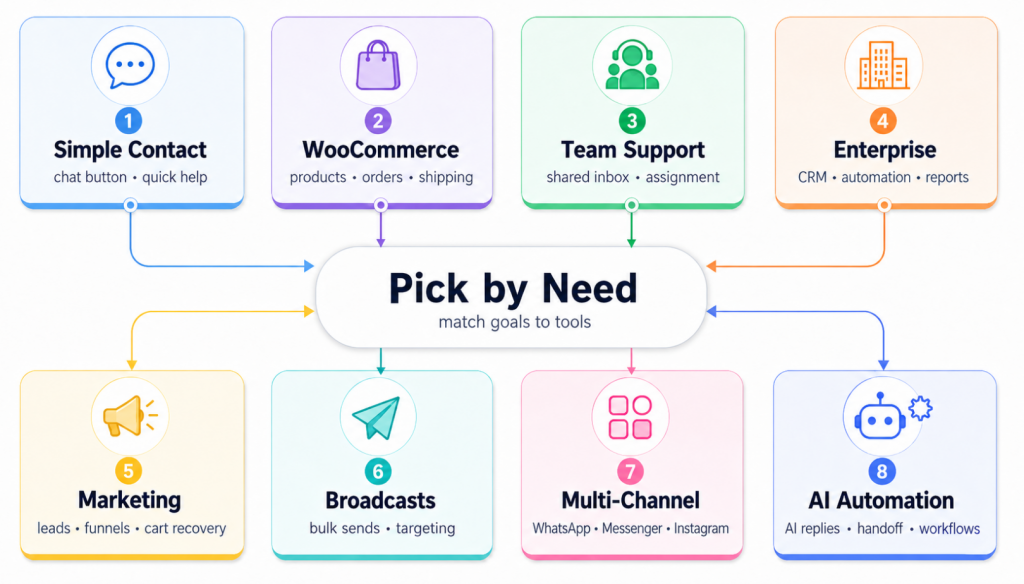
Choose based on your main goal: simple contact, WooCommerce support, team collaboration, enterprise customer engagement, marketing, broadcasts, multi-channel messaging, or AI automation.
The best option depends on your goal. Choose a simple widget for basic contact, a WhatsApp API platform for campaigns, a shared inbox for team support, or an AI-powered tool if you want automated replies and workflows.
You only need the WhatsApp Business API if you want broadcasts, automation, team inboxes, templates, or large-scale customer messaging. For a basic click-to-chat button, a normal WhatsApp number is usually enough.
WooCommerce stores should look for product question automation, order tracking, shipping updates, return support, and customer history inside conversations.
Yes. They make it easier for visitors to ask pre-sale questions, get quick answers, receive product help, and continue the conversation after leaving the website.
Small businesses should start with a lightweight WhatsApp widget if they only need direct contact. If messages grow, they can move to a shared inbox or automation platform.
WhatsApp has become a key customer engagement channel for WordPress websites. Visitors use it to ask questions, compare products, check orders, request support, and make faster buying decisions.
The best plugin depends on your goal. A simple widget works for basic contact. A marketing platform helps with campaigns and lead capture. A team inbox is better for support teams. For stores, WooCommerce workflows and order context matter most.
Used well, WhatsApp can reduce response time, build trust, and make your website easier to reach. Start with the tool that fits your current needs, test it on your key pages, and track how visitors respond.
For businesses that want support automation, WooCommerce assistance, omnichannel messaging, and workflow control in one place, YourGPT is a better choice. It helps answer customer questions faster and turns conversations into useful business outcomes.
Engage visitors, answer questions, and capture leads instantly with YourGPT’s AI-powered WhatsApp chatbot for WordPress.

Compare six Yuma alternatives by ecommerce capabilities, helpdesk compatibility, pricing and human handoffs to choose a replacement for your support team.


Move from Gorgias with a verified ticket archive, tested AI workflows, human handoff and a channel cutover plan before ending your subscription.


TL;DR The Gorgias AI Agent is the automation layer inside the Gorgias helpdesk, split between a Shopping Assistant for pre-purchase conversations and a Support Agent for post-purchase support. A connected Shopify store is required, and Gorgias documentation rules out platforms such as BigCommerce, Magento, and WooCommerce for the AI Agent. Billing runs on two separate […]

TL;DR Gorgias is the closest Richpanel alternative for Shopify stores that need native order actions directly inside support tickets. YourGPT fits stores that want one AI agent handling requests across web, WhatsApp, Instagram, and email, while Tidio and Re:amaze suit smaller teams looking for lighter, lower-cost options. Richpanel’s AI pricing starts around $500/month for two […]

TL;DR Shopify Inbox is a good free option for stores that only need basic storefront chat and simple customer conversations. Stores usually look for alternatives when they need multichannel support, stronger team workflows, or automated order actions. YourGPT is strongest for cross-channel AI automation, Gorgias for Shopify-native order workflows, and Tidio for smaller stores that […]

TL;DR Tidio recently restructured its top paid plan, and many 2026 reviews still describe the old pricing model. Confirm current pricing directly on Tidio’s site before budgeting. Lyro, Tidio’s AI agent, runs on Anthropic’s Claude rather than ChatGPT. Only the Premium tier carries a guaranteed resolution rate, well below the average Tidio advertises elsewhere. Billing […]