Shopify Chatbot Complete Guide 2026: Architecture, Apps & Setup

Rajni
Last updated on September 3, 2026

A Shopify chatbot architecture is how the bot decides what it can answer and what it can change. A rule based chatbot follows a scripted tree. A knowledge chatbot answers published pages. A storefront shopping agent writes to the live cart. An order and return agent looks up one order after two fields match. A helpdesk or portal AI finishes work in an inbox or a login.
Every successful Shopify store eventually reaches a moment where growth depends on how fast and better you support, not how much you sell. A customer who gets help in minutes is far more likely to buy than one waiting for a reply. That’s where intelligent ai agents has quietly become the new standard for ecommerce support.
An AI agent built for Shopify does more than answer questions. It helps customers compare products, check stock, or continue a checkout they paused earlier. It creates the feeling of personal attention without adding more people to your team.
The latest generation of Shopify chatbots is trained to understand what customers mean, not just what they type. They draw from your store data in real time and respond with accuracy that builds trust. The result is faster resolutions, smoother conversations, and higher conversions across every channel.
In this blog, we’ll be Understanding what are shopify chatbot, the underlying architecture helps you choose the right platform and configure each capability safely.
A Shopify AI agent is an automated customer service system on the storefront. It reads shopper intent in natural language and answers from store data, not from a fixed button tree.
Traditional ecommerce chatbots followed rigid decision trees with predefined buttons and scripted replies. When a customer asked a question outside the script, the conversation stalled.
A Shopify AI agent connects a language model to your catalog, policy pages, and backend APIs. It interprets an open-ended question, checks verified store knowledge, and answers in the shopper’s current session.

A Shopify AI agent checks visitor intent against live store data and business rules before it takes a storefront action or escalates to a person.
Inside a storefront shopping agent, three operational layers coordinate the work:
The storefront AI agent architecture guide shows how those three layers coordinate inside one shopping agent. The section below outlines the five chatbot architectures available to ecommerce stores.
Architecture is the system behind the bubble. It decides whether the chatbot follows a script, answers from trained pages, changes the cart, looks up an order, or finishes the work in an inbox.
Shopify stores usually run one of these five types. A store can use more than one in the same conversation. Naming the type first keeps the later app section a fit check, not a feature parade.
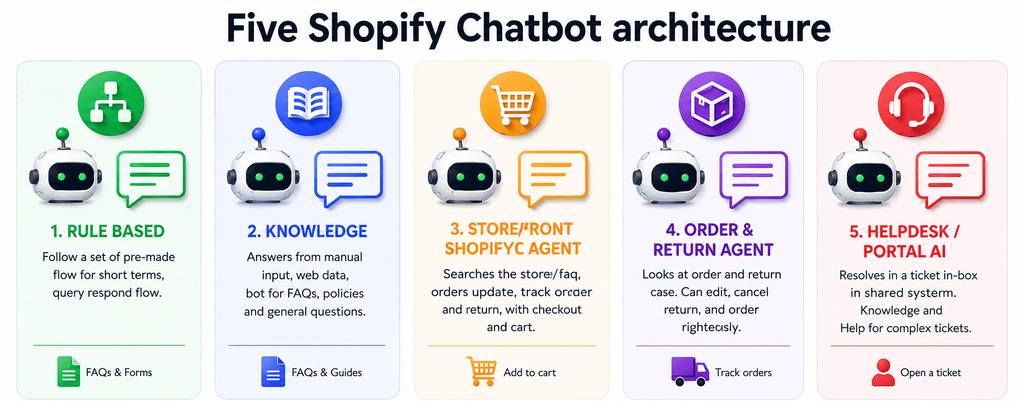
Architecture is how the chatbot decides what it can answer and what it is allowed to change.
A rule based chatbot follows a path you wrote in advance. The shopper taps buttons or matches a keyword. The bot replies with the line attached to that branch.
This is the right architecture for a short menu. “Track an order” can open a form. “Talk to support” can open a ticket. If the shopper types a question the tree does not cover, the conversation stops.
It cannot read a new policy page unless you add a new branch. It cannot add a variant to the cart unless you coded that exact button.
A knowledge chatbot answers from pages and text you trained. Shipping rules, return windows, size charts, and FAQs belong here.
This is the right architecture when the shopper asks “what is your return window.” It quotes published facts. If the same shopper then asks “where is my order,” this type can only quote the shipping page. It cannot see the order. It cannot write to the live cart.
When the written policy changes, the source has to be trained again. A catalog update does not refresh a paragraph on a returns page.
A storefront shopping agent sits on the theme and talks to the shopper’s real cart. It searches the live catalog, shows product cards, reads variants, and adds the selected variant to that cart.
This is the right architecture when the shopper asks “add the navy jacket in M.” A knowledge chatbot can describe the jacket. Only this type can put the right size in the cart.
It still cannot open a private order. If the catalog feed is stale, the agent is shopping yesterday’s inventory.
An order and return agent looks up fulfillment or return eligibility from order records. Those records are customer data, so this is a different architecture from a storefront shopping agent.
This is the right architecture when the shopper asks “where is order 1042.” The bot should match the order number to the email or phone on that order before it returns tracking or return eligibility.
Importing customer names and emails is not this architecture. Contact details are not order history.
A helpdesk or portal AI finishes the work outside the storefront bubble. The conversation lives in a shared inbox, or the shopper signs in and starts a return on an account page.
This is the right architecture when humans already work in tickets, or when post-purchase work should happen after login. It can draft a reply next to the order. It is not a storefront cart agent.
A storefront chatbot still needs a path to a person when the automated path cannot finish the ticket.
Once you know which type you need, the apps below are a fit check. You are matching a product to one of those five jobs.
Adding an AI chatbot to your store transforms how you handle customer questions, pre-purchase doubts, and order management. Instead of routing every question to an email inbox or ticket queue, an automated agent handles repetitive tasks and assists shoppers throughout their browsing session.
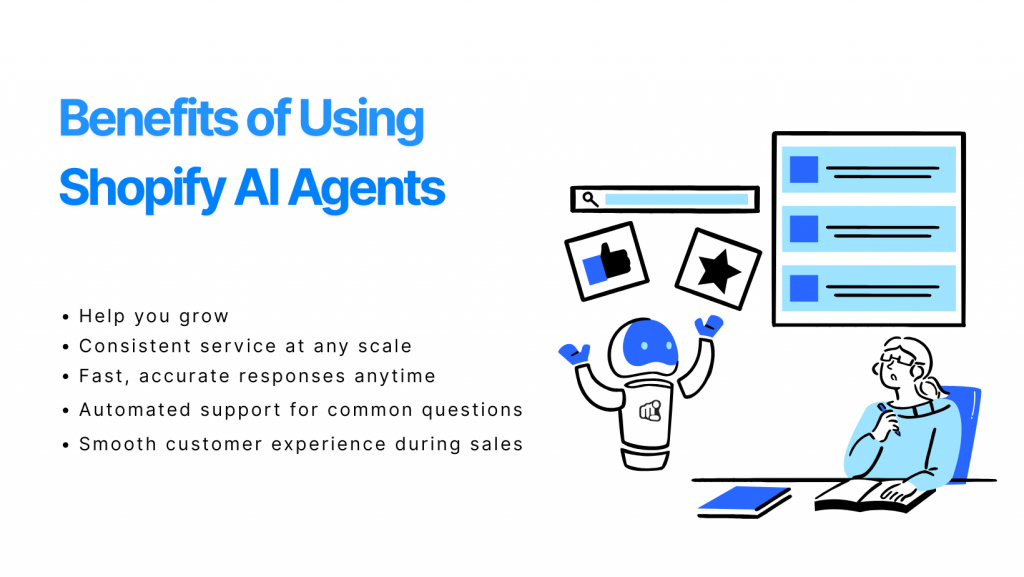
The architecture decides the buy. A store that needs a storefront agent, a shared inbox, or a shopper login portal is not shopping for the same product.
Each card below covers catalog work, order work, homepage fit, tradeoffs, and the official price on 27 August 2026.
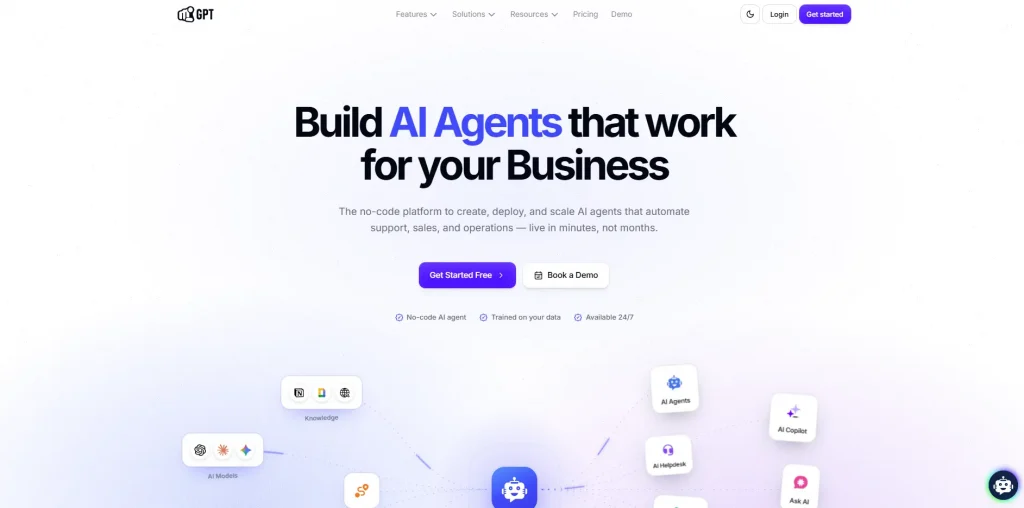
YourGPT is a no-code AI agent platform[](https://yourgpt.ai/) for building and deploying customer-facing AI agents across support, sales, and operational workflows. For Shopify stores, it connects directly with store data and operations, so businesses can add AI-powered shopping and support. Product and customer webhooks keep Shopify data current, while AI Copilot Actions let the agent take real actions such as updating a shopper’s cart or retrieving protected order information.
With the YourGPT Shopify integration, stores can use AI agents for pre-purchase support, product and variant recommendations, in-chat cart actions, and order tracking. The same agent can run across the storefront, WhatsApp, Instagram, and voice while using consistent business knowledge and workflows across channels. Shopify and YourGPT are billed separately, and the Shopify integration has no additional connector fee on any YourGPT plan.
SHOPIFY_TOKEN to add a variant to the live cart.On 27 August 2026 the annual plans are Essential at $39 a month, Professional at $79, and Advanced at $349. The monthly list is $59, $129, and $499. Each plan includes an AI credit pool. Extra credits are sold as add-ons when the cap is hit.
Fit for a storefront agent that should quote a policy, add a variant to the live cart, and look up one verified order on one credit pool. Not a replacement for a shared human inbox your team already lives in.
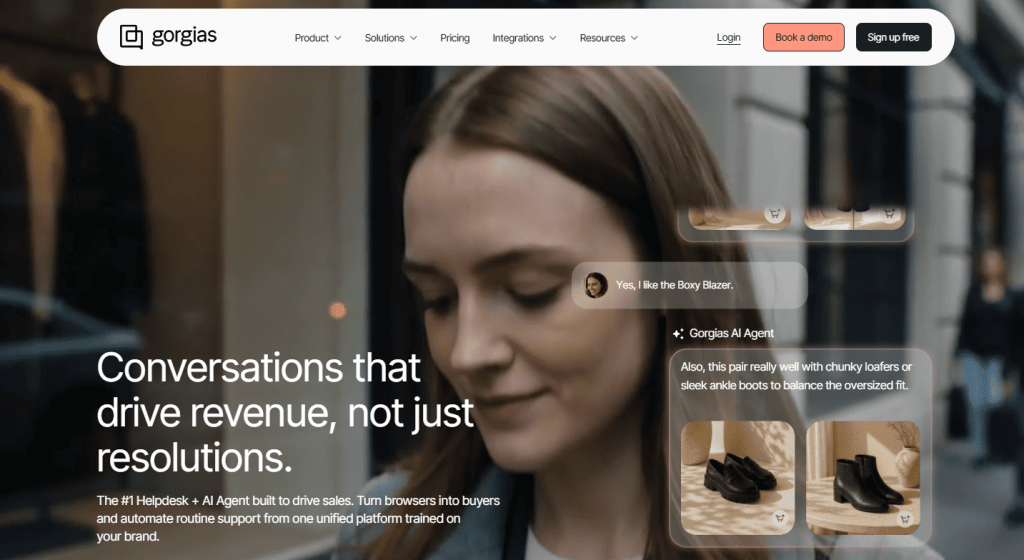
Gorgias is an ecommerce helpdesk built for Shopify stores. Ticket management and an AI Agent sit on the same bill. Email, live chat, SMS, and social land in one shared inbox.
Inside a ticket, a human can see order history, edit the order, issue a refund, or adjust a subscription without leaving the desk. The AI Agent automates common post-purchase questions.
On 27 August 2026 Gorgias pricing lists Starter at $40 a month with 50 tickets and 30 automated interactions. Ticket overage is $0.40. AI overage is $1.50 per automated interaction.
Basic annual starts at $77 a month. Pro annual starts at $471.
Fit when support already runs in a Shopify helpdesk and humans need that inbox tomorrow. You are buying two meters in a sale week. A Gorgias alternatives matrix helps if the inbox itself is still the open question.

Richpanel is an ecommerce customer service platform that pairs a helpdesk seat with a shopper login portal. After sign-in, the shopper can view tracking, start a return, or request an exchange through the portal instead of opening a chat.
The seat has no per-ticket fee. AI is billed per conversation thread, not per message. A returns and exchanges add-on sits on top. The fit is post-purchase account work, not mid-chat variant search and a live cart write.
On 27 August 2026 helpdesk seats are $99 per seat per month. AI Agents are $0.20 per AI handled conversation. The self-service portal is included. Returns and Exchanges start at $99 a month.
Fit when post-purchase work should finish in a login portal or a seat-based inbox. Not the pick when the shopper is still on the product page and needs a variant in the real cart.
| Platform | Primary architecture | Storefront cart actions | Order management method | Pricing on 27 August 2026 |
|---|---|---|---|---|
| YourGPT | AI Native Platform with self Learning | Direct in-chat cart actions and variant search | Authenticated two-field Admin API flows in AI Studio | Credit pool. Essential $39 a month annual |
| Gorgias | Ecommerce ticketing helpdesk | Helpdesk and chat campaigns | Inbox plus Actions on Basic and above | Tickets plus $1.50 AI overage |
| Richpanel | Customer portal and helpdesk seats | Links out of the portal | Logged-in tracking and returns | $99 a seat plus $0.20 per AI conversation |
The ecommerce AI chatbot comparison widens the field if the store is not Shopify-only, while our guide to essential Shopify apps helps evaluate other core tools for your store stack.
Merchants picking an AI support system care about speed, flexibility, and a bill that stays predictable as order volume grows.
YourGPT holds those advantages on a Shopify store:
Once you have selected your platform, run the install in this order. Use How to Add an AI Chatbot to Shopify when you need the full click path.
Train the agent first, customize the widget appearance, sync the live catalog, and enable cart or order actions once those sources are verified.
Open Training. Use Add New Link, or open Training → Crawl, enter the store URL, and select Extract.
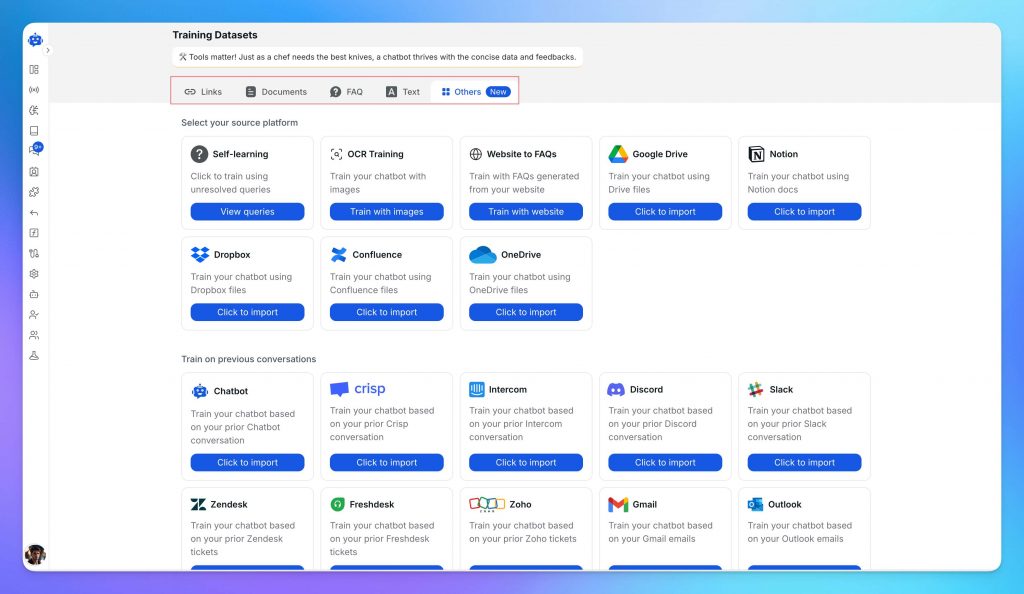
Add shipping, returns, size charts, and FAQs & Text for answers that have no page. Skip campaign landing pages. A written policy still needs a Training refresh when the terms change. Use train an AI chatbot on your data if the sources themselves are the open question.
Open Settings → Widget. Set the avatar, accent color, and position. In Welcome Settings, say the visitor is talking to an AI agent.
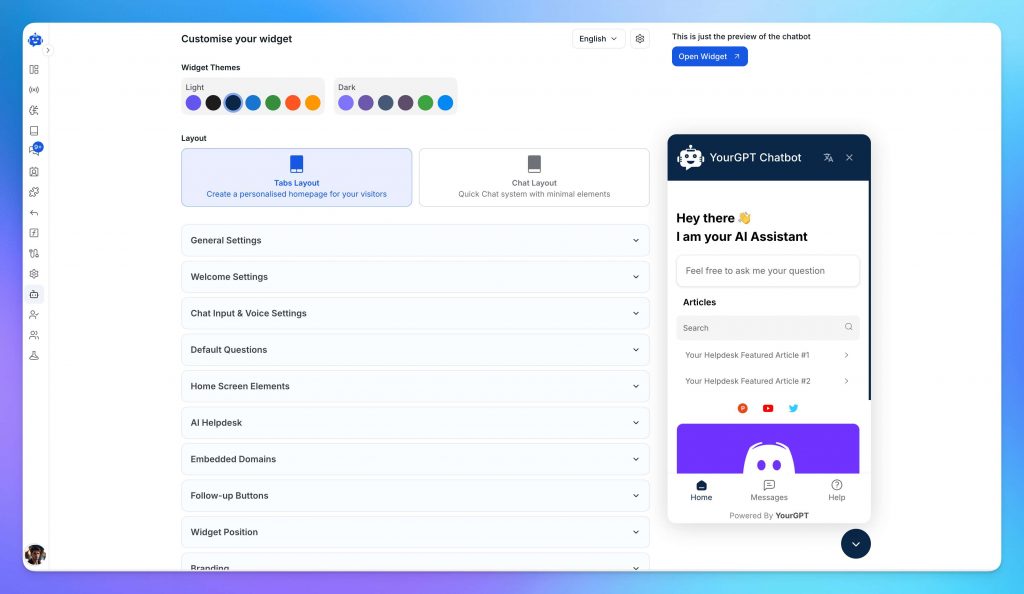
Add three or four Default Questions from real tickets, then set Follow-up Buttons.
Open Webhooks & Synchronization, select the Products tab, and turn on Real-time Sync. Copy that webhook URL.
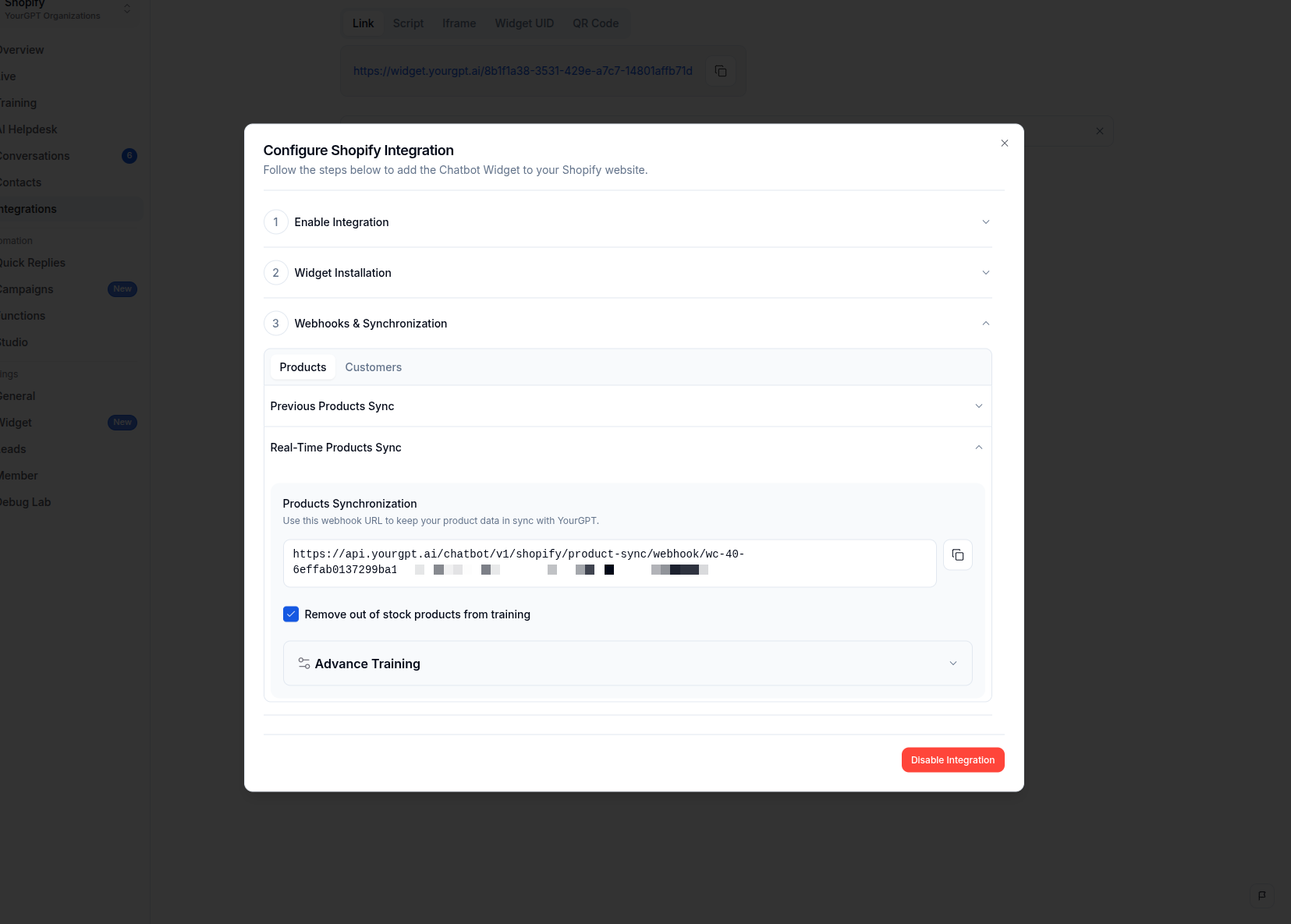
Paste it in Shopify Settings → Notifications → Webhooks for product create, update, and delete. Product pages must be public. Customer sync imports name, email, and phone only. When the ticket requires live order tracking after synchronization, follow the real-time Shopify order and product guide.
Switch to Agent Mode in Settings → Mode. Then open Functions → AI Copilot Actions → Shopify. All five actions turn on together and write to the shopper’s real cart.
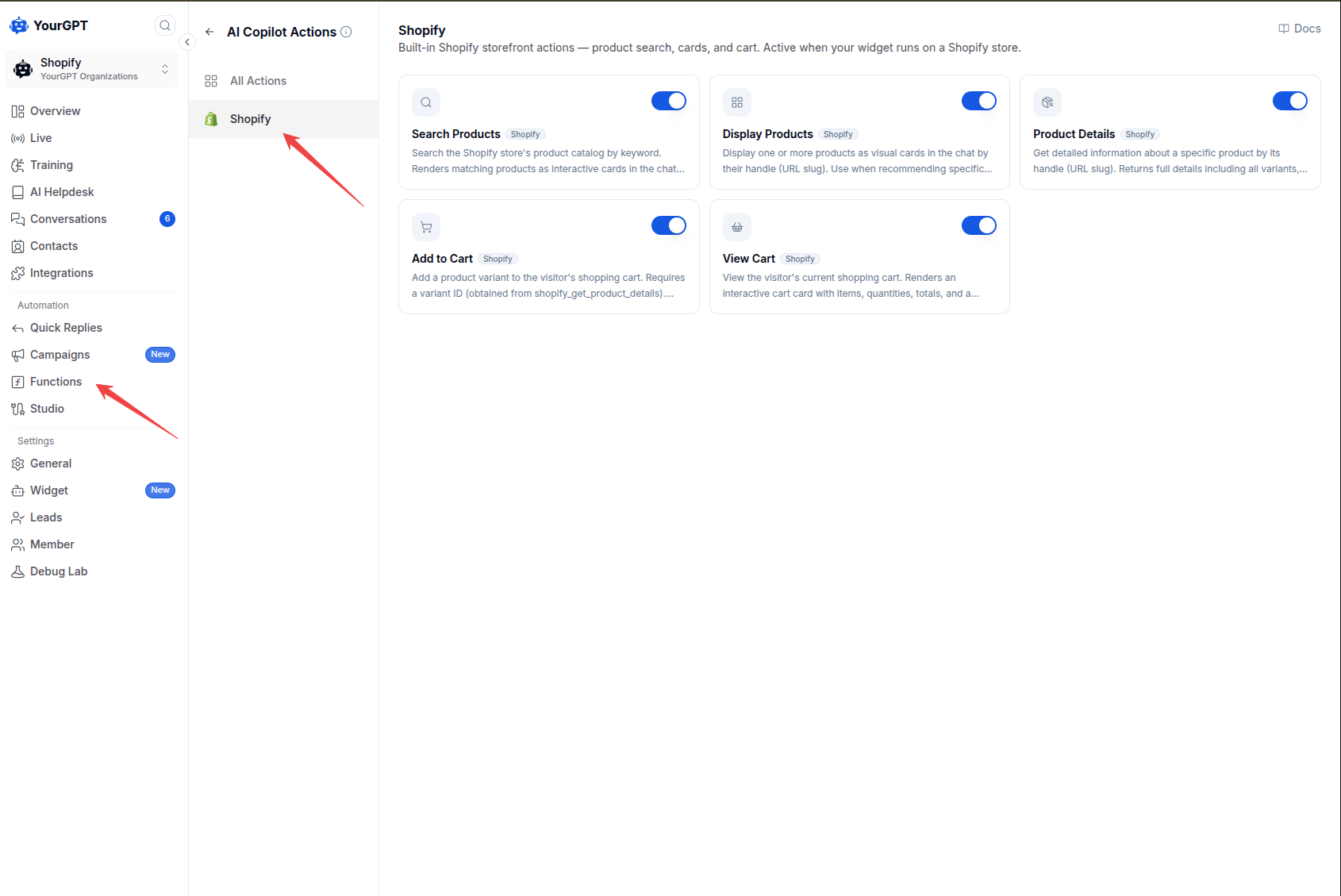
You do not paste SHOPIFY_TOKEN for cart work.
If you want to enable order lookup, import the Shopify template in AI Studio. Set SHOPIFY_ENDPOINT to your myshopify.com domain and SHOPIFY_TOKEN to your Shopify Admin API access token.
Then test the Order Status workflow in the Emulator, including cases where the customer enters an incorrect email. If the order cannot be verified, the flow can use Escalate to Human.
Keep SHOPIFY_TOKEN securely inside AI Studio. Do not add it to theme.liquid or any storefront script. Shopify theme scripts also do not run on checkout pages.
Open Integration and copy the widget script.

Duplicate the live theme. On that copy, open Online Store → Themes → ⋯ → Edit code.

In the left file list, open Layout → theme.liquid.

Paste the script once, above </body>. Do not also add it in Customize → Custom Liquid.

The boundaries below decide what that install is allowed to finish in the bubble.
Automated customer service works reliably only when strict operational boundaries dictate what the agent handles autonomously and what requires human review.
Without clear boundary rules, language models risk making unauthorized commitments regarding refunds, shipping exceptions, or custom policy overrides.
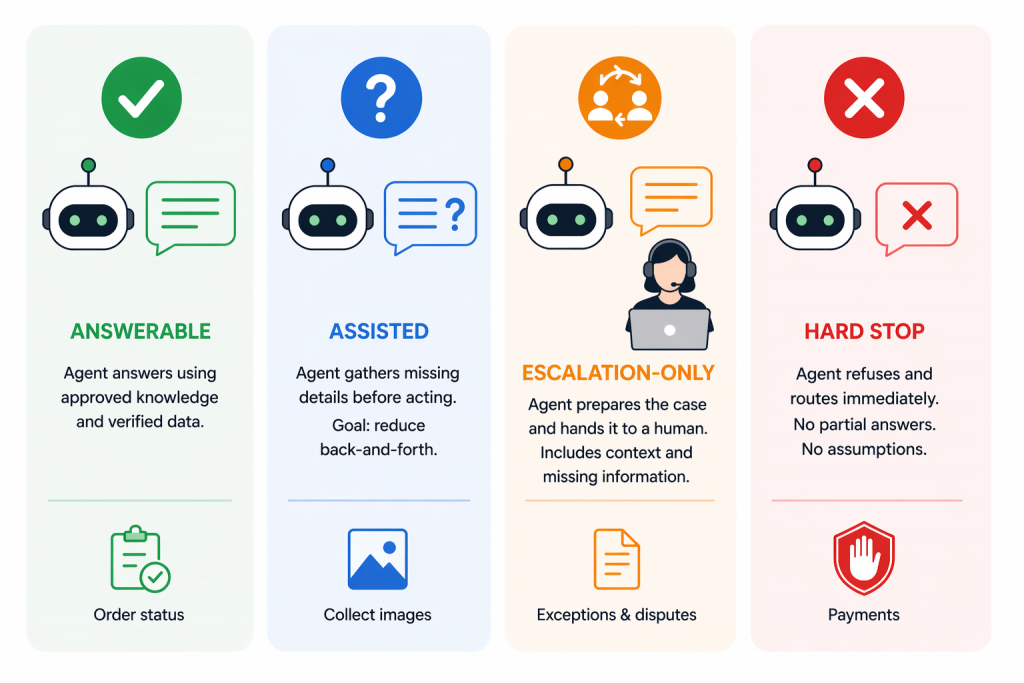
Safe support automation requires strict boundaries that define when the agent answers, when it requests verification, and when it immediately transfers the conversation to a human.
| Request handling type | System behavior | Trigger conditions | Example scenario |
|---|---|---|---|
| Answerable | Direct autonomous response from verified data | Factual policy or indexed catalog query | “What is your standard delivery timeframe?” |
| Assisted | Collects required details before executing action | Order lookup or return qualification | “I want to track my order” (prompts for Order ID and email) |
| Escalation-only | Packages conversation context and routes to human | Policy exceptions, repeated misunderstandings | “My package arrived damaged with broken items” |
| Hard stop | Immediate refusal and mandatory human transfer | Payment disputes, chargebacks, legal claims | “I am filing a credit card chargeback for this order” |
In AI Studio, use the Escalate to Human action when you want the AI agent to stop responding and hand full control of the conversation to a human. Assign Member only assigns the conversation to a team member in the dashboard, while the AI agent can continue responding.
Use real customer conversations when you test the chatbot. Simple test messages can miss important edge-case scenarios, such as unclear policies, product variant issues, or customer verification problems.
Pull 10 to 15 recent inquiries from your email, live chat, or support tickets. Include straightforward questions, multi-part requests, out-of-stock product questions, and return cases that require closer handling.
Then open the duplicate theme using Shopify’s Preview link and run those conversations through the chatbot one by one.
The playbook for achieving high AI resolution rates details how continuous test iteration improves containment without damaging customer satisfaction.
Support leaders can also review evaluating customer support AI agents for benchmark quality frameworks.
Stores setting up customer service automation often encounter predictable pitfalls. Avoiding these common mistakes saves engineering time and protects your customer relationships.
| Common mistake | Operational impact | Corrective action |
|---|---|---|
| Static crawling without webhooks | Agent quotes outdated prices and suggests out-of-stock items | Connect Shopify product creation, update, and deletion webhooks |
| Duplicate script installations | Two chat bubbles appear on the storefront, degrading site speed | Choose either theme.liquid or Custom Liquid; never use both |
| Exposing tokens in client code | Security vulnerability allowing unauthorized store API access | Store SHOPIFY_TOKEN strictly inside AI Studio config variables |
| Missing human escalation paths | Frustrated shoppers get trapped in loops with automated replies | Implement Escalate to Human nodes for edge cases and disputes |
| Skipping mobile responsiveness checks | Widget covers the checkout button or storefront navigation on mobile | Test widget size and offset settings across iOS and Android viewports |
Auditing these five areas before making your duplicate theme live ensures a smooth launch for both your shoppers and your support team.
The evaluating Shopify AI support agents guide provides an objective evaluation framework for comparing support agent capabilities.
Modern ecommerce shoppers do not restrict their inquiries to your website storefront. Customers frequently message your brand through messaging apps and social channels.
You can connect the same trained YourGPT agent across external messaging platforms so that customers receive consistent answers regardless of where they reach out.
The Shopify WhatsApp chatbot setup guide explains how to connect your WhatsApp Business API number to your Shopify store data.
In the YourGPT inbox, your team can monitor web chat, WhatsApp messages, and social inquiries in one place. Combining automated self-service with human oversight across all channels helps you maintain fast response times while expanding your store’s reach.
Stores considering voice shopping can also review our Voice AI Chatbot Guide for spoken voice shopping interactions.
Use a rule based chatbot only when the path is a short menu of buttons. Start with a knowledge chatbot so policy answers come from pages you published. Add a storefront shopping agent when shoppers ask to buy in chat. Add an order and return agent only after the workflow can match an order number to the email or phone on that order. Use a helpdesk or portal AI when the ticket should finish in an inbox or a login.
You do not need to build a custom app from scratch. You train the agent, paste the widget script into your theme, and turn on cart or order actions after your sources are verified. Adding the script and configuring webhooks takes only a few minutes.
AI Copilot Actions run in the shopper’s storefront session. They search the catalog, show product cards, and write to the real Shopify cart without an Admin API access token. AI Studio is the controlled path for order status and returns. You import the Shopify template, store SHOPIFY_TOKEN there, and require two matching fields before the workflow queries Shopify.
When Shopify webhooks are enabled for product changes, updates such as new products, price changes, variants, and availability are synced to the chatbot after they are saved in Shopify. This keeps product answers aligned with the current catalog instead of relying on manually updated product information.
Customer sync brings in basic contact information such as name, email, and phone number. Order history is handled separately. For order lookups, the agent should verify the shopper and retrieve the matching order through the Shopify workflow in AI Studio.
If the customer provides an order number that does not match their verified email or phone number, the AI Studio workflow refuses to return order details and routes the conversation to a human support agent through an Escalate to Human node.
Deploying an AI chatbot on Shopify involves three core foundations: indexing factual store policies, establishing real-time catalog webhooks, and configuring safe action workflows for carts and orders.
Start by testing your knowledge sources and Copilot cart actions on a duplicate theme. Run real customer support tickets through the agent to verify response accuracy, authentication safeguards, and human escalation triggers.
Once verified, publish your theme to provide your visitors with instant assistance across every stage of their shopping journey.
Create your agent, train it on store policies, and paste the widget script to start assisting shoppers.
Use YourGPT to help Black Friday shoppers choose products, check orders and understand returns. Prepare your answers and team before the sale.

Add in-app chat support to your SaaS or mobile app. Place it on the screens where users stall, pass who they are, and hand hard cases to your team.
Group new-account tickets by onboarding stage, train an AI agent on your docs, and place it in the product where new users get stuck.
AI agents can now find and buy products for shoppers. See what agentic commerce changes for a Shopify store and which support jobs stay yours.
Build a Halloween shopping assistant for Shopify with YourGPT. Set up product recommendations, stock checks, cart actions and human support before launch.

See what a good customer effort score looks like, how to word and calculate CES on each scale, and which support habits raise customer effort.