Shopify WhatsApp Chatbot Setup Guide (2026)

Rajni
Last updated on August 22, 2026
A Shopify WhatsApp chatbot brings your store experience into a channel customers already use, allowing the AI agent to support conversations with the same business context, data, and workflows connected to your Shopify store. A reliable setup depends on keeping store knowledge current, syncing live Shopify data, connecting the actions that require real-time information, and using a properly configured WhatsApp Business setup. Before going live, test the experience with real store data, failed verification cases, human escalation, and outbound messaging rules. Promotional or proactive WhatsApp messages should only be sent to customers who have opted in and through approved templates.
Shopify stores already answer product, order, and support questions on site chat. The same buyers write on WhatsApp too, and they expect the same answers there.
The agent behind your storefront chat can work that number as well. WhatsApp reaches it through the WhatsApp integration and a Business API number.
What the agent knows and what it can do run on separate wires, which is why the order below matters.
If the storefront widget is not on a theme yet, finish How to Add an AI Chatbot to Shopify in 2026 first. Every label below matches help and docs.
Gather these before you open Meta or AI Studio:
The ticket, the policy URL, and your own order are the test material for the last step, so keep them handy. Training comes first, because every later answer sits on top of it.
Create the agent in YourGPT first. Decide what it should answer, what it must refuse, and which tickets should end in an action instead of a written reply. Those three decisions tell you which sources to add now.
The website and link training guide lists the source types.
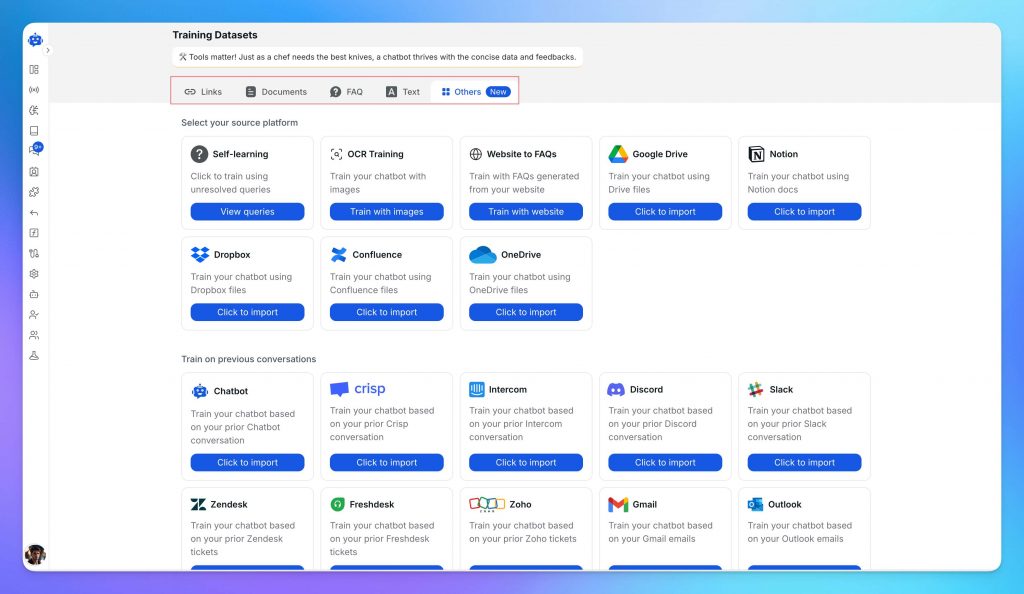
Remove expired policy PDFs and old sale posts before you test. The return file from last season will answer WhatsApp the same way it answers site chat. When a policy changes, update or refresh that Training source. Live price and stock still need Shopify product webhooks.
Training covers written policy. Price, variants, and stock change too often for that, so the catalog needs a live feed. In the YourGPT dashboard, open Integration and connect Shopify with the store URL. The connector checks that the storefront widget is on the theme.

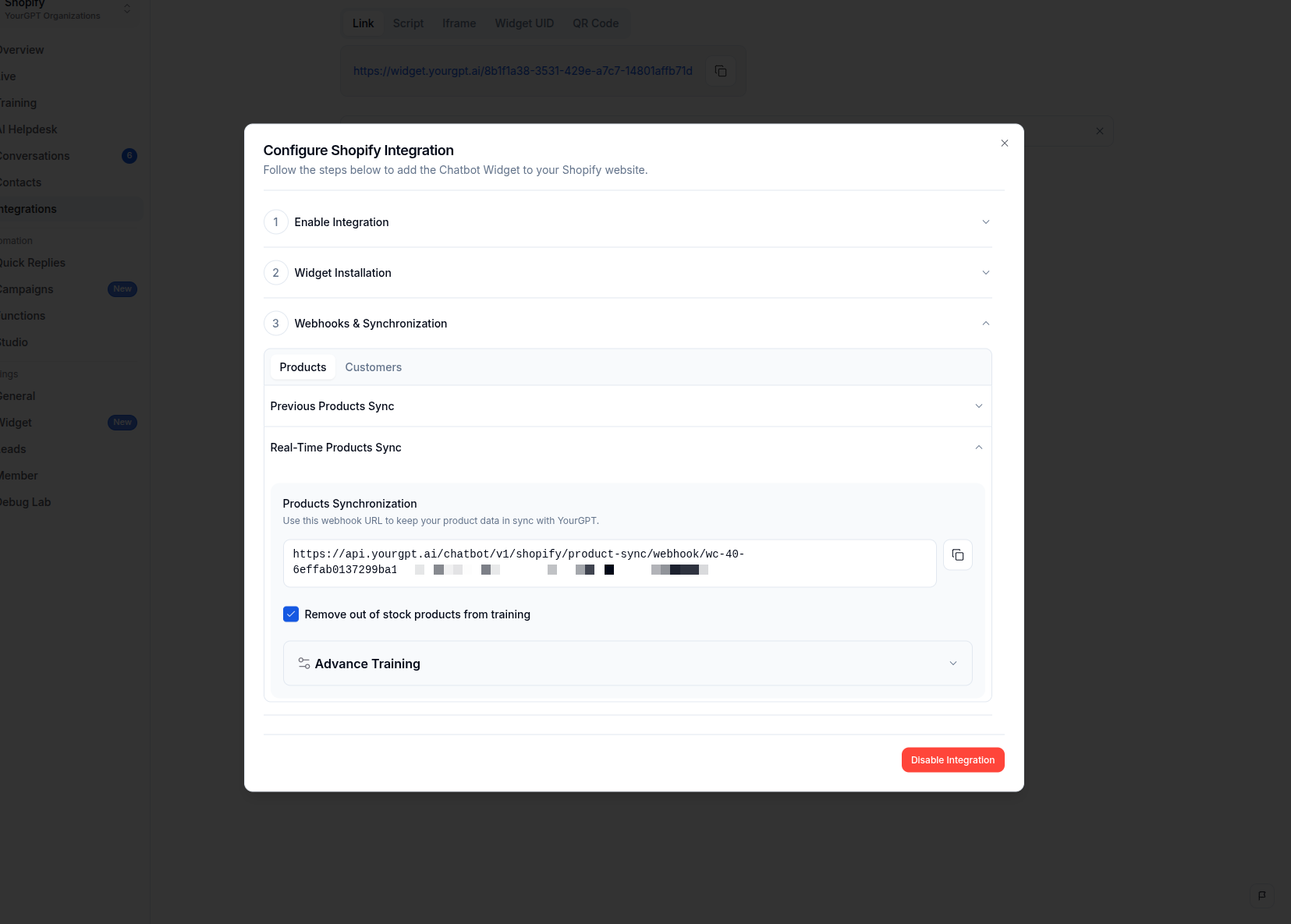
The real-time synchronization guide shows the Products and Customers tabs.
On the Products tab, turn on Remove out of stock products from training if the agent must not recommend sold-out items. Open Advance Training to check re-index timing.
Customer synchronization is optional, and it imports name, email, and phone only. It does not import order history, which is why order lookups need the actions in the next section.
Training and catalog sync give the agent facts. Neither one can look up a paid order, start a return, send a cart link, or pause the thread for a person. Those are actions, and they live in AI Studio.
The template carries six store scenarios. Two settings, SHOPIFY_TOKEN and SHOPIFY_ENDPOINT, have to be filled in before any scenario runs.
SHOPIFY_TOKEN and the store domain as SHOPIFY_ENDPOINT (your-store.myshopify.com).Keep the token out of theme code, WhatsApp fields, screenshots, and tickets. The Studio Shopify guide walks through the import and the Emulator.
Each scenario has one thing it needs from you before it works on a phone. Add to Cart and View Cart send links, and those links do not change a storefront widget cart.
| Action | What the shopper gets | What you must prove first |
|---|---|---|
| Search Product | Catalog matches from the synced store | Product webhooks and one live product URL |
| Product Details | Variants such as size and color | A product with more than one variant |
| Add to Cart | A cart link for the selected item | An in-stock product the test number can open |
| View Cart | A cart link with quantities and totals | The same cart link after Add to Cart |
| Order Status | Details for one verified order | SHOPIFY_TOKEN, shopper email, and order ID |
| Return Order | The return path for that same order | A test order you own and a current return page |
The Shopify chatbot for real-time order status page maps policy, product, and order sources if you need that split.
Order lookups touch a real customer record, so test them in the Emulator before the number goes live.
Run Order Status with the order you placed. Check that the agent asks for the shopper email and order ID before it reveals anything. A failed match must never show another customer’s order.
Run Return Order on that same order. If verification fails, send the thread to a person. Do not guess a refund.
Publish the agent from AI Studio once both checks pass. WhatsApp serves the version you published, so an unpublished fix never reaches the number.
That control pauses the agent and gives the thread to a person. The Actions reference covers the full list.
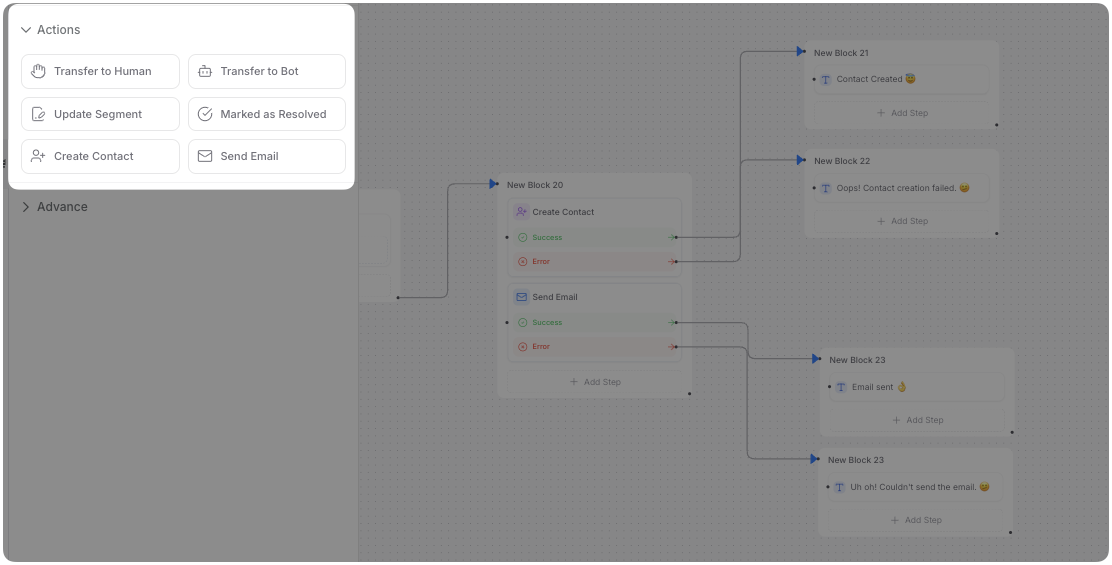
Use it when the shopper asks for a person, when verification fails, or when the request moves money. The same list holds Assign Member, which routes a thread to a teammate. Assign Member does not pause the agent, so replies keep going while your teammate reads.
Create Contact, Mark as Resolved, and Close Chat sit in the same list. Add them only when that ticket should end or become a contact record. The customer support automation guide helps you decide which tickets stay automated.
The agent can now answer and act. This step decides where it does that.
Open Integration → WhatsApp. You have two ways in. Either let Meta’s wizard collect the number for you, or paste the tokens yourself.
The wizard is called Auth Setup in help and Auto in docs, and the manual route is Custom Setup in help and Custom Installation in docs. Use the wizard unless you already manage a Facebook Developer app.
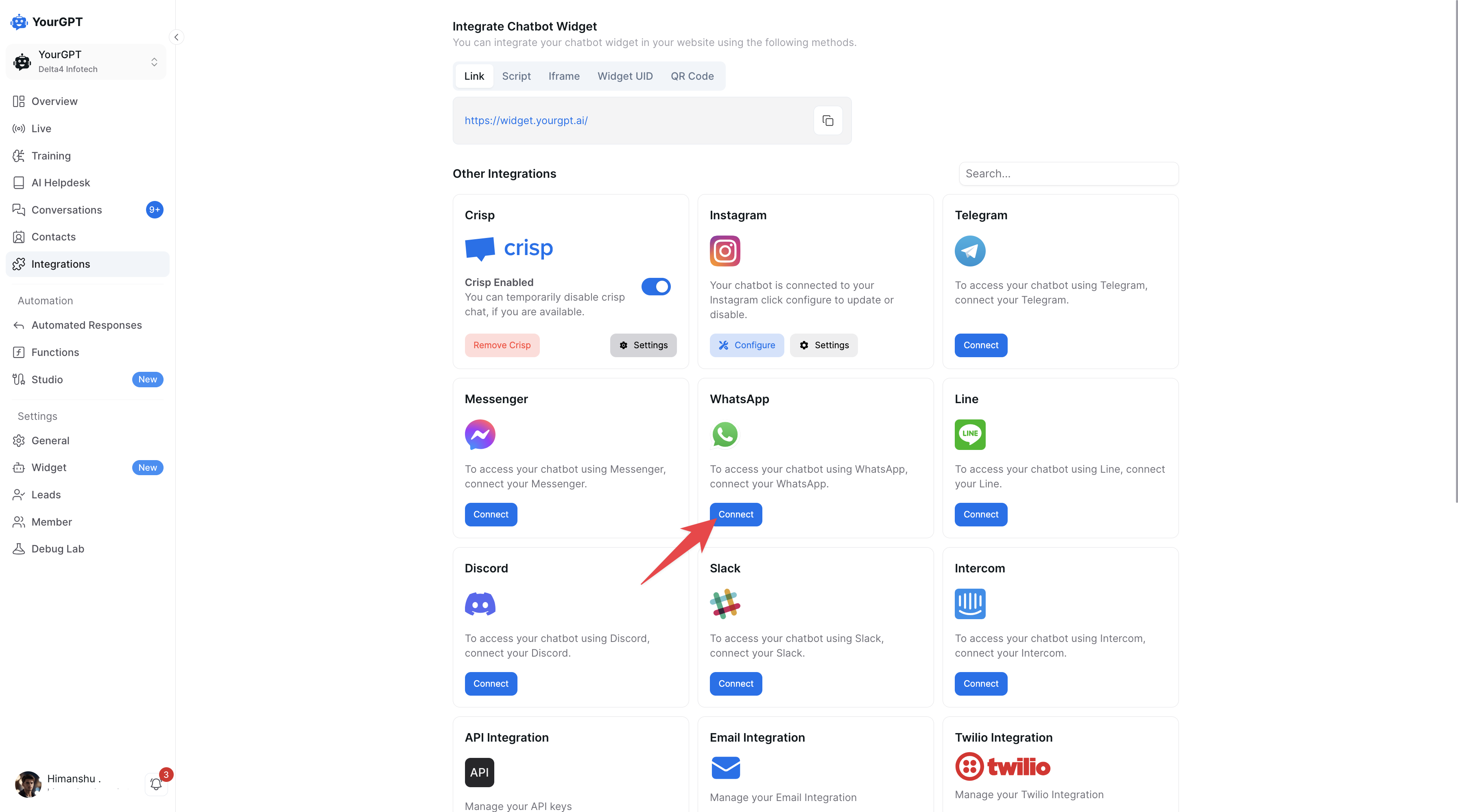
Follow either the WhatsApp help article or the WhatsApp docs. Do not mix wizard fields with pasted tokens.
Both paths deliver the same replies. Your agent can send text, images, video, audio, files, buttons, cards, and carousels on WhatsApp, but it cannot send a form. Anything past three buttons, cards, or carousels arrives as a plain list, so keep those replies short.
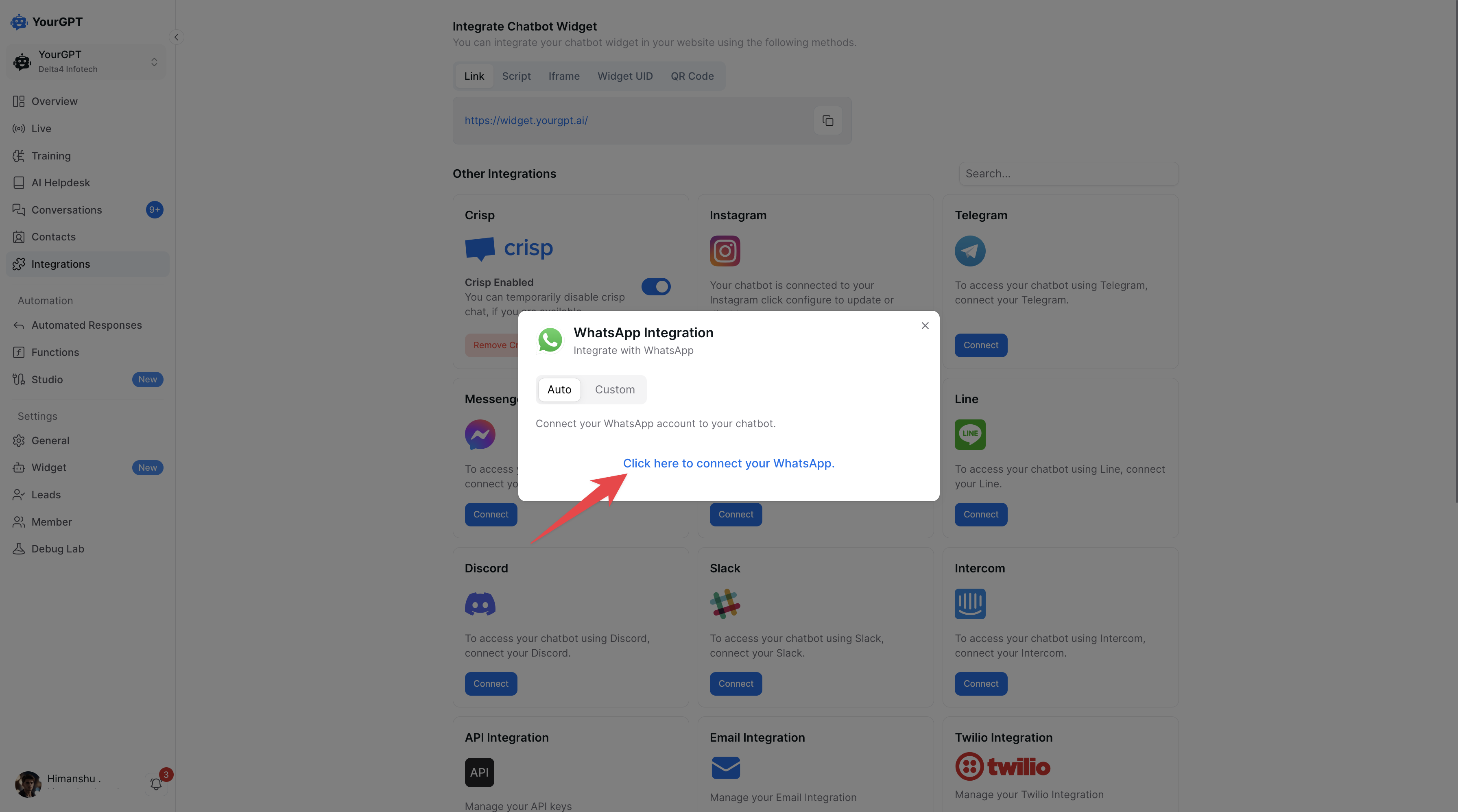
If Meta reports that the number is registered to an existing WhatsApp account, disconnect it in WhatsApp Manager first. A personal WhatsApp login on the same number blocks the Business API connection.
Choose Custom Setup or Custom Installation only when you already have a Facebook Developer app and a WhatsApp Business account. Click Connect, then fill three fields:
whatsapp_business_messaging permission.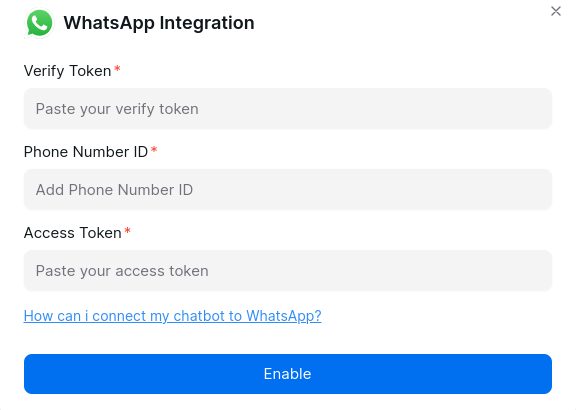
Temporary Access Token expires after 24 hours. If replies worked last night and the number is silent this morning, you pasted the temporary token. Generate a permanent one, or switch to Auth Setup.
The number now replies when a shopper writes first. Writing first yourself is a separate permission, and it is the step that fails after everything else works.
When a shopper messages you, Meta opens a customer service window, and inside it your agent can reply in plain messages. Once that window closes, or when you want to reach someone who never wrote to you, Meta requires an approved template and the shopper’s opt-in.
Do not send cart, restock, or promo templates to a number that never opted in. Product sync and customer sync are not consent. For the Business Manager verification path, read How Businesses Can Get the Official WhatsApp Verified Tick.
All five pieces are connected. Check them in the order you built them.
Give a teammate the inbound text from that inbox ticket, the policy URL, a product URL, and the order you placed. Use Default Questions. Do not invent demo questions.
Check these results on the connected number:
If a FAQ answer is wrong, open Debug Lab → Training Audit and use Find Document. If an order lookup is wrong, open the AI Studio Logs drawer and Variable Logs in the Emulator. Why AI Agents Give Wrong Answers explains source conflicts.
Fix the failing connection, then repeat only that check.
Once your Shopify and WhatsApp setup is working, the value comes from what the agent can handle across the customer journey. These seven use cases combine the most practical applications with the business impact behind them.
Shoppers often ask simple buying questions in WhatsApp: Is this available in medium? Does it come in black? What material is it made from?
With your Shopify catalog connected, the agent can search products, check variants and availability, and answer those questions directly in the conversation. Shoppers get the information they need without hunting through product pages or waiting for your team to respond.
Order status is one of the most common post-purchase questions, and one of the easiest to automate.
After the Order Status action has been tested with a real order, a shopper can provide their email and order ID and receive the current status from Shopify. The agent should only return the order when the details match. If verification fails, it should stop and escalate instead of guessing or exposing another customer’s information.
That keeps routine “Where is my order?” messages out of the support queue while your team focuses on cases that actually need judgment.
Customers can start a return in WhatsApp by providing their order ID and email address. The agent can verify the order, check the current return policy, explain whether the item is eligible, and direct the customer to the correct return portal or next step.
If the order cannot be verified or the request falls outside your policy, the conversation can move to a human instead of approving the return automatically.
Because the agent reads from your current Training sources, return answers change when you update the policy. This helps keep WhatsApp, site chat, and your published return rules consistent.
WhatsApp can also work as a product discovery channel.
If a shopper needs a different size, style, color, or alternative to the product they are considering, the agent can search the synced catalog and suggest relevant options that are actually available.
Instead of ending the conversation when the first product is not suitable, the agent can help the shopper continue toward another purchase.
If a shopper leaves before completing a purchase, you can use an approved WhatsApp template to bring them back.
The message can include an Add to Cart or View Cart link that opens the relevant storefront cart. Because this is an outbound WhatsApp message, the shopper must have provided valid opt-in before you send it.
This gives you a direct recovery channel without treating every customer record or previous WhatsApp conversation as permission to send promotional messages.
After an order is delivered, WhatsApp can be used for a simple follow-up asking how the purchase went or inviting the customer to leave a review.
These messages also require an approved template and valid opt-in. If Meta rejects or changes a template, update it and sync the approved version before using it again.
Done correctly, the same channel that handled product questions and order updates can continue into the post-purchase experience without creating another manual follow-up task for your team.
Restocks, new arrivals, and time-sensitive offers can be sent through approved WhatsApp templates to customers who have opted in.
When those messages generate replies, the same agent can answer product questions using the synced catalog and your current Training sources. If the conversation turns into a refund request, exception, complaint, or another case that needs human judgment, Escalate to Human can pause the agent and move the thread to your team.
That creates a cleaner division of work: repeat questions stay automated, while your team keeps the conversations where human involvement actually matters.
Together, these seven use cases turn WhatsApp from another support inbox into a connected Shopify channel for product discovery, order support, returns, cart recovery, post-purchase follow-up, and customer re-engagement.
These cover the decisions on either side of this setup.
The questions below are the ones that come up during setup.
First connect Shopify to your AI agent so it can use your store knowledge, product data, and configured actions. Then connect a WhatsApp Business API number under Integration → WhatsApp and test the published agent on that number. The Shopify storefront widget is a separate channel, so installing the widget does not automatically connect the agent to WhatsApp.
You need a WhatsApp Business API number. It is the connection used for automated customer conversations and approved outbound messages. The number must also be available for the Business API connection rather than remaining tied to a personal WhatsApp account.
Yes. The chatbot can collect the customer’s order details, verify the order, and guide them through the return process based on your current policy. If verification fails or the request falls outside the policy, the conversation should be handed to a human instead of approving the return automatically.
Not necessarily. The agent can handle conversations that can be resolved using your store data, policies, and configured workflows, while cases that require judgment, exceptions, or manual review can be transferred to your team. The goal is to automate repeatable work while keeping a clear path to human suppor
Yes. You can send an approved WhatsApp template containing a cart link to shoppers who have opted in to receive those messages. Connecting a phone number or customer record does not count as consent, so opt-in should be confirmed before any proactive cart reminder is sent.
Yes. When Shopify product synchronization is enabled, the agent can use current catalog data to answer product and variant questions. Because availability and product details can change frequently, these answers should come from the synced Shopify catalog rather than an old policy page or manually uploaded file.
No coding is required for the standard setup in this guide. Shopify, WhatsApp, training sources, and the required agent actions can be configured through YourGPT’s integrations and AI Studio. More advanced workflows can be added later as your requirements become more complex.
Add Escalate to Human in AI Studio. If the shopper asks for a person, or the request needs judgment, the conversation transfers to your team. The chat history stays visible so they have full context. Assign Member routes the thread and does not pause the agent.
Yes. YourGPT uses the pages, policies, and documents you add in Training, plus the Shopify catalog after sync. When shoppers ask something that is not pasted under FAQs & Text, the agent still answers from those sources. If the fact is missing, it should stop rather than guess.
No. Auth Setup connects the number through Meta’s wizard, and Custom Setup pastes Verify Token, Phone Number ID, and Access Token. Ongoing replies, actions, and message templates stay inside YourGPT.
There is no extra connector fee for the Shopify integration, and it works on all YourGPT plans. YourGPT and Shopify stay on separate bills.
A finished setup is one number with five connections behind it, and a test you can repeat in one sitting. That test is the part worth keeping. It tells you which connection broke instead of leaving you to guess after a shopper complains.
Three habits keep it working. Refresh the Training source when a policy changes, because product webhooks update the catalog and never touch your written rules. Re-run the order and return checks after any edit in AI Studio, then publish again. Keep a record of who opted in before you send a template to their number.
Give the number to buyers once all seven checks pass on your own phone. Until then it stays on the test list.
Train the agent on your catalog, add order and return actions, then connect the number.
Use YourGPT to help Black Friday shoppers choose products, check orders and understand returns. Prepare your answers and team before the sale.

Add in-app chat support to your SaaS or mobile app. Place it on the screens where users stall, pass who they are, and hand hard cases to your team.
Group new-account tickets by onboarding stage, train an AI agent on your docs, and place it in the product where new users get stuck.
AI agents can now find and buy products for shoppers. See what agentic commerce changes for a Shopify store and which support jobs stay yours.
Build a Halloween shopping assistant for Shopify with YourGPT. Set up product recommendations, stock checks, cart actions and human support before launch.

See what a good customer effort score looks like, how to word and calculate CES on each scale, and which support habits raise customer effort.