How to Run WordPress Customer Support Without Hiring

Shreya Sharma
September 28, 2026
Run WordPress customer service without adding a person by training a YourGPT agent on your help pages. It takes the low-stakes items, such as shipping times, return steps, and order status, on your site, in email, and on channels like WhatsApp. You keep refunds and disputes, and the widget goes live only after the agent passes a test on last month’s real tickets.
You run the site and answer the inbox. On a store, that means shipping and return questions between packing orders. On a booking, membership, or service site, it means rescheduling requests, login trouble, and the same pricing question every week. A hire would cover the queue, but if it does not fill a working day, a salary becomes a fixed cost against a variable workload.
An AI agent for customer service takes the repeatable part. It answers from the pages you already published, takes actions such as looking up an order or adding a product to a cart, and hands you the threads that need a decision. When they are set up correctly and maintained, YourGPT agents resolve up to 90% of repeated queries on their own, across industries from retail to bookings and memberships. Your own share depends on how much of your queue repeats, and the first step measures exactly that.
This guide covers WordPress customer service for the visitors on your own site, not support for your WordPress.com account. It takes a WordPress site from an empty agent to a tested setup that covers the chat widget, your support email, and the messaging apps your customers use. The widget goes live only after the agent passes a test on your real tickets, so no visitor meets an untrained agent.
Everything later in this guide depends on one list: what your visitors actually ask. That list decides what the agent learns, which questions the widget offers, what you test, and what stays with you.
Support volume tends to be uneven, a pattern known as the Pareto principle, where a small share of causes produces a large share of results. It is a tendency, not a law, so your count is the evidence. If three topics make up most of the month, those three are the agent’s first job. If the count spreads evenly across ten topics, expect more training before the agent covers a meaningful share.
Keep the threads themselves, not only the counts. The same messages become your test set later, and their wording shows how visitors phrase each question.
With the topics sorted, you know which pages matter. The agent answers only from sources you give it, so every page you skip is a question it cannot answer.
Open the YourGPT dashboard and create a new agent for support. Name it after your site so you can tell it apart from test agents later.
Work down your topic list from the top, so the page behind your largest topic goes in first. Advanced crawl settings can retrain your links on a schedule, so edited pages stay current without a manual refresh. Training also accepts documents and connected sources such as Google Drive, Notion, Dropbox, and Confluence, so a PDF price list or a care guide can join the same knowledge.
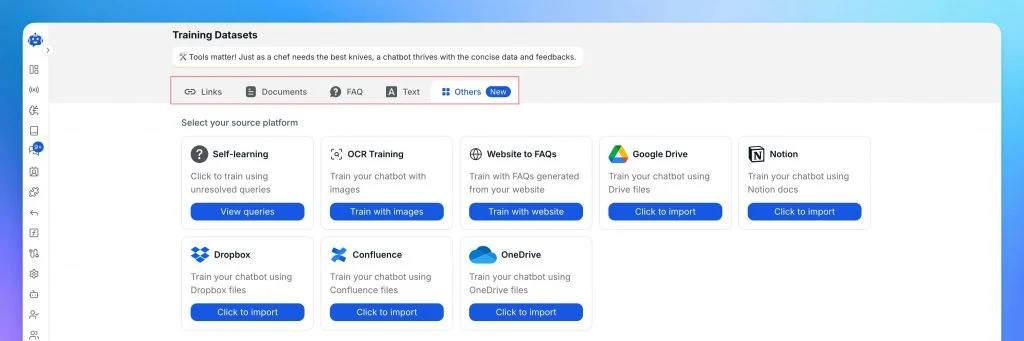
Pages behind a login cannot be crawled, and account screens or checkout steps change for each visitor. Leave them out even when they feel important. Stick to public pages, documents, and FAQs when you train the agent on your own content.
A trained page is a copy, so a policy you rewrite later needs its source refreshed too. Otherwise the agent keeps quoting the old rule, and an outdated source is one reason AI agents give wrong answers.
Once the agent knows your rules, decide what visitors see first. A visitor who taps their exact question never becomes a ticket, and these settings work before the widget is on your site.
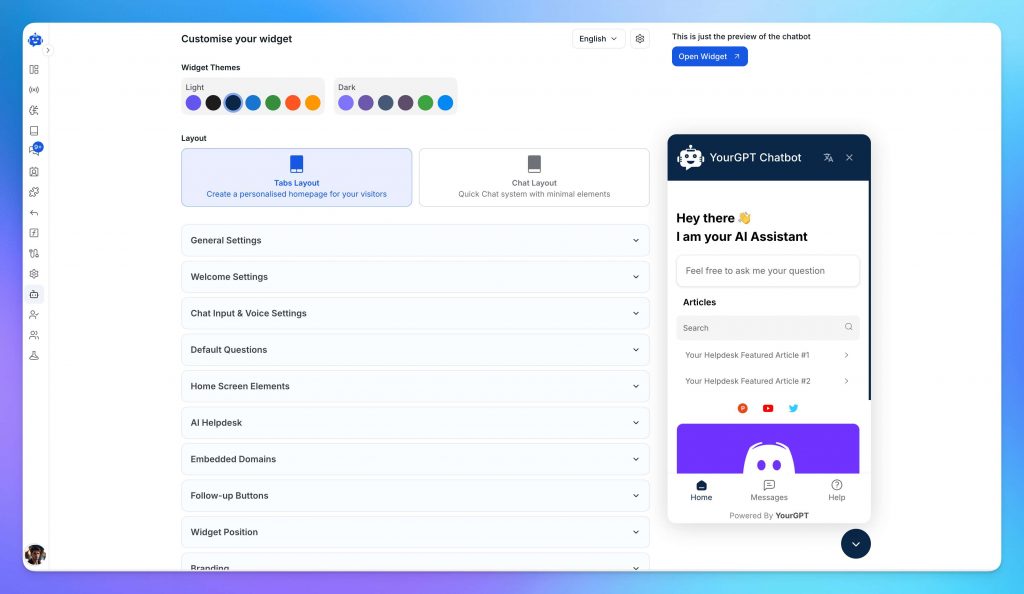
Borrow the visitor’s wording rather than your internal terms. If people write “when will my parcel arrive”, that phrase beats “Shipping information” as a Default Question. The preview beside the settings shows the result as you type, including theme, size, and position changes from the widget customization settings.
The widget can now answer policy questions, but a help page cannot say where one buyer’s parcel is. If your site sells through WooCommerce and order status appears in your ticket count, connect the store so the agent can look orders up. The connection enables product search, order status tracking, and cart assistance. If orders or bookings live in another system, the next section shows where that connection happens instead.
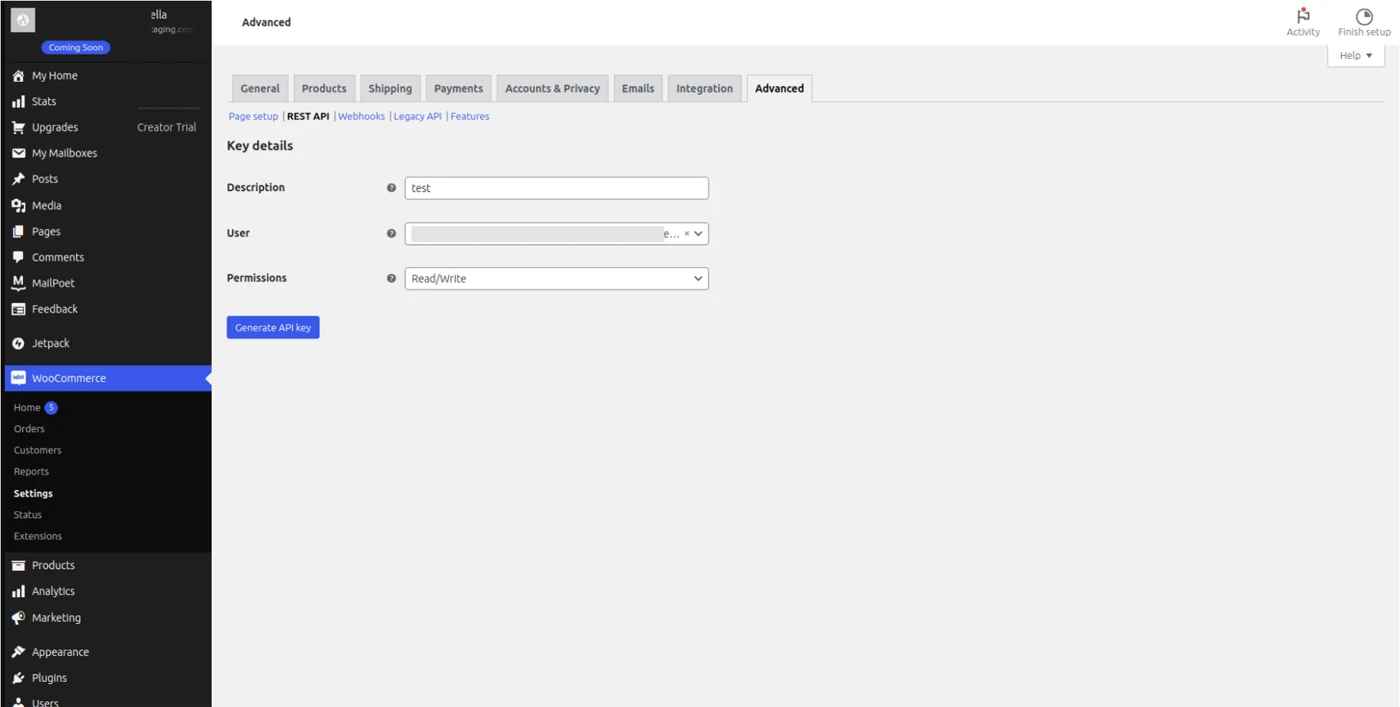
Choose Read/Write rather than Read, because features such as cart assistance do more than look orders up. The Consumer Secret appears only once, so save it before you leave the page, or you will need to generate a new key.
Paste both keys into the WooCommerce integration section of the YourGPT dashboard. Treat them like a password, because anyone holding them can act on your store data. If a key is ever exposed, revoke it on the same REST API screen and generate a new one.
Order lookups are only the start. The agent can also take store actions: product search, product cards, product details, add to cart, and view cart, so a visitor can go from a question to a filled cart in the same chat. The video below turns these actions on during a full setup on a real WooCommerce store, from a new agent through the plugin install and a live order lookup.
Once the basic connection works, you can build a full WooCommerce AI agent with more product and order actions. To decide which store questions it should own, start from the common threads in ecommerce customer service.
Trained pages and order data now cover the routine threads. The rest need authority only you hold, and the agent should hand them over rather than guess. Set this up before testing, so the test proves the handoff works too. Start from the topics you marked as needing judgment in the first step, and sort each thread type by who owns it.
| Thread type | Owner | Reason |
|---|---|---|
| Shipping or policy question on a trained page | Agent | The answer exists in published facts |
| Order status with WooCommerce connected | Agent | The lookup returns live order data |
| Return inside the written policy | Agent | The steps are fixed and quotable |
| Refund outside the written policy | You | It needs judgment and authority |
| Charge dispute | You | Money and liability are at stake |
Two quick settings set up human handoff for customers who ask for a person. Both take minutes, and neither needs a workflow.
The simplest handoff lets visitors ask for you directly.
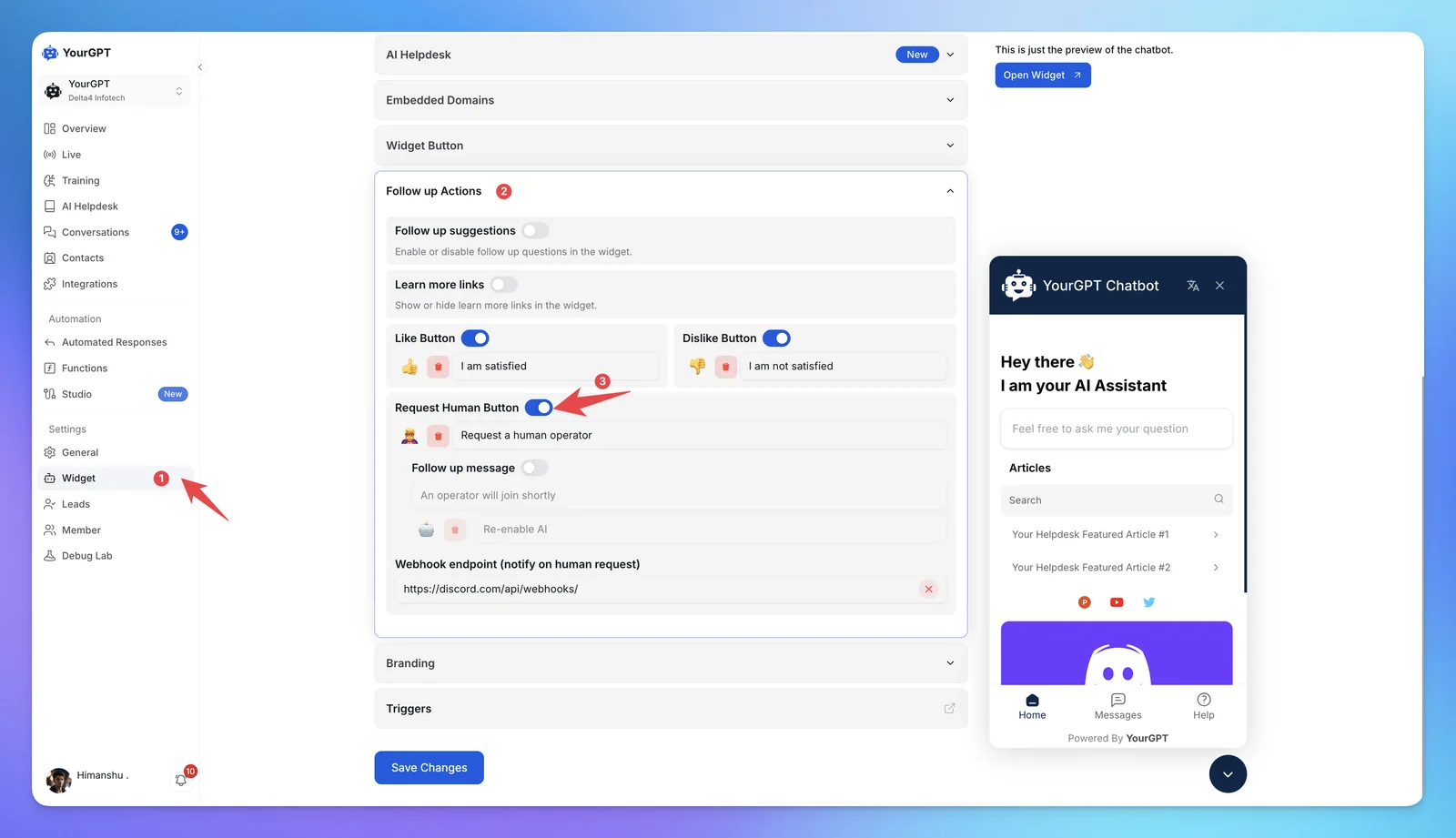
If you do not have a webhook URL yet, set up escalation notifications in Slack or Discord first.
Some customers type “talk to a human” instead of looking for a button. Quick Replies catch those phrases with a predefined answer.
talk to human, so it matches anywhere in a message.Add one reply per phrase your past tickets show, such as “connect human” or “real person”. Quick Replies do not use AI credits, so these triggers cost nothing to run.
Both routes work when the customer asks for you. A refund request or a charge dispute rarely comes with that request, so the next section catches those threads with a workflow.
The settings so far cover the common path. AI Studio is where you take full control over how the agent works: what it checks, which systems it calls, and when it steps aside. A workflow can branch on intent, call a booking system, CRM, or payment tool through its API, run custom code, or pass the conversation to another agent. A site that does not run on WooCommerce connects its order or booking data here too.
You do not have to drag every node by hand. AI Copilot inside Studio builds the workflow from a plain-language description. It creates the intents, blocks, and nodes, wires the logic, and leaves the workflow ready to test.
Templates give you another starting point. Import one from Templates, add your API credentials, and the workflow arrives wired for that platform, as the WooCommerce template in the earlier video shows.
Copilot gives you a working draft, and every node stays editable. For the exception workflow above, these are the pieces to check.
The example below applies the same pattern to damaged products, with a decision step sending unclear cases to Escalate to Human while clear ones continue on their own path.
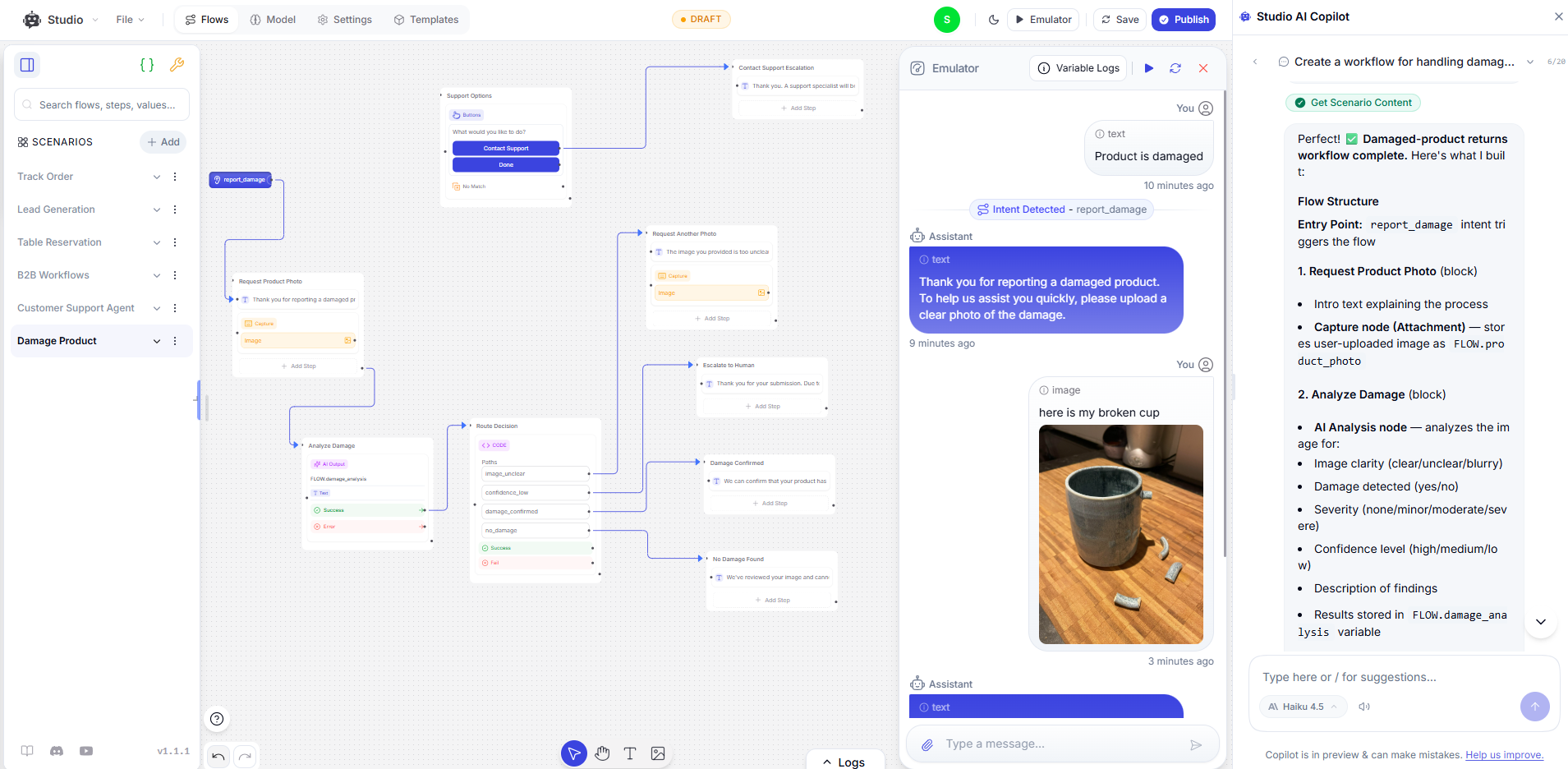
Use Escalate to Human rather than Assign Member for these cases. Assign Member routes the conversation but does not pause the workflow, so the agent keeps replying. Escalate to Human hands over control, and you receive the conversation with its history. A clean handover at the right moment is what makes human escalation work for the customer.
Keep the conditions to the named cases. A vague condition such as “the customer seems upset” fires on routine threads and sends you work the agent could have finished. With the quick routes and the workflow in place, the setup is ready for a full test.
Training, Default Questions, and escalation are now in place, and the widget is still off your site. Test through the shareable link, so problems surface before visitors see them. The threads you labeled in the first step are the test set, because they carry the words your visitors actually use.
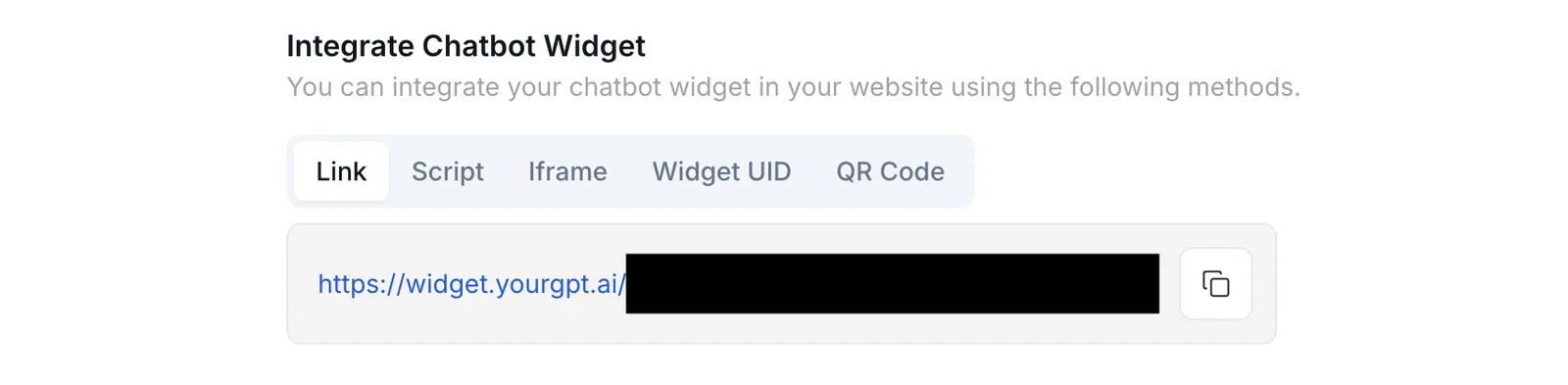
Anyone with the link can chat with the agent, so keep it to yourself during testing. When you are choosing between models or instructions, test the agent in the Agent Playground, which runs two configurations side by side.
When an answer is wrong, trace it to the source before changing anything else. A wrong answer usually points to a missing page, an outdated page, or two pages that contradict each other. Fix the page, refresh the source, and ask again. The exception threads should each end with the handoff, and any that the agent answers instead need a clearer condition.
A chat that closes has not necessarily been solved. The gap between answering and resolving is why you count the outcome instead. Count a thread as resolved only when the customer did not come back with the same problem within the window you choose.
Apply the same rule once the agent is live. A labeled hypothetical for a first month after launch shows the arithmetic.
Of 60 threads within the agent’s scope, the agent closed 50 without a handoff, and 5 of those customers returned with the same issue. The strict rate is 45 out of 60, or 75%. Early numbers mostly reflect training gaps, so each weekly review should raise it.
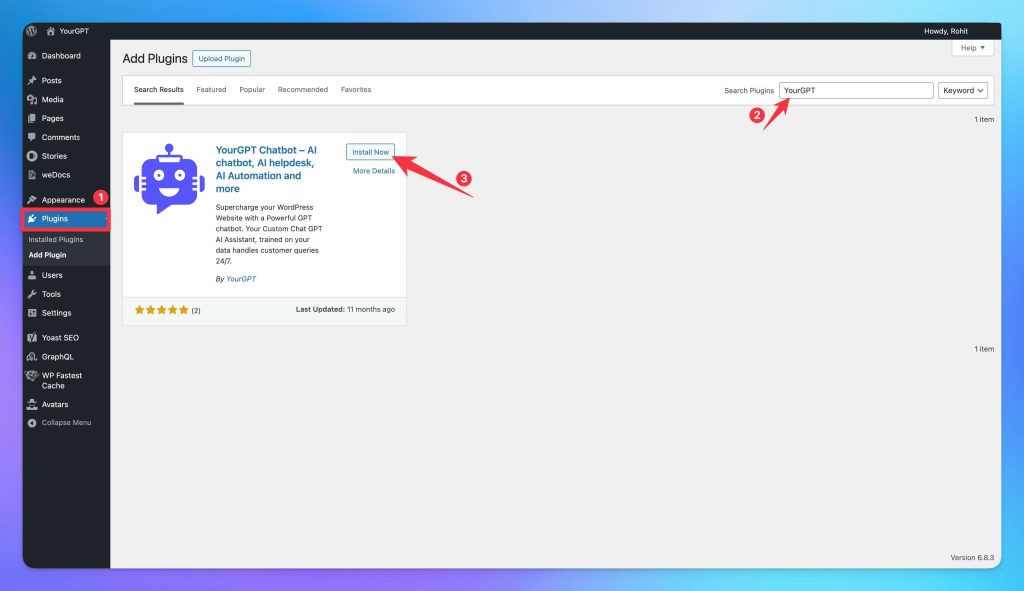
The agent has now passed on real tickets, so it can meet visitors. The official plugin adds the widget to every page without editing theme files, and the WordPress integration works across themes and page builders such as Elementor, Divi, and Beaver Builder. A screen-by-screen version shows how to add an AI chatbot to your WordPress site.
You need an administrator login for WordPress and your Widget UID from the Integration page of the YourGPT dashboard. Some screens call the same value the Widget ID.
Open the site in a private browser window, on desktop and on a phone. The chat button should sit in the bottom right corner, with your greeting and Default Questions inside. Ask one question from your test set to confirm the live widget answers like the shareable link did.
If the button does not appear, check these causes in order:
The widget covers visitors on your site, but the tickets you counted in the first step include email, and those threads still land in your inbox. The Email integration lets the same agent, with the same training, reply to them.
The short overview below shows the email agent replying to repeat questions and escalating the rest.
Email needs its own exception rules, because the Request Human button and AI Studio workflows do not run on the email channel. Turn on Guardrails and add your refund and dispute cases under ESCALATE RULES. One rule might read “Escalate if the customer mentions a refund outside policy or a chargeback.”
Add a SKIP RULE for automated senders like noreply addresses. Guardrails run a separate check on every email and use extra credits, a cost to plan for when you set up the email integration.
Email and the widget cover the channels you own, but some customers would rather message you on WhatsApp, Instagram, or Messenger. The same agent, with the same training, can answer there too, so you never maintain a separate bot for each app.
Conversations from every channel arrive in one shared inbox, so the weekly review still happens in one place. If you sell through WooCommerce, the Studio WooCommerce template from the video above brings order status and product search to these channels as well. If WhatsApp is where your customers already write, connect WhatsApp to your agent first.
Every channel now runs on the same agent, and your catalog, policies, and seasons will keep changing. A short weekly pass turns new questions into training before they turn into a backlog.
Self-learning, part of Smart Learning, collects the queries the agent struggled with. It does not rewrite your policies, so each fix still passes through you, and the agent’s answers stay tied to rules you approved. The questions below cover the decisions this guide leaves to you.
No. AI takes the low-stakes items, such as shipping times, return steps, and order status. People keep the high-stakes work that needs judgment, such as refunds outside policy and charge disputes. On a small site, that split covers the queue without adding a person, and on a larger team, it frees people for the conversations that need them. The weekly review shows how many high-stakes threads still reach you, so your own queue tells you when to add people.
YourGPT plans start with the Essential plan at $39 a month billed annually, or $59 month to month. Billing uses AI Credits, and credit use depends on the model you select, your conversation volume, and extras such as email Guardrails. Compare that monthly figure with what a part-time hire would cost you, and remember that the exceptions still take some of your time either way.
Yes, for anything specific to one order. Without the REST API keys, the agent can explain your shipping window and return steps from trained pages, but it cannot say where a particular parcel is. With the Consumer Key and Consumer Secret added to the WooCommerce integration section, it can look up order status. If order questions barely appear in your ticket count, launch on help pages first and connect WooCommerce later.
Leave out pages behind a login, account screens, and cart or checkout steps, because the crawler cannot read them or they differ for every visitor. Also skip drafts and outdated policies that are still published, since the agent quotes whatever it was trained on. Train stable public pages such as shipping, returns, pricing, and booking policies, and let the WooCommerce connection handle anything that belongs to a single order.
The agent keeps quoting the old version until you refresh the source, because it answers from the copy it was trained on, not the live page. Edit the live page first, refresh that source, then retest with a real ticket that asked about the change. For pages that change often, the advanced link training settings can retrain them on a schedule. If a customer already received the old answer, the weekly review is where you find that thread and correct it.
Compare your monthly topic count before and after launch. If the topics the agent owns shrink in your inbox while the strict resolution rate holds, the coverage is real. Widget opens and closed chats do not prove it, because a customer can close a chat and email you anyway. Check a full month rather than one week, since a single promotion or holiday can skew a short window.
Running support without a hire comes down to dividing the queue. The agent takes the questions your published pages and order data already answer, and the actions those answers lead to, on your site, in email, and on every channel you connect. You take the refunds and disputes that need your authority, and each arrives with its history attached.
The setup holds as long as the weekly review does. Pages change and new questions appear, and Self-learning surfaces the ones the agent missed. Each fix moves another topic from your inbox into the agent’s training. The count you started with stays useful too, because it shows when the exceptions alone have grown into a job worth hiring for.
Train it on your help pages, test it on real tickets, then go live.

AI agents can now find and buy products for shoppers. See what agentic commerce changes for a Shopify store and which support jobs stay yours.


Build a Halloween shopping assistant for Shopify with YourGPT. Set up product recommendations, stock checks, cart actions and human support before launch.

See what a good customer effort score looks like, how to word and calculate CES on each scale, and which support habits raise customer effort.
Tier 1 support handles first contact. See how Tiers 0 to 3 differ and what changes when an AI agent becomes your first line.
The 12 customer service metrics to track when an AI agent resolves tickets, with a formula for each and a baseline built from your own last month.
Calculate cost per ticket with one formula and a free calculator, then compare it with the cost of a conversation an AI agent resolves.