What Agentic Commerce Means for Your Shopify Store

Rajni
October 17, 2026
Agentic commerce is shopping where an AI agent searches, compares and checks out for a buyer inside a conversation. On Shopify, eligible stores reach AI channels through agentic storefronts, and those orders land in your admin like any other order. Discovery can move off your site, but order status, returns and product questions still come to you, so prepare your product data, policy pages and a store-side agent.
A Shopify sale used to pass through pages you designed. The shopper searched your catalog, read the product page, opened the size chart and checked out, and your chat widget sat on most of those pages. Shopify’s agentic storefronts change that path. They let customers discover and buy your products inside AI channels, and they are active by default for eligible stores.
The sale still books to your store. Shopify states that you retain full ownership of the customer relationship and the post-purchase experience for these orders. So a buyer who met your brand only through an assistant’s summary may contact you for the first time with a single question: where is my order? Below, we separate what moves to the AI channel from what stays with you, then cover the three things to prepare for that first question.
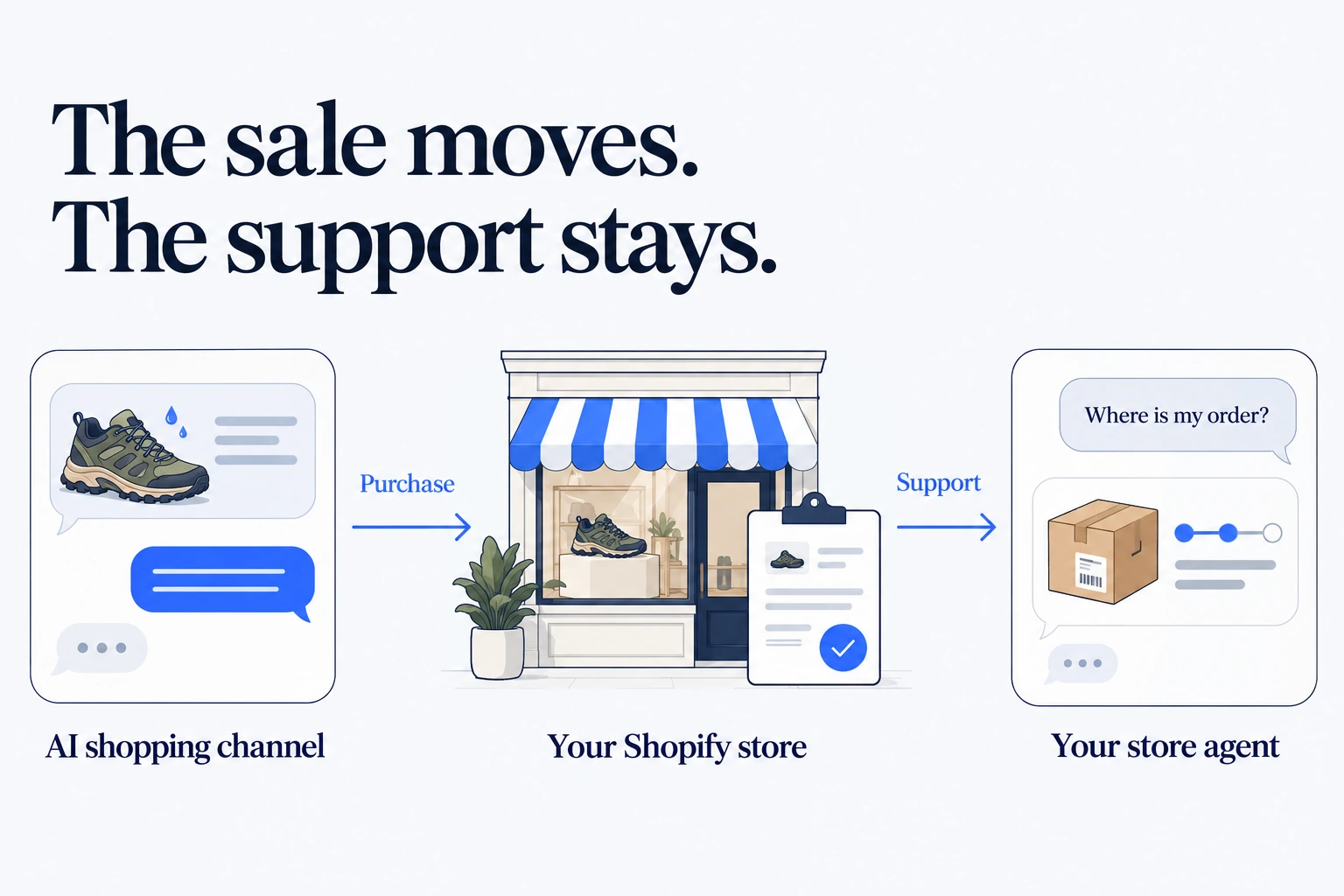
The term gets used loosely, so pin it down before you plan around it. Agentic commerce is online shopping in which an AI agent acts for the buyer, searching products, building a cart and completing checkout inside a conversation. The merchant still sells, ships and supports the order.
The word “agentic” means the software takes steps toward a goal instead of only answering. That is the same idea behind agentic AI in customer experience, pointed at buying rather than support.
So a shopping agent and the agent on your own store do different jobs:
Take a hypothetical buyer who asks an assistant for waterproof trail shoes in size 9 within a set budget. The agent reads product data from several catalogs, shows three options with prices and stock, and the buyer picks yours. The buyer never opened your product page, yet the order is yours to ship and support.
Under the hood, Shopify uses the Universal Commerce Protocol, an open standard that lets AI agents search products, build carts, check out and follow orders. You never configure it yourself, but it explains two things you will see again: agents work from your product record, and order updates can travel back to the buyer.
The path from a buyer’s prompt to your Orders list has four stops, and you control the record or setting behind three of them.
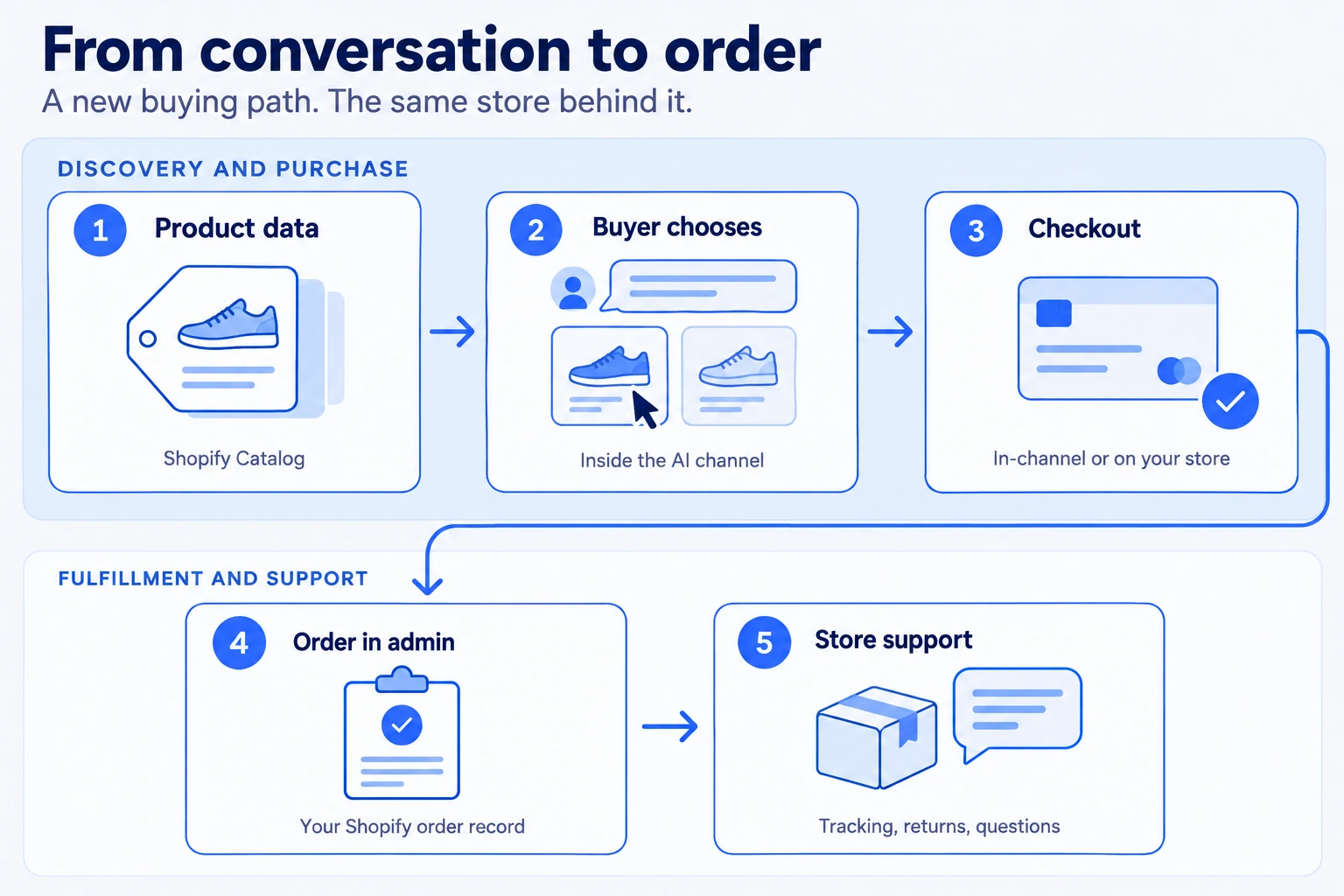
For support, the change that matters is where your chat widget can still reach the buyer. It was never on the payment step, because theme scripts do not load on Shopify checkout. With direct checkout inside an AI channel, the buyer may skip your theme entirely, from the first search to the order confirmation.
The table below shows the same purchase through your theme and through an AI channel.
| Stage | Order through your theme | Order through an AI channel |
|---|---|---|
| Discovery | Buyer browses collections and search on your site | Agent reads your product record through Shopify Catalog |
| Product questions | Product page, size chart or your store agent | The AI channel’s summary of your product data |
| Checkout | Your online store checkout | Direct checkout in the channel or a redirect to your checkout |
| Order record | Orders list in your admin | Orders list in your admin with channel or referrer attribution |
| Fulfillment | Your fulfillment process | The same fulfillment process |
| Order status, returns and refunds | Your policies and your support team | Your policies and your support team |
The top rows change, and the first two still run on the product data you keep. The bottom rows barely move: the order gains an attribution label, and fulfillment, returns and refunds stay with your team.
That bottom half is where your support work sits. A shopping agent can take the sale off your site, but it cannot take the support off your desk. Shopify’s own explanation of how agentic commerce works keeps you as the merchant of record, so refunds and delivery promises remain yours.
Agents can also follow order changes such as fulfillment, refunds, returns and cancellations through the same protocol, and an AI channel may pass those updates on to the buyer. Not every channel does, so do not rely on it. Either way, each update comes from your own order and fulfillment records, and a stale tracking number stays stale in every channel that reads it.
Three question types follow from this, and each one has a part a person should keep.
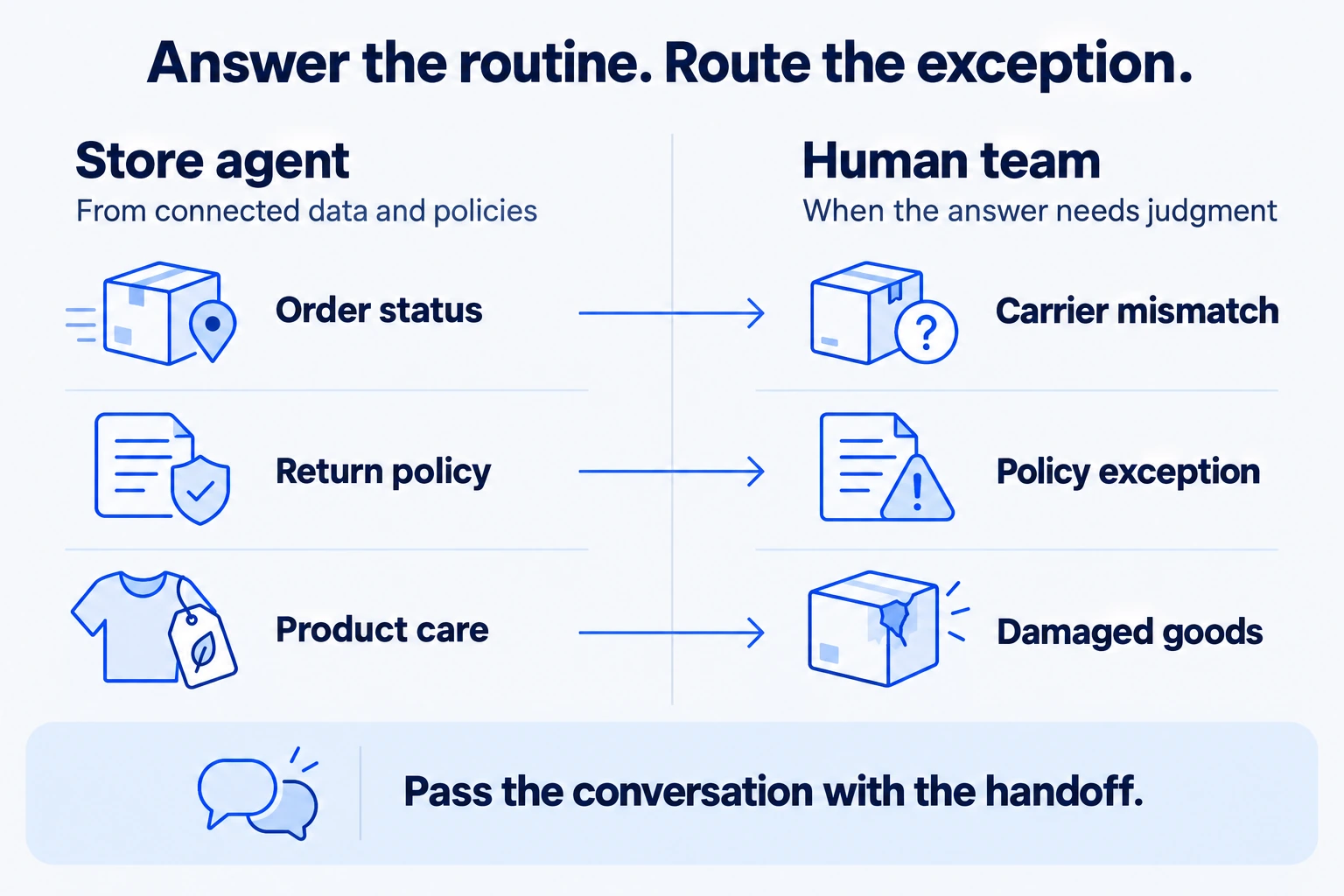
“Where is my order?” is a staple of ecommerce customer service, and it is the easiest of the three to answer from data. The answer lives in the order and its fulfillment record, so an agent connected to your orders can reply in the conversation without opening a ticket. Hand it to a person only when the carrier record contradicts the order, such as a parcel marked delivered that the buyer says never arrived.
A shopping agent’s summary can compress a policy into a phrase like “easy returns.” A buyer who relied on that summary may assume terms your policy never offered, such as free return shipping on a final sale item. Answer from the written policy page, and route exceptions, damaged goods and disputes to a person. Those cases need judgment, and they are where a wrong automated answer costs the most.
A buyer who skipped your product page also skipped your care instructions, size chart and compatibility notes. Expect questions that page would have answered, like how to wash a jacket or whether a charger fits a device. These are good candidates for automation, provided the answers sit on public pages your agent is trained on.
The quality of all three answers depends on the pages and product records behind them, so prepare those next.
Because AI channels read your products through Shopify Catalog, the fix for a wrong answer there usually sits in your own product record rather than in a setting. Merchants with custom setups can use Catalog Mapping to adjust how products are represented.
Read your top products as an agent would, one field at a time:
Write each policy so a single sentence can be quoted without the paragraph around it. State the return window in days, who pays return shipping, which items are final sale and how refunds reach the buyer. Shopify’s page on AI channels with built-in checkout lists a completed return and refund policy among the requirements. An empty or placeholder policy can keep you out of built-in checkout.
Plain headings help both people and software. “Return window” and “Return shipping” match the words buyers type, while a clever brand name for your returns program forces every reader to guess. Treat these pages as the knowledge base behind every answer, whether a shopping agent or your own agent gives it.
Keep product pages public. A page behind a login or a password cannot train your store agent, and outdated or conflicting pages are a common reason AI agents give wrong answers. With the records and policies in order, you can put an agent on the questions that follow the sale.
The AI channel’s part ends when the order lands in your admin. The questions that follow reach you through your own site and support channels, and that is where a store agent works. With YourGPT, that agent answers from your pages and your connected order data. It does not connect your store to AI shopping channels or to Shopify’s agentic storefronts, which stay Shopify sales channels that you manage in your admin.
When set up correctly and maintained, YourGPT agents resolve up to 90% of repeated queries. For a store, that covers order status, returns and product questions, subject to the capabilities you turn on. Decide that scope before you measure, because a good resolution rate for a Shopify store depends on it.
Set it up in this order:
SHOPIFY_TOKEN holds the Admin API access token that Shopify issues when you create a custom app, and SHOPIFY_ENDPOINT holds your your-store.myshopify.com address.On a damaged parcel or a dispute, a clean escalation keeps the buyer from telling the story twice.
The same agent can also help visitors shop on your own site. With AI Copilot Actions for Shopify, it searches products, shows product cards and adds items to the shopper’s real Shopify cart. The actions run only in Agent Mode, and the default is Chat Mode, so switch it under Settings → Mode first.
Our guide to add an AI agent to Shopify walks through each of these screens. Once the agent is live, check it against a real order before buyers rely on it.
Check the Shopify side first. Open Sales channels → Agentic in your admin to see which AI channels are active and whether direct checkout is on. Then open your Orders list and filter by channel to find any AI channel orders you already have.
Next, test your agent with that order, or with a recent theme order if you have none yet:
Fix the source behind any wrong answer, retrain the agent and ask the same question again. A real order shows whether the agent can resolve the request or only answer it, and a buyer waiting on a parcel notices the difference.
Start by checking the available AI sales channels under Sales channels → Agentic in your Shopify admin. Review product titles, descriptions, prices, inventory, and variants to ensure AI shopping agents can access accurate information. Keep your shipping and return policies updated, and verify your store’s eligibility for each supported AI channel.
Customers can find and compare eligible Shopify products through supported AI shopping channels. However, checkout options vary by platform. ChatGPT directs shoppers to the merchant’s Shopify checkout, while certain eligible AI channels support checkout within the AI experience. In both cases, your Shopify store remains responsible for order fulfillment, returns, and customer support.
Agentic commerce can create additional opportunities for customers to find your products through AI-powered search and recommendations. However, appearing in AI shopping results does not guarantee more sales. Product relevance, accurate descriptions, competitive pricing, and availability all influence purchasing decisions. Monitor AI-channel referrals and attributed orders to understand their impact on your store.
Orders placed through supported AI shopping channels appear in your Shopify admin, where you can manage fulfillment, returns, and refunds. An AI support chatbot connected to authorized Shopify order data can answer tracking questions, explain return policies, and provide product information. Complex requests, disputes, and sensitive account changes should be escalated to human agents when necessary.
Not necessarily. Shopify’s agentic storefronts help customers find and purchase products through supported external AI shopping channels, while a store-side chatbot handles customer interactions on your website and messaging platforms. For example, YourGPT allows Shopify merchants to build AI agents that answer product questions, assist shoppers, retrieve order information through configured integrations, and transfer complex issues to human support. Both serve different purposes and can work together to support customers before and after a purchase.
Agentic commerce moves discovery and sometimes checkout into AI channels, but it leaves the order, the fulfillment and the promise to the buyer with you. The buyer may have read only an assistant’s summary of your store. Your product records and policy pages are what that summary was built from, and they are also what your support answers come from.
This week, open Sales channels → Agentic and see what is already live for your store. Tighten the product records and policy pages behind your top sellers. Then run one real order through your store agent and confirm that the status, the return rule and the handoff all hold.
Train the agent on your policy pages, connect Shopify orders, then test one real order.
Set up YourGPT AI agents to answer questions, complete support actions, and resolve requests with business knowledge and clear human-assistance rules.


A practical rollout plan for support teams covering scope, knowledge preparation, YourGPT setup, testing, launch gates, security, and honest ROI measurement.
TL;DR The shift. Current HR agents read a live leave balance from the HRIS, check it against policy, submit the request and route it to a manager inside one conversation. The gap. Most HR self-service stops at the answer. Employees are told the policy, then open a portal to act on it, and that is […]

Real estate growth starts with meaningful conversations. Every buyer, renter, or investor who visits your website is looking for quick answers about properties, pricing, availability, locations, viewing options, or the next step in their journey. YourGPT helps real estate teams turn those moments of interest into qualified leads. With an AI chatbot trained on your […]

TL;DR Instagram buyers who ask “price?” in a comment expect an answer within minutes. Manual replies usually arrive too late to make the sale. YourGPT AI can connect to your professional account in minutes, reply publicly to selected comments, send detailed answers by DM, and handle follow-up questions using your knowledge base. Meta allows one […]
Connect your website AI agent to a CRM with YourGPT. Capture lead details, map contact fields and verify the record your sales team will use.