E-commerce with AI: Chatbots for WooCommerce Stores

Rajni
Last updated on June 5, 2026
An AI chatbot for WooCommerce connects to your store’s database and automatically handles customer questions about orders, inventory, shipping, and returns 24/7. It reduces support tickets by 30-40%, recovers 15-25% of abandoned carts, and answers customers in 100+ languages without requiring human intervention.
WooCommerce AI helps when customers leave because they cannot get clarity at the moment they want to buy. Most drop-offs happen when shoppers wait for details on delivery dates, return steps, or stock status right before checkout.
Support teams try to respond fast, but routine questions stack up during busy hours. High-intent shoppers stop moving forward when they do not receive the information they need on time. These moments create a steady loss that store owners rarely notice.
When shoppers get accurate information instantly, hesitation reduces and more carts move to completed orders without extra work from the team.
For stores focused on converting ready-to-buy visitors without expanding staff, WooCommerce AI agents are a direct way to close this revenue gap.
An AI chatbot for WooCommerce is a software plugin that integrates with your WooCommerce store to automatically respond to customer inquiries using real-time data from your product catalog, inventory, and order database. Unlike basic chat widgets that match keywords, AI chatbot understand the user query intent and take the most appropriate action like answering based on information or performing multi step actions.
When someone types “Do you have this backpack in large?” the bot queries your WooCommerce inventory table and responds based on current stock levels. When another customer asks about order status, the bot accesses your order database and provides tracking information without human involvement.
The technology works through three components:
1. WordPress plugin that connects to your WooCommerce database via REST API
2. AI agents that understands customer questions and intent across in 100+ languages
3. Performing actions that pull current inventory, orders, and policy information
A WooCommerce store may excel at fulfilling orders and keeping inventory in check, but real connections happen when customers feel seen and heard.
Imagine running a store where every visitor who walks in receives a friendly instant help with their questions, whether it’s a late-night inquiry or early morning for a quick check on product sizing.
Bringing this level of personal touch online is possible with AI chatbots. These assistants act like a knowledgeable teammate who’s always on the floor, ready to offer guidance, answer questions, and help customers navigate choices.
Instead of letting interest fade into frustration, the chatbot gives shoppers the confidence and satisfaction. As a result, customers not only get their answers, but also enjoy a shopping experience that feels thoughtful and genuinely welcoming, turning every interaction into an opportunity for connection and trust.
Support tickets drop by half because chatbots handle repetitive questions. One in five abandoned carts convert into orders. Customers in different time zones buy at night because they get help immediately.
Why even this important?
Customers compare your store with several others. The first one that took their attention wins the sale. A chatbot replies in ten seconds. Your email arrives the next morning. That difference decides who gets the order.
By combining automation with human-like conversation, AI chatbots make WooCommerce stores more interactive and customer-focused. They turn casual visitors into active buyers and help small businesses compete confidently with larger brands through better customer service and instant support.
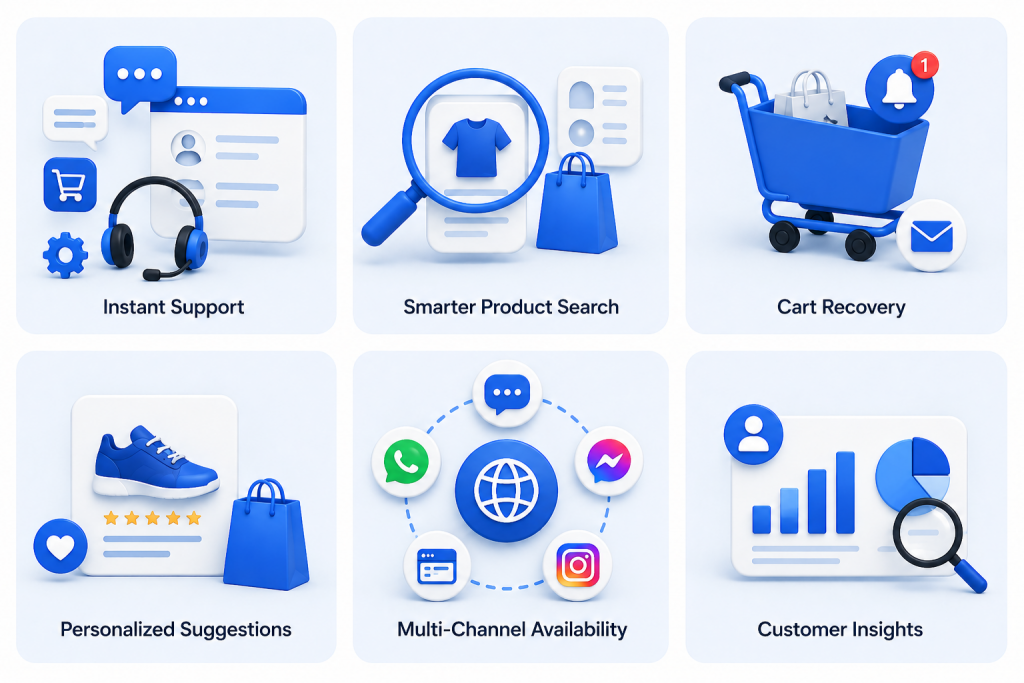
A WooCommerce AI chatbot supports customers through every part of their shopping journey from finding products to completing purchases. It helps your store respond faster, sell smarter, and operate more efficiently.
Customers expect quick answers. A chatbot handles common questions about orders, shipping, or returns within seconds. This reduces waiting time and keeps shoppers engaged while your team focuses on complex requests.
Instead of browsing multiple pages, shoppers can simply ask for what they need. When a customer types “Show me backpacks under $12 USD,” the chatbot searches your catalog in real time and displays matching products.
Many customers abandon carts before checkout. The chatbot follows up with gentle reminders or discount offers that encourage them to return and complete their purchase.
The chatbot observes what customers are viewing and suggests relevant items. If someone adds shoes to their cart, it may recommend socks or accessories that match. These prompts increase average order value naturally.
A single chatbot can manage conversations across your website, WhatsApp, Messenger, and Instagram. This ensures customers get the same level of support wherever they shop.
Every chat becomes useful data. You can track what shoppers ask, how often the bot assists, and which interactions lead to sales. This information helps refine both your support and marketing strategies.
By combining speed, personalization, and automation, AI chatbots make WooCommerce stores more responsive and customer-friendly. They turn everyday interactions into opportunities for better service and stronger sales.
You can add an AI chatbot to your WooCommerce store in just a few hours without writing any code. With YourGPT, your chatbot will chat with visitors, answer questions, recommend products, and even recover abandoned carts while staying connected to your WooCommerce data.
Prerequisites Checklist :
Before connecting YourGPT to your WooCommerce store, make sure these essentials are ready:
Once these are checked, you can move on to setting up YourGPT on your WooCommerce store.
Your setup begins with choosing the right AI chatbot platform. The platform you select will decide how easily you can install the chatbot, how well it works with WooCommerce, and how useful it becomes for customers.
A normal website chatbot may only answer basic FAQs. A WooCommerce chatbot should go further. It should understand product questions, shopping intent, stock-related queries, order support, and customer journeys.
When comparing AI chatbot platforms for WooCommerce, look for these key features:
Choosing the right platform at the beginning makes the rest of the setup much easier. It also ensures your chatbot can do more than answer basic questions it can capture leads, support customers, and guide visitors toward meaningful actions.
YourGPT is built for businesses that want AI automation without technical complexity. It works with WordPress and WooCommerce, lets you train your chatbot on your own business data, and allows you to deploy the same AI agent across multiple channels.
Here’s what makes it useful for WooCommerce stores:
You’ll spend the first few minutes installing the plugin, creating your YourGPT account, and setting up your AI Agent before connecting WooCommerce.
Adding YourGPT to your WordPress site takes just a couple of minutes. The official plugin manages the entire setup automatically, you do not need to manually configure.
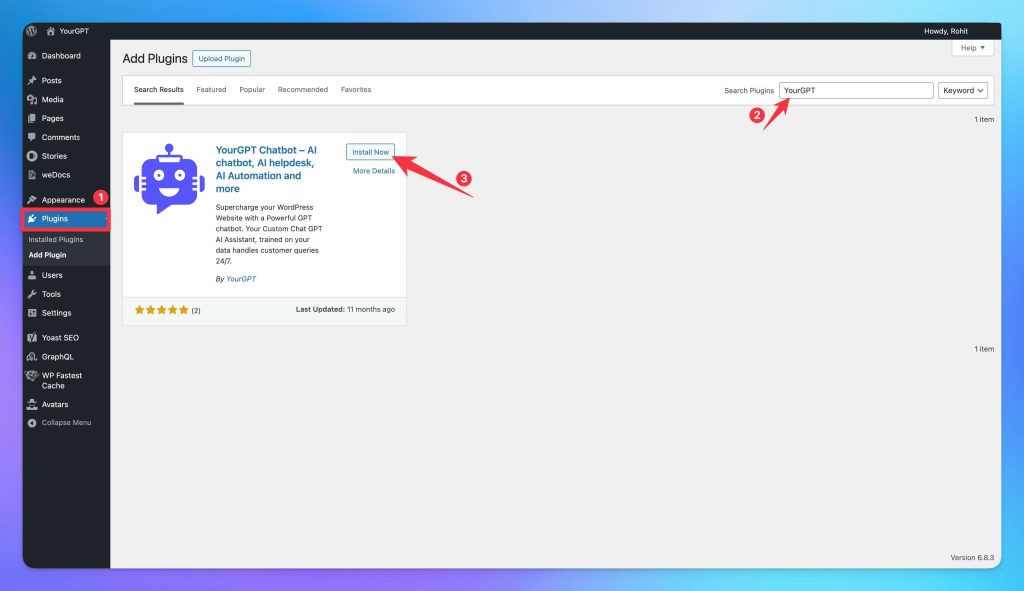
yoursite.com/wp-admin)This is where you will later paste your Widget ID and enable the chatbot on your WooCommerce store.
The plugin setup does not require HTML, CSS, PHP, or manual script installation.
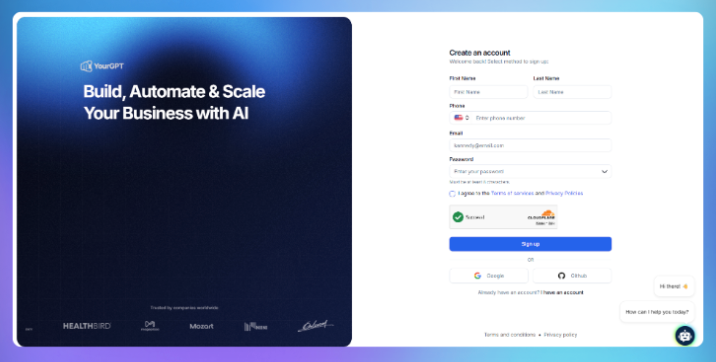
Before you connect the chatbot to your WooCommerce store, you need a YourGPT account.
Once you finish, your dashboard you can create your first AI agent, train it on your store data, customise the widget, connect WooCommerce, and deploy the chatbot to your website.
Here’s where your chatbot truly becomes your store assistant, helping shoppers find products, answer questions, and move smoothly toward checkout.
To get started, open the YourGPT dashboard and click Create New AI Agent.
Give your agent a clear, memorable name that fits your store or feels friendly and approachable. For example:
Next, choose the AI model that fits your store best:
Now, define your chatbot’s tone and purpose. For example:
“You are a helpful AI shopping assistant for [Store Name]. Help visitors find the right products, answer questions about product details, shipping, returns, payments, availability, and order tracking. Keep answers friendly, clear, and concise. Recommend relevant products when helpful, and guide shoppers toward checkout when they are ready to buy.”
Set how you want it to sound based on your brand:
You can always refine these settings later after reviewing real customer conversations. The goal is to make your chatbot feel natural, helpful, and aligned with your store’s personality.
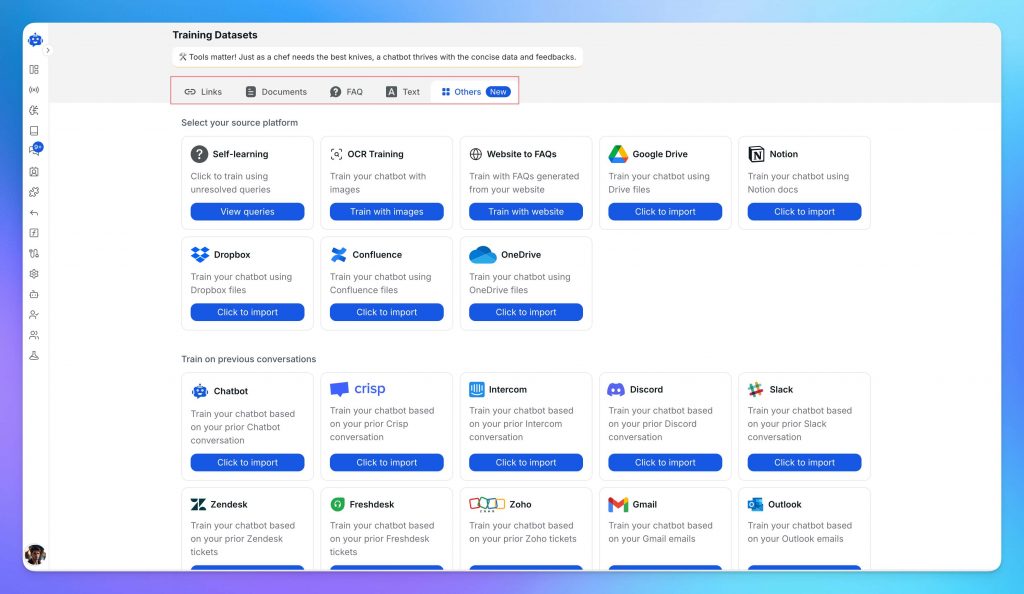
This is where your chatbot starts learning about your business what you sell, how you communicate, and the questions your customers ask most often. The more relevant data you provide, the smarter and more accurate it becomes.
In your YourGPT dashboard, go to Training → Add Data Source → Website.
Enter your WordPress URL, and YourGPT will automatically scan your site to collect and index important content like web pages, blogs, and docs FAQs. The training process depend on your size of the training data usually takes 2–5 minutes.
You can make your chatbot even more capable by adding additional data sources:
Start with essential information pricing, product details, policies, and troubleshooting guides, Training with the FAQs is the Best way. As your chatbot interacts with users, you can add more content over time to improve accuracy.
This is the most important step for a WooCommerce chatbot.
Training the chatbot on your website helps it understand static content. WooCommerce integration helps it work with live store information such as products, orders, customers, prices, and stock updates.
In your YourGPT dashboard, go to:
Integrations → WooCommerce
YourGPT will provide the WooCommerce connection details you need, such as your store URL, REST API credentials, webhook delivery URL, and webhook secret.
Now open your WordPress admin dashboard.
Go to:
WooCommerce → Settings
Then click the Advanced tab.
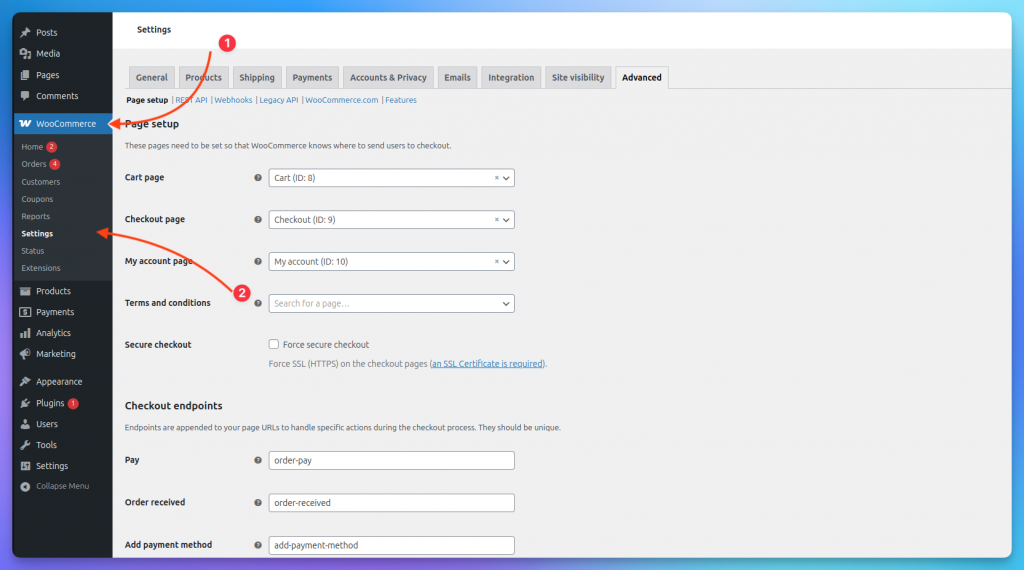
Inside the Advanced section, click:
REST API
Then choose:
Add Key
Give the key a clear name, such as:
YourGPT WooCommerce Integration
Select the user account that has admin permission.
For Permissions, choose the access level recommended inside your YourGPT WooCommerce integration screen.
For lookup-only use cases, Read access may be enough. For advanced workflows that need to update store information, use the permission level recommended by YourGPT.
Click:
Generate API Key
WooCommerce will generate:
Copy both values and paste them into the YourGPT WooCommerce integration screen.
Keep these credentials private.
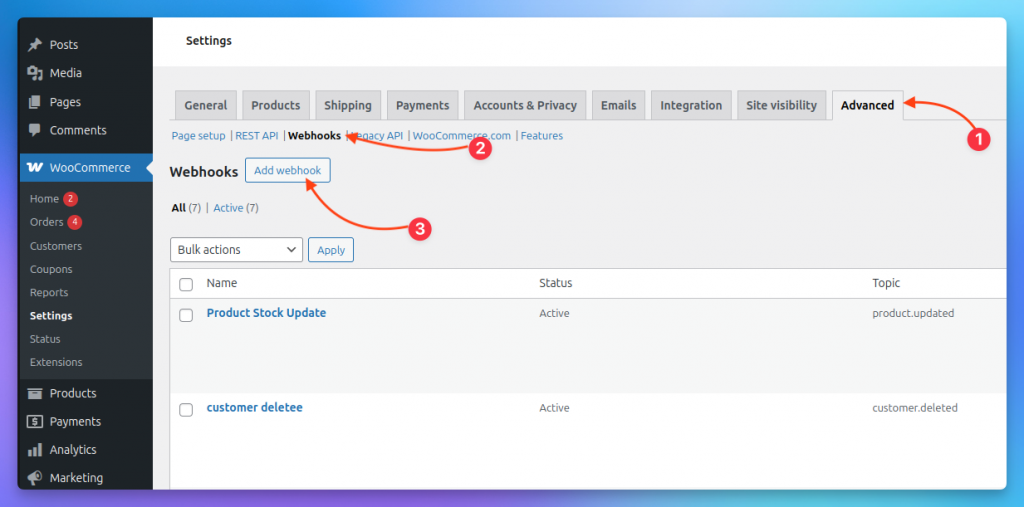
After adding REST API credentials, return to:
WooCommerce → Settings → Advanced
Click:
Webhooks
Then click: Add webhook
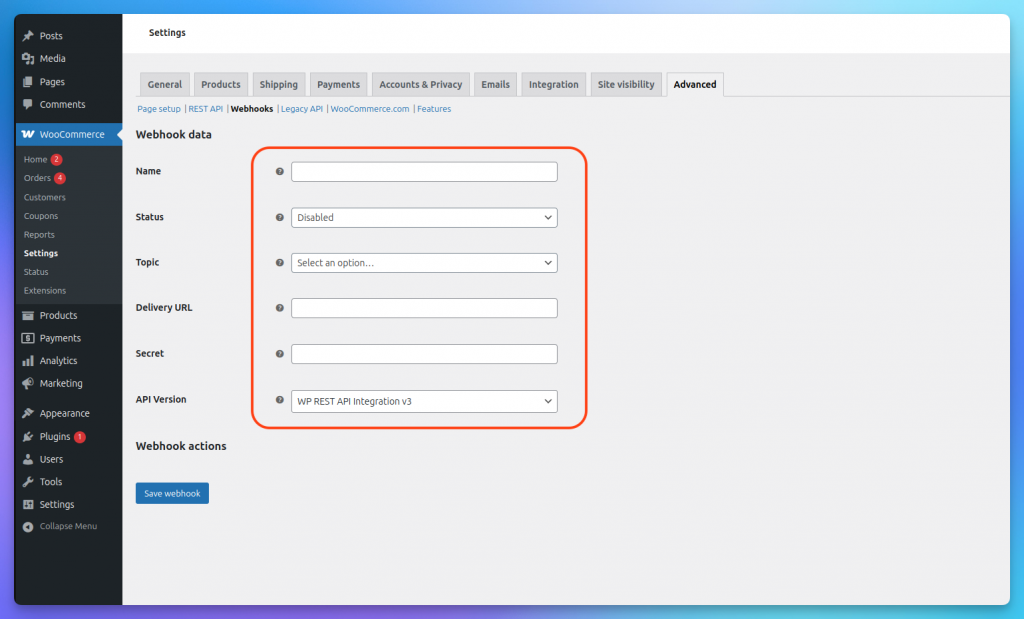
WooCommerce will now show the Webhook data form.
Fill it in using the details provided by YourGPT.
Use these settings:
Name
Choose a clear name, such as:
YourGPT WooCommerce Sync
For specific events, you can use names like:
Status
Change the status from Disabled to:
Active
The webhook will not send data if it stays disabled.
Topic
Choose the WooCommerce event you want to sync with YourGPT.
Common topics include:
Use the topic recommended in your YourGPT WooCommerce integration screen.
Delivery URL
Paste the webhook delivery URL provided by YourGPT.
Secret
Paste the secret key provided by YourGPT, or create a secure secret and use the same value in both WooCommerce and YourGPT.
Keep this secret private. It helps verify that webhook requests are genuine.
API Version
Keep this set to:
WP REST API Integration v3
Then click:
Save Webhook
Once WooCommerce is connected, your chatbot can support more advanced shopping experiences using live store data.
It can help with:
For example, a shopper can ask:
“Is this available in blue?”
“Do you have size M in stock?”
“Where is my order?”
“Can you suggest something similar?”
Instead of giving a generic response, the chatbot can answer using your WooCommerce store data.
Before moving ahead, test one WooCommerce event. For example, update a product, change the stock quantity, or update an order status. Then confirm that the change is received correctly inside YourGPT.
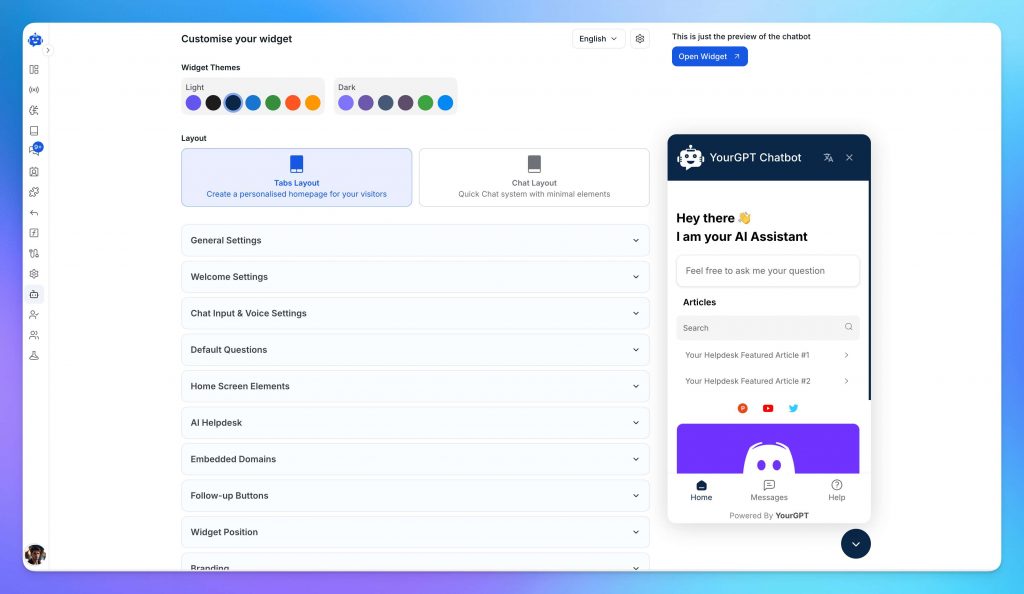
Your chatbot should look like part of your store, not a third-party tool added at the last minute.
Open the Appearance or widget customisation panel in your YourGPT dashboard.
Here, you can customise:
Use a short welcome message that encourages shoppers to ask questions.
Examples:
“Need help finding the right product?”
“Hi! I can help you track orders, check stock, or find products.”
“Looking for something specific? Ask me anything.”
You can also add quick-reply buttons for common actions:
Quick replies reduce friction and make the chatbot easier to use, especially on mobile.
Before publishing, preview the widget on both desktop and mobile.
Not every shopper buys on the first visit. Lead capture helps you collect contact details from interested visitors so you can follow up later.
In your YourGPT dashboard, go to:
General Settings → Leads
Then enable the lead form.
Add only the fields you really need. For most WooCommerce stores, this is enough:
You can also add:
For e-commerce, keep the form short. Long forms can reduce conversions.
For a more advanced setup, use AI Studio to design a complete lead journey. For example, your chatbot can:
This turns your chatbot into both a support tool and a sales assistant.
The final connection takes less than a minute.
Your WooCommerce AI chatbot is now live on your store.
Before announcing it, open your store in an incognito browser tab and test common questions:
“Where is my order?”
“What is your return policy?”
“How long does shipping take?”
“Do you have this product in stock?”
“Can you recommend something under $50?”
“Do you have this in another colour?”
Also test the widget on mobile. Many WooCommerce shoppers browse from phones, so the chatbot should be easy to open, read, and use on smaller screens.
Finally, test one WooCommerce webhook event. Update a product, stock quantity, or order status, then check whether the change syncs correctly.
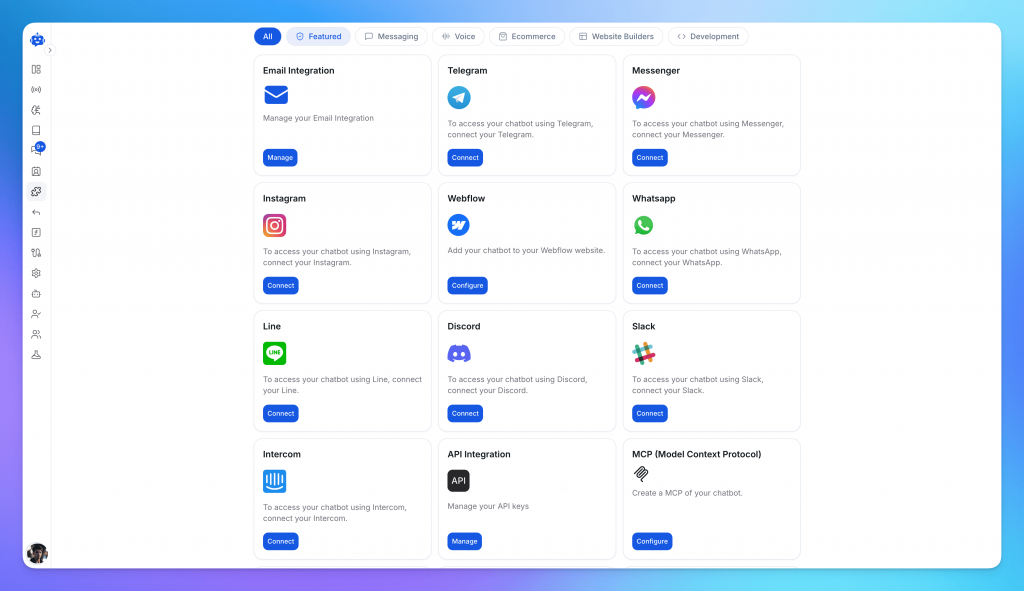
Your chatbot does not have to stay only on your WooCommerce website.
Many shoppers prefer messaging channels such as WhatsApp, Instagram, Messenger, or Telegram. With YourGPT, the same AI agent can be deployed across multiple channels from the same dashboard.
You can connect it to:
The benefit is consistency.
A shopper can ask a question on your website, Instagram, or WhatsApp, and the same AI agent can respond using the same store knowledge.
This is especially useful for WooCommerce stores that sell through social channels or receive product questions through Instagram DMs.
AI chatbots for WooCommerce are shifting from simple support tools to full service systems. They now guide shoppers through products, pull real time order details, and even help complete purchases inside the chat window. This gives customers a faster and more personal experience while taking routine work off your plate.
The next phase is deeper integration with store data and connected apps. Imagine a customer typing Reorder my monthly vitamins. The chatbot checks stock through WooCommerce then processes payment through WooCommerce Payments then updates delivery through ShipStation and finally sends a confirmation through email or WhatsApp. All of this happens in a few seconds without any manual effort.
Stores using these automations are already seeing up to 40 percent fewer repetitive tasks along with smoother repeat orders and fewer abandoned carts.
Here’s what’s next for WooCommerce chatbots in 2025 and beyond:
WooCommerce stores are shifting toward conversational commerce, where every chat becomes a potential sale. Adopting AI chatbots today gives businesses an early advantage faster conversions, lower support costs, and a smoother path to automated revenue.
A WooCommerce AI chatbot is an automated assistant that connects with your online store to answer customer questions, recommend products, track orders, and support shoppers in real time. It uses your store data, product details, FAQs, and policies to provide accurate responses without needing constant human support.
An AI chatbot helps shoppers make faster decisions by answering product, shipping, stock, and return questions instantly. It can also recommend relevant products, recover abandoned carts, and guide customers toward checkout, which helps reduce drop-offs and improve conversions.
Yes. When connected with WooCommerce, the chatbot can help customers check order status, delivery updates, stock availability, and product details. This reduces repetitive “Where is my order?” questions and keeps customers informed without manual follow-up.
No. With platforms like YourGPT, you can install the chatbot through a WordPress plugin, connect it with WooCommerce, train it on your store content, and customize the widget without writing code.
Yes. A WooCommerce AI chatbot can be deployed across channels such as WhatsApp, Instagram, Messenger, Telegram, email, and website chat. This helps customers get consistent support wherever they prefer to contact your store.
No. The chatbot handles common and repetitive questions, while your support team can focus on complex, sensitive, or high-value customer issues. A good chatbot also supports human handoff when a shopper needs personal assistance.
Start by training it on your product pages, FAQs, shipping policy, return policy, pricing details, troubleshooting guides, and order-related information. These are the areas customers usually ask about before buying or after placing an order.
Customers on WooCommerce expect quick guidance at every step. Some want help comparing products. Others need clarity on delivery timelines. Many pause at checkout and look for reassurance before completing the order. These moments shape the entire store experience and they touch support sales and day-to-day operations all at once.
YourGPT helps you manage these touchpoints in one system. It connects with your WooCommerce store and uses your actual catalog and order data to answer questions guide buyers and assist with simple operational tasks. Shoppers can reach the chatbot on your website WhatsApp and Instagram which keeps communication steady across all channels.
With YourGPT you can:
Once connected YourGPT keeps your product and order data updated so responses stay accurate. It supports your store across support sales and operations and helps maintain a smoother experience for visitors and teams alike.
Add an AI chatbot that chats with shoppers, answers instantly, and recovers lost carts — powered by YourGPT for WooCommerce.
No coding required • Works with WordPress & WooCommerce • Live in under 30 minutes
Use YourGPT to help Black Friday shoppers choose products, check orders and understand returns. Prepare your answers and team before the sale.

Add in-app chat support to your SaaS or mobile app. Place it on the screens where users stall, pass who they are, and hand hard cases to your team.
Group new-account tickets by onboarding stage, train an AI agent on your docs, and place it in the product where new users get stuck.
AI agents can now find and buy products for shoppers. See what agentic commerce changes for a Shopify store and which support jobs stay yours.
Build a Halloween shopping assistant for Shopify with YourGPT. Set up product recommendations, stock checks, cart actions and human support before launch.

See what a good customer effort score looks like, how to word and calculate CES on each scale, and which support habits raise customer effort.