Black Friday customer support playbook with YourGPT

Shreya
October 21, 2026
A Black Friday customer support playbook sets out how your agent and team will help shoppers choose products, check orders and understand returns during the promotion. With YourGPT, you can automate common answers and connect the store actions customers need. Start with your product information and sale policies, test the questions customers actually ask, and make it easy to reach your team. Keep those answers current as stock, delivery times and offers change.
Black Friday support starts before someone places an order. A shopper may need help choosing a size, checking a discount or deciding whether a gift can be returned. After checkout, the questions shift to dispatch, tracking and delivery.
YourGPT is a no-code AI agent platform for support, sales and operations. For your store, that means an agent can answer from your product and policy information and take actions through connected tools. You choose what it handles and when a teammate should step in.
Black Friday 2026 falls on 27 November, followed by Cyber Monday on 30 November. This playbook helps you prepare for that weekend, often called BFCM, with practical steps for your team. For the broader strategy, start with our ecommerce customer service guide.
Your first automation should solve a question your team answers repeatedly. Look at your last promotion, recent conversations or the questions customers ask on product pages. Group them into three areas so you know what information your agent needs.
| Customer need | What YourGPT needs | When your team helps |
|---|---|---|
| Choosing a product | Accurate descriptions, sizing, variants and promotion terms | A detail is missing or the shopper needs advice the store has not documented |
| Checking an order | A connection to the order record, plus your shipping policy | The order cannot be found or the delivery needs investigating |
| Understanding a return | The applicable return policy and, for eligibility, the customer’s order | A damaged item, disputed decision or gift return needs personal attention |
If you use a ticket export, remove duplicate rows rather than separate messages about the same problem. Repeat contacts still take your team’s time, and they can reveal where an answer did not help.
Choose a small starting scope you can test properly. Product questions and published policies are useful first steps; add order actions once the store connection works. You can expand after reviewing real conversations.
Start with the information you already give customers. Prepare your first version in three steps:
Choose the setup guide for your store:
Each platform has its own setup. Test the specific shopping and support actions you enable on your store.
Our Black Friday reminder below makes the case for preparing an agent before the rush. Starting early gives you time to check product recommendations, correct sale information and test what happens when a customer needs your team.
View our Black Friday preparation post on X
Use your own promotion history to forecast demand. The post’s traffic figure is not a forecast for your store. Adjust the schedule below to your sale date; each row gives you something concrete to finish.
| When | What to do | What you should have |
|---|---|---|
| Four weeks before | Review common questions and agree on sale terms with your team | Current product details, dispatch estimates and return rules |
| Two weeks before | Train the agent and test product answers, order lookups and human handoff | Replies that match the store and requests that reach the right person |
| The day before | Recheck changed offers, stock, staffing and available AI Credits | A clear owner for questions the agent cannot finish |
| During the sale | Review unanswered questions and update changed promises | Consistent answers from your agent and your team |
| After the weekend | Keep coverage for delivery and return questions | A short list of improvements for the next promotion |
Use this as a preparation checklist, then adjust the timing to your sale and the actions you plan to enable.
Give one person responsibility for keeping sale information current. A banner saying “dispatch within six business days” will not reliably correct an agent trained on a shipping page that still says two.
YourGPT can support both sides of a purchase: helping someone find what they need and helping them with an order they have already placed. The information behind each answer is different, so check these three areas before the sale.
Put sizing, materials, compatibility and promotion exclusions on your product pages. Your agent can use that information to answer buying questions without asking the shopper to search through several pages. When a detail is missing, it should say so or offer help from your team.
On Shopify, AI Copilot Actions can show product cards and let shoppers add items to their real cart. These actions require Agent Mode. Test the shopping journey, including sold-out options, before enabling it for the promotion.
This gives product questions a useful next step: a shopper can move from asking about an item to viewing it or adding it to their cart. It supports the buying journey without promising that every conversation will become a sale.
For more ideas on helping seasonal shoppers, read our Black Friday sales strategies with AI chatbots. Choose the ideas that fit your store, then use the preparation and testing steps in this playbook to put them into practice.
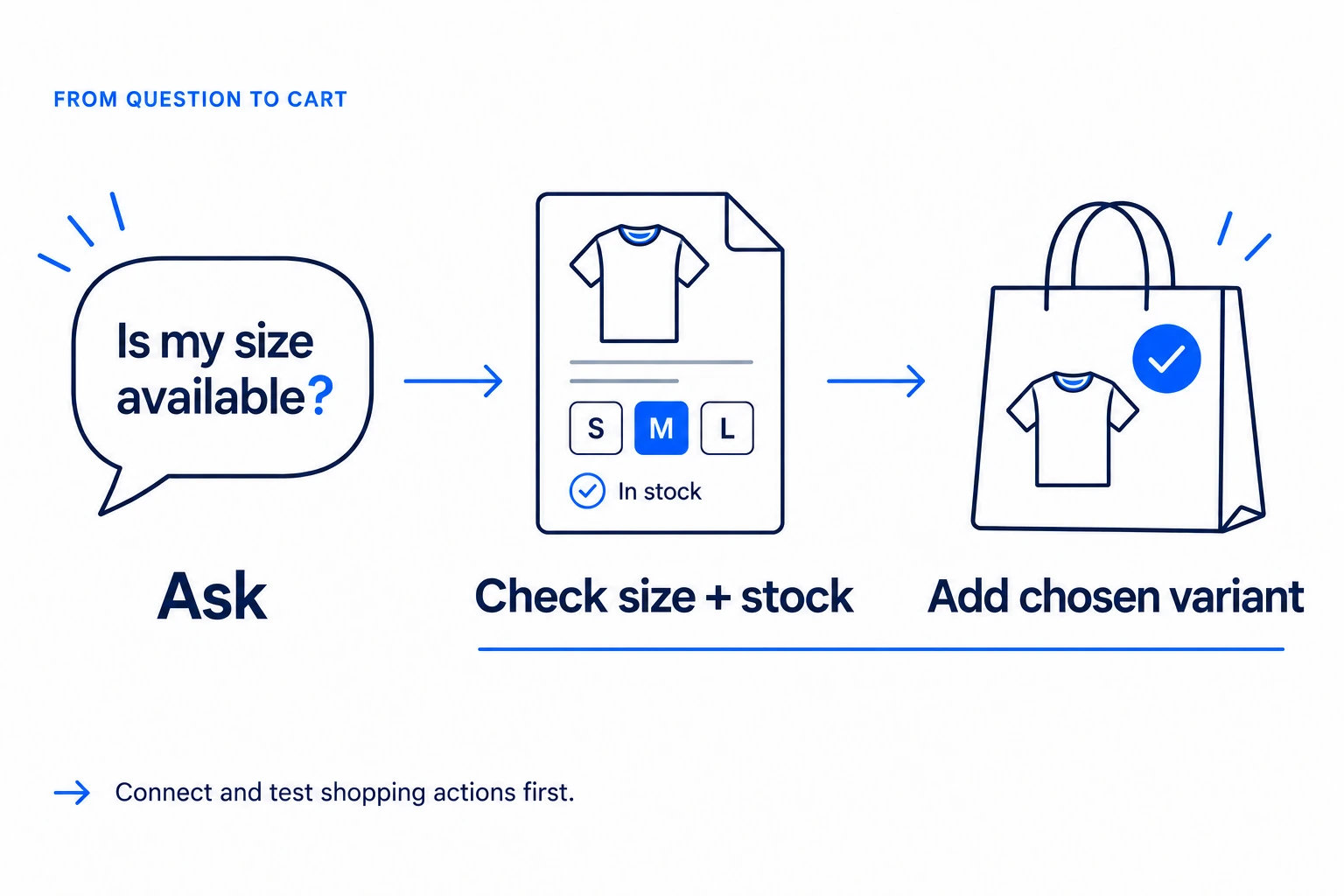
An illustrative shopping journey. Product answers use your store information; cart actions need the appropriate connection and testing.
Training on your website does not give the agent access to individual orders. For that, connect your store’s order lookup. Shopify stores can use the Order Status scenario in AI Studio, YourGPT’s tool for more advanced workflows.
Complete the order-status setup and test it with an authorized order. The reply should match the store record, with no guessed delivery date. Use your own platform’s connection for order lookups; the setup guides above are the starting point.
A general question about the return window can use your published policy. Deciding whether a particular purchase is eligible also needs the order details. With the Shopify returns setup, test both the answer and any return action you enable; a policy answer alone does not create a return or issue a refund.
A gift recipient without the required order details can still get general information. If they need an eligibility decision, pass the conversation to someone who can find the purchase. The next step should be clear even when the agent cannot finish the request.
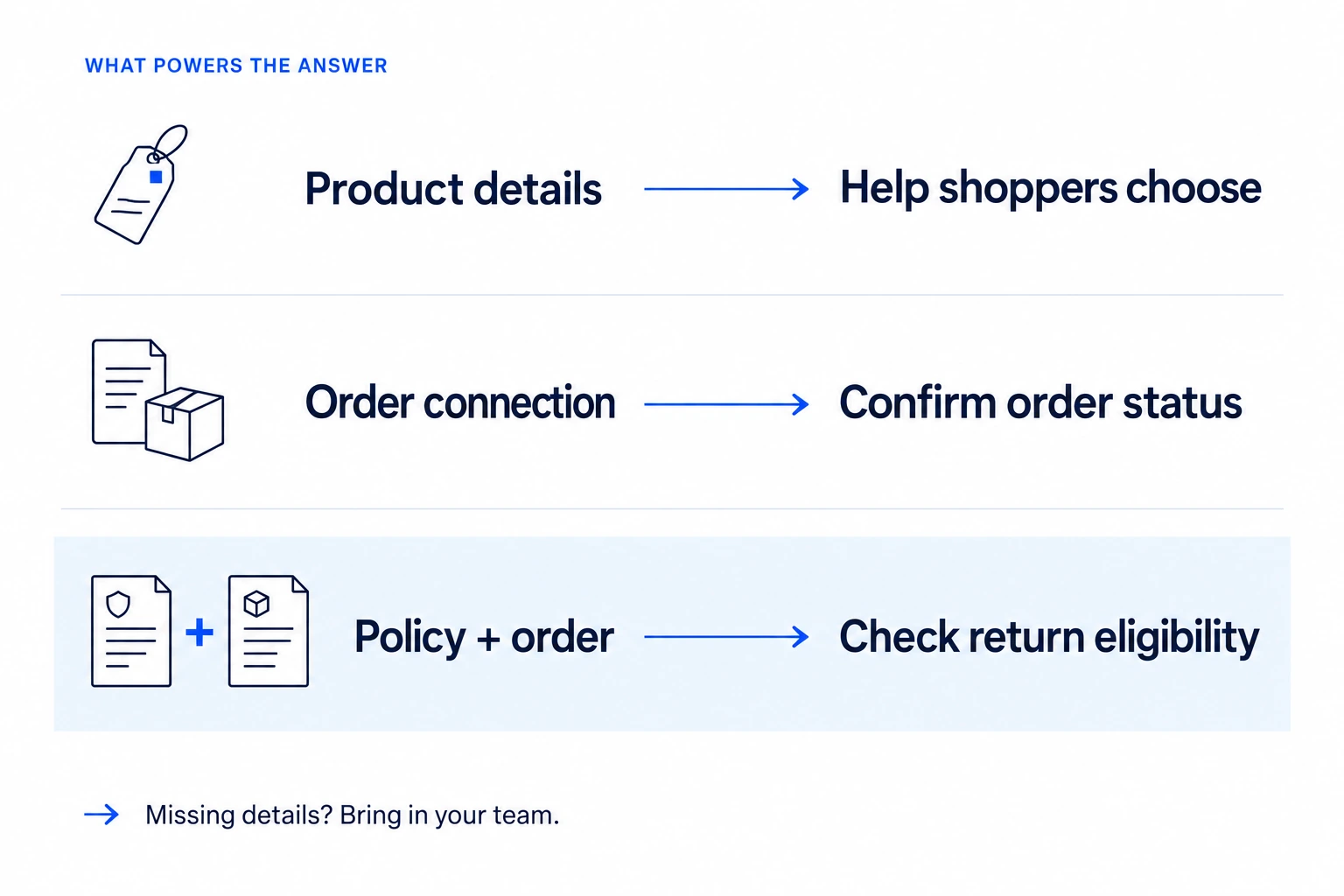
Give each question the information it needs. Product details help before a purchase; order records and the applicable policy help afterward.
Your agent and your team should give customers the same answer. Before the promotion, check your shipping page, return policy, product pages and saved replies for old or conflicting information. Keep standard terms where they still apply, and clearly explain the holiday exception.
Distinguish dispatch from delivery. For example, “Orders placed from 27 to 30 November 2026 dispatch within six business days after the order date” tells customers when you will send the parcel, not when it will arrive.
Use a timeframe your operations team can meet. Explain business days, order cutoffs and delivery estimates on the shipping page so the agent does not have to guess.
A fixed deadline and a rolling window are different policies. “Request a return by 31 January 2027” means something different from “Request a return within 30 days of delivery.” If your store offers both, explain which applies.
State which purchase dates and items qualify, whether the deadline is for requesting or sending a return, and any final-sale exclusions. These are wording examples, not suggested terms for your store. Save the policy customers saw when they bought so your team can check it later.
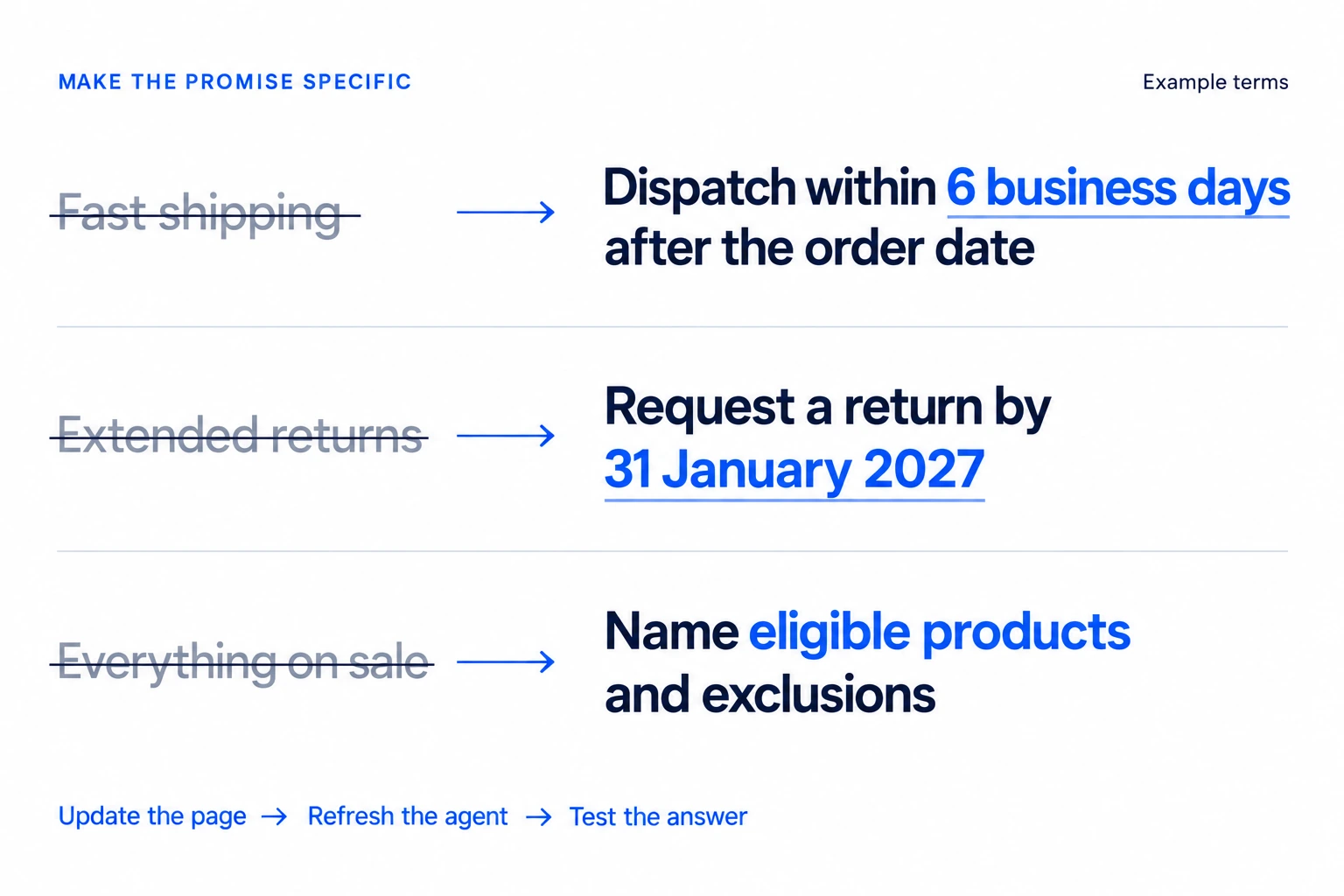
Illustrative terms only. Replace vague promises with your actual dispatch timeframe, return deadline and eligible products. Keep those details in your published pages so shoppers and your agent can use the same information.
Shopify product sync keeps catalog training updated through product webhooks, which are notifications sent when products change. Policy pages need their own refresh. When you change a sale rule:
Check individual variants too. A product can remain available while one size is sold out. Your agent should not describe that size as available simply because the rest of the product is still in stock.
A useful test checks what the customer hears and what happens next. Use real past questions and authorized orders in the Emulator, then try the same journey on your storefront. Keep return tests controlled so you do not accidentally create a live return.
| Try this | What a good result looks like |
|---|---|
| A common product question | The answer uses the correct product details and admits when information is missing |
| A sold-out size or color | The agent does not offer the unavailable option as ready to buy |
| A shopping action you enabled | The correct item and variant appear in the cart at the correct price |
| An order-status question | The reply matches the store record without inventing a delivery date |
| A holiday return question | The answer applies the right rule to the purchase date and item |
| A missing order or damaged item | The customer gets a clear explanation and can reach a teammate with the conversation context |
For returns, include purchases just before and after the promotion dates. For order lookup, check missing or mismatched details: the agent should never show another customer’s order. If an answer is wrong, check the source and connection, fix the problem and repeat the test.
Leave any untested action with your team. You can launch the parts that work, then add more once you have checked them. Before opening, confirm that someone can take over when needed and that your team knows how to pause an action that is not working.
YourGPT can handle repeated questions while your team focuses on requests that need judgment or follow-up. Make that handoff easy to find, and send the conversation history with it so the customer does not have to start again.
Keep a person available for:
Set up human handoff and test that the request reaches the right teammate. If you use AI Studio, Escalate to Human hands over control; Assign Member alone does not pause the agent. A ticketing system can help your team keep track of requests that need follow-up.
Plan coverage around your busiest hours, not just the weekly total. Forty requests spread across a day are different from forty arriving after one promotion email. Use past busy periods to estimate demand, include repeat contacts and failed automated requests, and allow time for breaks and follow-up work.
Keep backup cover available and tell customers when they can expect a reply outside staffed hours. Delivery and return questions continue after Cyber Monday, so your coverage should too.
Assign someone to watch urgent failures and waiting customers during each shift, then review recurring questions daily. Look for unanswered questions, customers waiting for a person and people asking again about the same issue. An assigned conversation can still leave a customer waiting.
If dispatch times or an offer change, update the public page and refresh the agent’s source. Test a question affected by the change and tell your team what is different. Save optional new features for a quieter period.
If an order connection stops working, explain that the status cannot be confirmed and pass the request to your team. Pause any action that shows the wrong customer’s information or makes an incorrect change, and check the fix before turning it back on.
Use Self-Learning to review questions the agent could not answer. A teammate checks the suggested answer before it becomes training material, helping you improve the agent without turning an uncertain reply into a store promise.
A fast reply is useful only if it helps the customer move forward. After the weekend, review which questions YourGPT answered correctly, which needed your team and which brought the customer back with the same problem. Check product questions separately from order and return requests so easy tracking answers do not hide a problem elsewhere.
For shopping conversations, check whether customers could find the right item and use the shopping actions you enabled. Do not treat a product click or cart addition as a completed sale. If you measure revenue, use completed order data and explain how you connect it to the conversation.
Keep the review simple: record the date range, the conversations checked and the changes you want to make. Include unresolved requests, and give recent conversations enough time for repeat contacts to appear. For a formal report, use consistent definitions when you measure AI resolution.
You do not need a perfect report to make the next improvement. A missing size guide, an unclear delivery promise or a handoff without context gives you something specific to fix.
A small team should automate repeatable questions and reserve people for exceptions. Make product details, shipping estimates and sale terms easy to find, then train YourGPT on that same information. Keep damaged orders, payment disputes and discount exceptions with a teammate. Base staffing decisions on how many requests still need a person and when they arrive, especially after promotion emails or during busy shopping hours.
Give customers a clear dispatch estimate and an easy way to check their order before they need to contact you. Put tracking links in shipping confirmations and explain known delays where customers will see them. Dispatch means leaving your warehouse; it does not mean delivery. YourGPT needs a tested order connection to answer about an individual purchase. If tracking has not updated, explain what is known and what the customer should do next.
An AI agent can explain your promotion rules, but your store determines whether a discount applies. Collect the code, the exact checkout error and the affected items. Your team can then check eligibility, minimum spend, active dates and discount combinations. On Shopify, the discount settings control which offers can combine. If an eligible cart still fails, send the details to a teammate who can investigate instead of promising a discount or an exception.
Let the customer leave their request and tell them when your team will respond. YourGPT can answer questions within its tested scope, but requesting a person does not make a teammate available. Enable the Request Human option and test that its notification reaches the right person. Make cancellation and address-change cutoffs clear. If those requests cannot wait until the next staffed shift, arrange human coverage for them.
No. A policy page explains the holiday return window; an individual eligibility decision also needs the order details. Check the relevant purchase or delivery date, the item and any exclusions against the policy for that order. On Shopify, compare your published wording with the configured return rules before enabling a return action. Send conflicting terms or disputed decisions to your team. Confirming eligibility does not mean a return or refund has been created.
Check whether the customer received the correct answer or completed action, rather than counting closed conversations alone. Review product questions, order lookups and returns separately because they require different evidence. An order-status answer should match the order record; a return action should have confirmation from the store. Track repeat contacts about the same unresolved issue and requests still waiting for a person. Use those findings to fix incomplete answers, failed actions and missed handoffs.
A shopper choosing a gift and a customer waiting for a parcel both want the same thing: a clear answer and a useful next step. Your Black Friday plan should make that easy, even when your team is busy.
YourGPT can help you put that plan into practice. Train your agent on product details and sale policies to answer common questions, then connect and test shopping, order and return actions as you need them. Shoppers get help moving toward a purchase, existing customers get help with their orders, and your team stays available for the situations that need personal attention.
Start with one question your team answers every day. Add the right information to YourGPT, try the conversation yourself and check the handoff. Once that works, build from there. You can enter Black Friday with a useful agent already helping customers and a clear plan for what to improve next.
Add your product and policy pages to YourGPT, then try your first customer conversation.
Add in-app chat support to your SaaS or mobile app. Place it on the screens where users stall, pass who they are, and hand hard cases to your team.

Group new-account tickets by onboarding stage, train an AI agent on your docs, and place it in the product where new users get stuck.
AI agents can now find and buy products for shoppers. See what agentic commerce changes for a Shopify store and which support jobs stay yours.
Build a Halloween shopping assistant for Shopify with YourGPT. Set up product recommendations, stock checks, cart actions and human support before launch.

See what a good customer effort score looks like, how to word and calculate CES on each scale, and which support habits raise customer effort.
Tier 1 support handles first contact. See how Tiers 0 to 3 differ and what changes when an AI agent becomes your first line.