10 Ways to Dominate 2026 Black Friday with AI Chatbots

Rajni
Last updated on October 15, 2026
AI chatbots can help Black Friday shoppers choose products, understand offers and get answers before they buy. Train YourGPT on your store information, connect it to your store for tasks such as adding items to a cart, and let your team take over when a customer needs personal help. Test it with your own products and measure completed purchases separately from chat activity.
On Black Friday, shoppers want quick answers before they buy: Does this fit? Does the discount apply? Can I return it? Having those answers ready helps customers decide and gives your team more time for questions that need personal attention.
U.S. online spending reached $11.8 billion on Black Friday 2025, according to Adobe’s Cyber Week results.
Black Friday 2026 falls on 27 November, followed by Cyber Monday on 30 November. Retailers often call this shopping weekend BFCM, short for Black Friday Cyber Monday. YourGPT is a no-code AI agent platform for support, sales and operations. The strategies below explain how to use it across the shopping journey while keeping your product information, offers and customer promises accurate.
The chart below shows reported U.S. online spending through 2025 and the outlook for 2026. Spending reached $11.8 billion in 2025, compared with $5.03 billion in 2017. Adobe forecasts $12.9 billion for Black Friday 2026 in its September 2026 holiday forecast. The lighter, hatched bar marks that prediction.
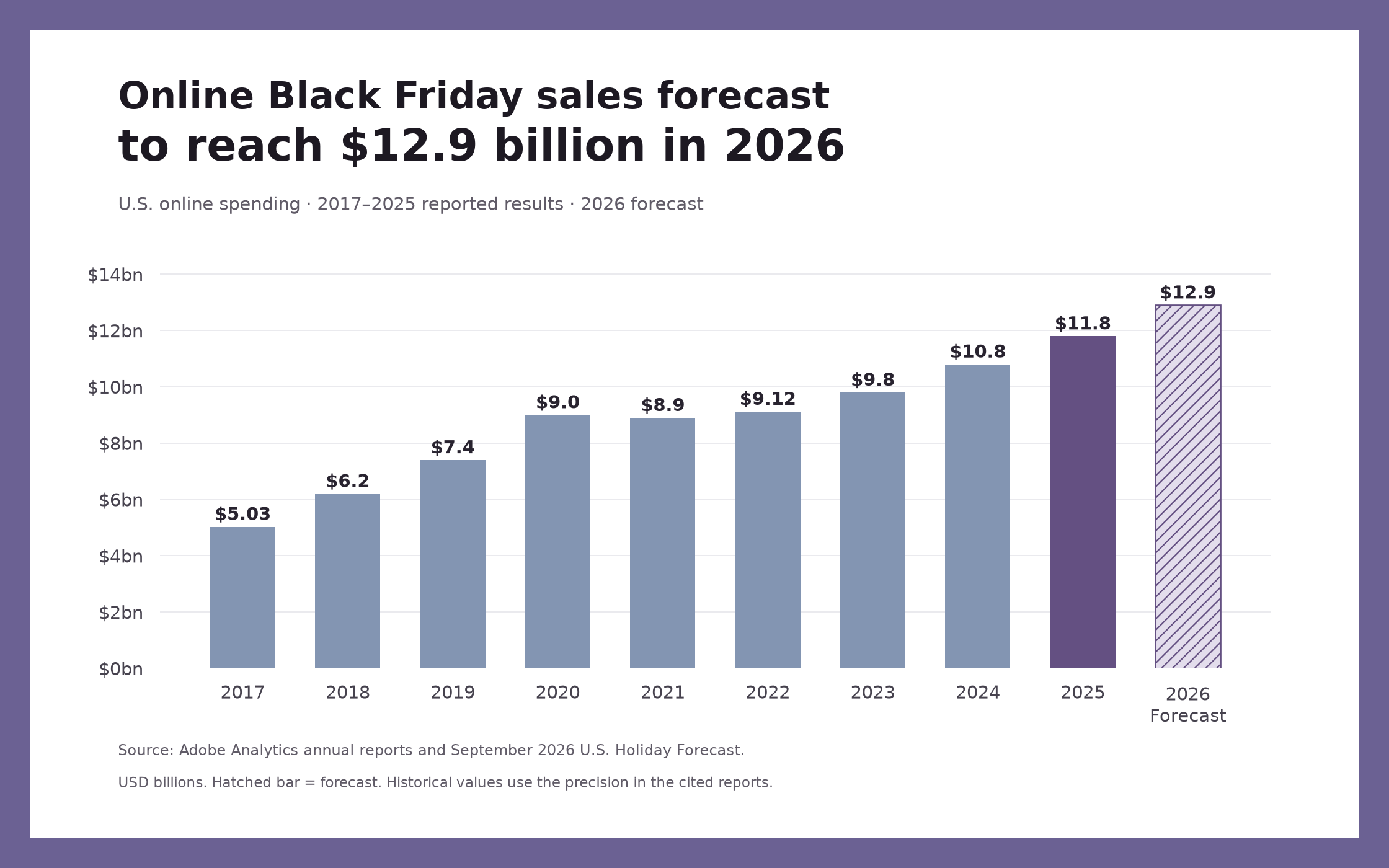
U.S. online spending in USD billions. Solid bars show reported results for 2017 to 2025; the hatched 2026 bar shows Adobe’s forecast. Historical sources: 2017, 2018, 2019, 2020, 2021, 2022, 2023, 2024, 2025 (linked in the introduction). The 2026 forecast was published in September 2026; actual results are not yet available.
For example, a shopper buying a jacket may want to know whether it is lined, which size to choose and whether the Black Friday offer applies. YourGPT can answer from your product information and sale terms, then use your store connection to help them view the item or add it to their cart.
After purchase, a connected order lookup can answer tracking questions. When someone needs specialist advice or an exception, the agent can collect the details and pass the conversation to your team. Start with the buying question your team hears most often and build the experience around resolving it.
Watch how YourGPT supports Black Friday shopping and customer conversations in this product introduction.
Build Your Own Chatbot: Follow the custom chatbot setup guide to create and train your first agent before adding shopping actions.
Look through your recent customer conversations as you review these ten ideas. Start with the questions your team answers most often, then decide where product recommendations, cart assistance or a conversation with a teammate would help.
When a shopper needs to check the fit or return terms, a clear answer helps them decide whether to buy. YourGPT can handle these repeated questions from your store information during the Black Friday rush, leaving your team available for customers who need individual advice.
Start with information customers repeatedly need:
Use recent conversations to identify gaps in your product pages and FAQs. Check whether the answer actually helped the customer. A fast reply is little use if the sizing advice is wrong.
A customer shopping from another time zone may need an answer before your team is back online. YourGPT can continue answering from your product and policy information, helping the shopper decide whether to buy or leave a request for your team.
Connect the channels your customers use, such as your website, WhatsApp or Instagram, and give the agent consistent offer information. Each channel needs its own connection, and shopping actions can differ by channel. Check the answers in the languages your customers use, and make your team’s response hours clear when a person needs to follow up.
A discount is only useful when the shopper understands how it applies. Your agent can explain the promotion’s dates, eligible products, minimum spend and exclusions using the sale terms you provide. It can also answer the delivery and return questions that affect a buying decision.
For a minimum-spend offer, for example, explain which items count toward the threshold and whether sale items qualify. If the customer needs an answer about their own cart, connect a cart lookup so the response uses the actual items. Your store’s checkout applies the discount rules; the agent helps the customer understand them.
Keep the campaign page, agent knowledge and checkout rules aligned whenever an offer changes. That gives shoppers a consistent answer from the first question to the final price.
YourGPT can use the preferences a shopper shares to suggest relevant products from your catalog. A recommendation becomes more useful when it explains why an item fits the person’s needs, rather than presenting a long list of products.
For example, someone buying headphones as a gift might want wireless connectivity, a microphone and a price within their budget. Your agent can narrow the catalog using those preferences and explain the differences between suitable options. A compatible accessory can be useful too, when the agent explains why it fits and leaves the choice to the shopper.
Connect the relevant catalog information and check that recommendations reflect available products. Recommendations based on previous purchases also need access to the relevant customer or order data.
A shopper comparing sizes needs different help from someone checking promotion terms. Use widget triggers to offer assistance on relevant pages and choose when it appears, using conditions such as time spent or a page interaction.
Offer help that fits what the shopper is looking at. On a product page, that might mean answering a sizing question; beside a promotion, it could mean explaining which items qualify. Let people browse before showing a message, make it easy to close, and keep it clear of buttons they need to tap on mobile.
On Shopify, the theme-installed widget appears on supported storefront pages, so plan assistance before the customer enters checkout. Following up after someone leaves their cart requires a separate campaign or integration and appropriate contact permission.
After buying a gift, a customer may return to check whether it has dispatched. With access to the order system, YourGPT can check the status without making the customer wait for a teammate to look it up. The customer gets an answer, and your team spends less time looking up routine orders.
A useful post-purchase experience can cover:
Use the order-status guide to plan this experience. Match private order information to the right customer, and check that the answer reflects the latest available status. For disputed deliveries or refund exceptions, pass the conversation to your team.
Once a shopper finds a product they like, they should be able to inspect it, choose the right option and add it to their cart. Interactive messages put product images, prices and buttons in the conversation, making those decisions easier to follow.
With Shopify AI Copilot Actions, the shopping conversation can continue into the customer’s real Shopify cart:
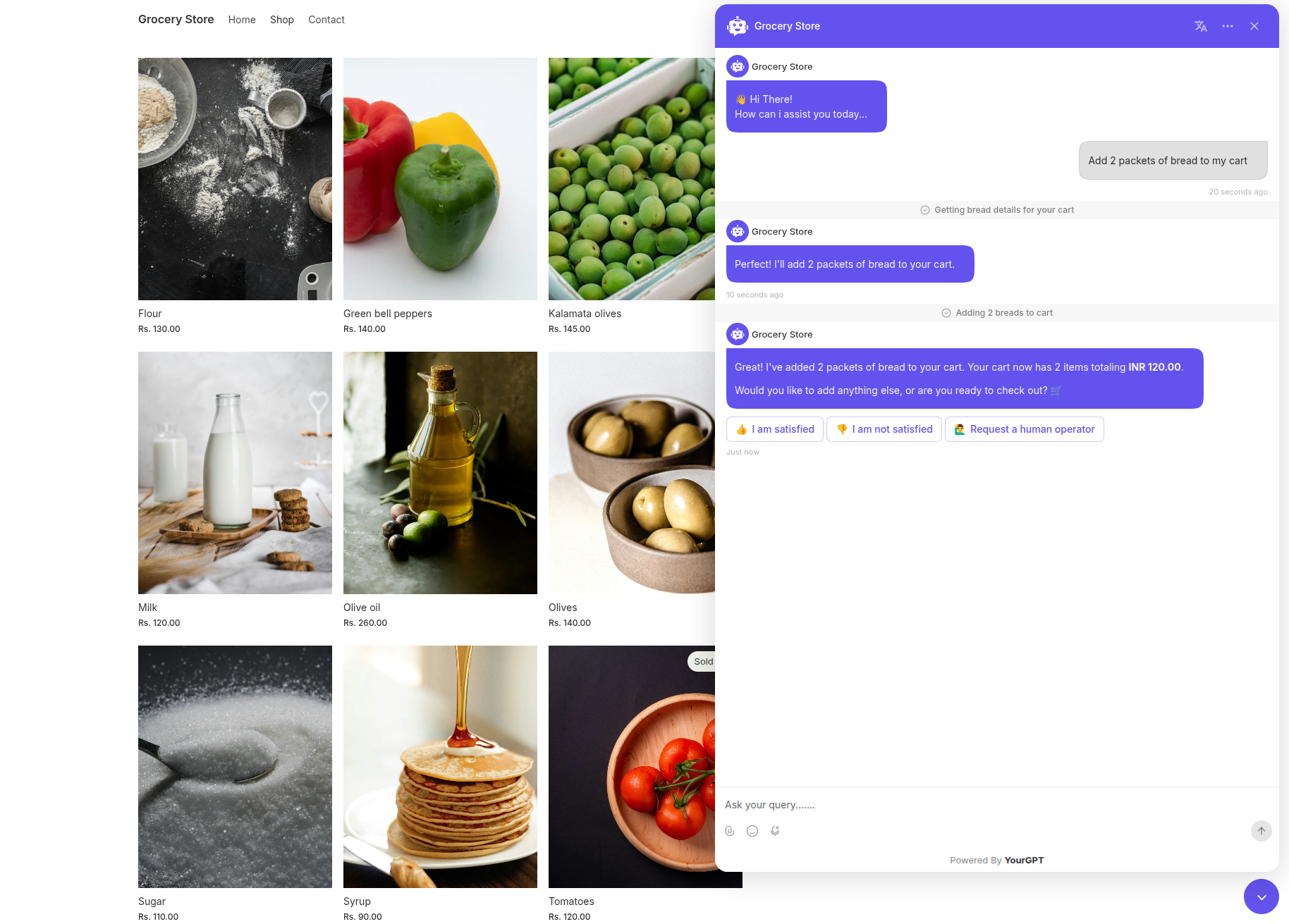
YourGPT’s documented grocery-store demo shows an add-to-cart conversation. It illustrates the product workflow, not a measured sales result.
These actions require Agent Mode and run on the Shopify storefront. Before the sale, try the journey with your own products and confirm that the intended item and quantity appear in the cart.
During a Black Friday sale, a product may still be listed while a popular size has sold out. A shopper needs to know whether their chosen option is available before deciding what to buy. When connected to inventory data for each size or color, YourGPT can check the latest stock information for the option the shopper wants.
If that size or color has sold out, suggest an alternative from your catalog only if it fits what the shopper is looking for. Use the same approach for changing information such as current prices. This helps customers choose from the options your store can actually offer.
API calling connects the conversation to that store information. Check that the lookup returns the correct product and option, and give the customer a clear route to help if availability cannot be confirmed. The walkthrough below shows how to connect an external system.
YourGPT API-calling walkthrough. The current interface may differ from the recording.
A customer choosing a bulky gift may need to know whether you deliver to their postcode before placing an order. If your store uses defined service areas, you can configure a YourGPT workflow to collect the postcode, check your delivery rules and explain the available option.
Use your current delivery areas and exclusions for the postcode check. If the shopper also asks when the gift will arrive, the agent needs your delivery estimates and order deadlines before it can answer.
AI Studio lets you connect the information and rules behind that answer. Code Execution can add custom logic when an existing action does not cover the requirement. This is optional advanced work; use it when a specific customer request needs it, after your product answers and standard shopping actions are working.
YourGPT Code Execution walkthrough for extending an agent workflow with custom logic.
Some conversations deserve personal attention: a bulk order, specialist product advice, a delivery dispute or a request for an exception. Give shoppers a clear way to reach your team so those conversations can continue with someone who can make the decision.
Set up human handoff and define which requests should go to your team. For a sales enquiry, ask what the customer wants to buy, how many they need and how they would like your team to contact them. Pass those details along with the conversation so the customer does not have to explain everything again.
Before the sale, test that the request reaches the right teammate. Let the customer know when to expect a reply, especially if your team is offline.
A useful agent needs accurate information and a clear role. Check these six mistakes before your promotion begins.
AI is changing how shoppers research products and find deals before they even reach your store. For Black Friday 2026, prepare for that discovery journey as well as the questions customers ask once they arrive. These five trends show where to focus.
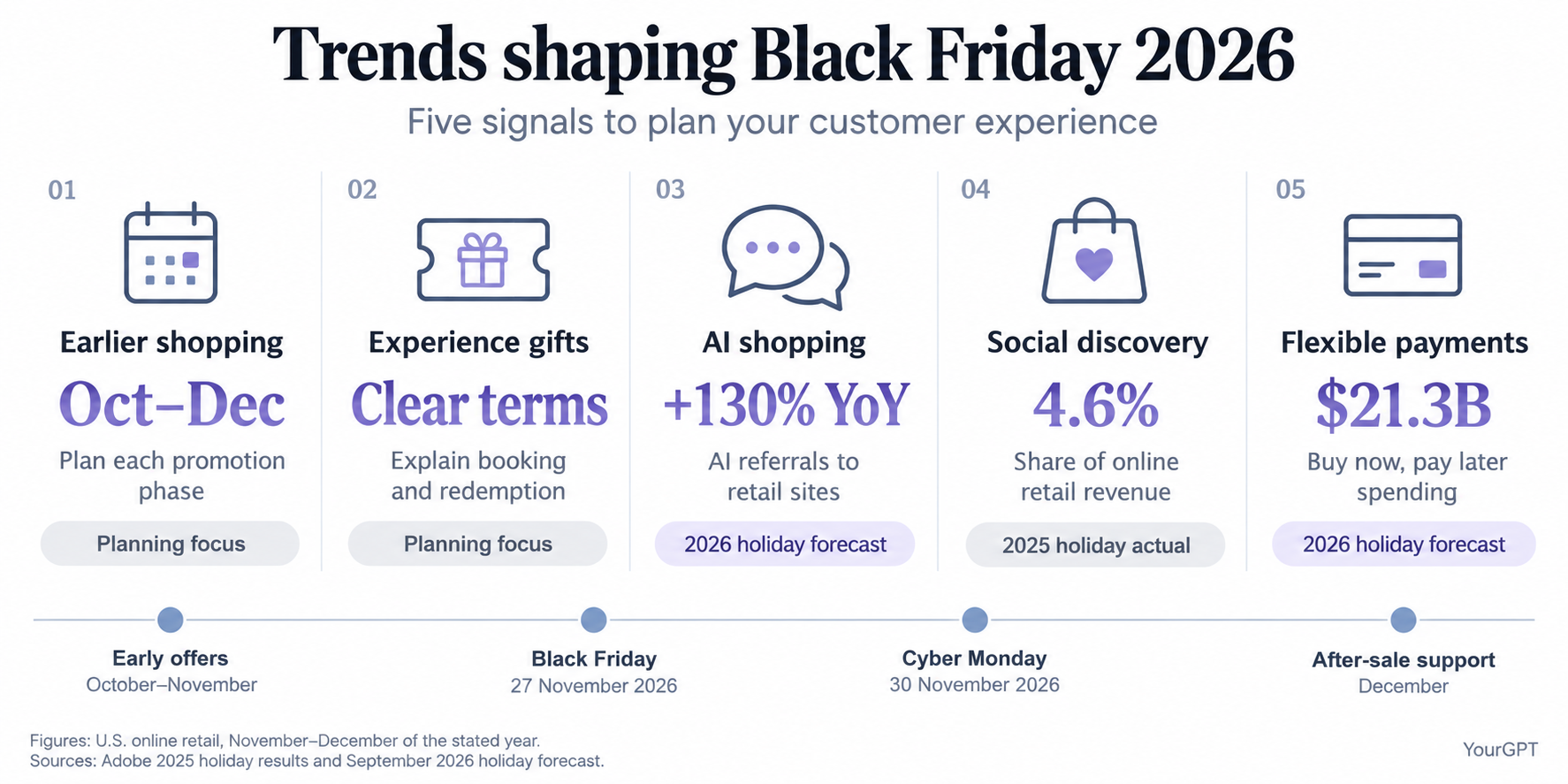
Figures cover U.S. online retail during November and December of the stated year. AI traffic growth and payment spending are 2026 forecasts; social revenue share is a reported 2025 result. Earlier offers and gift guidance are planning priorities.
If your promotion runs in phases, give each offer its own start date, end date and eligibility rules. The agent needs to know which terms apply now, rather than answering from an expired early-access deal. Keep delivery and returns coverage available after the discount ends.
If you sell experiences, memberships or gift packages, customers may need to check booking restrictions, redemption dates and transfer rules. Put those details into your product and policy information. Clear answers help gift buyers understand what the recipient can use and when.
AI now has a role before shoppers reach your store and while they decide what to buy. People can use AI shopping assistants to research products, compare options and find deals. On your storefront, an AI agent can help with the next questions, such as whether a product meets their needs or an offer applies.
Adobe’s holiday report found that traffic from generative AI tools to U.S. retail sites grew 693.4% year over year during November and December 2025, although the user base remained modest. Its 2026 holiday forecast projects another 130% year-over-year increase for November and December 2026. These figures measure visits from external AI services, not sales generated by a store’s own agent.
For your Black Friday campaign, prepare for both parts of that journey:
Social media’s share of U.S. online retail revenue reached 4.6% during the 2025 holiday season in the same Adobe report. If a campaign brings shoppers to a particular product, make sure the landing page and agent explain the same offer. Connect each messaging channel and check that its answers match the campaign landing page.
Adobe’s September 2026 forecast projects $21.3 billion in U.S. online buy now, pay later spending during November and December.
Help customers understand the payment options your store actually supports, with links to the published terms. Eligibility, approval and repayment details come from the checkout and payment provider.
Choose the setup for the store you already run. YourGPT connects with Shopify, WooCommerce and BigCommerce for shopping assistance. Follow the guide for your platform to install the widget and configure the actions your customers need.
If customers also contact you on WhatsApp, connect that channel separately. Follow the Shopify WhatsApp setup to bring store-aware answers into those conversations.
Choose a conversation your team already handles often. That gives you real questions to test and a clear reason for adding the agent.
Keep responses focused and use your brand’s normal tone. A long answer or repeated prompt can get in the way even when its facts are correct. The wider ecommerce customer service guide helps connect sales assistance with the support customers need after buying.
A chat, a product click and a cart addition are different outcomes. Track them separately so you can see where assistance helps and where shoppers still get stuck.
| What you measure | What it tells you | What to check next |
|---|---|---|
| Product question answered correctly | The agent supplied useful buying information | Whether the answer resolved the shopper’s question |
| Product viewed or added to cart | The shopper took a shopping action | Whether the shopper completed the order |
| Completed order linked to a conversation | A purchase followed assistance under your attribution rules | Whether a controlled comparison shows additional sales |
| Unanswered question or human handoff | A customer needed information or help beyond the current scope | Whether the customer reached the right person and received help |
Use conversation analytics to understand what shoppers ask, and your store’s completed order data for sales reporting. Record the reporting period and how you connect a conversation to an order; do not count the same order twice because the shopper asked several questions.
For an assisted-purchase rate, divide the number of assisted shoppers who place an order by the total number of shoppers who received assistance, then multiply by 100. Count each shopper once and define how long after a conversation you will attribute an order to it.
For example, if 200 shoppers receive assistance during your campaign and 40 of them buy within your chosen window, the assisted-purchase rate is 20%. These are illustrative numbers, not YourGPT results. The calculation tells you how many assisted shoppers bought; it does not tell you how many bought because of the agent.
A higher purchase rate among people who chat can also reflect their existing intent to buy. If you want to estimate additional sales caused by the agent, use a controlled comparison where practical, and account for changes in offers and traffic. For routine reporting, track assisted purchases and use the conversations to identify the next improvement.
The YourGPT widget installed through your Shopify theme works on storefront pages; that installation does not place it inside checkout. Help shoppers with product choices, offer terms and cart questions before they enter checkout. The cart card can send them to your store’s checkout, where Shopify handles the purchase.
Choose an AI chatbot that works with your ecommerce platform and can help customers complete your most common buying tasks. Test product recommendations, promotion answers, supported cart actions and human handoff using your own catalog. Compare answer quality, setup effort and total usage costs. During the trial, follow a shopping task from the first question through to the cart to see where customers might get stuck.
Start with the recurring questions that delay purchases, such as size, compatibility, discount eligibility or delivery options. Use recent customer conversations to choose the first task. If shoppers struggle to choose between products, start with recommendations. If they keep asking which items qualify for a discount, start with your offer terms. Add cart assistance once those answers are working.
Prepare your AI chatbot before your first Black Friday promotion goes live, including any early-access sale. Allow time to add approved offer information, test the mobile shopping journey and correct failed answers or actions. Launch when the selected tasks work with your real products and current terms. Recheck the agent whenever prices, stock connections or promotion rules change.
Give your Black Friday chatbot product details, size or compatibility guides, promotion dates and time zones, discount eligibility, exclusions, delivery cutoffs and sale-item return terms. Use the same approved information as your storefront. Connect store data for answers that depend on a specific cart, available stock or private order. Refresh changed policy pages so an expired offer does not remain in the agent’s knowledge.
An AI chatbot can address questions that cause shoppers to hesitate, such as whether an item fits, an offer applies or delivery is available. Offer relevant help on supported product and cart pages. Contacting shoppers after they leave requires a separate abandoned-cart campaign or integration with appropriate permission. Track completed recovered orders to assess that campaign, separately from conversations started on your storefront.
Measure Black Friday chatbot ROI by comparing incremental gross profit and actual cost savings with setup, subscription, usage and maintenance costs. A controlled comparison helps estimate extra purchases caused by assistance. Without that comparison, report assisted orders separately from proven additional sales. Track time saved too, while distinguishing freed staff capacity from an actual reduction in costs.
Getting shoppers to your store is only part of the sale. They may still need help choosing the right product, understanding policies or checking delivery. YourGPT can answer from your store information and, with the right connections, help them find a product and add it to their cart. Your team can step in for specialist advice or requests that need a personal decision.
Start with one question your team hears often. Give your agent the information it needs, test the answer on your storefront and check that any connected cart or product action works. After launch, review what shoppers still ask and whether they complete their purchases. Let that guide what you improve next.
Add your product pages to YourGPT, then test a buying question from your customers.
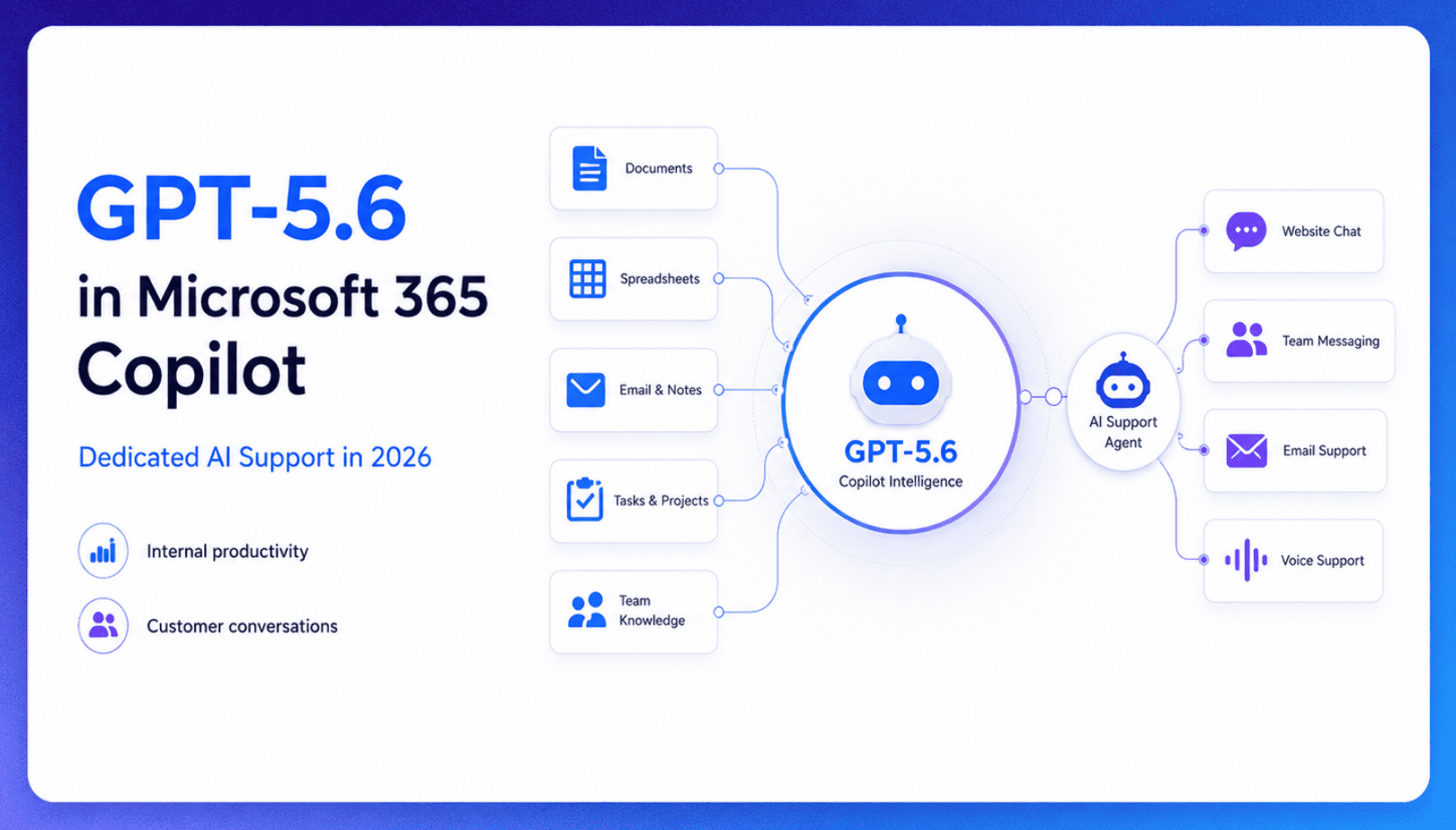
TL;DR Microsoft made GPT-5.6 the preferred model across Word, Excel, PowerPoint, Copilot Chat, and Cowork on July 9, 2026, focusing on internal workplace productivity rather than customer-facing support. Dynamics 365 Service Agent also reached general availability, but it mainly helps human support representatives manage cases within Microsoft’s existing permission structure and requires separate licensing. A […]

TL;DR Cheap frontier models now compete for the same high-volume support workloads, with DeepSeek V4 remaining the lowest-cost option in this comparison. Kimi K2.6 and GLM-5.2 are open-weight and self-hostable, while Qwen 3.7 Plus is proprietary and available only through an API. Claude Haiku 4.5 is the only model here that its developer explicitly recommends […]
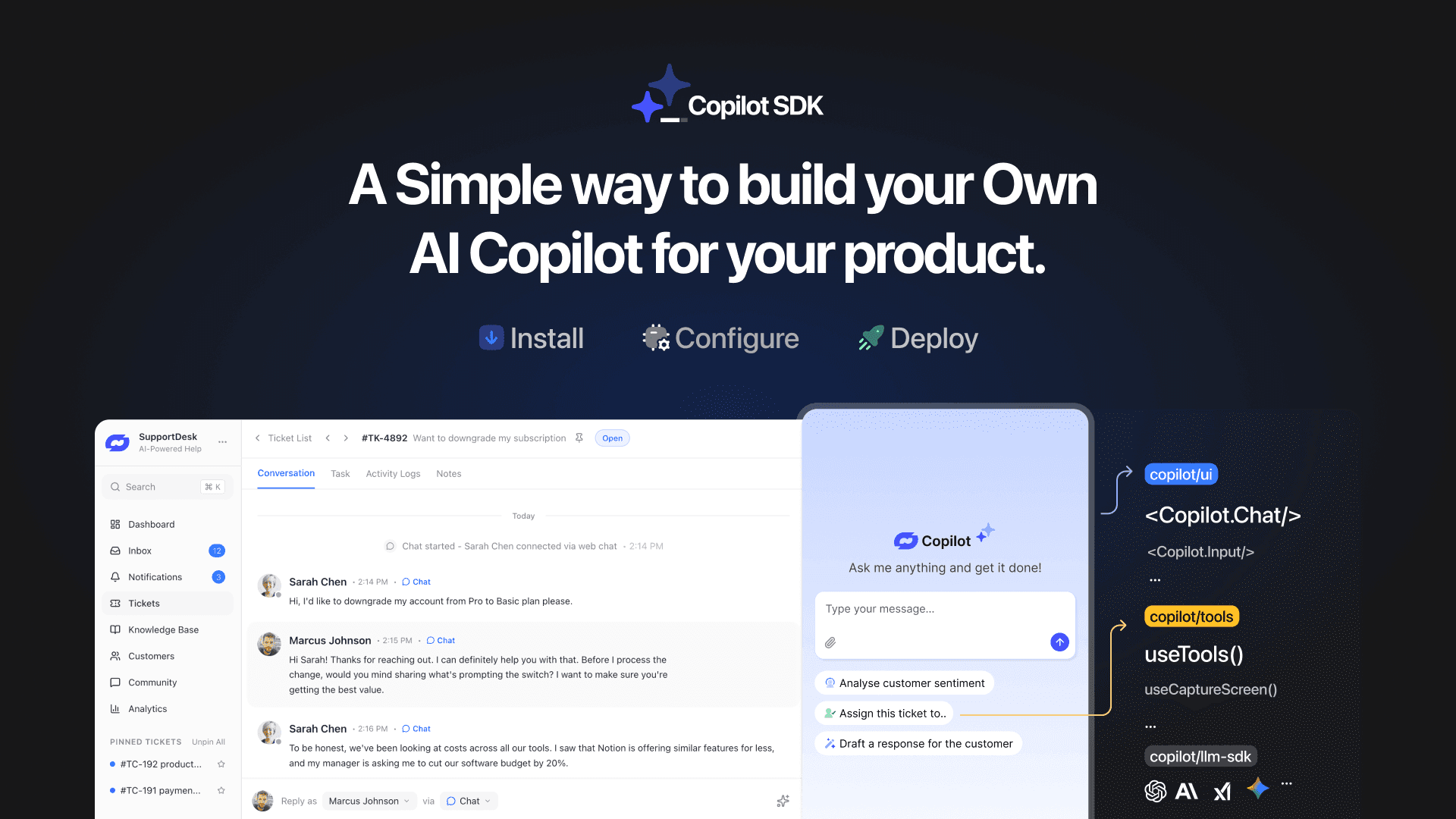
TL;DR YourGPT Copilot SDK is an open-source SDK for building AI agents that understand your application state, user context, and what is happening inside your product. Instead of working like isolated chat widgets, these agents connect directly with your product and can take real actions within existing workflows. This helps teams build contextual AI experiences […]
TL;DR YourGPT 2.0 adds AI Studio for building, testing, and debugging automated workflows. It includes native MCP integration for more than 100 tools, upgraded voice agents, and native SDKs for iOS and Android applications. With shared context across web, WhatsApp, Instagram, Telegram, and mobile, YourGPT turns conversations into real actions across support, sales, and operations. […]

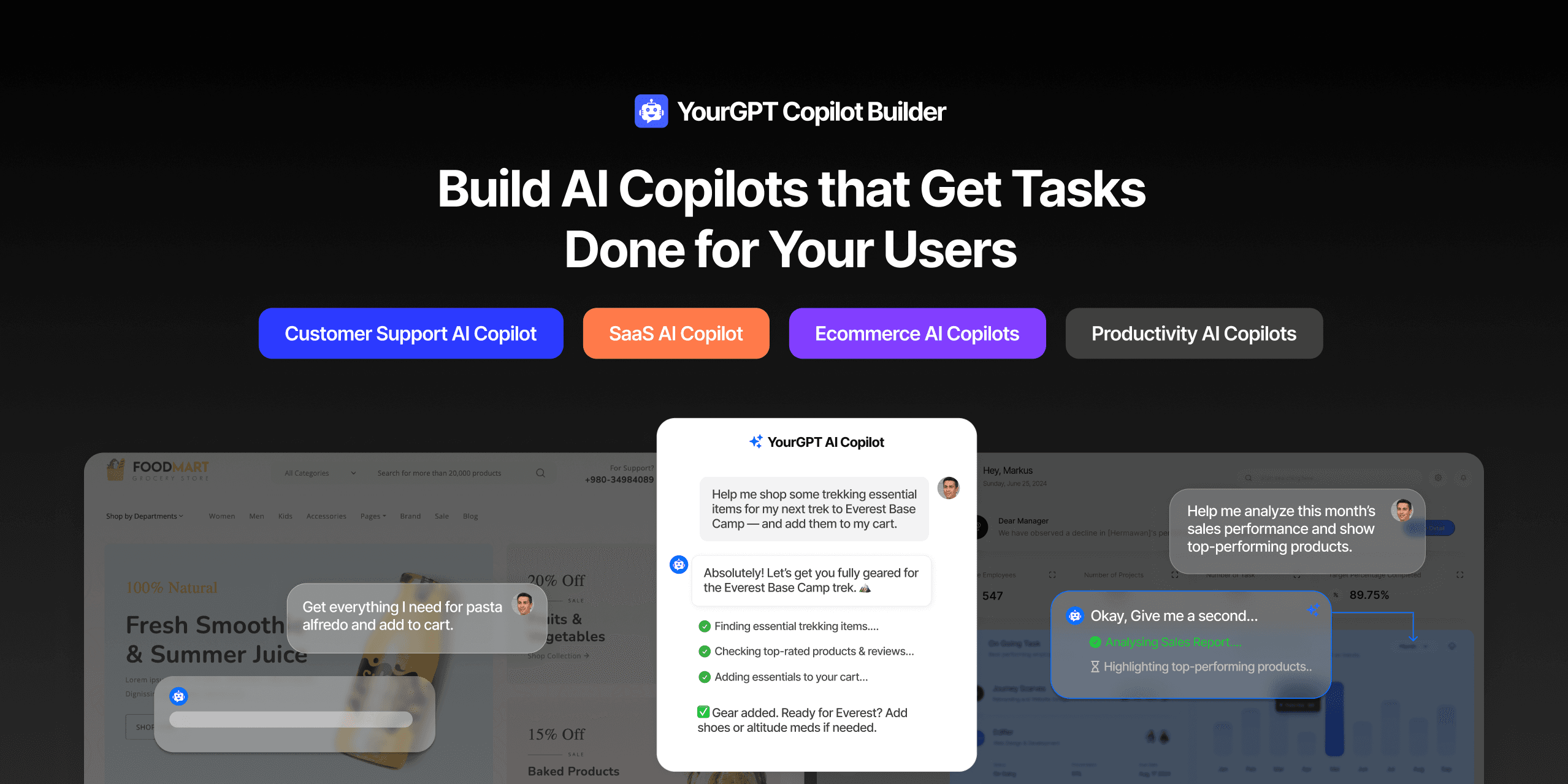
TL;DR Most AI tools provide answers but still leave users to complete the task through search results, settings pages, or checkout flows. AI Copilot Builder closes that gap by executing registered actions directly inside the product instead of only explaining what to do. Search, cart updates, account changes, and multi-step bookings can all happen within […]
TL;DR Building an AI-powered Telegram bot does not require custom development. BotFather provides the Telegram bot token, while a no-code platform like YourGPT handles AI training, free-form conversations, and the Telegram connection. This guide covers the full setup, from creating the bot in BotFather to connecting it with YourGPT and taking it live. Most Telegram […]
