Top 7 Customer Service Email Management Software in 2026

Rajni
Last updated on July 23, 2026
Customer service email management software helps teams organize shared inboxes, assign emails, automate workflows, and respond faster.
The right tool reduces missed messages, improves team collaboration, and gives every customer conversation clear ownership.
This guide compares the top 7 tools in 2026, including YourGPT, Freshdesk, Zendesk, Help Scout, Front, Gorgias, and Hiver.
Email is still one of the most important customer support channels. But for many teams, it is also where support breaks down first.
A customer sends a message. No one owns it. Two agents reply at the same time. A refund request sits unanswered. A high-priority complaint gets buried under routine questions. These small inbox problems quickly turn into slower response times, frustrated customers, and lost revenue.
That is why modern customer service teams need more than a shared inbox.
Customer service email management software helps teams turn scattered emails into organized, trackable, and actionable conversations. The right platform gives every message a clear owner, routes requests to the right team, tracks service-level agreements, and gives managers visibility into support performance.
In 2026, the best tools are moving beyond traditional ticketing. AI is now helping teams draft replies, classify conversations, summarize long threads, detect urgency, and automate repetitive support tasks. For growing businesses, this means faster responses without adding more agents to every workflow.
This blog compares the top customer service email management platforms based on what actually matters: automation, ease of use, scalability, collaboration, integrations, AI capability, and overall value.
We will also look at where each platform fits best, where it may fall short, and which type of team should choose it.
Let’s start with the basics: what customer service email management software is and why it matters.
Email management software is a dedicated platform that converts incoming customer emails into structured, trackable tickets. Unlike a standard Gmail or Outlook inbox, these tools give support teams the ability to assign conversations, collaborate internally, set automated workflows, track SLA compliance, and measure performance through analytics.
The difference between a regular shared inbox and a proper email management system can be measured directly in customer satisfaction scores. When emails are missed, duplicated, or left unanswered, churn follows quickly.
Here is what a quality customer service email management platform should provide in 2026:
With that framework in mind, here are the 7 best customer service email management tools you should consider in 2026.
| Platform | Best For | Rating |
|---|---|---|
| YourGPT | Teams that want AI agents to automate support, sales, and operations by executing real actions across web chat and messaging channels | 4.7/5 |
| Superhuman | Executives, founders, sales teams, recruiters, and high-performing teams that rely heavily on Gmail or Microsoft 365 and want the fastest possible AI-powered email workflow | 4.7/5 |
| Zendesk | Mid-size to large enterprises that need a comprehensive, multichannel support platform | 4.3/5 |
| Mailbird | Individuals, freelancers, and small teams that want a clean desktop email client for managing multiple inboxes without moving into a full helpdesk system | 3.6/5 |
| Front | Teams that want to manage customer emails and internal conversations together in one shared inbox | 4.7/5 |
| Gorgias | E-commerce businesses that need strong integration with Shopify, BigCommerce, or Magento | 4.6/5 |
| Hiver | Gmail-first teams that want help desk features without leaving their existing inbox | 4.6/5 |
Find customer service email tools that help your team manage shared inboxes, reply faster, and keep every customer conversation organized in one place.
Best for: Teams that want AI agents to automate support, sales, and operations by executing real actions across web chat and messaging channels.
YourGPT is a no-code platform built to help businesses build AI agents for customer support, sales, and operations. While many tools focus only on answering questions, YourGPT goes further by allowing AI agents to complete real tasks, reducing manual effort and improving response times across every channel your team operates on.
The platform works across websites, WhatsApp, Slack, Messenger, Instagram, LINE, email, and voice, bringing all interactions into one unified system. This makes it easier for teams to manage conversations, automate workflows, and maintain full context across channels without switching tools throughout the day.
What makes YourGPT different is its no-code approach combined with action-based automation. Teams can build and deploy AI agents using existing documents, FAQs, or website content without relying on developers. It also includes built-in voice capabilities through PhoneAI, allowing businesses to handle both inbound and outbound calls using AI in over 100 languages.
Another strong advantage is the multi-model playground. Teams can test models like Claude and GPT side by side before deploying, helping improve accuracy based on real use cases instead of guesswork.
Best for: Executives, founders, sales teams, recruiters, and high-performing teams that rely heavily on Gmail or Microsoft 365 and want the fastest possible AI-powered email workflow.
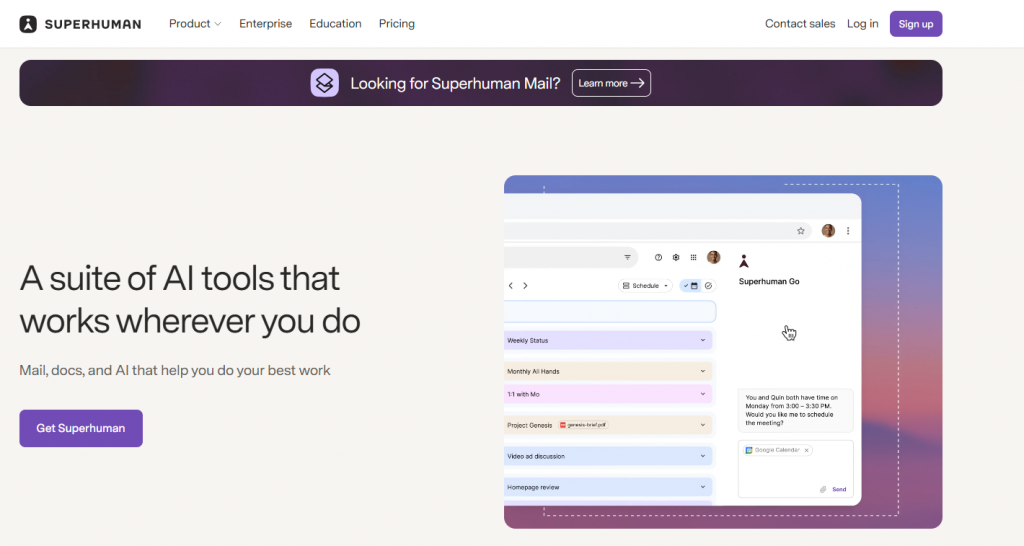
Superhuman Mail is a premium email productivity app designed around speed, responsiveness, and focus. It is positioned as an AI-native email client rather than a traditional helpdesk platform, so it is best for teams that need to move faster through individual and team inboxes rather than manage large-scale customer support queues. Superhuman says Mail is built for teams using Gmail or Outlook and focuses on helping users fly through email, respond to what matters, and collaborate faster.
The platform’s standout capability is its speed-first workflow. Superhuman combines keyboard shortcuts, Split Inbox, reminders, snooze, send later, read statuses, snippets, and AI assistance to reduce the friction of everyday email. Its AI features can organize the inbox, draft replies, summarize messages, and help automate workflows, making it especially useful for people who spend a major part of their day in email.
Superhuman also includes team collaboration features that make it more powerful than a standard individual email client. Users can share live views of email conversations, leave team comments, use shared drafts, share snippets, view team read statuses, and see when teammates are replying to avoid duplicate responses. These features make it useful for revenue, recruiting, leadership, and customer-facing teams that need shared context without forwarding threads or taking screenshots.
The Superhuman Mail pricing page lists annual billing and shows Starter, Business, and Enterprise plans. Business and Enterprise add more advanced AI, sales, team administration, and security capabilities.
Best for: Mid-size to large enterprises that need a comprehensive, multichannel support platform.
Zendesk is one of the most recognized names in customer service software and has maintained that position in 2026 by continuing to deepen its AI capabilities and expand its integration ecosystem. It is a true omnichannel solution, consolidating email, live chat, phone, social media, and messaging platforms into a single unified workspace that large support teams can manage efficiently.
What sets Zendesk apart from many competitors is the depth and maturity of its AI tooling. Intelligent triage features detect customer intent, prioritize tickets by urgency, and surface knowledge base articles to encourage self-service resolution before a ticket even reaches an agent. AI-powered bots handle common requests autonomously or route to the right human agent when escalation is needed, creating a smoother customer journey at scale.
For teams managing high email volume with complex routing needs, Zendesk’s macro and trigger system is particularly powerful. Pre-defined response templates can be applied with a single click, and automation rules handle routing, tagging, and assignment without any manual input from agents or managers.
Zendesk is the right choice for larger organizations that need a sophisticated, enterprise-grade platform capable of handling intricate workflows and high volumes across multiple communication channels simultaneously.
Best for: Individuals, freelancers, and small teams that want a clean desktop email client for managing multiple inboxes without moving into a full helpdesk system.
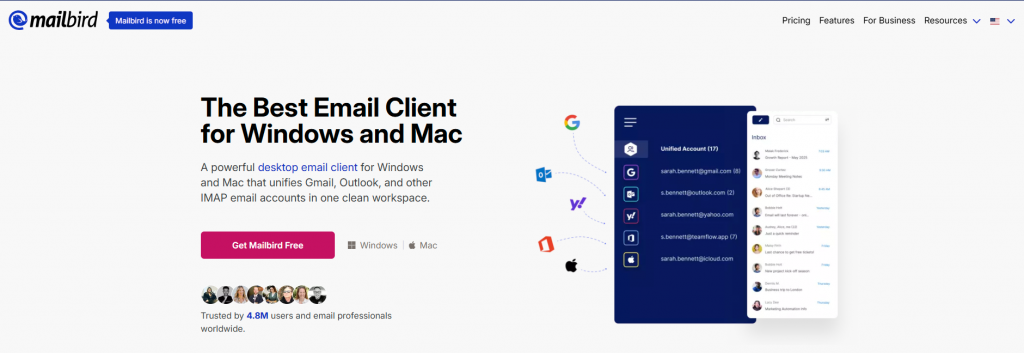
Mailbird is a modern desktop email client built for users who want to simplify daily email management across multiple accounts. Unlike Freshdesk, it is not a customer support ticketing platform; it is better suited for professionals and smaller teams that need one polished place to manage email, contacts, calendars, apps, and basic productivity workflows. Mailbird supports Windows and Mac, and its pricing page lists cross-platform licensing for both systems.
The platform’s biggest strength is its unified inbox experience. Mailbird brings messages and contacts from different email accounts into one app, which helps users avoid constantly switching between Gmail, Outlook, Yahoo, Office 365, and other email accounts. It also supports IMAP and POP3 accounts, making it flexible for people who use several providers or custom business email setups.
Mailbird also includes a useful set of productivity features for day-to-day email handling. Users can snooze messages, schedule emails with send later, undo sends, create email templates, use snippets, track email opens, block senders, and search for attachments quickly. Its built-in AI email authoring feature uses ChatGPT to help draft messages, making it helpful for users who write a high volume of routine business emails.
All plans include a 14-day money-back guarantee, and Mailbird’s pricing page notes that paid licenses are cross-platform for Windows and macOS. Prices appear promotional and may vary by region or campaign.
Best for: Teams that want to manage customer emails and internal conversations together in one shared inbox.
Front reimagines the traditional help desk by combining a shared inbox with the collaborative feel of a team messaging tool. Rather than forcing agents to work inside a rigid ticketing interface, Front keeps email feeling like email while adding assignment, threading, internal comments, and analytics layered directly into the conversation view.
What makes Front particularly well-suited for customer service teams is its focus on context and continuity. Every conversation thread carries full history, internal discussion, and customer data alongside the email itself. Agents can loop in teammates through @mentions, draft replies collaboratively, and hand off conversations without any loss of context, making it especially strong for teams that handle complex or high-value accounts where relationship continuity matters.
Front also connects email with SMS, social media, live chat, and voice, creating a unified inbox that brings all customer communication into one place. The platform’s automation capabilities allow teams to build routing rules, auto-assignment logic, and triggered follow-ups without developer involvement.
Front is the right choice for teams that handle relationship-driven customer communication and want the familiarity of email combined with the collaboration structure of a modern team workspace.
Best for: E-commerce businesses that need strong integration with Shopify, BigCommerce, or Magento.
Gorgias is built specifically for e-commerce customer support, and that focus shows in every part of the platform. While most help desk tools treat e-commerce integrations as add-ons, Gorgias makes them the foundation. Agents see full order history, shipping status, payment details, and customer lifetime value directly inside every ticket, without toggling between tabs or copying data from a separate system.
The platform connects natively with Shopify, BigCommerce, Magento, and WooCommerce, and allows agents to perform store actions such as refunding orders, editing subscriptions, or applying discount codes directly from the ticket view. This eliminates the back-and-forth between support tools and store admin panels that wastes time and slows resolution.
Gorgias also includes a powerful automation layer built around e-commerce logic. Common scenarios like where is my order, how do I return this, or can I get a discount can be handled by automated rules or AI responses that pull live order data to give accurate, personalized answers without agent involvement.
Gorgias is the clear first choice for any e-commerce business that wants their customer support team to have instant, actionable access to order data and the ability to resolve issues without leaving the help desk.
Best for: Gmail-first teams that want help desk features without leaving their existing inbox.
Hiver takes a distinctly different approach from every other tool on this list. Rather than asking teams to move to a new platform, Hiver extends Gmail itself with help desk functionality. The result is a familiar environment where agents do not need to change their habits while still gaining the structure and accountability of a proper ticketing system layered directly into the inbox they already use every day.
Inside Gmail, Hiver adds shared inbox management, email assignment, SLA tracking, collision alerts, canned responses, and analytics. Agents work within the Gmail interface they already know, with Hiver’s features surfaced through a sidebar and additional controls that feel natural rather than bolted on.
For teams that love Gmail and want to avoid the disruption of a full platform migration, Hiver removes the biggest adoption barrier entirely. It also integrates with Asana, JIRA, Salesforce, Slack, and Zapier, meaning it connects well into broader workflow ecosystems without requiring those tools to be replaced.
Hiver is the best option for small to mid-size teams running on Google Workspace that want help desk functionality without the friction and cost of migrating to an entirely new platform.
| Platform | Best For | Main Strength | Email Management Use Case | Integration Fit | Best Choice For |
|---|---|---|---|---|---|
| YourGPT | AI support, sales, operations, and workflow automation | No-code AI agents that answer questions, complete real tasks, and automate support workflows | Automating customer replies, routing conversations, handling repetitive requests, and reducing manual support workload | Strong fit for teams that need chat, email, messaging apps, voice, and AI workflows in one system | Businesses that want AI agents to do more than draft replies and actually execute support tasks |
| Superhuman | Executives, founders, sales teams, recruiters, and high-performing teams that rely heavily on Gmail or Microsoft 365 | Speed-first AI email workflow with inbox prioritization, drafting, summaries, reminders, and team collaboration | Managing high-priority emails, drafting faster replies, summarizing conversations, setting reminders, and keeping important follow-ups on track | Best fit for teams using Gmail or Microsoft 365 who want a faster email client rather than a full help desk platform | Power users and fast-moving teams that live in email and need maximum speed, focus, and responsiveness |
| Zendesk | Mid-size to large enterprises with complex support operations | Enterprise-grade ticketing, AI triage, workflow automation, advanced reporting, and omnichannel support | Handling high email volume, prioritizing tickets by urgency, routing requests, managing SLAs, and tracking team performance | Strong fit for organizations that need deep integrations with Salesforce, Shopify, analytics tools, and enterprise systems | Large support teams that need a scalable customer service platform with advanced customization |
| Mailbird | Individuals, freelancers, and small teams that want a clean desktop email client for managing multiple inboxes | Unified desktop inbox with multi-account email management, productivity tools, app integrations, and AI email writing | Managing multiple email accounts, scheduling sends, snoozing messages, using templates, tracking opens, and drafting routine business emails faster | Good fit for users who want Gmail, Outlook, Yahoo, Office 365, IMAP, POP3, calendars, and productivity apps in one desktop workspace | Professionals and small teams that want simpler email management without moving into a full support ticketing system |
| Front | Teams that manage customer emails and internal collaboration in one shared inbox | Email-native shared inbox with assignments, internal comments, routing, analytics, and AI-assisted replies | Centralizing customer emails, collaborating on replies, handing off conversations, and keeping full thread context | Strong fit for teams using Salesforce, HubSpot, Jira, Slack, SMS, live chat, social channels, and voice tools | Relationship-driven support, sales, and operations teams that need collaboration around customer conversations |
| Gorgias | E-commerce businesses that need support connected to customer and order data | Commerce-focused help desk with order history, store actions, automation, and revenue tracking | Managing order questions, shipping updates, refunds, returns, customer history, and repetitive e-commerce support emails | Strong fit for Shopify, BigCommerce, Magento, WooCommerce, Klaviyo, Attentive, and Recharge users | Online stores that want support agents to resolve order issues without switching between tools |
| Hiver | Gmail-first teams that want help desk features inside their existing inbox | Gmail-native shared inbox with email assignment, SLA tracking, collision alerts, canned responses, and analytics | Assigning support emails, tracking ownership, preventing duplicate replies, monitoring SLAs, and collaborating inside Gmail | Best fit for Google Workspace teams using Gmail, Slack, Salesforce, Asana, JIRA, Zapier, and Chrome-based workflows | Small to mid-size teams that want structured email support without migrating away from Gmail |
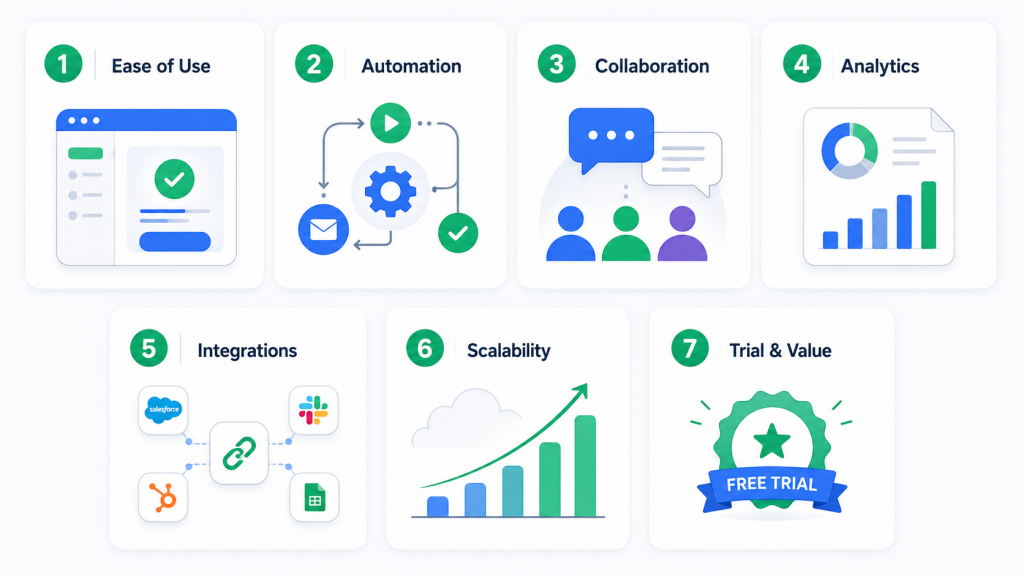
Choosing the right customer service email management software is not just about comparing features or picking the most popular platform.
The best tool should be easy for your team to adopt, powerful enough to automate repetitive work, and flexible enough to scale as your customer conversations grow.
Before committing to a platform, look for these key qualities.
Your support team should be able to move from a traditional inbox to the new system without a long learning curve.
Look for a clean interface, simple setup, clear ticket ownership, and workflows that agents can understand from day one. If the software feels too complex, your team may avoid using it consistently.
Automation is one of the biggest reasons to use email management software.
Basic automation features like tagging, routing, canned replies, SLA alerts, and auto-assignment help teams respond faster and reduce manual work.
In 2026, AI automation matters even more. The best platforms can summarize conversations, detect customer intent, prioritize urgent requests, draft replies, and automate repetitive support tasks.
For teams that want to go beyond simple reply suggestions, YourGPT helps create AI agents that can automate conversations, trigger workflows, and complete real actions across channels.
Customer emails should not live in isolated inboxes.
Choose a platform with shared inboxes, internal notes, agent tagging, collision detection, and clear assignment rules. These features help teams avoid duplicate replies, reduce confusion, and make sure every customer message has a responsible owner.
Strong collaboration tools are especially important for remote teams, growing support teams, and businesses where multiple departments handle customer requests.
You cannot improve what you cannot measure.
A good email management platform should show response times, resolution times, email volume trends, workload distribution, SLA performance, and customer satisfaction scores.
These insights help managers identify bottlenecks, balance agent workload, improve response quality, and understand when the team needs more automation or staffing support.
Your customer service software should connect smoothly with the tools your team already uses.
Check whether the platform integrates with your CRM, ecommerce platform, knowledge base, messaging apps, phone system, internal collaboration tools, and reporting stack.
A strong integration setup gives agents more context and reduces the need to switch between multiple tabs just to solve one customer issue.
The right platform should support your team as customer email volume increases.
Look for role-based access control, permission settings, data encryption, reliable performance, and the ability to handle more agents, channels, and workflows over time.
A tool that works for your team today should not become a blocker six months later.
Before making a final decision, test the platform with real customer emails.
Free trials and free ticketing systems are useful because they show how the tool performs in daily support work, not just in a product demo.
During the trial, check how quickly agents can assign conversations, collaborate, use automation, find customer context, and track performance.
The best customer service email management software is not always the one with the longest feature list. It is the one your team can adopt quickly, use confidently, and scale with as support volume grows.
In 2026, the strongest platforms do more than manage emails. They help teams resolve customer requests faster, reduce repetitive work, and create a more consistent support experience across every channel.
YourGPT is the top choice for AI-driven automation and real task completion across channels. Freshdesk and Zendesk are strong options for teams needing a proven balance of features and scalability. The best platform always depends on your team size, existing tech stack, industry, and automation requirements.
Yes. Freshdesk offers a free plan for up to 10 agents. HubSpot Service Hub has a free tier with core inbox and ticketing features. Missive provides a free plan for up to 3 users. Most other platforms on this list offer free trials ranging from 7 to 45 days.
Focus on ticket assignment and ownership tracking, SLA management, automation rules, internal collaboration tools, reporting and analytics, and knowledge base integration. AI-powered response drafting, intelligent triage, and action-based automation have become increasingly important for teams managing growing email volume with limited headcount.
Yes. All major platforms on this list consolidate emails from multiple addresses such as support@, billing@, and sales@ into a single unified inbox, allowing teams to manage every inbox from one place without switching between accounts or missing messages.
A shared inbox is a standard email account accessed by multiple people simultaneously. Email management software converts those emails into structured tickets with assignment, tracking, SLA management, collaboration features, and analytics dashboards. It solves the accountability, duplication, and visibility problems that unstructured shared inboxes create as teams grow.
Pricing varies widely depending on the platform and plan tier. Free options exist through Freshdesk, HubSpot, and Missive for small teams. Mid-tier plans typically range from $10 to $49 per user per month. Enterprise plans with advanced AI, reporting, and customization features can reach $79 to $99 per agent per month or more depending on the platform and seat count.
Gorgias is purpose-built for e-commerce and offers the deepest native integration with Shopify, BigCommerce, Magento, and WooCommerce. It allows agents to perform store actions like refunds and order edits directly from the support ticket, making it the clear first choice for online retail businesses.
Customer service email management software has moved beyond simple inbox organization. The right platform should help your team assign conversations clearly, reduce repetitive work, collaborate without confusion, and respond faster across the channels your customers already use.
The best choice depends on how your team works. Some businesses need advanced ticketing and reporting, others need a simple shared inbox, ecommerce teams need order-aware support, and fast-moving teams may need AI-powered email productivity. Before choosing, test each platform with real customer conversations, review how easily agents can adopt it, and look at the long-term impact on response time, workload, and customer experience.
For teams that want to go beyond managing emails and start automating real support actions, YourGPT offers a stronger path forward with AI agents that can answer questions, route conversations, and complete workflows across channels. The best software is not the one with the most features; it is the one that helps your team work smarter, resolve issues faster, and scale support without adding unnecessary complexity.

Compare six Yuma alternatives by ecommerce capabilities, helpdesk compatibility, pricing and human handoffs to choose a replacement for your support team.


Move from Gorgias with a verified ticket archive, tested AI workflows, human handoff and a channel cutover plan before ending your subscription.


TL;DR The Gorgias AI Agent is the automation layer inside the Gorgias helpdesk, split between a Shopping Assistant for pre-purchase conversations and a Support Agent for post-purchase support. A connected Shopify store is required, and Gorgias documentation rules out platforms such as BigCommerce, Magento, and WooCommerce for the AI Agent. Billing runs on two separate […]

TL;DR Gorgias is the closest Richpanel alternative for Shopify stores that need native order actions directly inside support tickets. YourGPT fits stores that want one AI agent handling requests across web, WhatsApp, Instagram, and email, while Tidio and Re:amaze suit smaller teams looking for lighter, lower-cost options. Richpanel’s AI pricing starts around $500/month for two […]

TL;DR Shopify Inbox is a good free option for stores that only need basic storefront chat and simple customer conversations. Stores usually look for alternatives when they need multichannel support, stronger team workflows, or automated order actions. YourGPT is strongest for cross-channel AI automation, Gorgias for Shopify-native order workflows, and Tidio for smaller stores that […]
TL;DR Tidio recently restructured its top paid plan, and many 2026 reviews still describe the old pricing model. Confirm current pricing directly on Tidio’s site before budgeting. Lyro, Tidio’s AI agent, runs on Anthropic’s Claude rather than ChatGPT. Only the Premium tier carries a guaranteed resolution rate, well below the average Tidio advertises elsewhere. Billing […]