Proactive AI: Why Waiting for Customers to Ask Is Leaving Money on the Table

Rajni
May 19, 2026
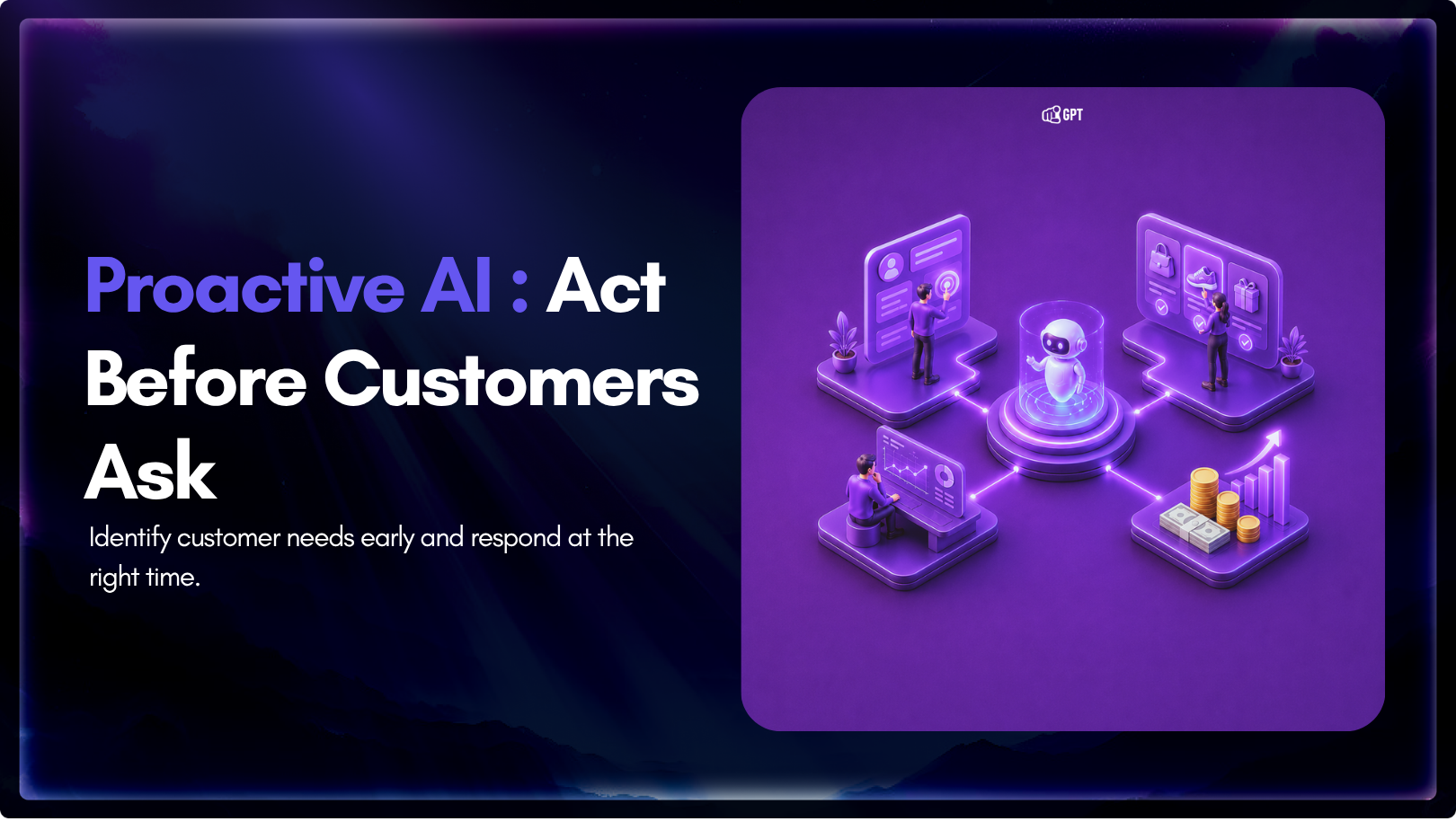
Proactive AI is not a new category. It is just a shift in how you use the systems you already have.
Instead of waiting for a customer to ask for help, you step in earlier, when the signal is there, but the request has not happened yet.
Most teams are still reacting. A ticket comes in. A chatbot answers a question, or a workflow fires after someone clicks something. It works, but it always puts the burden on the customer to start the interaction.
Proactive systems flip that. They look at behavior, context, and timing, then act before the customer feels stuck or drops off.
When it works, it feels obvious. When it does not, it feels intrusive. That line matters more than anything else.
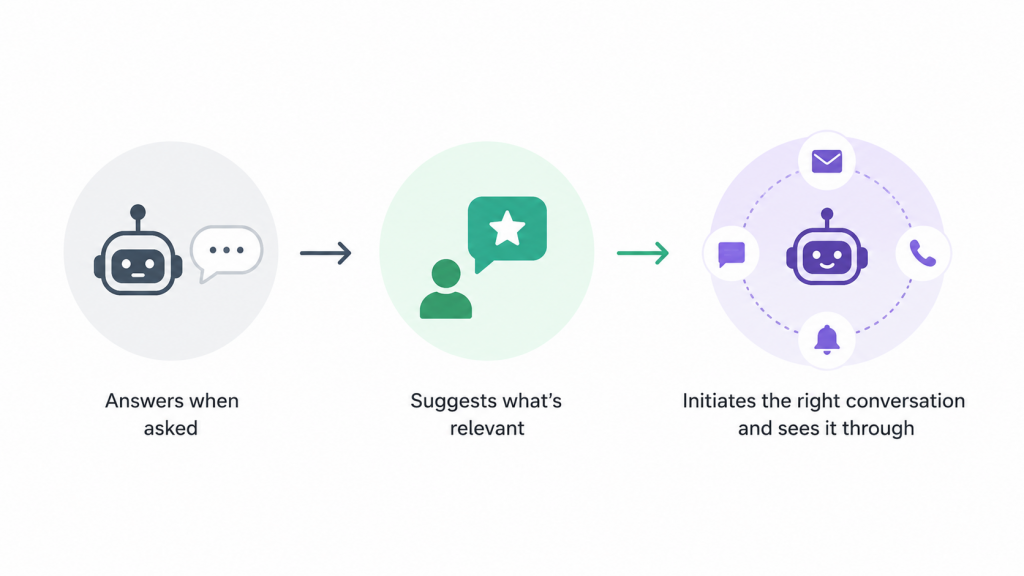
Early customer service AI was basic. Keyword matching, basic routing, and escalation rules reduced some manual work, but did not change the experience much. Customers still had to figure out when to ask for help and how to phrase it.
Then personalization got better.
Netflix did not wait for you to search. It pushed something you would probably watch. Amazon went further: anticipatory shipping moved inventory before the order even existed. Financial services followed the same pattern. Assistants like Capital One’s Eno or Bank of America’s Erica surfaced things customers did not know to ask about yet.
Customer expectations moved with it.
But there is still a gap most companies have not closed. Reactive AI handles inbound well. Proactive AI needs to go outbound. That means initiating the right conversation, at the right moment, through the right channel, and then managing the response without losing context.
You are looking for moments where stepping in early changes the outcome:
Those are real signals in investment migration.. You do not need a perfect model to see them.
Leon Huang, CEO of RapidDirect, works with B2B manufacturing clients where buyers often evaluate technical requirements before reaching out. He says: “A lot of the decision-making happens before anyone contacts you. People are checking specs, materials, and whether you can actually deliver what they need. When that information is easy to find at the right moment, you get better conversations. When it is not, they do not ask. They just move on.”
In eCommerce, this shows up in specific ways. A user browsing bulk inventory is usually not exploring casually. They are comparing supply, pricing, and reliability. If someone keeps returning to a category like blank t-shirts, that is a strong signal of intent but also hesitation. The right move is surfacing clarity on stock availability, pricing tiers, or turnaround time before they leave.
Good proactive systems connect three things:
Get those wrong, and you annoy people. Get them right, and you remove friction before it becomes a problem.
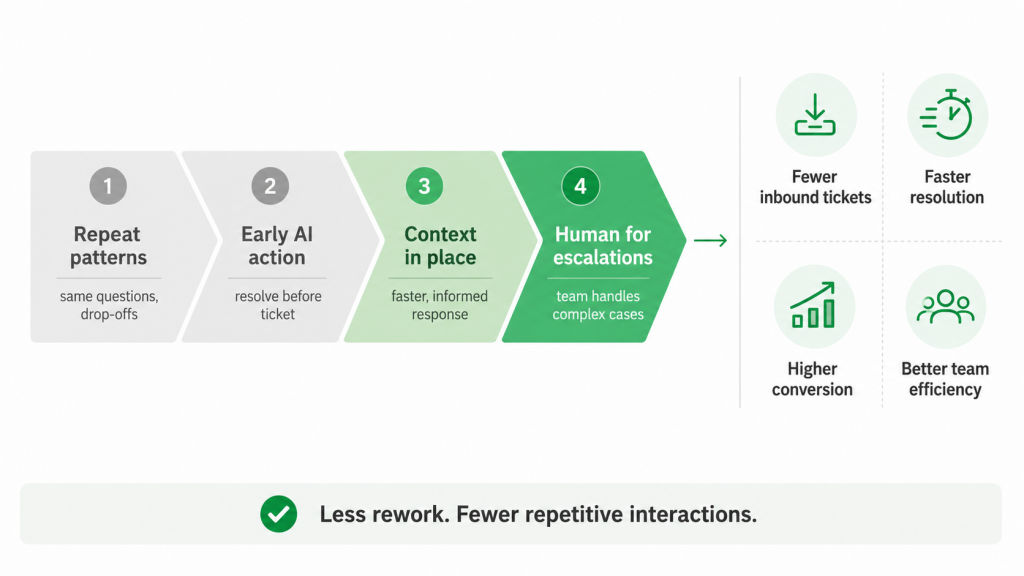
If you have ever worked in support or growth, you have seen the same patterns repeat: the same questions, the same drop-off points, the same “almost converted” users.
Proactive AI works when you use it to handle those patterns early.
Instead of waiting for tickets, resolve the issue before it is raised. Instead of chasing conversions, intervene at the moment hesitation shows up. Instead of scaling support headcount, reduce the number of cases that need a human at all.
The impact shows up in specific places:
The cost side is straightforward: less rework and fewer repetitive interactions. You lose fewer people in the middle of the journey.
This is especially visible in service-based businesses where decisions stall around uncertainty. Someone researching virtual assistant services is not just looking for a number. They are trying to understand scope, trade-offs, and whether the service fits their workflow. When that context is not clear, they hesitate. The teams that handle this well do not wait for a sales call. They surface the right comparison or breakdown at that moment, while the intent is still there.
Research backs the direction. More than half of organizations are already using AI in at least one function, and early adopters are seeing both efficiency and revenue gains. But those gains do not come from AI alone. They come from fixing the right moments in the right order.
Most teams get reasonably good at identifying signals. They know who is stuck, who is about to churn, and who browsed but did not buy. The harder part is acting on that signal quickly, across the right channel, and then managing what comes back.
That second part is where most campaigns quietly break down. A team spots a drop-off pattern and sends a follow-up message. The contact replies. That reply lands in a general inbox. Someone picks it up two days later with no idea what the original message said, which campaign triggered it, or what the contact actually needs. The context is gone, and so is the moment.
This is what YourGPT Campaigns is built for: closing the gap between spotting the signal and actually completing the conversation.
Campaigns lets teams initiate outreach and manage the full conversation from one platform. When a contact responds, AI continues the conversation using the full context of the original campaign and every interaction that follows. No broken threads. No lost context.
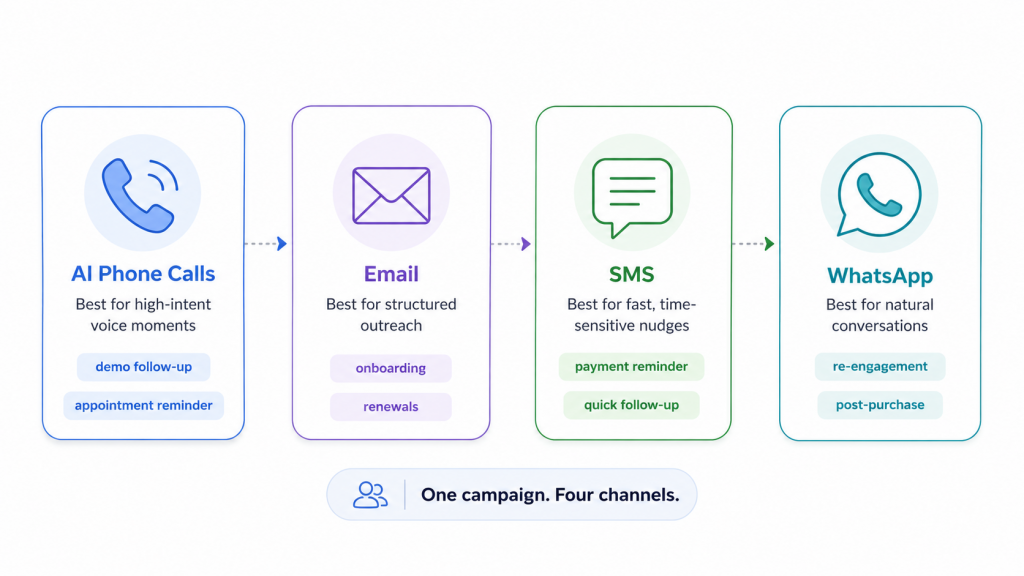
Campaigns runs across four channels, each suited to a different kind of proactive moment:
AI Phone Calls : For high-intent moments where a live conversation moves faster than text. Automated AI calls can handle follow-ups after demos, appointment reminders, re-engagement for high-value accounts, or any situation where voice changes the outcome. The AI understands the campaign context and manages the conversation without a human agent.
Email : For structured outreach with more context: onboarding sequences, post-consultation follow-ups, renewal reminders, product announcements, or any campaign where the message benefits from length and formatting. Replies are handled in the same platform, keeping the thread intact.
SMS : For time-sensitive nudges where speed matters: payment reminders, appointment confirmations, flash promotions, or quick follow-ups after a key action. SMS has high open rates precisely because it is direct. Campaigns lets you act on that without routing replies to a disconnected inbox.
WhatsApp : For conversational outreach in markets where WhatsApp is the default channel. Re-engagement, support follow-ups, event reminders, and post-purchase check-ins all work well here. Because people are already active on WhatsApp, the response rates tend to be higher and the conversations feel more natural.
Data is the first problem. It is scattered, inconsistent, and not set up for real-time decisions. Stitching together CRM data, product events, support logs, and analytics tools takes longer than expected and often delays any real action by months.
Then there is trust. If a system reaches out at the wrong moment with the wrong assumption, it feels off immediately. People notice. And once it feels intrusive, it is hard to recover.
In legal or medical negligence, the cost of hesitation is higher. When someone lands on a page around a sensitive topic, the expectation is immediate clarity: what qualifies, what the next step is, and who to contact. If that is not obvious, people do not spend time figuring it out. The gap here is not persuasion. It is making the next step obvious at the exact moment the question shows up.
There are also technical issues that rarely show up in planning documents:
And beyond the technical side, there is the context problem. You can have the right message and the right moment, but if the follow-up conversation loses the thread, the original effort is wasted. Keeping outreach and responses connected in the same system is not a nice-to-have. It is what determines whether the interaction actually gets resolved.
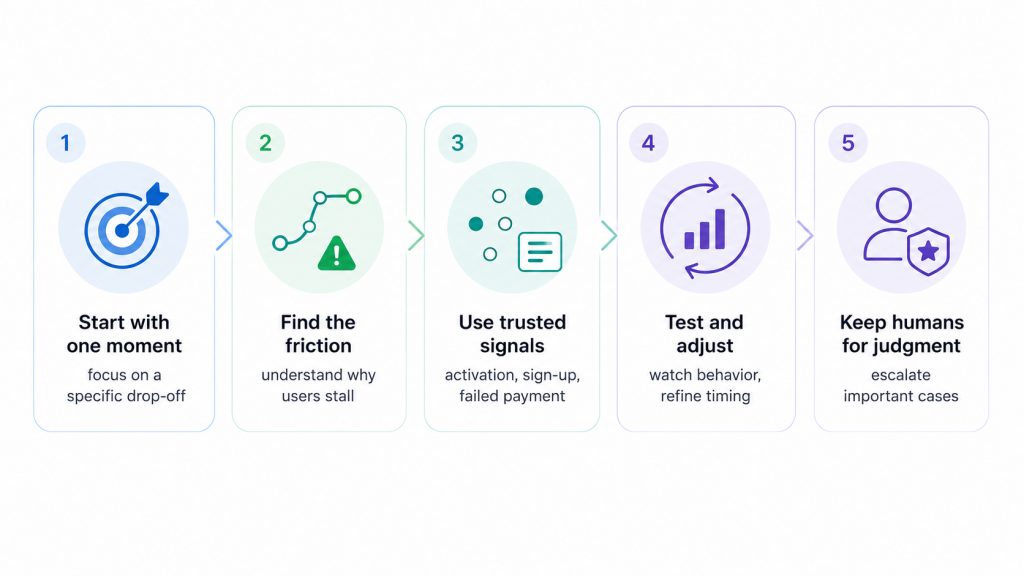
Simple, reliable solutions focused on real customer needs tend to deliver the best results in practice.
1. Start with a problem you already feel: The teams that get traction focus on one specific moment and build around it. It is the fastest way to see whether earlier intervention actually changes behavior. Broad strategies that try to cover every scenario usually stall before anything ships.
2. Focus on the moment, not the message: The default instinct is to add communication: an email sequence, a reminder, a prompt. That is rarely the real fix.
If users drop off at a specific step, the first question is not what to say. It is what is happening at that step. Are they missing context? Are they being asked to do too much upfront? Are they unsure what comes next? If you intervene without understanding that, you end up sending messages that do not land.
When this works, the intervention matches the situation. Someone who never completed setup gets something different from someone who explored but did not take action. Sometimes it is a nudge. Sometimes it is simplifying the step itself. In some cases, the best intervention is removing the step entirely.
3. Use the signals you already trust: This is where most teams slow down unnecessarily. They try to unify every data source before doing anything useful: CRM, product analytics, support logs, billing systems. It turns into a long integration project before a single use case is live.
You need a small set of signals you trust. Core events like sign-up, activation, and failed payment. Basic user context with reliable timestamps. That is enough to act on. Expand from there once you have proven that early intervention changes the outcome.
4. Test in a way that reflects real behavior: This does not work as a one-time experiment. You put something in place, watch what changes, and adjust. Not just based on conversion rates, but on how people move through the flow.
Do fewer users drop off at that step? Do fewer support tickets come in around the same issue? Do people complete the task faster?
If nothing changes, the intervention is off. Either it is too early, too late, or not relevant to what the user actually needs in that moment.
Phil Santoro, Co-Founder of Wilbur Labs, works across a portfolio of companies where teams are constantly testing changes to growth and operations. He says: “You do not really know if something worked until you look past the first interaction. A user might click or respond once, but what matters is what happens after that. Do they complete the flow? Do they come back with the same issue? That is usually where you see whether the system actually solved anything.”
This is also why reply management matters as much as the initial send. A campaign that generates responses but cannot track whether those responses led to resolution tells you very little about whether the system actually worked.
5. Keep humans where judgment matters: There is a tendency to automate everything once the system starts working. That is where things usually degrade.
Some moments still need human judgment: high-value customers, unusual edge cases, situations where context matters more than speed. The goal is not to remove people from the process. It is to reduce the volume of repetitive work so they can focus on cases that actually require attention. Good systems surface those moments clearly rather than trying to absorb them.
6. Avoid turning this into more noise: The most common failure mode is easy to spot: more emails, notifications, and prompts triggered by every possible event. It looks proactive on the surface. In reality, it creates more friction.
If users feel like they are being interrupted more often, the system is working against you. The goal is not to increase touchpoints. It is to remove effort. When this is done well, fewer issues reach the user in the first place. Fewer questions need to be asked. Fewer actions need to be taken to get to the same outcome.
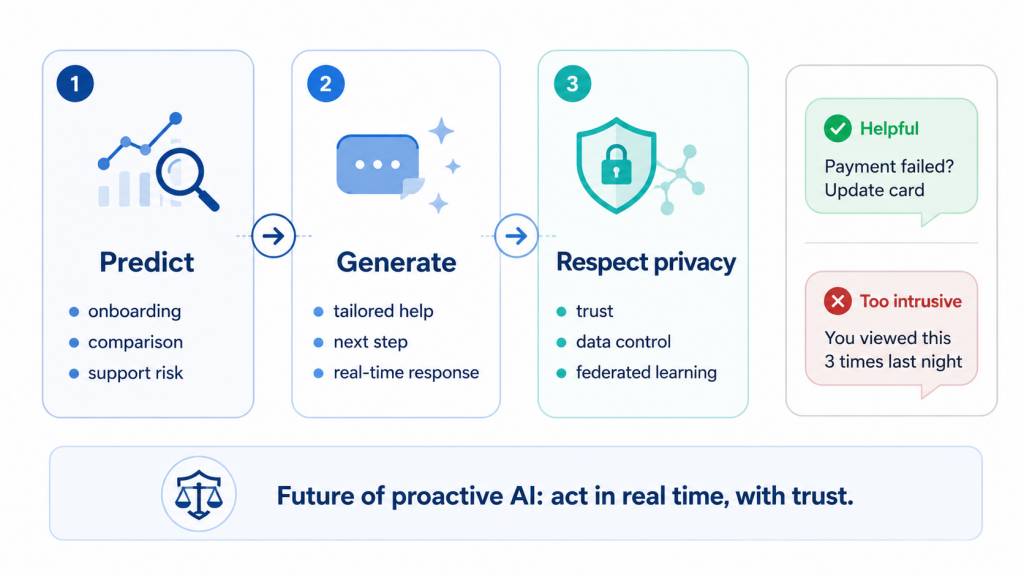
Proactive AI is moving in a clear direction. Systems will not just predict what a customer might need. They will also create the response, offer, or next step in the same moment.
That is the useful part of generative AI here. Not writing chatbot replies. The real value is when prediction and response happen together.
A customer is stuck in onboarding, so the system does not send a generic help article. It explains the exact step they skipped, tailored to how far they got. A shopper keeps comparing two products, so the page surfaces the difference that usually matters at that decision point. A support issue is likely to happen, so the system warns the customer before they have to open a ticket.
IBM describes newer AI personalization as moving closer to real-time experiences that respond to customer behavior immediately, rather than relying on static segments or scheduled campaigns. Salesforce research also shows the pressure behind this: customers increasingly expect personalization, but they also want clearer control over how their data is used.
This is why privacy-preserving approaches matter. Federated learning, for example, lets models improve across devices or organizations without moving raw user data into one central place. The model learns from local data, but the data itself stays where it is. Customers want relevance, but they do not want to feel watched.
One study on the personalization-privacy paradox found that personalization can support loyalty, but the effect depends heavily on trust. If the experience feels opaque or intrusive, the value breaks down quickly.
A proactive message can be helpful: “We noticed your payment failed. Do you want to update your card?” The same idea can also feel invasive: “We saw you checked this product three times on your phone last night.” Both are technically personalized. Only one feels acceptable.
The future of proactive AI will depend on that judgment. Not just whether the system can act, but whether it should, and whether it can handle what comes back when it does.
Most teams already have the signals. They know who is dropping off, who is hesitating, and who is close to converting but has not. The gap is rarely insight. It is execution: reaching out at the right moment, through the right channel, and keeping the conversation going when someone responds.
Proactive AI only delivers on its promise when all three of those things happen together. A well-timed message that loses context on the first reply is not proactive. It is just faster friction.
YourGPT is built around closing that gap entirely. With Campaigns, you can initiate outreach across Phone, Email, SMS, and WhatsApp, and when contacts respond, AI continues the conversation with full context of the original campaign. No broken threads, no handoffs that lose the plot, no replies disappearing into a generic inbox.
The teams seeing real results are not the ones with the most sophisticated models. They are the ones who identified one moment that was costing them, acted on it early, and measured what changed. Start there. One channel, one use case, one drop-off point you already know about.
That is enough to see whether proactive AI actually moves the numbers for your business. And if it does, you will have a clear picture of where to go next.
Learn how to judge Shopify AI resolution rates with clear formulas, a worked example, ticket-level checks and practical ways to improve support quality.
TL;DR B2B customer service means supporting multiple people within the same account, including end users, admins, finance or procurement contacts, and executive sponsors, each with a different definition of a resolved ticket. Traditional support bots handle one conversation at a time and often lose account context when requests move between contacts, channels, or teams, forcing […]
TL;DR A vector embedding is a list of numbers that represents meaning, placing similar concepts closer together in a mathematical space. AI chatbots use embeddings to match questions by meaning rather than exact wording, which is a core part of retrieval-augmented generation (RAG). Anthropic recommends Voyage AI for embeddings, while OpenAI, Google, and Cohere provide […]

TL;DR An FAQ chatbot answers repetitive questions by matching user queries with a knowledge base and returning grounded responses using rules, AI retrieval, or both. Modern FAQ chatbots use confidence checks to deliver instant answers for strong matches and fall back to broader retrieval or human handoff when confidence is low. Rule-based bots work well […]
TL;DR Multimodal chatbots let customers share photos, screenshots, documents, video, or audio directly in a conversation, giving AI more context than text alone. YourGPT’s Attachment Capture node in AI Studio can collect these files mid-conversation, while vision-capable AI models can analyze and understand their contents. Key use cases include ecommerce returns, insurance and warranty claims, […]
A customer asks where their order is. A traditional bot pastes a tracking link and calls it done. An agentic system checks the carrier API, sees the shipment stuck at a depot, applies a credit under the delay policy, updates the CRM, and messages the customer before they’ve had time to get annoyed. Same question. […]